While most AI tools today are still limited to "answering questions," a new wave is quietly changing the game: AI that can act on your behalf. Instead of just making suggestions, they can open applications, process tasks, and even run complex workflows. And OpenClaw is a prime example of this trend—an open-source, autonomous AI agent built on a local-firstphilosophy, giving you complete control over your data and how the AI operates. So, what exactly is OpenClaw, how does it work, and how can you install and use it effectively? Let Markdao guide you through the details in this article.
What is OpenClaw?
OpenClaw is an open-source autonomous AI agentdesigned not just to "answer" but to take action on your computer on your behalf. Unlike traditional AI chatbots, OpenClaw acts as a "digital arm," capable of directly interacting with your system—from opening applications and processing data to automating complex tasks.
What makes OpenClaw special is its local-first philosophy: the entire processing workflow can take place directly on your device, rather than relying entirely on cloud servers. This enhances data security, reduces latency, and provides greater control over your AI experience.
To better understand the difference, imagine it like this:
- AI like ChatGPT: Answers questions, provides suggestions
- OpenClaw: Receives request → analyzes → executes actual actions
For example: Instead of just showing you how to create a report, OpenClaw can open the file, process the data, and export the completed report as requested.

How does OpenClaw work?
OpenClaw combines multiple technological components to create an autonomous AI system:
- Large Language Model (LLM): helps understand user requests
- Planning engine: breaks tasks down into specific steps
- Execution layer: interacts directly with the computer (clicking, typing, running commands, etc.)
Basic operating process:
- User provides a request (prompt)
- OpenClaw analyzes and plans
- AI automatically executes each step
- Returns results or continues to optimize the task
If traditional AIs are like a "brain" – helping to think and answer, OpenClaw goes further by acting as:
- "Eyes": observing the interface and reading data on the screen
- "Hands": interacting directly with the system (clicking, dragging and dropping, typing, etc.)
As a result, OpenClaw can perform tasks that previously AI could only provide guidance for, rather than doing them itself.
OpenClaw is not just an AI tool, but a leap forward in how humans work with computers: From "AI assistance" → "AI doing the work"
What is Local-first AI and why does it matter?
As AI becomes increasingly ubiquitous, most current tools operate on cloud-based platforms. However, a new trend is emerging as the future standard: Local-first AI – where AI is prioritized to run directly on the user's device.
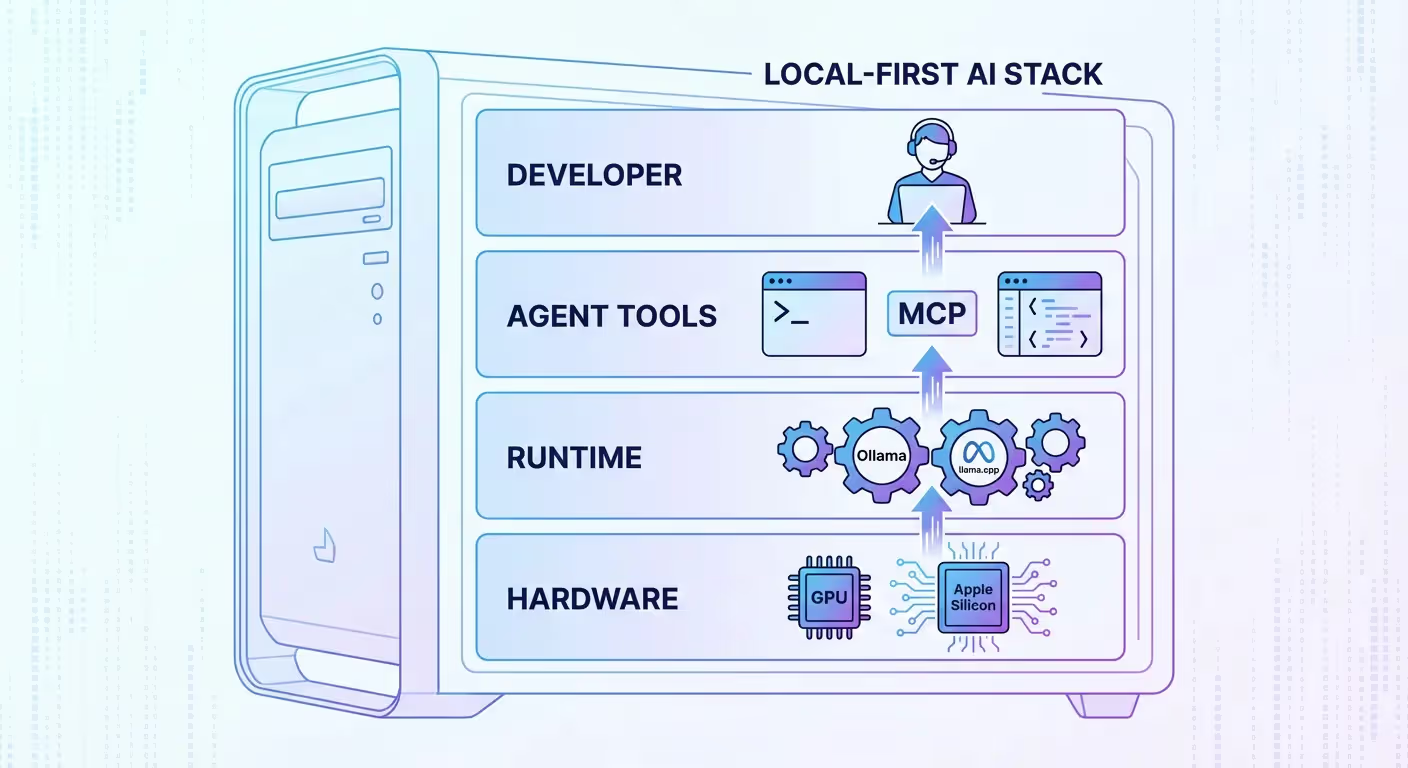
Local-first AI is an AI deployment model where:
- Data is processed directly on your personal machine (PC, laptop, or local server)
- Sending data to external servers is either unnecessary or kept to an absolute minimum
- Users have full control over their AI systems
Simply put, instead of sending requests to the cloud and waiting for a response, the AI operates "on-site", much like software installed directly on your computer.
Why is Local-first AI becoming increasingly important?
1. Data security – the critical factor
When using cloud AI, your data (internal documents, customer information, code, etc.) is typically sent to third-party servers. This poses risks such as:
- Data leaks
- Uncontrolled storage
- Violations of corporate security policies
Local-first AI fundamentally solves this issue because all data remains on your device.
2. Stable speed and performance
Not relying on the internet means:
- No lag during poor network conditions
- No worries about server downtime
- Near real-time response
This is a critical factor for AI Agents like OpenClaw, when they need to execute actions continuously.
3. Full control over AI
Local-first allows you to:
- Customize AI models
- Control how the AI operates
- Deeply integrate into internal systems
This is especially useful for developers, marketers, or businesses that need to build their own workflows.
4. No reliance on third-party platforms
With Cloud AI, you may encounter issues such as:
- API rate limits
- Unexpected price hikes
- Policy changes
Local-first AI helps you take full control of your technology, without being dependent on any platform.
Local-first is not just a technical choice, but also the foundation for developing AI Agents like OpenClaw.
Because for AI to:
- Observe
- Make decisions
- Execute actions
… it needs to run as close to the user's system as possible.
This is exactly why local-first is becoming the backbone of the next generation of AI.
What makes OpenClaw different from other AI Agents?
When people think of AI Agents, they often think of tools like AutoGPT, BabyAGI, or Devin. However, OpenClaw is not just another option in the same category; it represents a new approach: moving AI from "assistance" to "execution."
1. From AI that provides answers to AI that performs actions
Most current AI Agents follow a familiar process: receiving a request, analyzing it, and then returning results in the form of text or code. This still requires the user to perform the subsequent steps themselves.
OpenClaw completely changes that workflow. Instead of just suggesting solutions, the system can directly execute actions on your computer. This bridges the gap between "idea" and "result," turning AI into a tool capable of real-world work.
2. Direct computer control capabilities
A key differentiator for OpenClaw is its ability to interact directly with the operating system environment. While many AI agents are limited to terminal or simulated environments, OpenClaw can manipulate applications and interfaces just like a human user.
This unlocks a higher level of automation, where the AI doesn't just process logic but engages in the entire operational workflow. You can think of this as a hybrid between AI agents and Robotic Process Automation (RPA) systems, but with significantly greater flexibility and intelligence.
3. Local-first philosophy and data control
Unlike many AI agents that rely on APIs from platforms like OpenAI or Claude, OpenClaw is built to prioritize running directly on the user's device.
This approach offers three distinct benefits. First is data security, as all information is processed internally. Second is consistent performance, independent of network connectivity. Third is comprehensive control, allowing users to customize how the AI operates to suit their specific needs.
4. Open source and deep customizability
OpenClaw is an open-source project, allowing users to directly intervene in how the system operates. Compared to closed platforms like Devin, this creates a major difference in flexibility.
Users can customize logic, integrate with internal tools, or build unique workflows. This is especially important for developers, technical marketers, or businesses looking to deploy AI in a highly personalized way.
If traditional AI agents focus on supporting thought processes, OpenClaw focuses on executing tasks. This difference lies not just in the technology, but in how the role of AI in daily work is defined.
OpenClaw is not merely an intelligent chatbot; it is a system capable of turning requests into concrete actions. This represents the shift from AI that assists to AI that works, serving as a foundation for the next generation of AI agents.
Quick comparison of OpenClaw and some competitors
Pros and cons of OpenClaw
No technology is perfect, and OpenClaw is no exception. However, its unique approach is what makes it so compelling. To better understand if OpenClaw fits your needs, let's look at both sides: its standout advantages and its practical limitations.
Advantages of OpenClaw
- Executes actions instead of just providing suggestions: OpenClaw doesn't stop at "telling you what to do"; it can directly perform tasks on your computer, saving you significant time and effort.
- Operates on a local-first philosophy: Data is processed right on your device, minimizing the need to send information externally, thereby enhancing security and privacy.
- No third-party platform dependency: You are not bound by API limits, usage costs, or policy changes from AI service providers.
- Flexible customization through open source: Users can deeply modify the system, adjust how the AI operates, or integrate it with their own tools and workflows.
- High-level automation capabilities: OpenClaw can handle complex task sequences, from office work to programming or digital process operations.
- Aligned with the new generation of AI Agents: This is not just a tool, but a leap forward in how humans use AI—shifting from simple assistance to active execution.
Limitations of OpenClaw
- Requires technical knowledge for installation and operation: Not entirely beginner-friendly, especially if you are unfamiliar with programming environments or system configuration.
- Performance depends on hardware: Since it runs locally, the user experience depends on your machine's specifications (CPU, GPU, RAM), especially when handling heavy tasks.
- Initial setup can be complex: Setting up the environment, configuring models, or integrating tools can sometimes be time-consuming and prone to errors if you are inexperienced.
- Not yet fully optimized for general users: Compared to SaaS-based AI, OpenClaw is still more "technical-first" than "user-friendly."
- Stability may vary by version: As an open-source project currently under development, some features may be incomplete or require further refinement.
OpenClaw offers a very different approach: powerful, flexible, and full of potential, but it comes with higher technical and configuration requirements.
If you are looking for an AI solution that can "do the work for you" and are willing to invest the time to set it up, OpenClaw is worth considering. Conversely, if you prioritize simplicity and convenience, you may need some time to get familiar with it before fully unlocking the value of this tool.
Practical applications of OpenClaw
Once you understand how OpenClaw works, the more important question is: how can this tool actually help? The greatest strength of OpenClaw lies in its ability to turn requests into concrete actions, so its applications go beyond theory and straight into your daily workflow.
Automating office tasks
- Automatically opening and processing Excel files, Google Sheets, or internal documents
- Aggregating data from multiple sources and generating complete reports
- Drafting emails and sending them to existing mailing lists
- Performing repetitive tasks like data entry and data verification
Instead of performing each step manually, users simply need to provide a request and let OpenClaw handle the entire process.
Supporting programming and software development
- Creating projects and writing code based on requirements
- Opening IDEs, editing files, and running programs
- Debugging errors and suggesting solutions
- Automatically running tests and optimizing code
Compared to tools that only generate code, OpenClaw can participate in the entire development lifecycle, from writing to testing.
Applications in SEO and Digital Marketing
This is an area with significant potential, especially for content and performance teams:
- Crawling website data and analyzing competitors
- Automatically auditing on-page elements (titles, meta tags, headings, internal links)
- Support for outline creation, writing, and content optimization
- Keyword research and clustering
- Automated publishing or content updates on CMS
When integrated with internal systems, OpenClaw can function as a nearly autonomous "SEO assistant."
Personal productivity optimization
- Daily task management, reminders, and scheduling
- Personal workflow automation (e.g., generating morning reports)
- Searching, filtering, and presenting information on demand
- Connecting multiple work tools into a seamless process
The difference is that it doesn't just make suggestions; it executes them directly.
Internal system operations and automation
- Integration with enterprise software (CRM, ERP, CMS)
- Automated processing of internal workflows
- Monitoring and executing recurring tasks
- Building custom automation workflows to suit specific needs
For businesses looking to reduce reliance on manual labor for repetitive tasks, this is a highly compelling approach.
OpenClaw is not limited to any specific field. Any task with a clear, repetitive process or one that can be defined by logic can be automated.
The key difference is that OpenClaw doesn't just help you work faster; it can directly handle parts of the work for you.
That is precisely why this tool is becoming a vital platform in how humans work with AI.
Detailed guide on installing and using OpenClaw
This is the most important part of the article, as the true value of OpenClaw is only realized when you can deploy and use it in practice. As a local-first open-source tool, the installation process requires some technical steps, but if done correctly, you can have an AI Agent running entirely on your own machine.
1. System requirements before installation
Before you begin, ensure your machine meets these basic requirements:
- Operating system: Windows, macOS, or Linux
- CPU: Minimum 4 cores (8 cores or more recommended)
- RAM: Minimum 8GB (16GB+ recommended)
- GPU (optional): Helps improve performance if running local models
- Storage space: At least 10–20GB
Additionally, you need to have the following installed:
- Python (>= 3.10)
- Git
- (Optional) Docker if you prefer running it as a container
2. Preparing the environment
Before installing OpenClaw, you need to set up your working environment:
- Install Python and verify with the command:
python --version - Install Git to clone the source code
- Create a virtual environment (recommended):
python -m venv venv
source venv/bin/activate (macOS/Linux)
venv\Scripts\activate (Windows)
Using a virtual environment helps prevent library conflicts during installation.
3. OpenClaw installation steps
Step 1: Clone the source code
Download the source code from the official repository:
git clone https://github.com/.../openclaw.git
cd openclaw
Step 2: Install dependencies
pip install -r requirements.txt
This process may take a few minutes depending on your machine's configuration.
Step 3: Configure the AI model
OpenClaw can operate in two ways:
- Using a local model (LLM running on your machine)
- Using an API (faster but dependent on a third party)
You need to configure the .env or config file:
Example:
MODEL=local
MODEL_PATH=./models/your-model
or:
MODEL=api
API_KEY=your_api_key
Step 4: Launch OpenClaw
python main.py
If the installation is successful, the system will start and be ready to receive commands.
4. OpenClaw user guide for beginners
Once running successfully, you can start interacting with OpenClaw.
Create a task for the AI
Example:
- “Create a revenue report from the Excel file in the Downloads folder”
- “Open the browser and collect 10 articles about AI Agents”
OpenClaw will:
- Analyze the request
- Create a plan
- Execute step-by-step
Monitor execution progress
The system typically displays:
- Steps the AI is currently taking
- Action logs
- Results for each stage
You can:
- Stop the task
- Edit the request
- Intervene when necessary
Customize OpenClaw's behavior
You can adjust:
- Access permissions (which apps are allowed to be controlled)
- Automation level (auto vs. step-by-step confirmation)
- The AI model used
- Custom workflows
This ensures OpenClaw is tailored to your specific needs.
5. Important notes for usage
- Start with simple tasks to get familiar with how the AI operates
- Do not grant full system access from the start
- Monitor logs regularly to understand how the AI makes decisions
- Optimize prompts to be clear and specific to achieve better results
6. Common errors and how to fix them
- Missing library error
→ Check requirements.txt and reinstall dependencies - Model fails to run
→ Check the model path or API key - AI does not perform the task correctly
→ Rewrite the prompt more clearly and break down the requirements - Slow performance
→ Reduce task complexity or use a lighter model
Installing OpenClaw may be more complex than standard AI tools, but in return, you get an AI system capable of independent operation, flexibility, and complete control.
Once successfully set up, OpenClaw is more than just a support tool; it can become a true "digital assistant," helping you automate and optimize your daily work.
Conclusion
OpenClaw is not just a new AI tool; it is a sign that the way we work with technology is changing. From asking questions and waiting for answers, users can now delegate tasks and let the AI execute them itself—a clear shift from "assistance" to "action."
The notable point is not that OpenClaw is more powerful than other AIs, but that it opens up a different path: AI can become a direct part of the workflow instead of standing outside as a reference tool. When combined with a local-first philosophy, users not only leverage the power of AI but also maintain full control over their data and systems.
Although there are still certain technical and user experience barriers, OpenClaw paints a clear picture of the future: a place where AI not only understands what you want but can also carry it out on its own.