



Website banner dimensions are more than just technical specifications; they are a decisive factor in display effectiveness, page load speed, and the conversion potential of your entire interface. Whether you are designing an e-commerce site, a service page, or a news blog, choosing the right banner size for each position is essential if you want to optimize user experience and retain visitors.
The following article compiles the most popular website banner sizes today, along with practical application tips so you don't have to waste time guessing.
What is a website banner?
A website banner is an image or graphic content block placed in strategic locations on a website, such as the top of the page (hero banner), the middle of the page, or the sidebar. It is the first "signboard" users see, tasked with conveying a message, grabbing attention, and triggering immediate action.
A professional website banner design must be more than just beautiful; it must encapsulate information, reflect brand personality, and drive conversions. In an era where users only glance at content for a few seconds, a banner is your "first shot" at making an impression and keeping them engaged.
Types of banners by purpose
1. Online advertising banners
This is the most common type of website banner, often appearing on websites, blogs, or advertising systems like the Google Display Network. Its main goal is to attract clicks, increase brand awareness, and drive calls to action (CTA) such as purchasing, signing up, or downloading documents.
2. Banners for online newspapers and magazines
On news sites, banners serve as both content elements and advertising tools. Here, banner design needs to strike a balance between aesthetics, context, and conversion potential.
3. Outdoor banners adapted for websites
OOH (Out-Of-Home) banners such as billboards, panels, and standees are often repurposed as website banners to promote campaigns or major events.
The role of banners in interface and user experience
A properly designed website banner shapes the initial impression of both the interface and the user experience. It is not just a "decorative" element, but a pillar of UX (User Experience) architecture. Here are the roles that cannot be overlooked:
- Guiding the eye: Banners placed in prominent positions help users identify the most important information from their very first visit.
- Delivering powerful CTAs: Whether it's buying, signing up, or viewing new products, a banner is the primary tool for persuading action.
- Consistent brand representation: The fonts, colors, and messaging within a banner contribute to shaping the overall brand identity on the website.
- Optimizing the user journey: A clear, prominent banner with well-positioned messaging helps users stay on track without wasting time searching.

Benefits of designing banners with the right dimensions (UX, load speed, branding)
Beyond aesthetics, website banner dimensions play a crucial role in operational efficiency and conversion rates. Wrong dimensions? Your site will load slowly, display incorrectly on mobile, and lose its competitive edge in an instant.
Here are 3 practical benefits of using the correct website banner dimensions:
1. Increase page load speed
Banners that are too heavy or incorrectly scaled = sluggish page performance. A properly sized banner (e.g., 1920x600 px for a hero banner) ensures images load quickly, efficiently, and smoothly. Google loves that! Faster pages mean better SEO and happier users.
2. Ensure a seamless user experience (UX)
Banners that are too large take over the screen, while those too small go unnoticed. When you follow standard dimensions, your website banner displays perfectly on every device, from desktops to smartphones. No cropping, no pixelation, and no user frustration.
3. Maintain a professional brand image
Standard dimensions mean crisp, undistorted images that are perfectly scaled and true to your vision. This is the foundation for maintaining consistent brand design across all digital platforms.
What are the standard website banner dimensions?
Website banner dimensions shouldn't be chosen at random. They directly impact display quality, page load speed, user experience, and communication effectiveness.
Common dimensions by placement
Depending on the position within the interface, each website banner must adhere to specific dimensions. Here are the standards you cannot afford to ignore:
1. Hero banner (Top-of-page banner):
- 1920×600px: The most common size, ensuring an attractive display on large screens.
- 1920×1080px: For full-screen layouts or showcasing featured products/videos.
Making a strong first impression the moment a user arrives is the primary weapon in any digital marketing campaign.

2. In-content banner:
- 728×90px (Leaderboard): Ideal for desktop, placed at the top or bottom of an article.
- 970×250px (Billboard): Perfect for high-end branding campaigns to grab maximum attention.
Increase CTA click-through rates and guide users more effectively through your content.
3. Sidebar banner:
- 300×250px (Medium Rectangle): Optimized for both desktop and mobile devices.
- 160×600px (Wide Skyscraper): Designed for sidebars, commonly used in blog layouts or landing pages.
Optimize right-column space to increase ad visibility without disrupting the user experience.
4. Pop-up banner:
- 800×400px: Large enough to convey a compelling message without annoying the user.
- 600×600px: A square format that displays easily across various screen sizes.
Responsive dimensions for mobile devices
In a mobile-first era, if your banner doesn't display well on smartphones, you are missing out on over 60% of your visitors.
Common responsive website banner dimensions include:
- 320×100px (Large Mobile Banner): Optimized for footers or headers on mobile devices.
- 300×250px: Popular for mobile content or sidebars.
- 320×480px / 360×640px: For full-screen banners, splash screens, or app promotions.
Ensure smooth display on all screens without cropping or font issues, maintaining a seamless user experience. This also improves Core Web Vitals, a critical factor for modern SEO.

Standard banner sizes for Google Ads / IAB
If you are running display ads, keep in mind the standard IAB (Interactive Advertising Bureau) banner sizes recommended by Google Ads, which are supported across multiple platforms.
Standard IAB website banner sizes include:
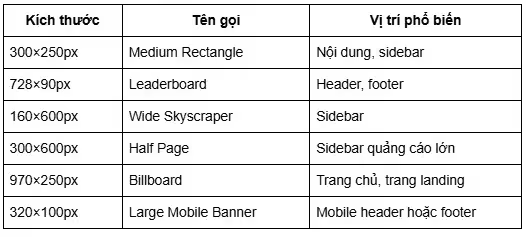
Using the correct Google Ads standards ensures your banners are distributed more widely, increases impression rates, lowers advertising costs, and significantly boosts ROI.
Key considerations for website banner design
1. Optimize image format and file size
Choose the right image format (WebP, JPEG, SVG) and keep the file size under 250KB to increase page load speed, improve SEO, and prevent website bloat.
2. Create strong contrast and clear CTAs
Website banner designs should feature striking colors, engaging CTAs, and intuitive layouts so users can easily see, understand, and act within the first few seconds.
3. Responsive design for optimal display on all devices
Ensure website banner dimensions display smoothly on both desktop and mobile. Use clear fonts and large buttons that are easy to interact with on touchscreens.
4. Measure effectiveness with A/B testing and analytics
Always test multiple banner versions and track performance via Google Analytics, heatmaps, and UTMs to make data-driven decisions rather than relying on intuition.
Recommended banner sizes for different types of websites
1. eCommerce websites
- Hero banner: 1920×600px or 1920×1080px (homepage)
- Promo banner: 728×90px, 300×250px (within product categories)
2. News / blog websites
- Content banner: 728×90px, 970×90px (within articles)
- Sidebar banner: 300×250px, 160×600px
3. Service / corporate websites
- Hero banner: 1920×600px (for service introductions or vision statements)
- Call-to-action banner: 970×250px or 800×400px (within service pages)
Conclusion
A beautiful website banner design is not enough; choosing the right dimensions is what truly drives effectiveness. From hero banners and sidebars to Google Ads, every position has its own standards that must be followed to ensure sharp display, correct proportions, and cross-device compatibility. If you are preparing to design or optimize your website interface, start by reviewing all your current banner dimensions to ensure they comply with current standards.