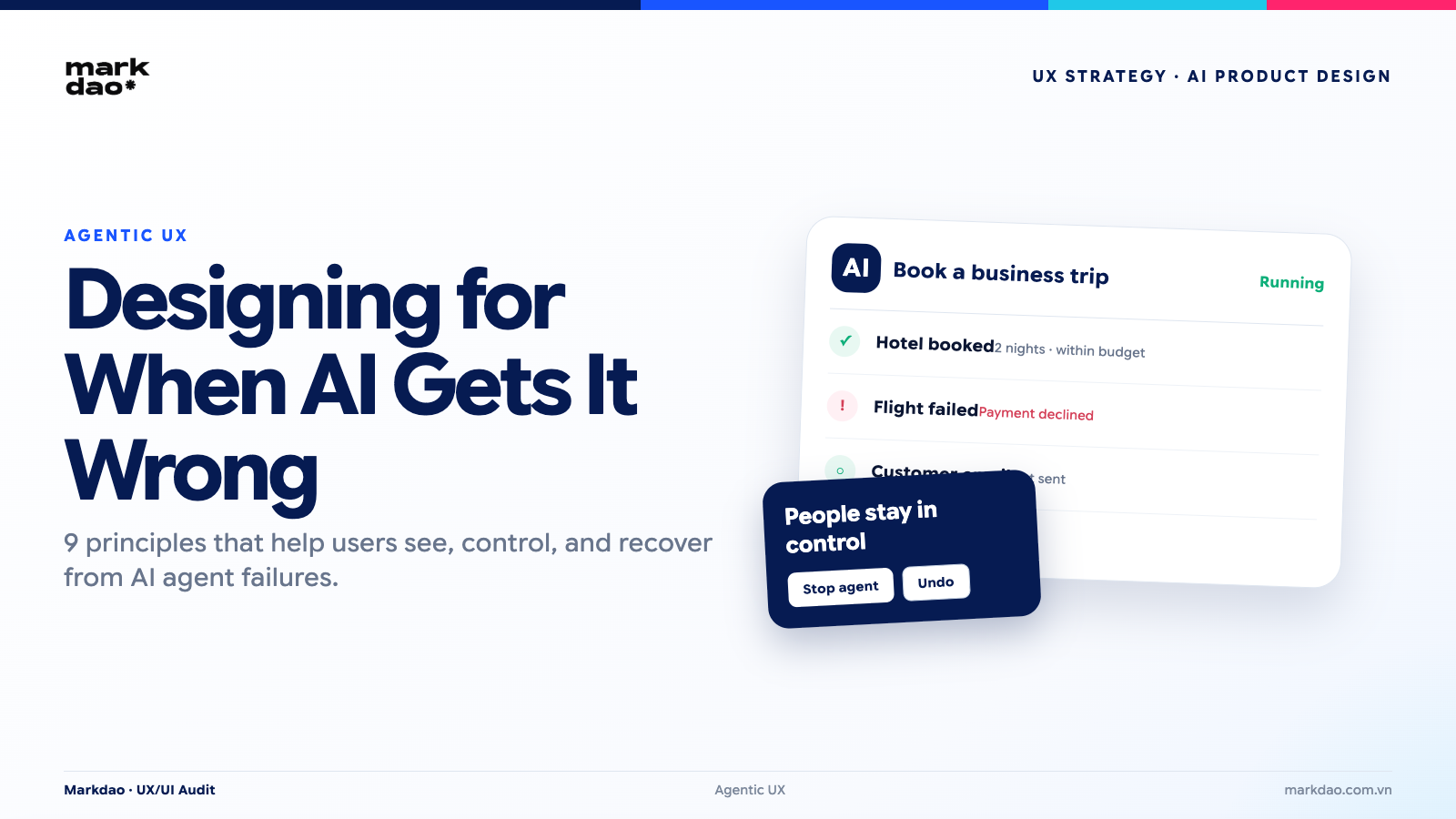

You ask an AI to find three suitable flights for your business trip next week.
The AI doesn't just stop at searching. It selects a flight, pays using your corporate card, and sends a confirmation email to the client waiting on the other end.
No one asked it to do that. But it does it anyway, because within its granted permissions, "finding a suitable flight" and "completing the booking" are part of the same goal from the agent's perspective.
This is where the UX question shifts entirely. For traditional products, the question is "is the interface easy to use?" For chatbots, it's "is the answer accurate?" But for AI agents, the question becomes: who authorized the AI to act, and when it acts incorrectly, who is the first to notice?
Three questions every product team should ask before adding an agent to their flow:
1. Does the user know what the AI is about to do before it happens?
2. Can the user stop, undo, or take over mid-process?
3. If the AI only completes 8 out of 10 steps, who is responsible for the remaining two?
If your product doesn't have clear answers to these three questions, it's time to talk about Agentic UX.
What is Agentic UX?
Agentic User Experience (Agentic UX) is a design approach for systems where an AI agent has the capability to proactively understand goals, plan, make decisions, and execute multi-step actions on behalf of the user, rather than simply responding to individual requests like a traditional chatbot.
Unlike traditional UX, where the user performs each step directly, Agentic UX allows the user to delegate goals to the AI and define the scope of its authority, while the AI carries out tasks within those permitted boundaries. Therefore, Agentic UX design must help users understand what the AI is doing, know what it will do next, confirm critical actions, intervene when necessary, and undo or control the outcomes.
In short, Agentic UX is the design of experiences for autonomous AI systems, where humans provide goals, the AI executes actions, and the user retains control.
To review fundamental errors before designing an agent, see 57 common website UX/UI errors and how to fix them.
3 core characteristics of Agentic UX
1. High autonomy. The agent analyzes goals, breaks tasks down into steps, and executes entire multi-step workflows without requiring manual user input for every action.
2. Real actions, not just suggestions. Unlike chatbots that only generate text responses, AI agents directly execute operations within applications or other tools, such as booking tickets, sending emails, or updating data.
3. User role shifts from executor to supervisor. Users no longer perform tasks step-by-step; instead, they shift to a role of monitoring progress, approving key milestones, and intervening when necessary.
These three characteristics are the pillars around which most Agentic UX design patterns in this article revolve: patterns for autonomy (Autonomy Dial, Permission Scope), patterns for real actions (Progress Stream, Action Audit), and patterns for the supervisory role (Pause/Stop/Take Over, Human Hand-off).
From response-based interfaces to action-based interfaces
Traditional UX operates on a logic where the user performs an action and the system responds. Every click and every submission is initiated by the user.
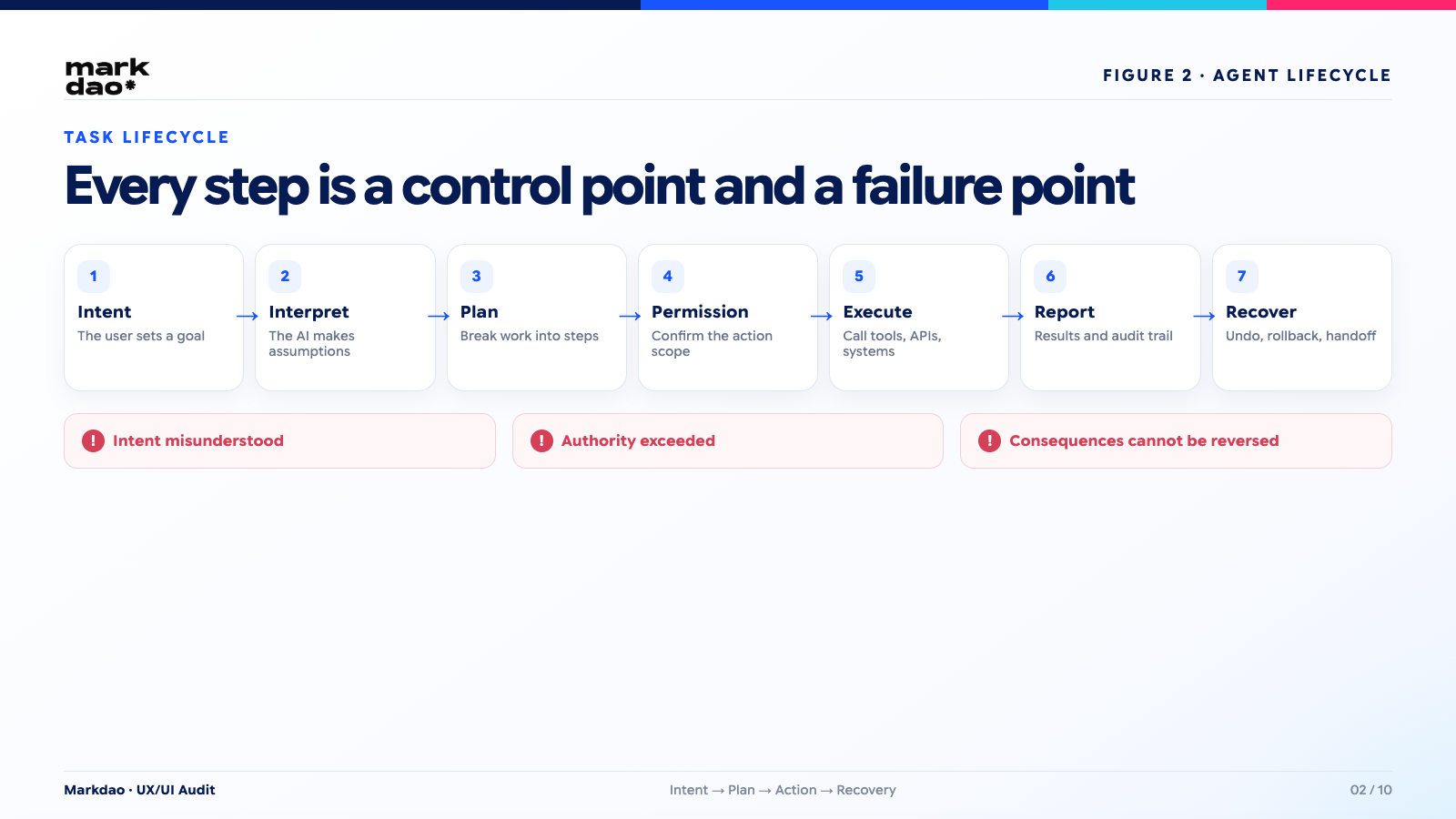
Conversational UX (chatbots, conversational assistants) adds an intermediate layer: the user makes a request in natural language, and the AI responds with text. The user remains the one deciding the next step.
Agentic UX differs in one core aspect: the user provides a goal, while the AI plans, selects the tools to use, and executes multiple consecutive steps, sometimes even when the user is no longer looking at the screen.
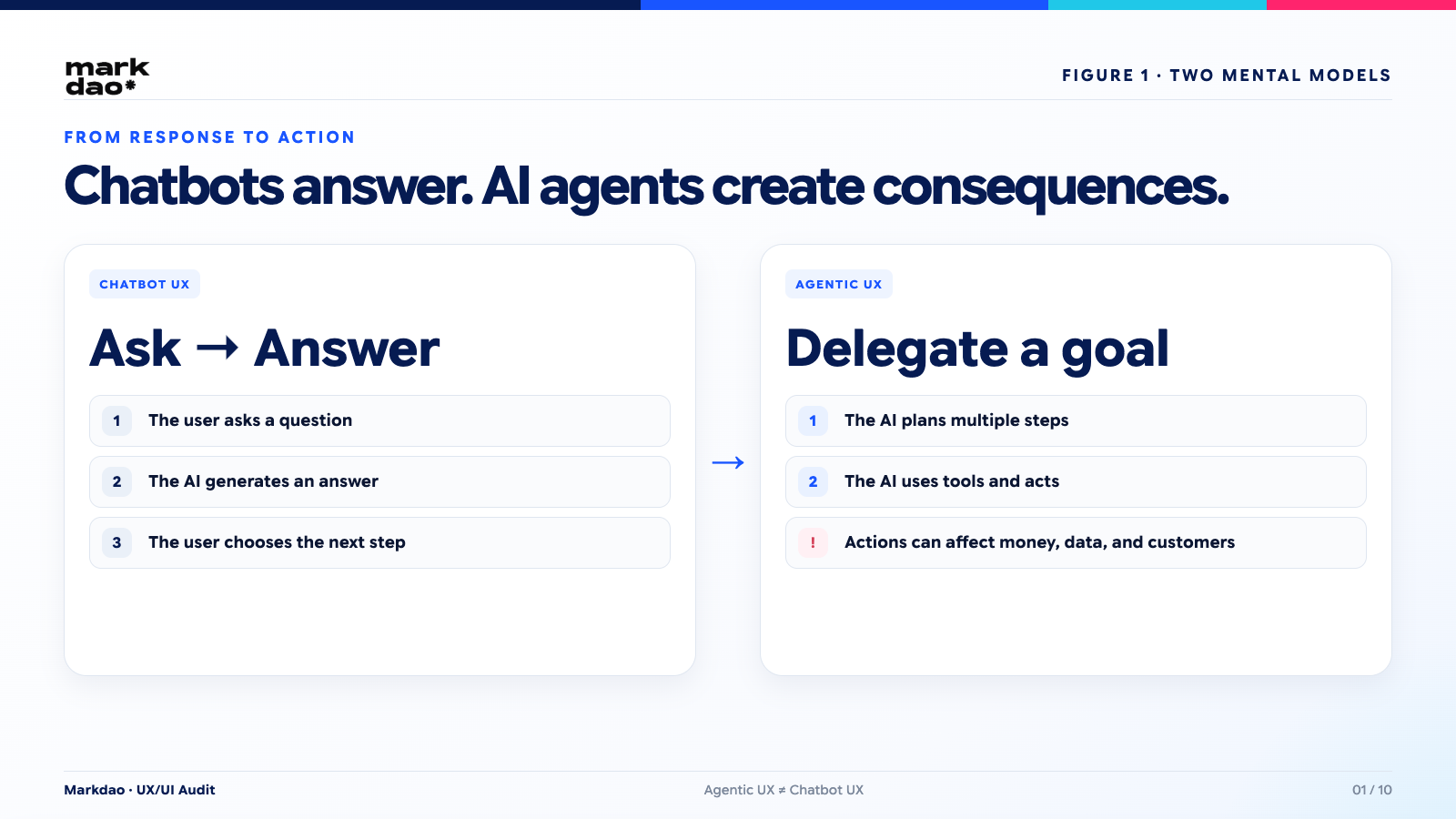
The focus of Agentic UX is not to make the AI appear smarter, but to ensure users always understand what the AI is doing, can control the scope of its authority, have the ability to stop or undo actions, and can recover safely when the AI makes a mistake.Figure 2. The lifecycle from intent to recovery for an AI agent
The basic lifecycle of an AI agent
An agent typically operates in a cycle:
User intent
→ AI interprets intent
→ Plans the necessary steps
→ Requests permission, or acts automatically if authorized
→ Executes multiple steps, calling various tools/APIs
→ Reports results
→ Corrects errors or escalates to a human if needed. Figure 3. 7 common failure states in Agentic UX
Each arrow in this cycle is a point where UX design can intervene, and also a point where errors can occur.
Agentic UX is not the same as chatbot UX
If your product team is designing an agent but still using a chatbot mental model, focusing only on the quality of the response, the biggest risk isn't that the AI gives a wrong answer, but that the AI takes a wrong action before anyone realizes it.
Why are AI agent errors more dangerous than traditional interface errors?
A wrong decision can have consequences outside the interface
Traditional interface errors usually stop at the screen: wrong layout, wrong color, or a form that won't submit. The user sees it immediately and can just refresh.
AI agent errors are different. They can:
- Send an email to the wrong customer.
- Book the wrong flight or hotel.
- Deleting critical data.
- Transferring money to the wrong account or in the wrong amount.
- Changing product prices on a live website.
- Publishing unapproved content to official channels.
These consequences occur behind the interface, within the live system, using real data. By the time the user notices, the action has already been completed.
An agent can make a mistake in the middle of a long workflow.
For multi-step tasks, errors aren't just "success" or "failure." There are four types to distinguish when designing:
- Total failure: no steps are completed.
- Partial failure: some steps are completed, while others are not.
- Silent failure: the system reports "success," but the actual result does not meet the requirements.
- Cascading failure: one incorrect step causes subsequent steps to fail, as the agent continues to rely on incorrect data from the previous step.
Silent failure is the most dangerous type because the user has no reason to be suspicious or intervene.
Users do not see every action taken by the AI.
This is a form of "invisible UX": the interface may look very simple, just a chat box, but underneath are a series of tool calls, API requests, and automated decisions that the user never sees. The simpler the interface, the greater the gap between "what the user thinks is happening" and "what is actually happening," unless the design proactively bridges that gap.
7 common error types in Agentic UX
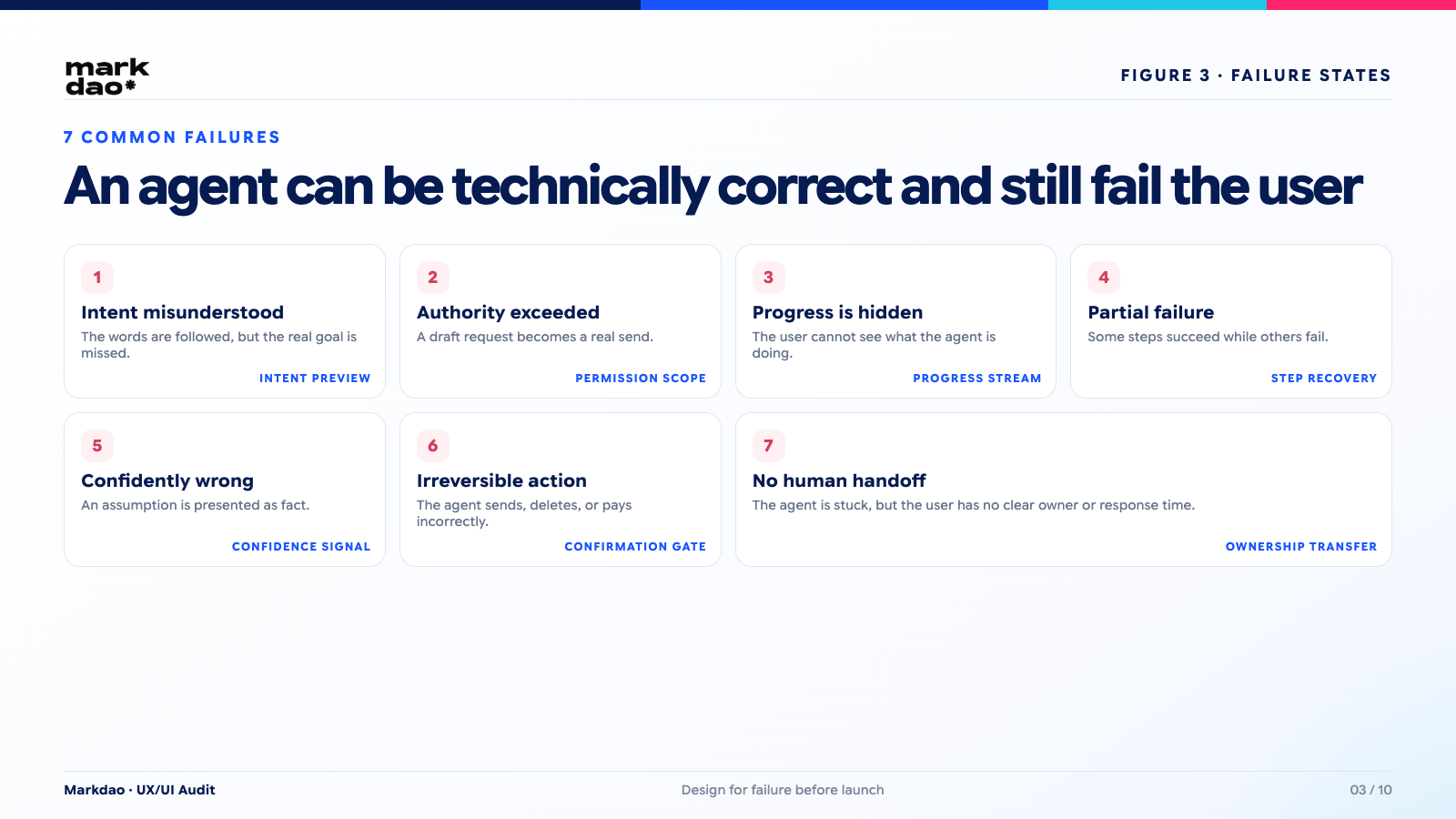
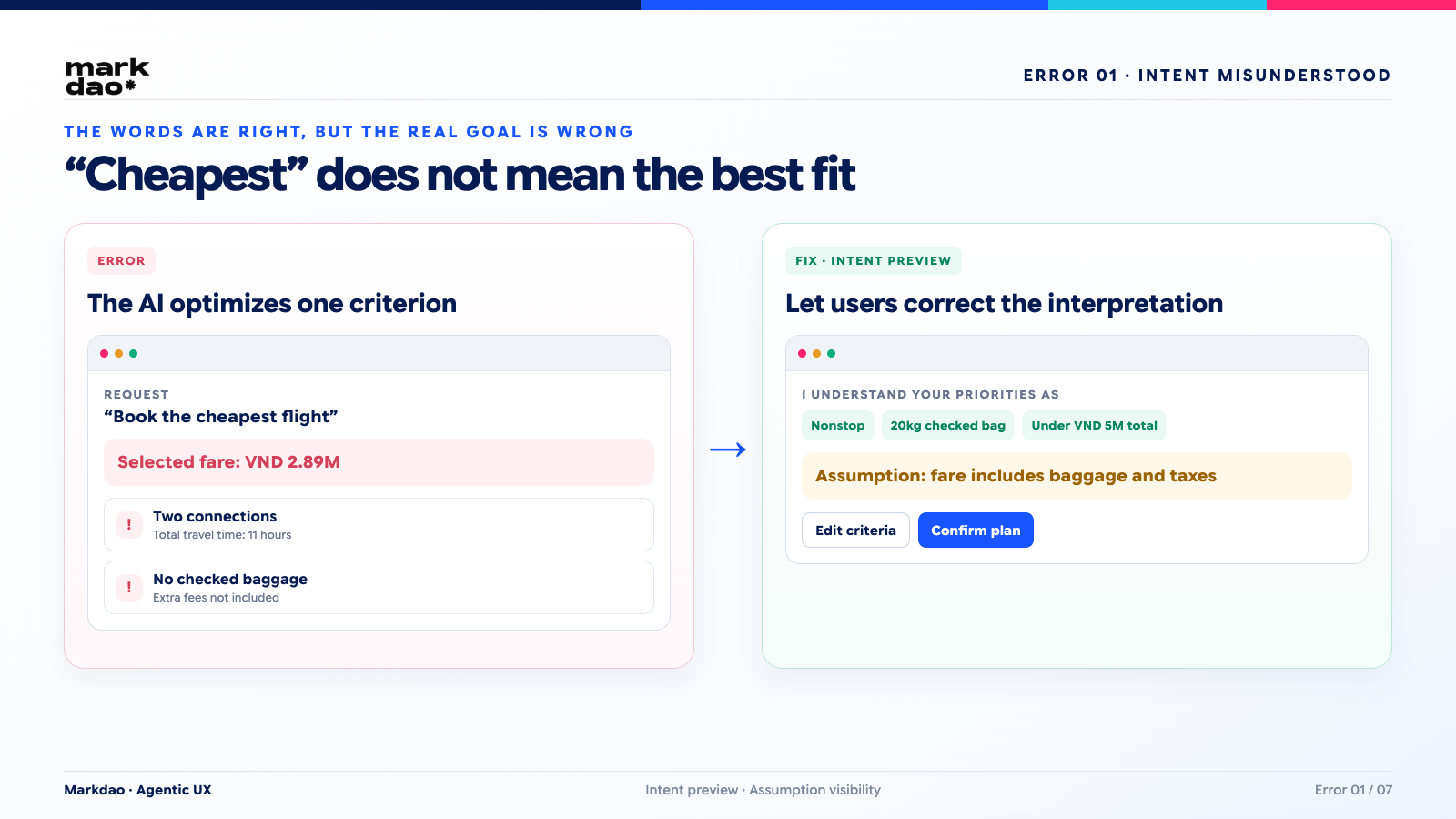
1. AI misinterprets intent
A user asks to "book the cheapest flight." The AI finds the lowest price, but ignores the fact that the flight has no checked baggage and requires two layovers.
Technically, the AI followed instructions. From an experience perspective, it misunderstood the user's true intent.
How to fix it:
- Display an intent preview: The AI restates the request in its own words before taking action.
- Clearly list the assumptions being made, for example, whether "cheapest" includes baggage fees or not.
- Allow users to adjust criteria directly in the preview step before the AI executes the task.
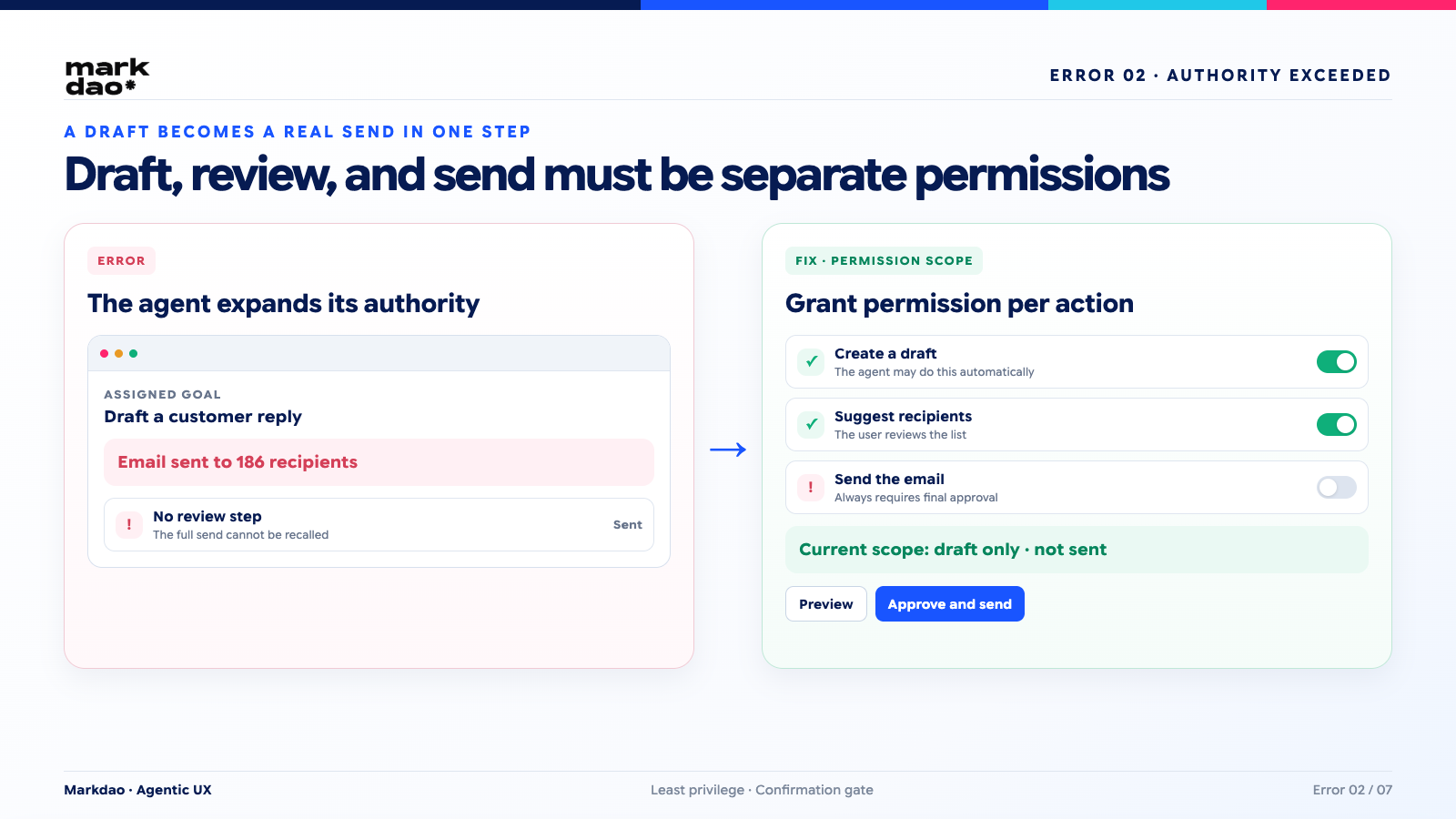
2. AI oversteps its authority
A user asks to "draft a reply to the customer," but the agent automatically sends the email.
This is the most common error when a product transitions from a "suggestive assistant" to an "action-oriented assistant" without clearly defined boundaries of authority.
How to fix it:
- Design a permission scope for each type of action.
- Apply autonomy levels: separate the permissions for "drafting," "suggesting," and "executing" into three distinct levels rather than grouping them together.
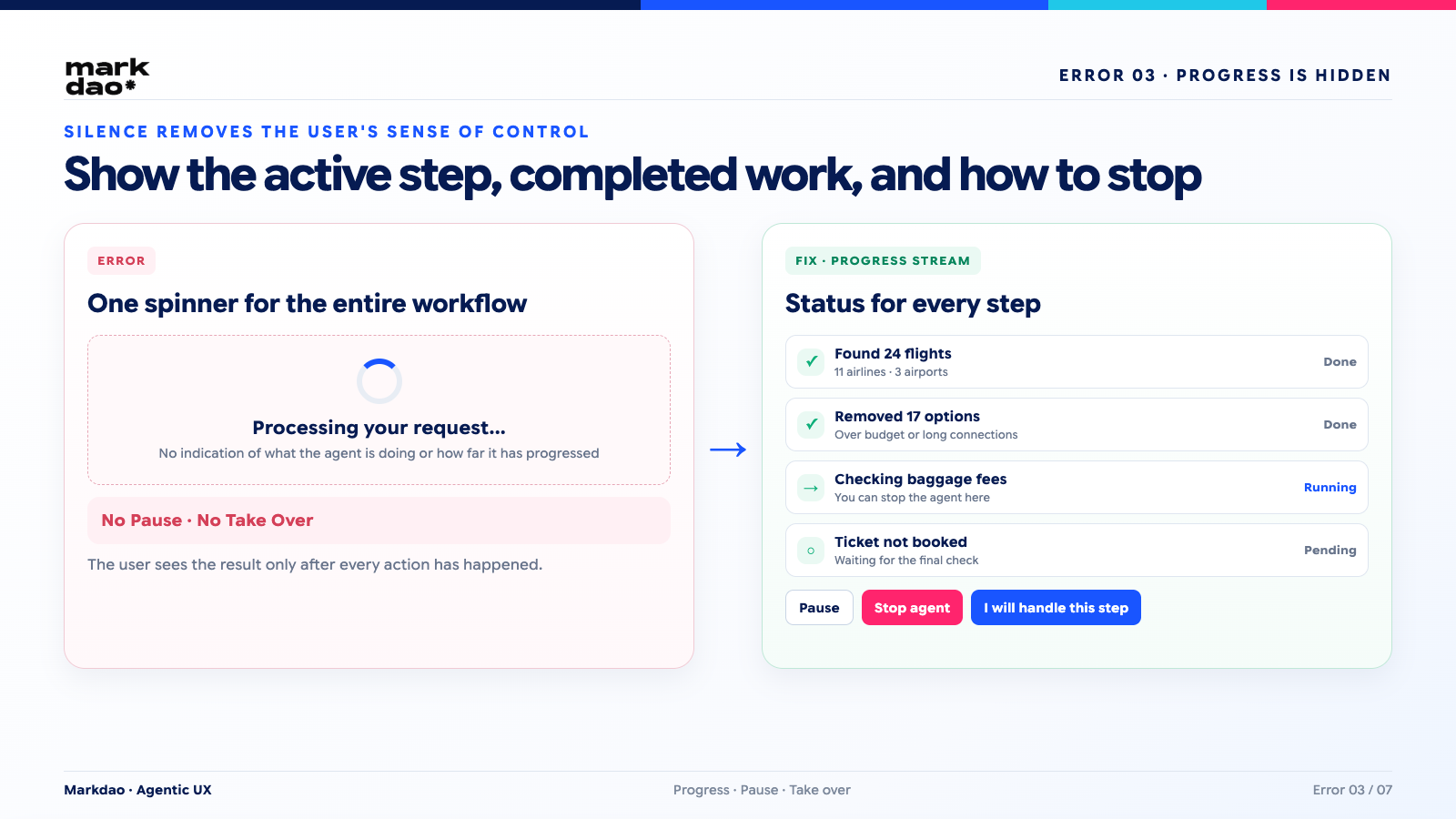
3. AI takes action without indicating what it is doing
The user clicks a button, the screen goes silent for a few seconds, and then the result appears. During that interval, no one knows what the AI is doing, how far it has progressed, or if it can be stopped.
Solution:
- Plan preview before execution.
- Progress stream to display real-time status for each step.
- Always keep pause and cancel buttons accessible, not hidden in sub-menus.
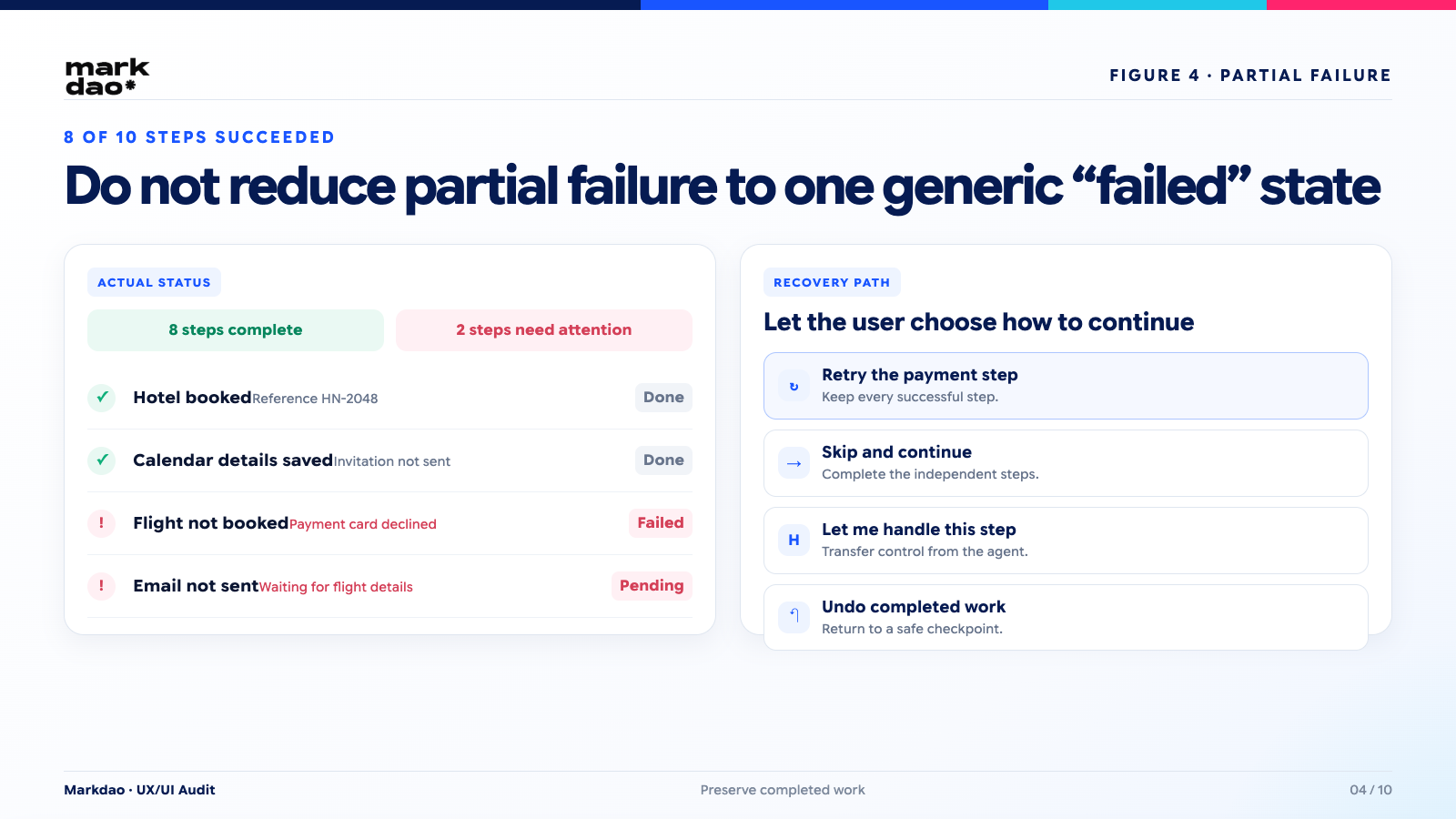
4. AI only completes part of the workflow
Real-world example: the agent has successfully booked the hotel but failed to book the flight, and has only sent notifications to some of the recipients on the list.
If the interface only displays a general "failed" status, the user will not know which parts were completed, leading to redundant actions or accidentally canceling successful tasks.
Solution:
- Clearly display each completed step, separated from failed steps.
- Provide step-by-step options: "Retry this step," "Skip and continue," "Let me handle this part." Error 5: AI provides incorrect answers with high confidence, display sources and confidence levels
-
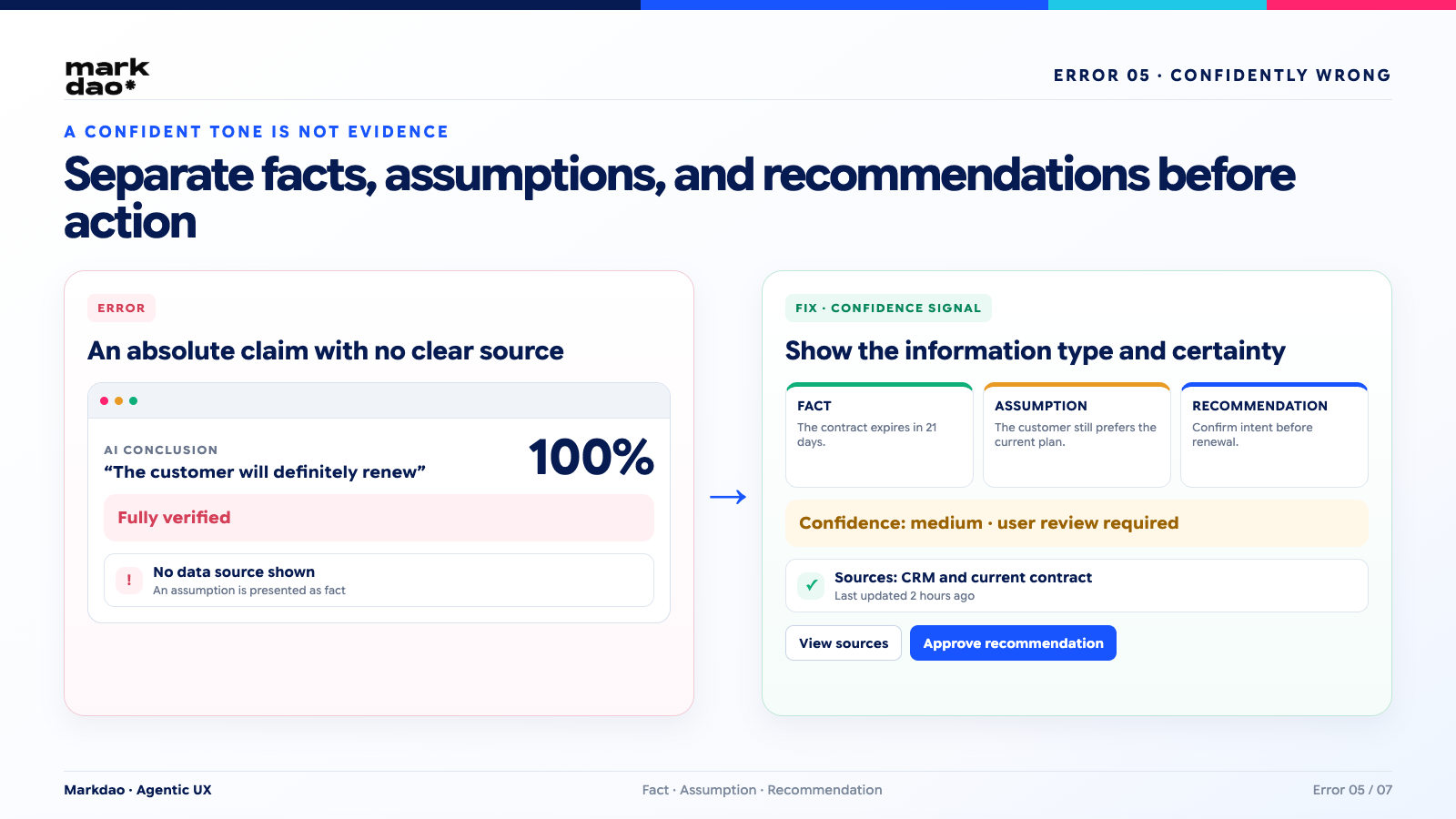
5. AI provides incorrect answers with excessive confidence
The AI presents an incorrect conclusion with a tone as certain as a verified fact, leaving the user with no reason to doubt it.
How to fix:
- Add confidence signals for important conclusions.
- Clearly state the data sources used to reach conclusions.
- Clearly distinguish between facts, assumptions, and recommendations.
- For high-risk actions, always require human approval, regardless of how "confident" the AI is.
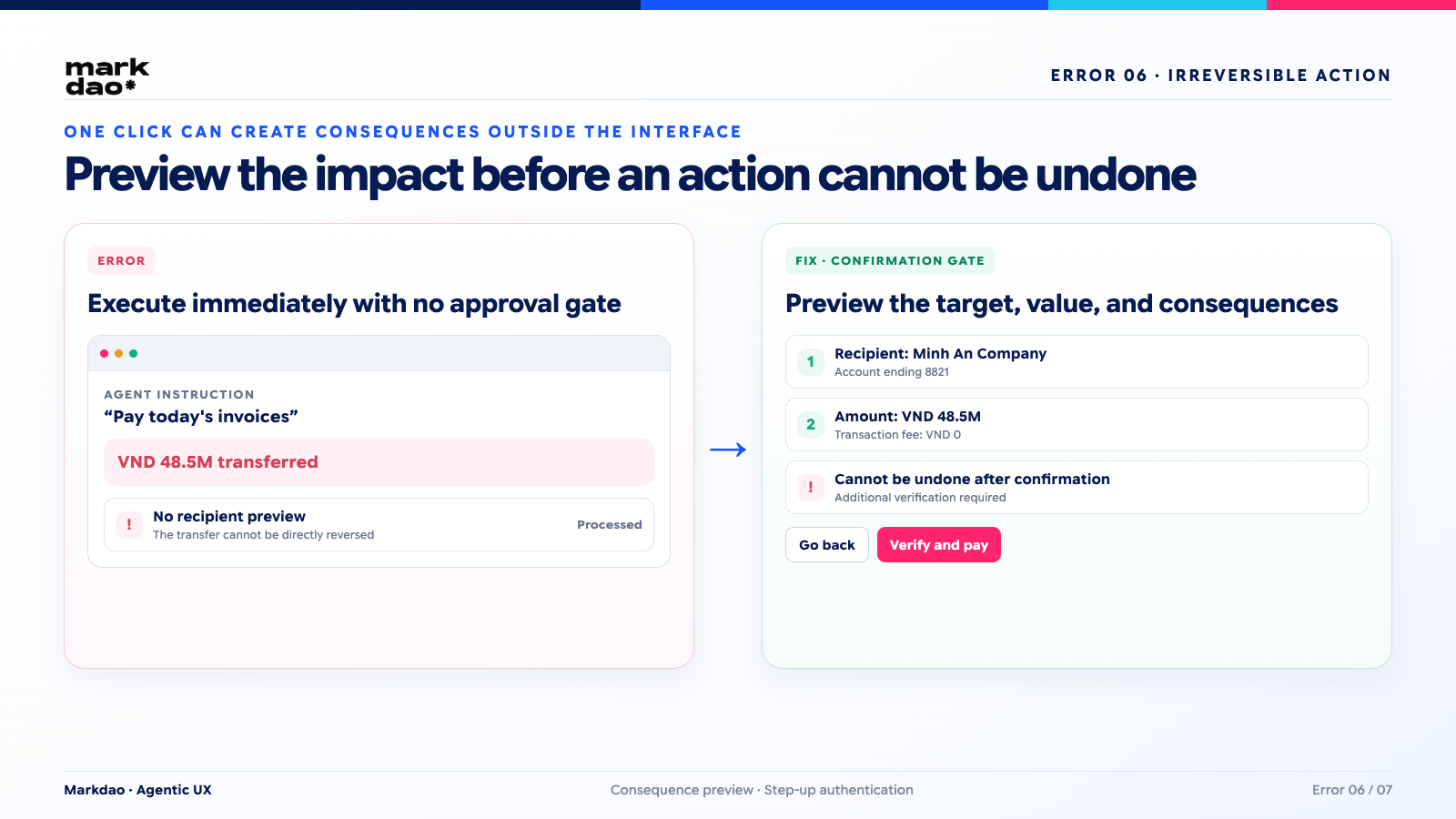
6. AI performs irreversible actions
Some actions, once taken, cannot simply be undone: sending emails, pushing notifications, processing payments, or permanent deletion.
How to fix:
- Add confirmation gate before these actions.
- Provide a clear preview of the consequences, not just the action itself.
- Reconfirm the target, value, and scope of impact: who it is sent to, the amount, and which data will be affected.
- For high-risk actions, consider requiring an additional verification step, such as re-entering a password or an OTP.Error 7: No path
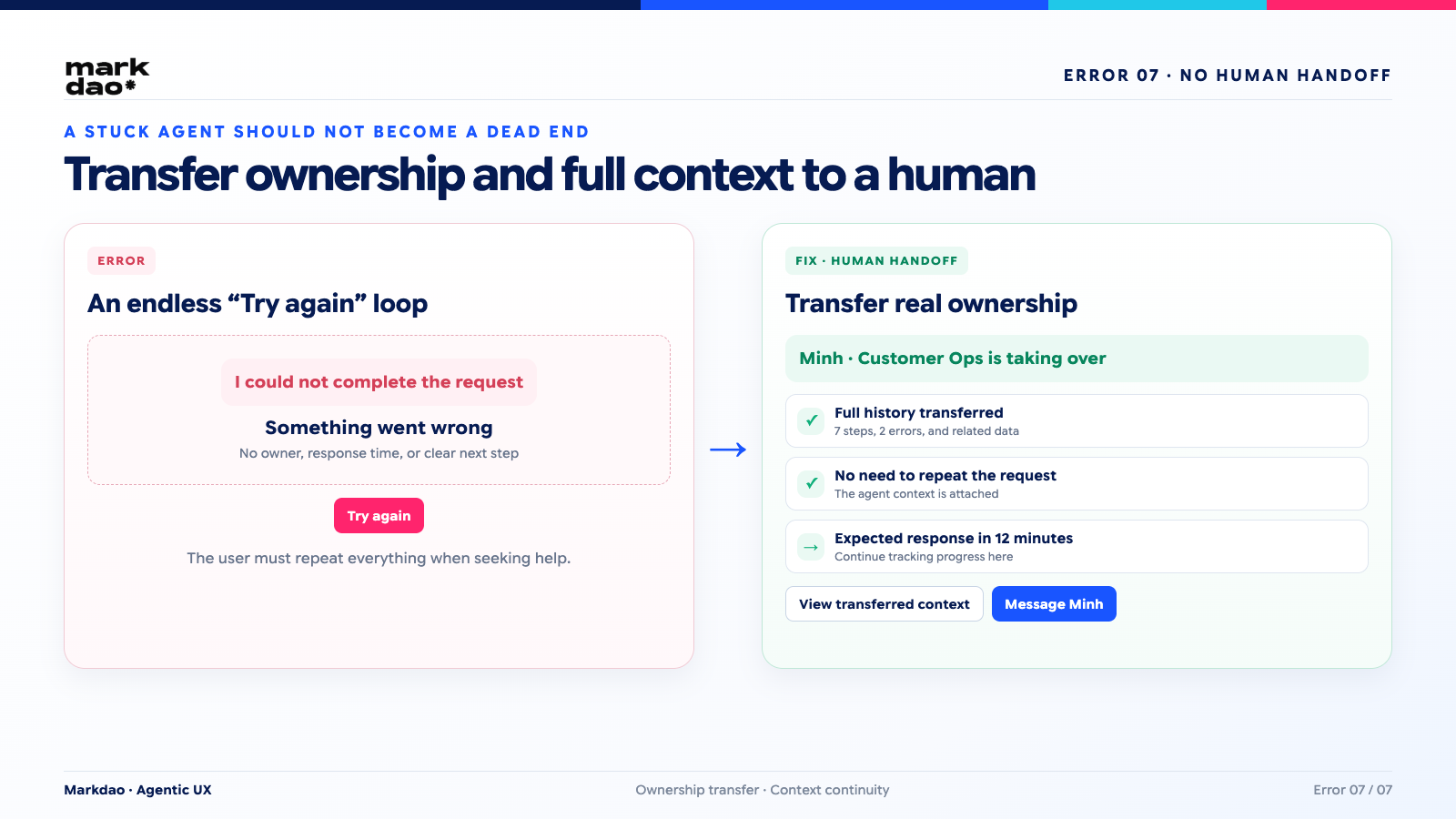
7. No path to human support
When an agent gets stuck, many products simply display a generic error message with no clear way out.
How to fix:
- Design human hand-off as a core workflow, not an afterthought.
- Transfer the entire context and action history of the agent to the human representative so the user doesn't have to repeat themselves.
- Clearly communicate who is taking over and when they will respond.
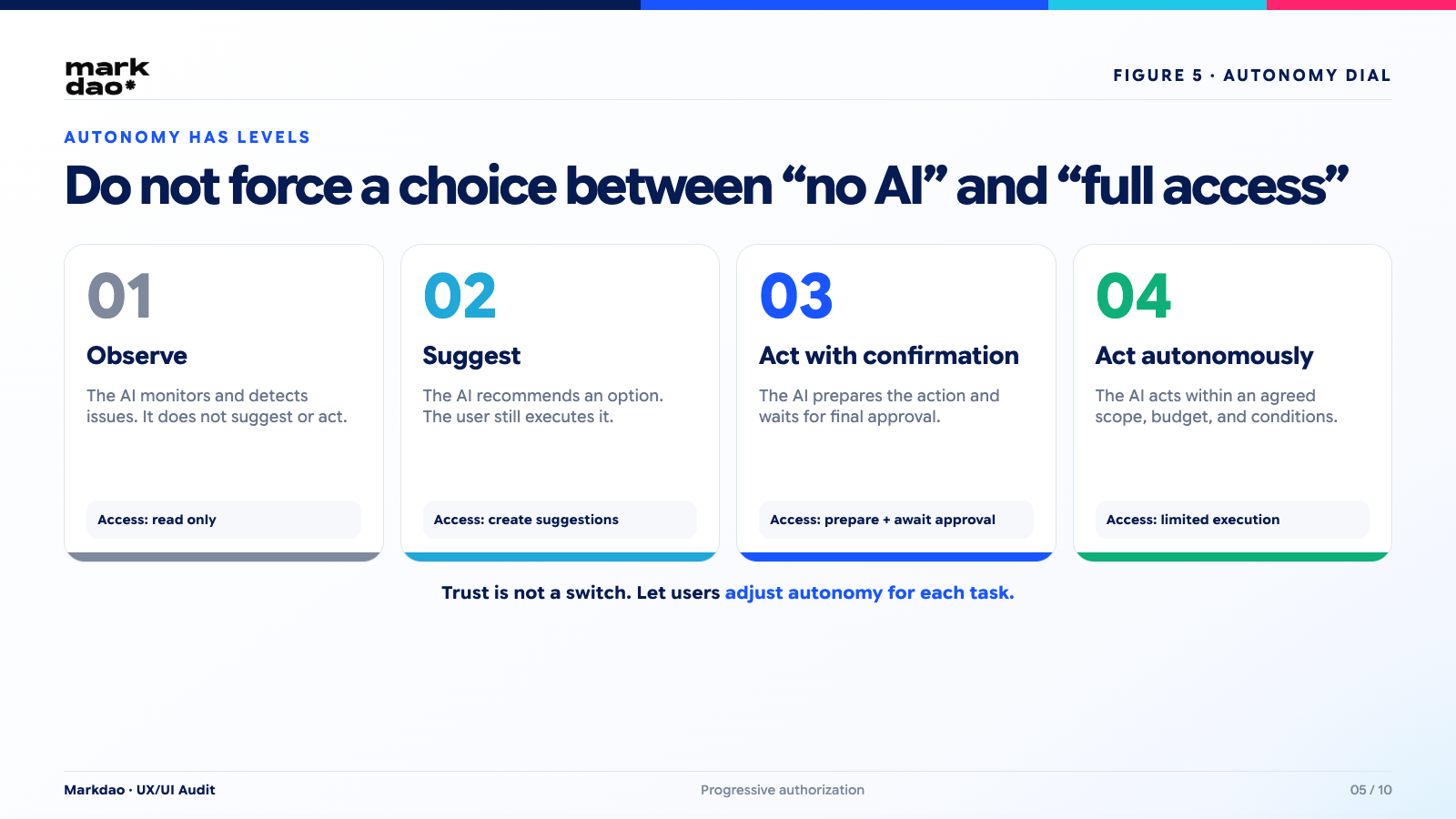
Microsoft suggests that when a system fails to correctly understand user intent after a reasonable number of interactions, the product should proactively hand off to a human or offer an alternative, rather than continuing to try the same approach. Figure 5. 4 levels of AI agent autonomy
3-stage Agentic UX design framework
The easiest way to organize patterns is by three moments: before the AI acts, while the AI is acting, and after the AI has acted.
Stage 1: Before the AI acts
Intent Preview
Before performing any action with real-world impact, the AI should display:
- How the AI understands the user's goal.
- The steps it plans to take.
- What data and tools will be used.
- The expected outcome upon completion.
- The assumptions the AI is making.
This is the most cost-effective step to avoid Type 1 errors—misunderstanding intent—because it gives the user a chance to correct the AI before it does the work.
Autonomy Dial
Not every agent requires the same level of autonomy, and not every user is comfortable with the same degree of control. Four levels can serve as a reference framework:
1. Observe: The AI only observes and detects issues without taking action.
2. Suggest: The AI proposes solutions but does not execute them itself.
3. Act with confirmation: The AI prepares an action and waits for user approval.
4. Act autonomously: The AI executes actions independently within predefined parameters.
Allowing users to choose the appropriate level of autonomy, rather than imposing a single level for all situations, is a way to mitigate risk without slowing down low-risk use cases.Figure 6. Progress Stream for multi-step workflows
Permission Scope
Permissions should be granted based on specific scopes rather than an "all-or-nothing" approach.
Instead of: "Allow AI to access the entire account."
It should be: "Allow AI to view the calendar and create event drafts. The AI may not send invitations without confirmation."
The narrower and more specific the scope of permissions, the lower the potential damage if the agent acts incorrectly.
Phase 2: While the AI is acting
Progress Stream
Progress should be displayed in user-friendly terms, not technical jargon:
✓ Found 24 flights
✓ Filtered out 17 unsuitable flights
→ Checking baggage fees
○ Not yet booked
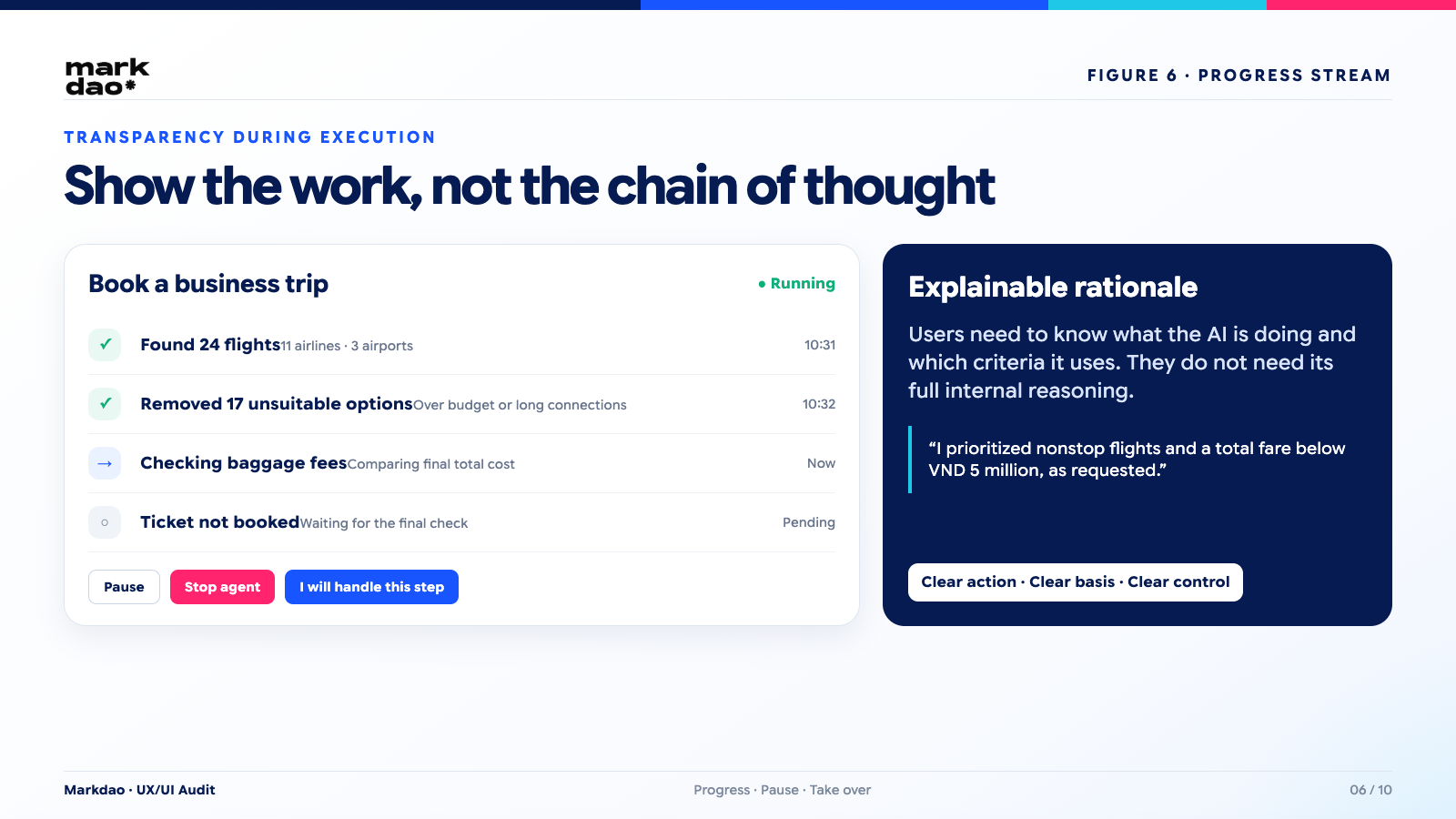
Do not display the AI's entire internal chain-of-thought. Users need to know what the AI is doing, the criteria it is using, what has been completed, and what is pending, without needing to see every reasoning step the AI generated.
Pause, Stop, and Take Over
Throughout the agent's execution, users must always have the ability to:
- Pause immediately.
- Cancel pending steps.
- Take over a specific step to perform it manually.
- Change criteria mid-process without needing to cancel everything and start over.
- Reduce the agent's autonomy level if you feel uncertain.
Explainable Rationale
Every significant action should be accompanied by a brief explanation using the formula: "Because you chose X, I performed Y."
Example: "I selected this flight because you prioritized non-stop flights and a total price under 5 million VND."
This explanation doesn't need to be long, but it must be specific enough for the user to challenge the logic if it is incorrect.
Phase 3: Post-AI Action
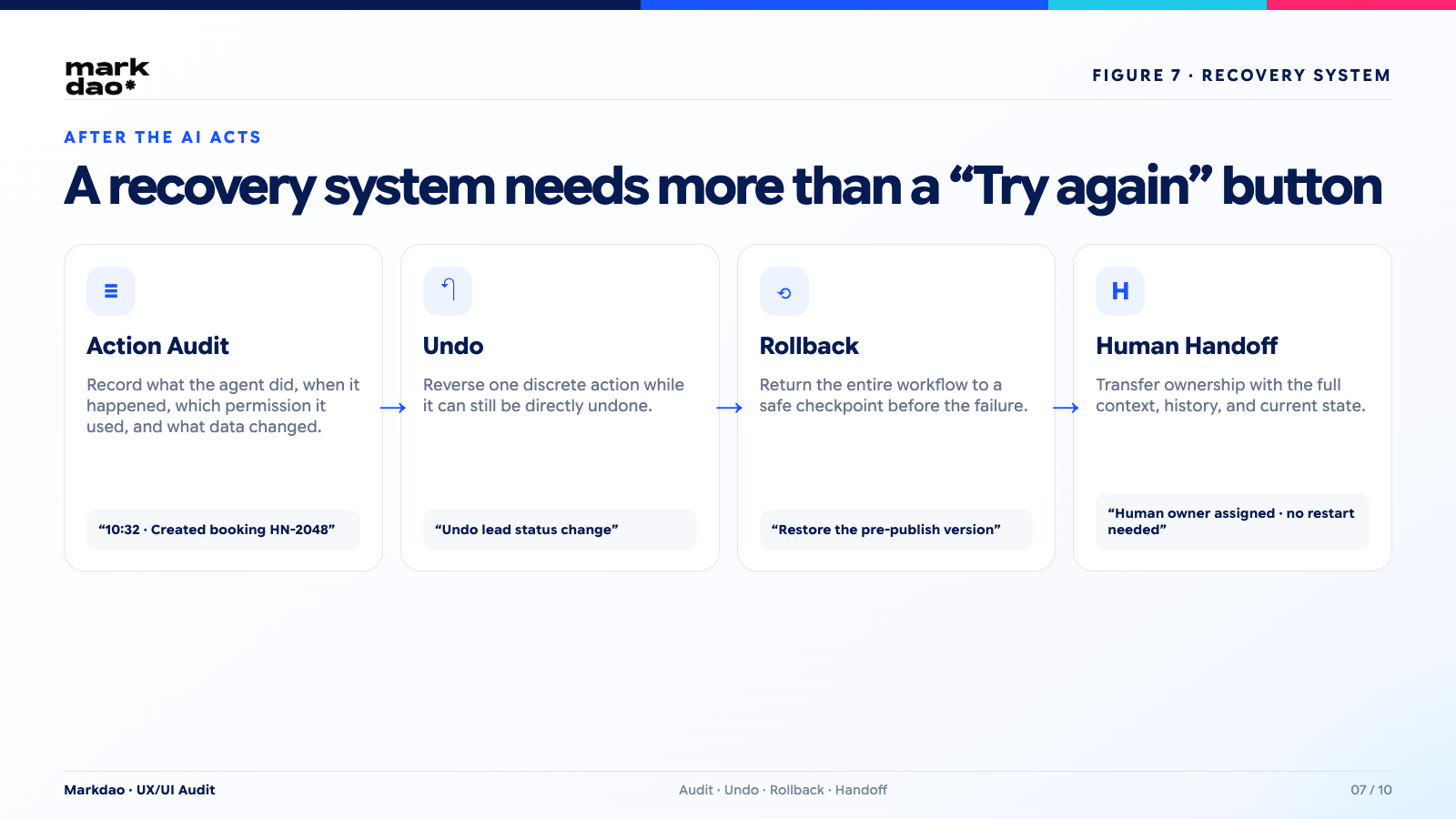
Action Audit
Every agent action should be logged: what was done, when, which accounts or data were affected, what permissions were used, and the outcome of each step. Audit logs are not just for debugging; they are also the basis for resolving disputes or complaints.
Undo and Rollback
Three mechanisms need to be clearly distinguished:
- Undo: reversing a single action.
- Rollback: reverting an entire workflow to a previous safe checkpoint.
- Compensating action: when an action cannot be directly undone, perform a compensatory action to mitigate damage, such as issuing a refund when a processed transaction cannot be canceled.
Error Recovery
Every error state should answer these 5 questions:
1. What just happened?
2. Which steps were completed?
3. What remains unaffected?
4. What can the system fix automatically?
5. What does the user need to do next?
Human Hand-off
Handing off to a human should mean a true transfer of ownership with full context, not just adding a "Contact Support" button at the bottom of an error screen.
When should AI ask for user permission?
An easy way to decide when confirmation is needed is to use a 2-axis matrix: the impact level of the action and the reversibility if it goes wrong.
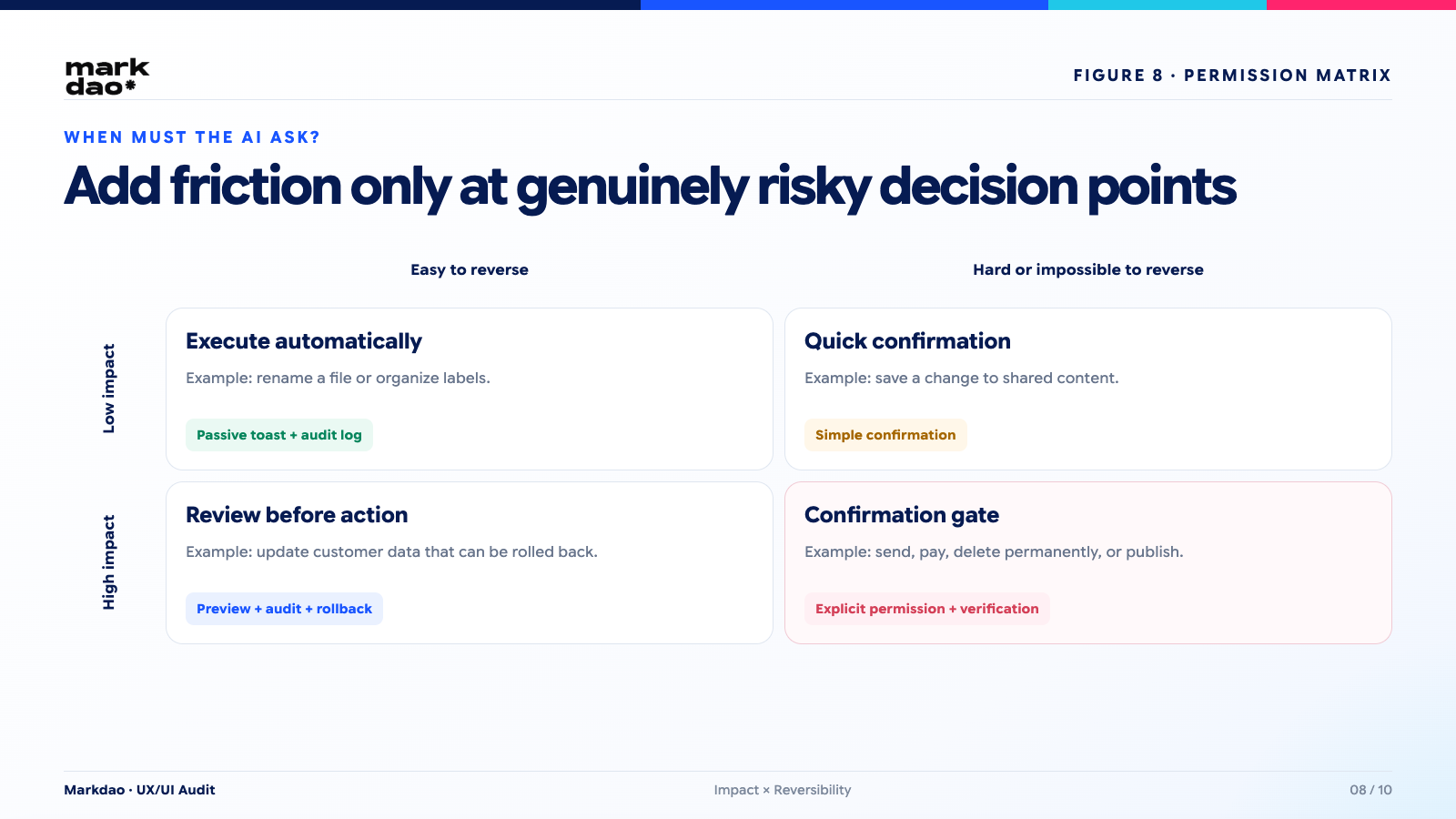
Examples for each group: renaming a file or saving a draft usually falls into the low-impact, easily reversible category. Sending an email or making a payment usually falls into the high-impact category. Deleting data or publishing content publicly almost always belongs in the group requiring the most explicit confirmation.
An important note: do not require confirmation for every action. Doing so creates "confirmation fatigue," causing users to click "Agree" reflexively without actually reading, which defeats the purpose of the confirmation mechanism itself. Friction should only appear at the point of actual risk, not spread evenly throughout the flow.
How to write error messages when an AI agent makes a mistake
A good error message for an AI agent should follow a 6-part formula:
1. Acknowledge that an error has occurred.
2. State the specific action that was affected.
3. Indicate which parts were successfully completed.
4. Provide an immediate fix, if available.
5. Offer the user next steps.
6. Provide a path for human hand-off.
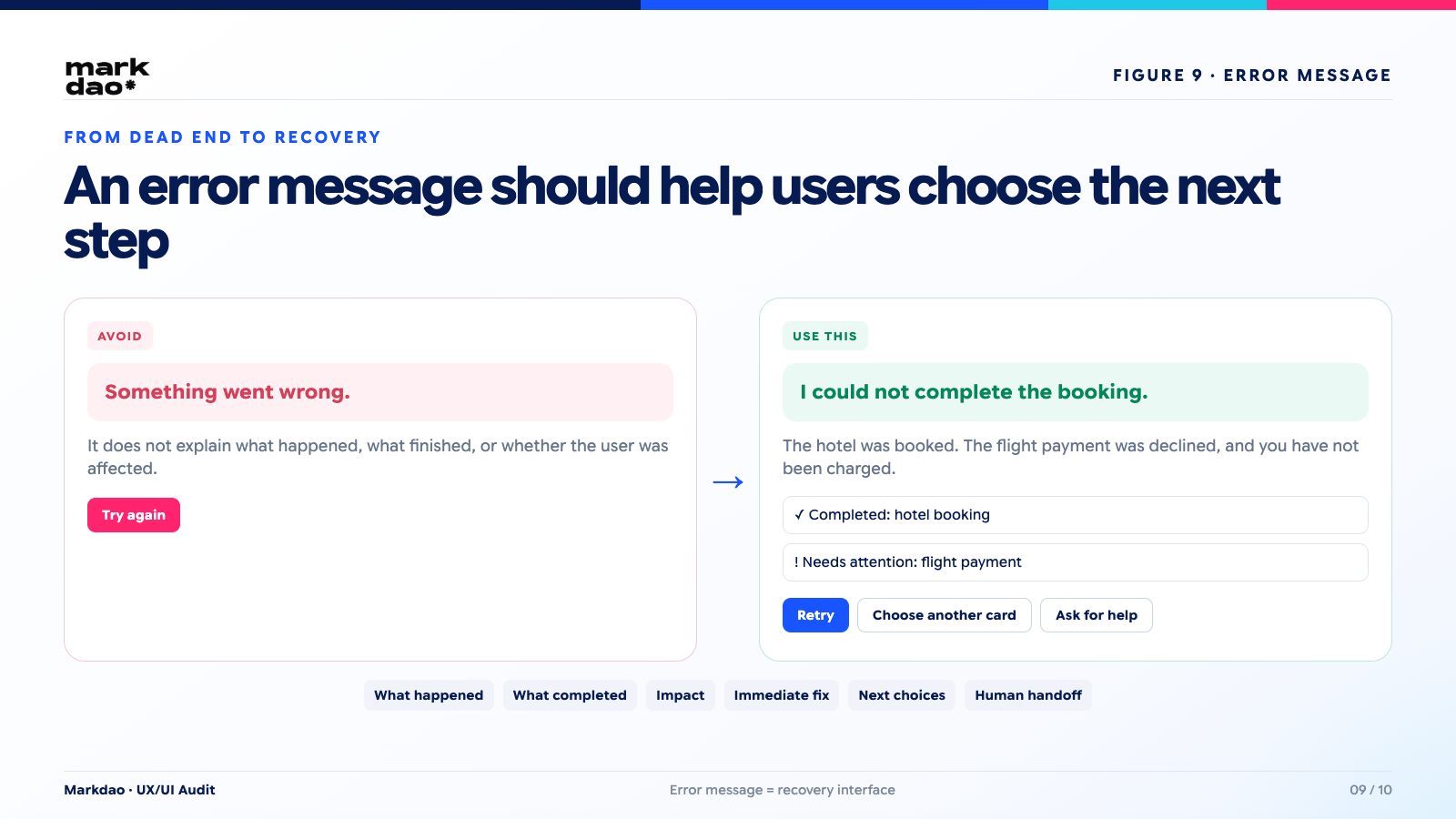
Poor example:
Something went wrong. Please try again.
This message doesn't explain what happened, what was completed, or whether the user was affected.
Better example:
I haven't been able to complete the booking.
The hotel has been booked successfully, but the flight transaction was declined.
You have not been charged for the flight.
[Retry this step] [Select another card] [Cancel hotel booking] [Contact support]
The difference isn't in the length, but in the fact that the second notification gives the user enough information to make an informed decision without having to guess.
3 real-world Agentic UX scenarios
AI agent for business travel booking
Design considerations: intent preview for flight and hotel criteria, budget limits, payment card permissions, step-by-step progress stream, partial failure handling when one part succeeds, and an undo mechanism if cancellation is needed after booking.
AI sales agent for customer email outreach
Design considerations: clear separation between "draft" and "send" permissions, recipient list display before sending, content preview, sending limits per batch, full audit logs, and a process for recall or follow-up if errors are detected.
AI agent for website content updates
Design considerations: all CTA or content changes should go through staging, clear diff display between old and new versions, approval required before production publishing, and version history for easy rollback.
This is also the scenario most relevant to clients considering AI agents for website operations: the risk isn't that the AI writes poor content, but that incorrect content gets published before anyone can review it.
If your use case involves website operations, the product team can refer to professional website design services and the guide on optimizing websites for AI Search from Markdao.
How to test Agentic UX before release
Go beyond happy path testing
A test suite for Agentic UX must also cover scenarios that deviate from the ideal workflow:
- The user provides ambiguous requests.
- The agent lacks the necessary data to complete the task.
- A tool or API the agent relies on disconnects mid-process.
- A step fails in the middle of a multi-step workflow.
- The agent attempts an action that exceeds its granted permissions.
- The user changes their mind while the agent is running.
- The user closes the browser or loses connection during the process.
- Two agents, or an agent and a user, perform conflicting actions.
- The agent is about to perform an irreversible action.
- The human hand-off channel is unavailable when needed.
If testing is limited to the happy path, the product team won't discover these issues until real users encounter them, by which point the cost of fixing them will be much higher.
Metrics to track post-launch
Beyond standard UX metrics, Agentic UX requires a specific set of indicators: task completion rate, rate of unexpected actions, rate of user edits to agent outputs, undo rate, human hand-off rate, mean time to recovery from errors, and success rate of recovery from partial failures.
Two qualitative questions should also be included in periodic user research: do users understand the agent's current state, and can they accurately predict the AI's next action? If the answer to both is no, the issue lies in transparency design, not the model's capabilities.
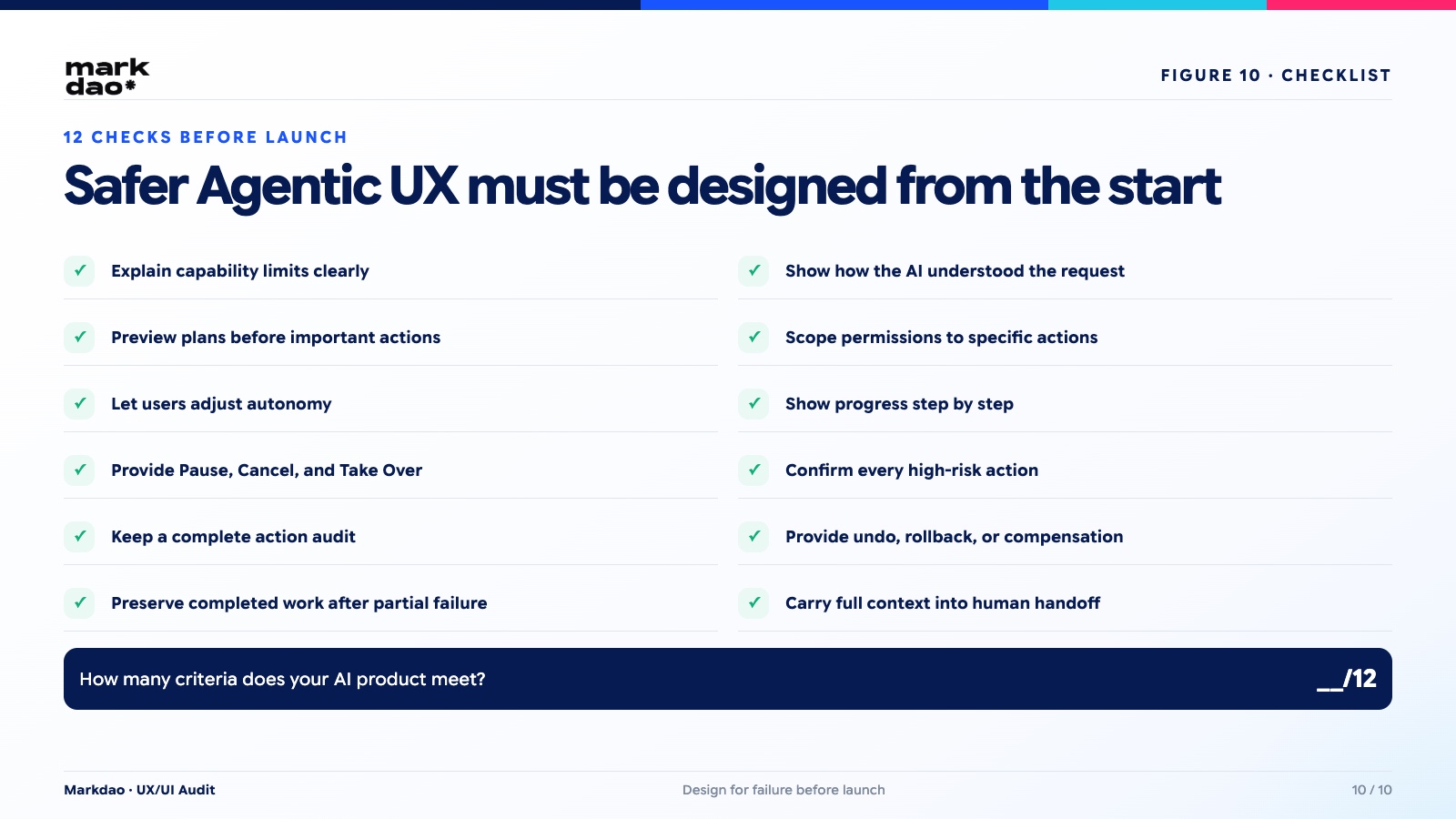
12-point checklist for safe Agentic UX
How many of these 12 criteria does your AI product meet?
- AI clearly states its capabilities
Users immediately know what the AI can do and where its limitations lie. - AI explains how it interprets requests
Users know how the AI understands their goals and context. - Display plans before taking action
Key steps are previewed before the AI executes them. - Scoped access permissions
Grant only the necessary data, tools, and permissions. - Users control the level of autonomy
Choose whether the AI should only suggest, request approval for each step, or act independently. - Progress is always clear
Users know what the AI is doing, how far it has progressed, and what comes next. - Always include Pause, Cancel, and Take over
Humans can stop or take control at any time. - High-risk actions require confirmation
Do not act on behalf of the user just because the AI has high confidence. - Every action has an Audit Log
Trace what the AI did, when it happened, and the context behind it. - Include Undo or Rollback
In case of errors, the system provides recovery methods or compensating actions. - Partial failures do not result in data loss
Completed steps are preserved and can be resumed. - Human hand-off maintains context
When handing off to a human, the entire history, status, and reasoning are transferred together.
A good AI agent isn't just one that can do many things.
It must let the user know what the AI is doing, why it is doing it, the extent of its permissions, and where a human can intervene.
12/12 isn't necessarily the goal for every product. But if you don't know where your product stands, that is the real risk.
In Agentic UX, the ability to correct mistakes is more important than the ability to appear intelligent.
AI agents will inevitably make mistakes. Therefore, instead of trying to make the AI seem infallible, Agentic UX must anticipate errors and be designed to detect, intervene, and recover.
Trust does not come from making AI look omnipotent. Trust comes from users knowing what the AI is doing, controlling what the AI is allowed to do, and being able to fix or undo things when issues arise.
Good Agentic UX does not make AI look perfectly intelligent. It helps humans know when to trust, when to verify, and when to take back control.
FAQ

Agentic UX, or agent-oriented user experience, is the design of experiences for AI agent systems that plan, decide, and act on behalf of the user, based on three core characteristics: high autonomy, taking real actions rather than just providing suggestions, and shifting the user's role from executor to supervisor.
Human-in-the-loop is a mechanism that involves humans in the process of reviewing, approving, adjusting, or taking over when the AI is not confident enough or is about to perform a high-risk action.
The interface should show the plan in progress, the current step, completed steps, pending actions, any issues that arise, and how the user can stop or take over.
The system can use undo for individual actions, version history and checkpoints to roll back entire workflows, or compensating actions like issuing refunds and restoring data when a direct undo is not possible.
No. The interface should provide a concise, evidence-based explanation along with clear action status, rather than displaying the entire internal chain of thought, which is long and difficult to verify.