



Have you ever wondered what users are actually doing on your website? Where do they click, how far do they scroll, or simply, where is their attention focused? All these questions can be answered by heatmaps, a "superpower" tool that helps you gain insight into user behavior on your site.
In this article, Markdao will not only help you explore what a heatmap is but also list the best heatmap software for 2025 so you can optimize your website most effectively. Let's dive in!
What is a heatmap?
Definition
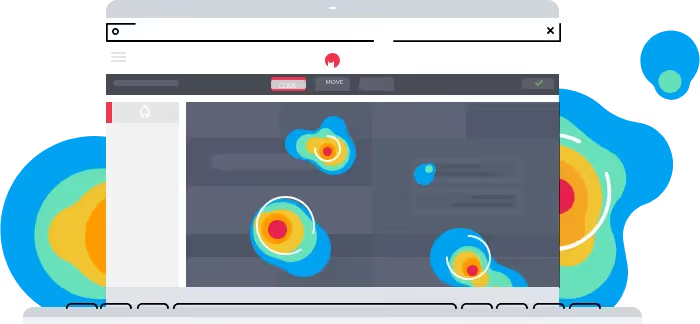
A heatmap, also known as a heat map, is a data visualization tool widely used in website analytics. It allows website owners to see how users interact with their site by displaying data through color gradients.
"Hot" areas like red or orange indicate where users interact the most, while "cold" colors like blue or purple represent areas that are being ignored.
Simply put, a heatmap is like a weather map for your website, helping you identify which areas are "heating up" and worth focusing on.
How it works
Heatmap collects and analyzes user behavior data on a website using tracking technologies such as cookies or session tracking. This data is then transformed into an easy-to-read heat map, helping website owners identify strengths and weaknesses in their interface or content.
How it works:
- Data collection: Tracks clicks, mouse movements, and scrolling behavior. Sessions are stored for later analysis.
- Data analysis: Uses algorithms to evaluate engagement levels.
- Visualization: Heat maps are displayed directly on the interface, highlighting key areas.
Common types of website heatmaps
Heatmaps are categorized into several types depending on their purpose:
Scroll Heatmap
- Description: Shows how far users scroll down a page, revealing which content areas are viewed the most and which are ignored.
- Benefits: Helps determine the best placement for important CTA (Call-to-Action) buttons.
Click Heatmap
- Description: Track and record the most clicked areas.
- Benefits: Identify effective action areas such as buttons, links, or menus.
Move Heatmap
- Description: Record mouse movements on the page to show which areas interest users the most.
- Benefits: Gain a clear understanding of content layout organization.
Attention Heatmap
- Description: Evaluate user focus based on the time spent on each area.
- Benefits: Optimize the interface to enhance user experience (UX).
Benefits of using heatmaps on your website
Understanding the role of heatmaps in analyzing user behavior is the first step, but the specific benefits below are exactly why this tool has become indispensable for websites.

Understand user behavior: Heatmaps make it easy to understand how users interact with your website. You can see where they click, which areas they spend the most time on, or which content they ignore. This helps businesses optimize layout, content, and interface, thereby increasing user experience.
Conversion Rate Optimization (CRO): By analyzing data from heatmaps, you can identify weaknesses in your conversion funnel. For example, if users aren't clicking your CTA (Call to Action) button, you can adjust its color, placement, or messaging to better capture their attention.
Content improvement guidance: With insights into the most-viewed areas, you can focus on developing more relevant content. This is especially critical for sales pages, where content must be persuasive enough to keep readers engaged.
Enhancing UI design efficiency: Heatmaps help uncover design issues, such as buttons that are hard to see, illogical spacing between sections, or distracting elements. Improving your interface not only boosts aesthetics but also makes your website perform more effectively.
Supporting SEO strategy: When you know which sections users are interested in, you can optimize your content and SEO keywords in those specific areas to improve your search engine rankings.
Saving time and money: Instead of relying on guesswork, heatmaps provide visual data that helps you make the right decisions from the start. This saves time on trial-and-error and optimizes your website development costs.
Given these significant benefits, it’s easy to see why heatmaps have become an indispensable tool for website managers and marketers. Let’s explore the top heatmap software available today to choose the best solution for your needs.
Top 6 best heatmap software for 2025
In 2025, heatmap analysis tools continue to see major improvements with advanced features that meet the diverse needs of businesses, from small startups to large enterprises. Below are the top heatmap software solutions compiled by Markdao:
1. Hotjar – An all-in-one tool for small and medium-sized businesses
Key features:
- Heatmaps that provide visual insights into clicks, mouse movements, and scroll depth.
- Session recordings that recreate the entire user journey.
- Integrated survey and feedback tools to gain a deeper understanding of the actual user experience.

Best for:
Small and medium-sized businesses, service websites, or personal blogs looking to optimize user experience and increase conversions.
Pricing:
Starts at $39/month for the basic plan, with a limited free version available.
Pros:
Hotjar is user-friendly, requires no advanced technical skills, and provides a comprehensive view of user behavior.
2. Crazy Egg – A top choice for e-commerce
Key features:
- Heatmaps with detailed click, scroll, and attention maps.
- A/B testing tools to experiment with different versions of your website.
- Snapshot reports that make it easy to analyze results in real-time.

Best for:
E-commerce websites and online businesses that need to optimize every detail to boost revenue.
Pricing:
Starting at $29/month, with various flexible plans.
Key strengths:
Crazy Egg is more than just a heatmap tool; it is a comprehensive optimization platform, ideal for CRO (Conversion Rate Optimization) strategies.
3. Mouseflow – Focused on the customer journey
Key features:
- Records every visitor's journey from landing to exit.
- Funnel features help identify drop-off points in the conversion process.
- Detailed form analytics to detect common user errors.

Best for:
Businesses looking to gain deep insights into customer behavior and optimize conversion funnels.
Pricing:
Starting at $24/month.
Key strengths:
Mouseflow is a powerful tool for tracking and improving customer experience, especially on complex e-commerce sites.
4. FullStory – Powerful analytics for large enterprises
Key features:
- Records all user behavior, including interactions with dynamic elements like menus or popups.
- Smart filters for quickly searching specific behaviors or errors.
- Integrates with development tools like Jira and Trello for bug reporting and progress tracking.

Best for:
Large enterprises or complex websites that require a comprehensive analytics solution.
Pricing:
Free basic plan; premium plans available upon request.
Pros:
FullStory offers exceptional detail, making it ideal for companies that need precise data for continuous improvement.
5. Lucky Orange – Cost-effective solution with Live Chat
Key features:
- Heatmaps with basic click, scroll, and attention tracking.
- Live Chat feature to interact with customers in real-time.
- Form analytics tool to identify bottlenecks in submission forms.
Best for:
Startups or new websites that need a simple, affordable solution.
Reference price:
From $10/month.
Pros:
Lucky Orange offers many useful features in a single tool, making it especially suitable for beginners.

6. Plerdy – SEO and UX integration
Key features:
- Heatmap real-time visualization.
- SEO Checker for on-page optimization directly within the tool.
- Detailed reports on user behavior for every button or link.
Best for:
SEO specialists or marketers looking to optimize both user experience and SEO strategy simultaneously.
Reference price:
Starting from $29/month.
Pros:
Plerdy stands out for its ability to integrate both SEO and UX, helping to improve overall website performance.

Each tool heatmap each possess their own unique strengths, suited to different types of businesses and specific needs. Choosing the right tool not only helps you gain deeper insights into user behavior but also provides a significant competitive advantage in 2025.
Conclusion
Heatmap is more than just a data analysis tool; it is a "treasure map" that helps businesses discover and optimize the user experience on their websites. From understanding visitor behavior and identifying strengths and weaknesses to improving conversion rates, heatmaps have proven to be an indispensable part of any modern digital marketing strategy.
With the heatmap software options for 2025 presented here, you can easily choose the solution that best fits your needs and budget. Remember that success in website optimization lies not only in choosing the right tool but also in how creatively and effectively you leverage and apply the data.