What is a layout? It is how you arrange elements on a webpage to create a visual experience that is coherent and encourages users to take action. An effective web layout not only makes a site look professional but also plays a crucial role in guiding the user's eye, optimizing SEO, and increasing conversion rates. To build a beautiful web layout, you need to understand the popular layout models used today.
This article by Markdao will help you explore 9 HTML web layouts that are widely applied, ranging from simple single-column layouts to Z-pattern layouts that guide user behavior.
What is a layout?
A layout, or web page structure, is the way interface elements such as the header, menu, main content, sidebar, and footerare arranged in a logical order on a webpage. The goal of a layout is to guide the user's gaze, create a coherent experience, and lead them toward a desired action.
In design language, the layout is the backbone of a website; without a good layout, the interface is just a jumble of images that distracts the eye and loses potential customers at first glance.
Key components of a web layout
A standard HTML web layout typically includes the following components:
- Header: The top section containing the logo, navigation menu, and CTA.
- Navigation (Menu): Helps users quickly access the main areas of the website.
- Main Content: The primary content area—where the core value of the page is delivered.
- Sidebar: A supporting column, often containing links, forms, or featured products.
- Footer: The footer contains contact information, terms and conditions, social media links, and more.
Furthermore, a beautiful website layout must ensure consistency in spacing, proportions, contrast, and the use of white space to create an airy and professional feel.
Its role in user experience and SEO
Layouts do more than just affect aesthetics; they determine conversion efficiency and SEO rankings. If you ignore your layout, you are losing 90% of your website's conversion potential.
- Optimizing user experience: A logical layout makes it easy for users to read, understand, and interact. When everything is in the right place, users feel comfortable and are encouraged to explore further.
- Increasing time on page: When content is organized scientifically, users stay longer to read, which is a key factor in improving SEO.
- Improving page load speed and mobile-friendliness: A streamlined, responsive layout ensures the website runs smoothly on all devices, thereby boosting Core Web Vitals scores.
- Guiding user behavior: A good layout clearly directs users toward CTAs (calls-to-action), naturally increasing conversion rates.
Fundamental principles of layout design
To build a UX/UI-standard website layout, you need to follow these foundational principles:
- Hierarchy: Guiding the user's eye from the most important elements to the least important.
- Consistency: Maintaining the style and placement of elements throughout the entire site.
- Whitespace: Creates breathing room and improves focus.
- Responsiveness: Layouts must automatically adjust to look great on any screen size.
- Grid System: Provides balance and makes it easy to align elements.
9 popular website layouts today
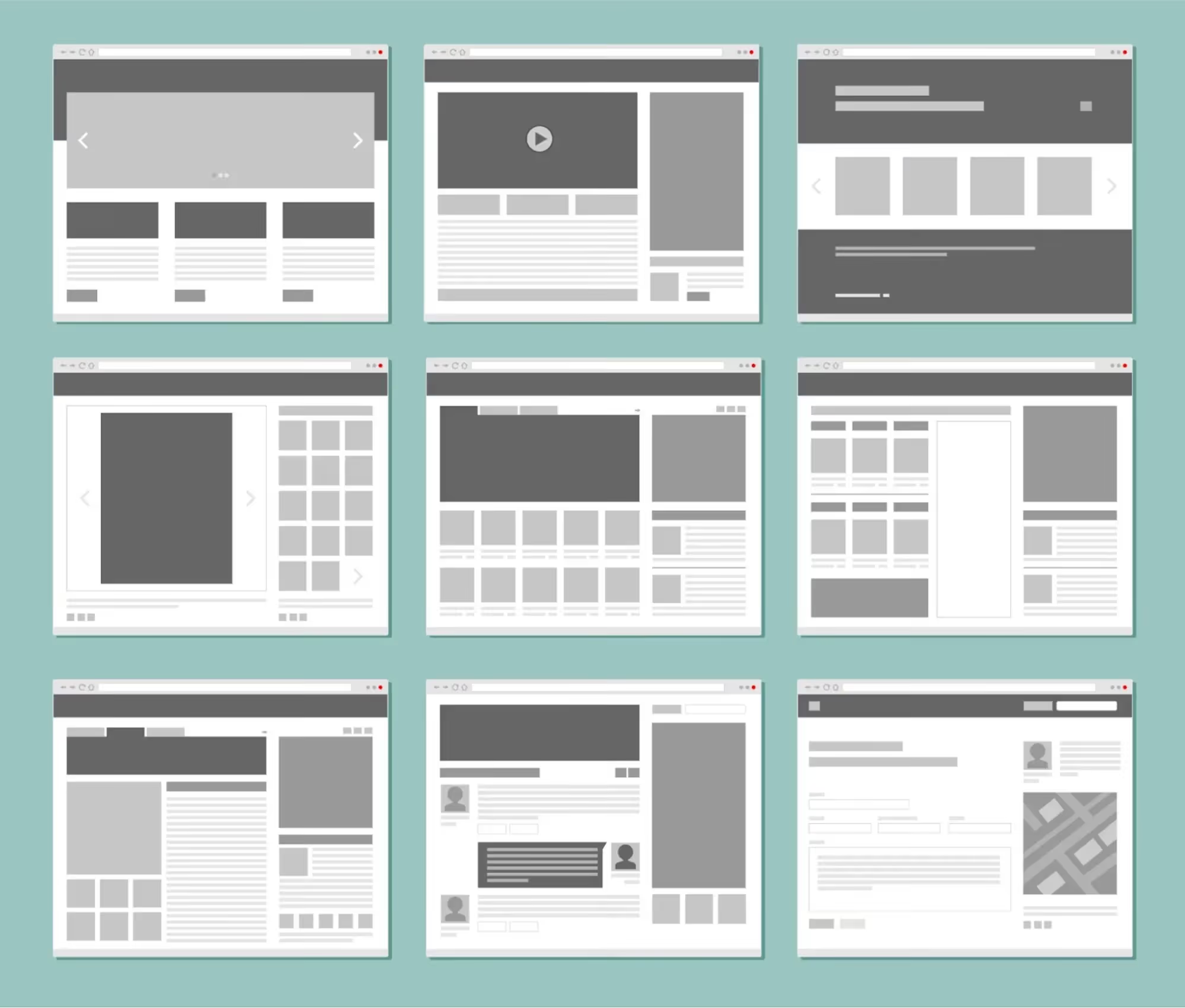
Below are 9 of the most popular HTML website layouts today, each suited for a specific goal. If you want a website that doesn't just "have an interface" but actually drives results, these are the layouts you cannot ignore.
Single-column layout
A single-column layout arranges all content along a vertical axis. This design is simple yet highly effective for websites focused on content or storytelling.
Pros:
- Very mobile-friendly
- Absolute focus on the main content
- Increases readability and engagement with each piece of information
Often used for blogs, landing pages, or product introduction pages that use vertical scrolling. If you want readers to "make it to the end," this layout is the ideal choice.
Split-screen layout
This layout divides the webpage into two distinct areas, usually vertically or horizontally. Each area represents a specific piece of content, choice, or action.
Pros:
- Present two clear messages or options
- Create a strong visual impact
- Ideal for brands with a clear market segmentation strategy
A split-screen layout is highly effective when you need users to choose their path right from the start.
Symmetrical layout
A symmetrical layout creates a sense of balance and professionalism. Content is distributed evenly on both sides, mirrored along a central axis.
Pros:
- Conveys stability and reliability
- Easily creates a premium brand impression
- Simple to build an aesthetically pleasing layout without clutter
Suitable for corporate, legal, or consulting websites that prioritize precision and sophistication.

Grid layout
A grid layout organizes content into rows and columns, typically used when you need to display multiple pieces of information simultaneously while keeping things tidy.
Pros:
- Easy to group content
- Optimizes scanning experience
- Easily responsive across devices
This layout is extremely effective for blogs, product catalogs, image galleries, or news websites.
Box layout
The box-based layout organizes content into distinct blocks, making it easy to differentiate sections without overwhelming the user.
Pros:
- Clear content segmentation
- Easy to A/B test or rearrange content blocks
- Simple to organize complex structural elements
This is an ideal layout for multi-purpose websites such as landing pages, general service pages, or sales pages that need to display many elements simultaneously.
Fixed sidebar layout
This layout keeps the sidebar visible as the user scrolls, typically housing menus, CTAs, or forms.
Pros:
- Keeps key elements within the user's view
- Increases CTA click-through rates
- Improves navigation on long pages
A fixed sidebar layout ensures that e-commerce sites, service pages, or registration forms never lose sight of their primary call to action.

Image-focused content layout
This layout focuses on displaying large, impactful images that occupy most of the page space. It is well-suited for industries that rely on visual storytelling.
Pros:
- Creates an immediate visual impact
- Clearly expresses brand personality
- Increases engagement through compelling imagery
Commonly used in fashion, travel, photography, design, or high-end product showcase websites.
F-Layout
The F-layout is based on research into user reading behavior: they scan from left to right across the top, then move down and continue reading in shorter horizontal segments.
Pros:
- Guides the eye according to natural habits
- Optimized for text-heavy content
- Highly effective at maintaining attention
The F-layout is particularly well-suited for blogs, news sites, and product pages with long descriptions and multiple paragraphs.
Z-Layout
The Z-layout mimics the path of the human eye as it scans from left to right at the top, moves diagonally down, and continues from left to right at the bottom of the page.
Pros:
- Creates a strong and coherent reading rhythm
- Highly effective for pages with clear conversion goals
- Directs users toward key touchpoints like CTA buttons and registration forms
This layout is widely used for landing pages, homepages, or service pages that need to drive quick action.
A beautiful, UX-standardized website layout with a sound visual strategy can help users grasp information faster, remember the brand longer, and be more ready to take action.
Guide to designing impressive web layouts
Below are 5 core steps to help you design an impressive web layout, from concept to actual implementation.
Step 1: Image processing – Start with visual emotion
In a modern HTML website layout, images are not merely decorative elements. They are the center for inspiration and guiding the user experience. To create an engaging layout, you need to master image processing techniques:
- Select high-quality, sharp images that are contextually relevant.
- Optimize file sizes to ensure fast page loading (prioritize WebP or JPEG 2000 formats).
- Apply lighting, contrast, and color grading techniques to create strong focal points.
The hero image is the first thing users see; if you handle it carelessly, you are throwing away 3 golden seconds of conversion time.
Step 2: Cropping & Compositing – Building a layout with a hero image
A beautiful layout requires more than just eye-catching images; it needs smart cropping and compositing techniques to guide the user's eye. In this stage, you should:
- Crop images to ratios that fit your defined layout (following grids or blocks).
- Seamlessly integrate images and content to create a professional look.
- Ensure consistent proportions and spacing between all elements.
Don't overwhelm users with disconnected imagery. A logical layout starts with thoughtful composition.

Step 3: Color & Effects – Creating depth and emotion
Color is an invisible language that profoundly influences user emotions. In layout design, you need to:
- Select a color palette that aligns with your brand, user psychology, and design goals.
- Apply color schemes based on visual principles (contrast, complementary, gradients).
- Utilize subtle motion effects (hover, fade, zoom, etc.) to create a dynamic, interactive experience.
A beautiful web layout cannot exist without harmonious colors and refined effects. If you want users to remember your website, let color guide their emotions and define your brand.
Step 4: Banner Design – A strategic highlight in your layout
A banner is more than just a large image at the top of the page. It is where you communicate your strongest message: promotions, brand values, and compelling benefits.
When designing banners, keep the following in mind:
- Use clear, legible fonts that look great on any device
- Prioritize concise messaging and highlight your Call to Action (CTA)
- Combine imagery, color, and typography using Z or F-pattern layouts to drive user action
A successful layout always includes a high-impact banner. This is your "first impression" to keep users engaged with your website.
Step 5: Slicing the layout in Photoshop – Preparing for development
Once your design is complete, you need to "translate" it into a developer-ready format by slicing the layout in Photoshop. This stage requires precision and attention to detail:
- Slice individual elements (buttons, headers, backgrounds, etc.) into separate assets
- Organize layer files logically to make things easier for developers
- Ensure image dimensions, formats, and quality are optimized for the web
A professional HTML website layout always begins with standardized resources during the design phase. Don't let a beautiful design become a developer's nightmare due to sloppy slicing.
Conclusion
A layout isn't just about looking "pretty"—it must have a clear purpose and guide users toward the actions you want them to take. When you understand what a layout is and how to flexibly apply the 9 most popular web layouts, you turn your website into a powerful tool for delivering your message, retaining customers, and driving revenue. Remember, the layout is the foundation; choose it wisely and your website will thrive, but choose it poorly and your design is just an empty shell. Don't design by intuition; design by strategy.