



CSS (Cascading Style Sheets) is a core web development technology used to format and design professional website interfaces. If HTML provides the skeleton of a website, CSS acts as the skin, color, and style that make it engaging for users.
From changing colors and layouts to creating animations, CSS plays a crucial role in enhancing user experience and optimizing display across all devices. So, what is CSS, how does it work, and how can you apply it effectively in web design? Let's join Markdao as we explore this in this article.
What is CSS?
CSS (Cascading Style Sheets) is a stylesheet language used to design and format the interface of a website. CSS helps control how HTML elements are displayed, from colors, fonts, and spacing to layouts and animations.
If HTML serves as the framework of a website, CSS is the skin and attire that makes the site look attractive, professional, and user-friendly. Thanks to CSS, web developers can create impressive designs without needing to edit the HTML directly.
One of the greatest strengths of CSS is its ability to separate content (HTML) from presentation (CSS), which makes websites easier to maintain, improves performance, and enhances user experience across various devices.
%20d%C3%B9ng%20%C4%91%E1%BB%83%20thi%E1%BA%BFt%20k%E1%BA%BF%20giao%20di%E1%BB%87n%20trang%20web.avif)
3 popular CSS versions
CSS has undergone many developmental versions to meet the increasingly high demands of web design. Below are the key versions of CSS:
1. CSS1
Launched in 1996, CSS1 was the first version introduced by the W3C (World Wide Web Consortium). This version supported basic features such as text formatting, colors, alignment, fonts, and spacing between elements. However, due to limitations in layout control, CSS1 is no longer widely used.
2. CSS2 and CSS2.1
- CSS2 (1998): A significant improvement over CSS1, allowing for better website layout configuration with features like z-index (element stacking), table formatting, print styles, and support for different screens.
- CSS2.1 (2011): A revision of CSS2 that fixed several bugs and removed features that were no longer relevant.
3. CSS3
Launched in the early 2010s, CSS3 brought a revolution to web design with many powerful features, including:
- Flexible layout: Supports Flexbox and CSS Grid, making interface design easier.
- Dynamic effects: Supports animation, transition, helping create smooth effects without JavaScript.
- Advanced colors: Supports RGBA, HSLA, gradients, allowing for richer color displays.
- Responsive Design: Supports media queries, ensuring the website looks great on various devices.
CSS3 is currently the most popular standard in web design, helping to create modern interfaces that are compatible with all platforms.
5 basic CSS properties
CSS provides many properties to control the appearance of a website. Here are some important ones:
1. Color and background properties
- color: Sets the text color of an element.
- background-color: Sets the background color of an element.
- opacity: Adjusts the transparency of an element.
Example:
p {
color: blue;
background-color: lightgray;
}
2. Size and spacing properties
- width / height: Defines the width and height of an element.
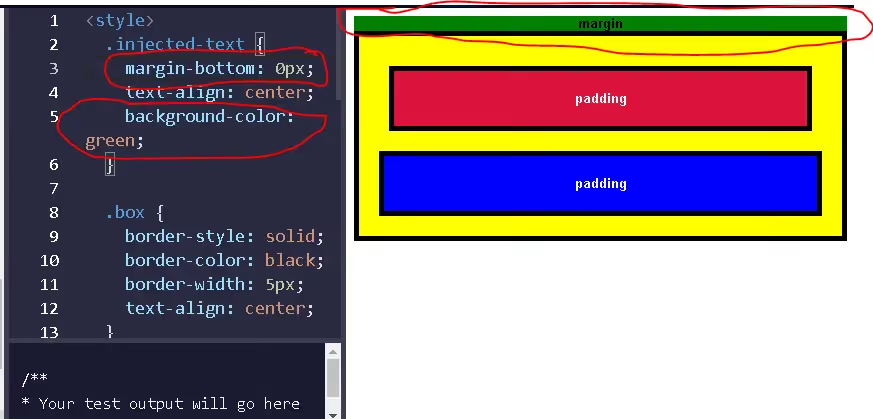
- margin: Creates external spacing between elements.
- padding: Creates internal spacing within an element.
Example:
div {
width: 300px;
height: 200px;
margin: 20px;
padding: 10px;
}
3. Text formatting properties
- font-family: Select the font style.
- font-size: Adjust the text size.
- text-align: Align content (left, right, center, justify).
- line-height: Adjust the spacing between lines of text.
Example:
h1 {
font-family: Arial, sans-serif;
font-size: 24px;
text-align: center;
line-height: 1.5;
}
4. Display and positioning properties
- display: Control how an element is displayed (block, inline, flex, grid).
- position: Determine the position of an element (static, relative, absolute, fixed).
- z-index: Adjust the stacking order of an element.
Example:
.box {
display: flex;
position: absolute;
z-index: 10;
}
5. Transition and animation properties
- transition: Creates a transition effect between states.
- animation: Creates an animation effect for an element.
- transform: Modifies the size, rotation angle, and position of an element.
Example:
button {
background-color: green;
transition: background-color 0.3s ease-in-out;
}
button:hover {
background-color: darkgreen;
}
CSS not only makes websites look better but also improves user experience, increases page load speed, and provides better support for mobile devices. In the following sections, we will explore more advanced concepts and practical applications of CSS.
Advantages of CSS
CSS offers significant benefits for web design and development, helping to optimize user experience and improve website performance. Here are the key advantages of CSS:

1. Separates content from presentation
CSS allows developers to separate content (HTML) from presentation (CSS), making the codebase cleaner, more readable, and easier to manage. Without CSS, any changes to colors, fonts, or layouts would have to be made directly within the HTML, which is time-consuming and difficult to maintain.
For example: Instead of applying styles directly to each HTML tag like this:
<p style="color: blue; font-size: 16px;">This is a paragraph.</p>
You can use CSS to manage the entire presentation:
p {
color: blue;
font-size: 16px;
}
2. Reduces code size and improves page load speed
Using CSS helps reduce the size of HTML files by avoiding repetitive formatting code within individual elements. With less HTML code, browsers load pages faster, improving both website performance and user experience.
Additionally, you can use external CSS files so that the browser only needs to load them once and apply them across the entire website, further optimizing load times.
3. Supports flexible design with diverse layouts
CSS provides powerful tools for creating flexible website layouts that easily adapt to different devices. Some common CSS techniques for effective layout design include:
- Flexbox: Flexibly align elements in rows or columns.
- CSS Grid: Allows for the creation of grid layouts with multiple columns and rows, facilitating professional web design.
- Media Queries: Enables the website to automatically adjust its layout based on screen size, making it suitable for mobile devices, tablets, and desktops.
4. Support for responsive design (compatible with multiple devices)
CSS ensures websites display well on all devices, from phones and tablets to large screens, by using Media Queries. This enhances user experience and optimizes SEO, as Google prioritizes mobile-friendly websites.
The code snippet above adjusts font size for screens smaller than 768px, ensuring optimal display on mobile phones.
5. Support for animations and increased interactivity
CSS3 provides various dynamic effects such as animation, transition, transform, which help create smooth effects without the need for JavaScript. This reduces browser resource load and improves the user experience.
6. SEO optimization and accessibility
A well-designed website using CSS makes content easier to read, improves user experience, and helps search engines better understand the site's structure. Some SEO benefits of CSS include:
- Reduce page load times to help improve your Google ranking.
- Support a logical layout to make it easier for Googlebot to crawl your site.
- Improve accessibility for users with special needs by using readable colors and fonts.
CSS is an indispensable tool in modern web design, helping to optimize interfaces, increase page load speeds, and enhance user experience. With powerful advantages such as separating content from presentation, supporting responsive design, creating dynamic effects, and optimizing SEO, CSS is the key for web developers to build professional and effective websites.
The layout and structure of a CSS block
CSS layout
CSS layout is built upon the Box Model. In this model, every HTML element on a webpage is treated as a rectangular box, consisting of the following components:
- Content: The main area containing the text or images within the HTML element.
- Padding: The space between the content and the element's border.
- Border: The line surrounding the element, located between the padding and the margin.
- Margin: The space between the element and other elements on the page.
Example of the CSS box model:
.box {
width: 300px;
padding: 20px;
border: 2px solid black;
margin: 30px;
}
- width: 300px; → Defines the width of the element.
- padding: 20px; → Creates space between the content and the border.
- border: 2px solid black; → Sets a 2px solid black border.
- margin: 30px; → The space between the .box element and other elements.
Thanks to the box model, you can precisely control your website layout, helping to create cleaner and more intuitive designs.
CSS syntax structure
CSS uses a simple syntax consisting of selectors, properties, and values to style HTML elements.
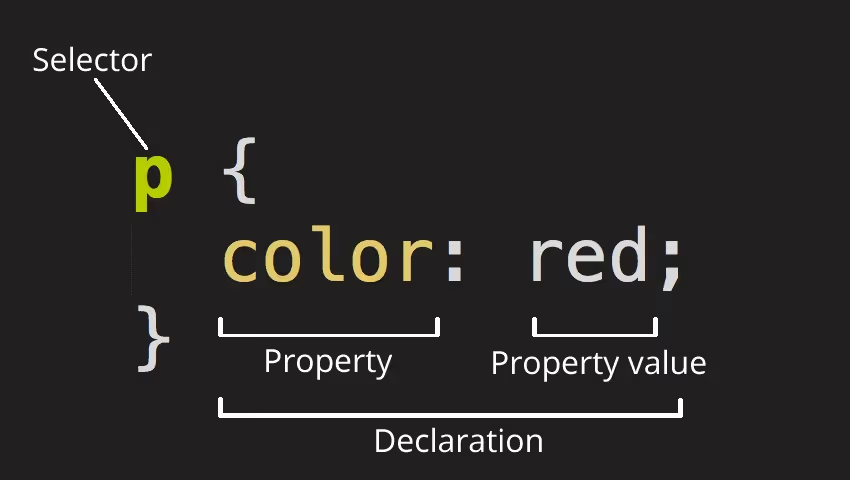
The general structure of a CSS block:
selector {
property: value;
property: value;
}
Where:
- Selector: Identifies the HTML element to be styled.
- Property: Specifies the style to be applied to the element.
- Value: Sets the specific parameter for the property.
Concrete example:
p {
color: red;
text-align: center;
}
Explanation:
- p → Selector, applies to all <p> tags.
- color: red; → The color property makes the text red.
- text-align: center; → The text-align property centers content.
Key components of a CSS rule
A standard CSS rule consists of three main parts:
a) Selector
Selectors identify which HTML elements the CSS should be applied to. Some common types of selectors include:
Type Selector → Applies to all tags with the same name.
h1 {
font-size: 24px;
}
Class Selector → Applies to elements with a specific class attribute.
.text-blue {
color: blue;
}
ID Selector → Applies to an element with a specific id attribute (unique within the page).
#main-title {
font-weight: bold;
}
Group Selector → Apply the same style to multiple elements.
h1, h2, h3 {
color: green;
}
Descendant Selector → Apply CSS to an element nested inside another element.
div p {
font-style: italic;
}
b) Declaration
Each declaration consists of:
- Property: How the HTML element will be styled.
- Value: The specific value assigned to the property.
Example:
p {
font-size: 18px;
line-height: 1.5;
}
- font-size: 18px; → Sets the font size of the <p> tag to 18px.
- line-height: 1.5; → Increases the spacing between lines in the paragraph.
c) Complete structure of a CSS block
Below is a complete example of a CSS block:
/* Selector applied to all <p> tags */
p {
font-size: 16px; /* Font size 16px */
color: darkblue; /* Dark blue text color */
text-align: justify; /* Justify text alignment */
}
/* Class selector */
.button {
background-color: blue; /* Blue background color */
color: white; /* White text color */
padding: 10px 20px; /* 10px top/bottom padding, 20px left/right padding */
border-radius: 5px; /* 5px corner radius */
}
/* ID selector */
#header {
background-color: gray; /* Gray background color */
padding: 20px; /* 20px padding */
}
CSS plays a crucial role in styling website interfaces, allowing you to control how HTML elements are displayed. By mastering CSS layout and structure, you can easily build and customize web interfaces exactly as you envision.
How to use CSS in web design
CSS is an essential tool for styling and laying out websites, transforming plain HTML code into intuitive, beautiful, and professional interfaces. By learning how to use CSS effectively, you can control every element on your site, from colors, typography, and images to spacing, animations, and responsiveness across different devices.
Below is a detailed guide on how to use CSS in web design, helping you understand and apply it proficiently in your projects.
Ways to embed CSS into a website
Depending on the requirements of each project, you can use one of three methods to add CSS to your website:
a) Inline CSS
This is the simplest method, where CSS is written directly within the style attribute of an HTML tag. Each HTML element will have its own distinct CSS rules.
The advantage of this method is that it is easy to use for minor changes, but the downside is that it is difficult to maintain because the CSS code is scattered throughout the HTML page.
.avif)
b) Internal CSS
Internal CSS is written inside a <style> tag pair and placed within the <head> section of an HTML page. This method makes CSS easier to manage compared to Inline CSS and is suitable for small to medium-sized websites.
The downside is that with many HTML pages, repeating CSS code on each page makes updates and maintenance difficult.
.avif)
c) External CSS
This is the most optimal and professional method, where CSS is written in a separate .css file and linked to the HTML page using the <link> tag.
The biggest advantage of External CSS is that it gives the website a clear structure, makes it easy to manage, and reduces the load on HTML. Any changes made in the CSS file will be applied to the entire website, saving time on edits.
.avif)
Applying CSS in Web Design
CSS not only makes a website look attractive but also influences its layout and user experience. Below are some key applications of CSS in web design:
a) Controlling typography and color
CSS allows for the customization of font-family, font-size, color, text-align, and line-height, making content easier to read.
Using appropriate colors also enhances aesthetics and helps build the website's brand identity.
b) Creating flexible web layouts
CSS provides powerful tools like Flexbox and Grid to help organize website content logically and efficiently.
- Flexbox: Helps align elements in rows or columns, suitable for interfaces with simple layouts.
- CSS Grid: Provides the ability to divide a page into multiple cells and control how content is arranged in rows and columns.
Thanks to these tools, you can design websites that fit any screen size without needing to rewrite the HTML.
c) Controlling images and multimedia
Images are an important part of a website, and CSS helps you control their size, borders, shadow effects, transparency, and positioning.
For example, the object-fit property helps images automatically adjust their size without distortion.
d) Creating animations and user interactions
CSS supports many animation effects that make websites more dynamic without the need for JavaScript. Some popular effects include:
- Hover: Changing colors, sizes, or effects when a user hovers over an element.
- Transition: Creating smooth transitions between two states.
- Animation: Creating complex effects such as shaking, fading in, or sliding back and forth.
These effects help engage users and enhance the overall website experience.
e) Responsive Web Design
CSS allows websites to display well across various screen sizes, from desktops to mobile phones. This is achieved using media queries, which help adjust the website's layout based on screen dimensions.
For instance, you can set different CSS rules for small screens (under 768px) and large screens (over 1200px) to ensure content is displayed appropriately.
Things to keep in mind when using CSS in web design
To ensure your website performs well and remains easy to maintain, keep the following points in mind:
- Organize your CSS: Use logical class and ID names to make your code readable and easy to edit.
- Avoid overusing inline CSS: Because it increases code size and makes maintenance difficult.
- Optimize your CSS code: Remove unnecessary code to reduce page load size.
- Limit the use of excessive animations: Because they can slow down page load speeds.
- Leverage CSS Variables: To easily update colors or fonts across the entire website without needing multiple edits.
CSS is an indispensable tool in web design, allowing you to control every aspect of a website's interface, from typography, colors, and layout to animations and cross-device compatibility.
What is the relationship between HTML and CSS?
HTML (HyperText Markup Language) and CSS (Cascading Style Sheets) are two core technologies for building and presenting websites. They are closely related but serve distinct roles:
- HTML acts as the skeleton of a website, helping to organize and display content such as text, images, tables, and links. Each HTML element is defined by tags, which help the browser understand the structure of the page.
- CSS is responsible for styling and design, helping to adjust the colors, fonts, layout, and dimensions of HTML elements. CSS makes a website more intuitive, visually appealing, and user-friendly.
The relationship between HTML and CSS is one of complementation: HTML provides the content, while CSS makes that content appear more attractive. Without CSS, a website would only display as raw text without a clear layout. Conversely, without HTML, CSS would have nothing to style.
In practice, CSS can be embedded directly into HTML or written in separate files for easier management and reusability. This helps separate content from presentation, leading to greater efficiency in web design.
Conclusion
CSS not only makes a website intuitive and visually appealing but also plays a crucial role in optimizing user experience and improving page load performance. Understanding and applying CSS effectively will help you build professional, responsive, and easily maintainable websites.
However, to have a website that is not only beautiful but also SEO-friendly, speed-optimized, and consistent in design, partnering with a professional web design agency is essential. Markdao is proud to offer web design services modern, helping your business establish a unique digital footprint, enhance user experience, and maximize business efficiency.