



Did you know that with a simple Google search command, you can instantly assess the competitiveness of a keyword? That is Allintitle – a powerful tool that helps SEOers analyze keywords effectively. When used correctly, this command not only helps you identify potential keywords but also optimizes your content strategy to achieve high rankings on Google. So, what is Allintitle? How do you use this command to select SEO-friendly keywords? Let's join Markdao to explore it right in the article below!
What is Allintitle?
In the world of SEO, finding potential keywords that can help a website rank on Google is always a challenging task. Allintitle is a useful tool that helps you evaluate keyword competition by showing the number of websites that have used that keyword in their titles.
Simply put, Allintitle is a special Google search command that filters for websites containing the entire keyword within their title tag. This command helps assess keyword competition and duplication.
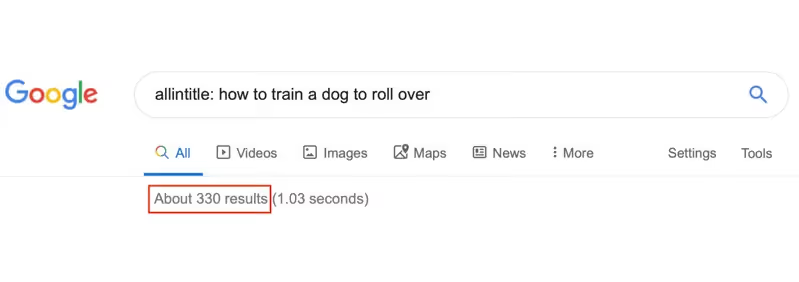
Allintitle command syntax in Google Search
The syntax for using this command is very simple:
allintitle: [your target keyword]
For example, if you search:
allintitle: "effective SEO methods"
Google will only display websites that contain the phrase “effective SEO methods” in the title of the article
5 Roles of Allintitle in SEO
In an SEO strategy, assessing keyword competition is a crucial step to optimize content and increase the chances of ranking high on Google. Allintitle acts as a powerful analytical tool, helping SEOers determine whether a keyword is too competitive before investing time and resources into content development.
1. Assessing keyword competition
Allintitle allows you to check how many websites have used the entire keyword in their article titles. This helps determine:
- Low-competition keywords: If the number of results is small, the keyword is less optimized, meaning you have a better chance of achieving a good ranking.
- High-competition keywords: If thousands of websites have used that keyword in their titles, you will need a stronger SEO strategy to outperform your competitors.

2. Long-tail Keyword Research Support
Allintitle helps identify niche keywords with low competition but solid search volume. This is a crucial factor in SEO because:
- Short-tail Keywords are typically highly competitive and difficult to rank for.
- Long-tail Keywords usually yield fewer results, are easier to optimize, and drive higher conversion rates.
For example, instead of focusing on the keyword “weight loss”, you could search for “how to lose weight fast for office workers” and find that the number of results is much lower, which means a better SEO opportunity.
3. Helps optimize article titles for SEO advantages
Google considers article titles one of the most important factors for ranking content. Using keywords in your title intelligently can help your article:
- Be easily recognized by Google as relevant to user search queries
- Have a higher potential to attract clicks if the title is compelling and matches search intent
Allintitle helps you check how competitors have optimized their titles, allowing you to create more unique and impactful headlines.
4. Supports the Keyword Golden Ratio (KGR) strategy to find easy-to-rank keywords
Allintitle is an essential tool for calculating Keyword Golden Ratio (KGR) – a method that helps SEOers identify keywords with low competition but still have decent search volume.
KGR Formula:
KGR = Number of Allintitle results / Monthly search volume
- If KGR < 0.25, this keyword has the potential to rank quickly.
- If KGR > 1, this keyword is too competitive and should be reconsidered before implementation.
%20%C4%91%E1%BB%83%20t%C3%ACm%20t%E1%BB%AB%20kh%C3%B3a%20d%E1%BB%85%20l%C3%AAn%20top.avif)
Example:
- Keyword A: 50 results, 500 searches/month → KGR = 0.1 (good)
- Keyword B: 10,000 results, 1,000 searches/month → KGR = 10 (too competitive)
Thanks to this formula, you can easily find keywords with low competition that still have the potential to drive significant traffic.
5. Supporting competitor research in SEO
Allintitle not only helps you evaluate keywords but is also an important tool for analyzing competitor strategies. You can check which keywords the top websites in your niche are focusing on, allowing you to determine the right approach to compete more effectively.
If a keyword has too many strong competitors already optimized for it, you can try a different approach by:
- Adding specific elements to the keyword to create differentiation, for example: “free SEO guide for beginners” instead of just “SEO guide”.
- Focusing on higher-quality content to outperform competitors, such as writing more in-depth articles or adding statistical data or new research.
How to use Allintitle for SEO keyword analysis
Allintitle is a powerful tool that helps SEOers analyze keyword competition before creating content. By using this special search command, you can determine the number of websites that have optimized their titles for that keyword, enabling you to make informed strategic decisions.
1. How to perform an Allintitle search on Google
To check a keyword, simply enter the following command into the Google search bar:
allintitle: keyword to check
For example, if you want to check the competition level of the keyword “basic SEO guide”, you will enter the following into Google:
allintitle: basic SEO guide
Google will return the number of results containing the exact keyword in the article title. This figure represents the keyword's level of competition.

2. Analyzing keyword competition with Allintitle
Once you have the number of results from Allintitle, you can assess the competition level as follows:
- Under 100 results → Low competition keyword, easy to rank.
- 100 – 1000 results → Medium competition keyword; SEO is possible but requires high-quality content.
- Over 1000 results → High competition keyword; requires a strong strategy to outperform competitors.
Example:

From the table above, we can see that “how to lose weight with celery juice” is a potential keyword because it has few competitors.
3. Combining Allintitle with the Keyword Golden Ratio (KGR) for keyword optimization
As previously mentioned, Keyword Golden Ratio (KGR) is a formula that helps identify keywords with low competition but significant search volume.
KGR Formula:
KGR = Number of Allintitle results / Monthly search volume
KGR evaluation rules:
- KGR < 0.25 → Keywords with the potential to rank quickly.
- KGR from 0.25 - 1 → Moderate competition; SEO is possible, but high-quality content is required.
- KGR > 1 → Keywords are too competitive and difficult to rank highly for.
Practical example:
%20%C4%91%E1%BB%83%20t%E1%BB%91i%20%C6%B0u%20t%E1%BB%AB%20kh%C3%B3a.avif)
By using this formula, you can find low-competition keywords that still drive significant traffic.
4. Combine Allintitle with Google Keyword Planner and Ahrefs for comprehensive data
Although Allintitle helps you assess keyword competition, you should combine it with other tools for a complete picture, such as:
- Google Keyword Planner: Check monthly search volume to calculate KGR.
- Ahrefs / SEMrushAnalyze keyword difficulty, competitor backlinks, and overall competition levels.

For example, if a keyword has high search volume, a low Allintitle count, and an Ahrefs difficulty score below 20, it is an ideal keyword for SEO.
5. Optimize article titles based on Allintitle data
Once you have found keywords with an appropriate level of competition, the next step is to optimize your article titles to increase ranking potential. Here are some tips to help you create engaging, SEO-friendly titles:
- Use the main keyword in the title, while ensuring it sounds natural and avoiding keyword stuffing.
- Add compelling elements to attract clicks, for example:
- “2024 SEO Guide: How to Rank on Google Quickly”
- “How to Lose Weight with Celery Juice – Effective in 7 Days!”
- Avoid overly generic titles; instead, clarify the user's search intent.
For instance, instead of writing “How to SEO a website effectively”, you can optimize it to:
“How to SEO a Website Effectively for Beginners – An A-Z Guide”
Allintitle is a powerful tool that helps SEO professionals analyze keyword competition to develop sound content strategies. When combined with KGR, Google Keyword Planner, and Ahrefs, you can identify high-potential keywords that can rank quickly without facing intense competition.
Important considerations when using Allintitle for SEO
Although Allintitle is a useful tool for SEO keyword analysis, using it incorrectly can lead you into the trap of misjudging keyword competition. Here are some important notes to ensure you make the most of it without making mistakes:
- Don't rely solely on Allintitle: This metric helps assess competition, but it should be combined with tools like Google Keyword Planner, Ahrefs, and SEMrush for a comprehensive view.
- A low Allintitle count isn't always good: A keyword with few results might simply have low search volume or lack commercial value.
- Combine with KGR to select potential keywords: The KGR formula helps identify keywords that are easier to rank for, helping you avoid choosing keywords that are either too competitive or lack traffic.
- Allintitle results may not be 100% accurate: Google frequently updates its algorithms, and the number of indexed pages may not always reflect reality.
- Content remains the deciding factor: Even if a keyword has low competition, it is difficult to achieve high rankings on Google if the content is not high quality.
- Don't overuse Allintitle for all keywords: For short-tail keywords with high search volume, this metric may not accurately reflect true competition. Prioritize analysis for long-tail keywords instead.
Other search operators beyond Allintitle
Besides Allintitle, you can use many other advanced Google search operators for SEO analysis, keyword research, and competitor assessment. Here are some useful commands:
1. The “intitle:” command
- Find pages that contain keywords in the title, without requiring the exact phrase.
Syntax: intitle: [keyword]
Example: intitle:SEO guide
- Find all pages with titles containing the words "guide" and "SEO," even if they are not adjacent.
2. "inurl:" command
- Find pages where the keyword appears in the URL.
Syntax: inurl:
Example: inurl:learn-seo
- Find pages with "learn-seo" in the URL path, typically SEO tutorial articles.
3. "allinurl:" command
- Find websites that contain all keywords in the URL in the exact order specified.
Syntax: allinurl:seo-guide
- Only display URLs that contain "seo-guide".
4. "site:" command
- Search for content on a specific website.
Syntax: site:example.com “keyword”
Example: site:markdao.com.vn “SEO”
- → Search for all articles related to SEO on the Markdao website.
5. “filetype:” command
- Search for files with specific formats (PDF, DOC, XLS, etc.).
Syntax: keyword filetype:pdf
Example: SEO guide filetype:pdf
- Find SEO guide documents in PDF format.
6. “related:” command
- Find websites similar to a specific site.
Syntax: related:example.com
Example: related:markdao.com.vn
- Find websites with content similar to Markdao.
7. “cache:” command
- View the cached version of a website.
Syntax: cache:example.com
Example: cache:markdao.com.vn
- View the Google-saved version of the Markdao website.
Besides Allintitle, advanced search operators such as intitle, inurl, site, filetype, related... will help you leverage Google data more effectively. Combining these commands helps SEOers analyze keywords, research competitors, and optimize SEO strategies comprehensively.
Conclusion
Allintitle is a powerful tool that helps SEOers assess keyword competition and optimize content strategies. However, to achieve high effectiveness, you need to combine it with other research methods such as KGR, search intent analysis, and the use of Google's advanced search operators. When applied correctly, Allintitle not only helps you select potential keywords but also improves SEO rankings sustainably.


