
Quick summary: What Google shows in the AI Search report?
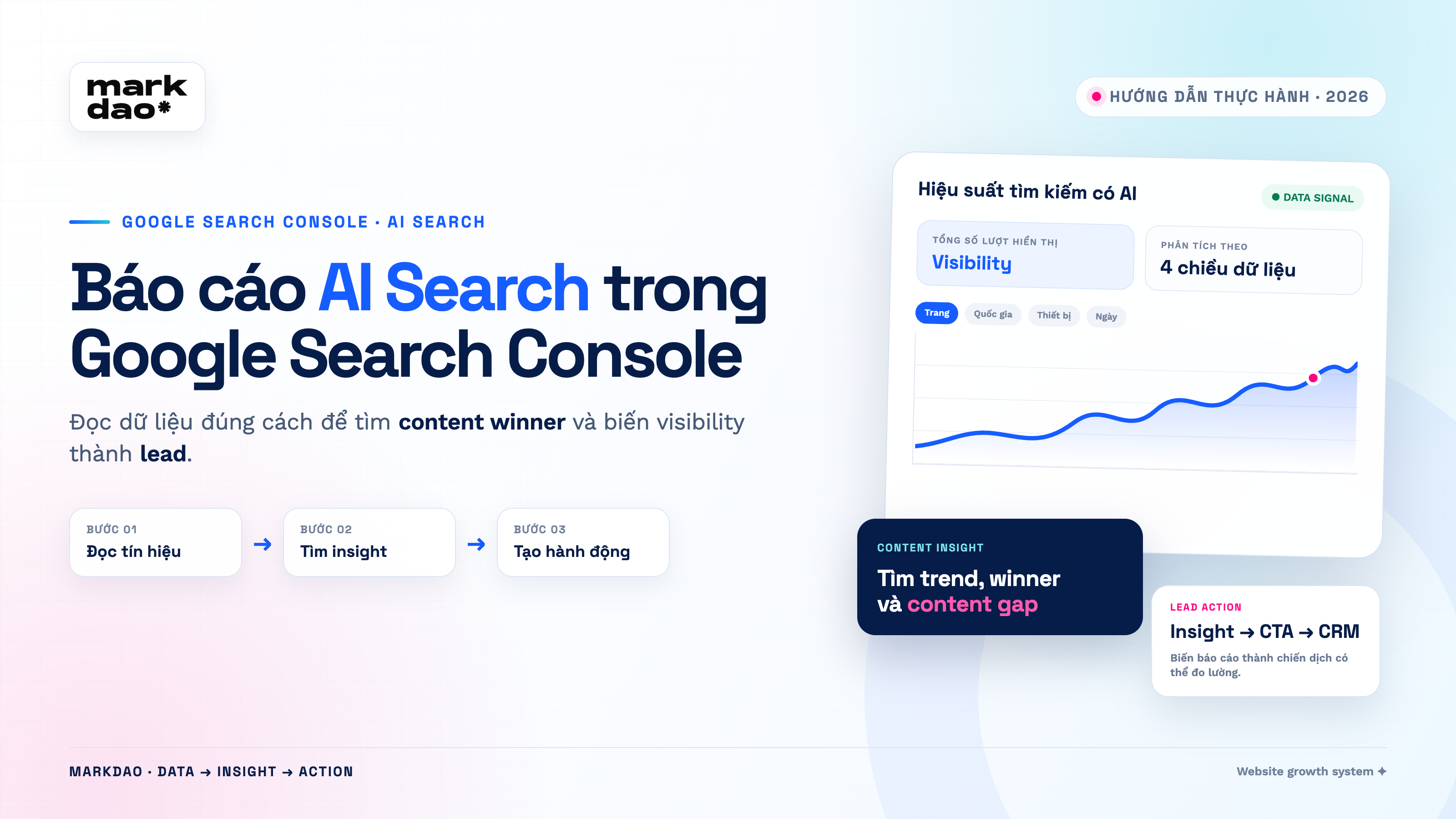
Google Search Console now features a dedicated report for website performance within generative AI features on Google Search. In localized interfaces, the report is labeled “Generative AI.” It shows how many times a website has been displayed, which URLs appear, the countries users are from, the devices they use, and how data changes over time.
The most important takeaway: the report currently only shows impressions. It does not yet display clicks, CTR, position, or queries. Therefore, if a page has many AI impressions, we can only conclude that it has appeared in a Google AI experience. We cannot yet conclude whether users have clicked on the page or generated leads.
Think of this report like a counter for how many times a store sign is seen. The counter tells you the sign appeared before passersby, but it doesn't tell you how many people walked into the store or made a purchase.
- To see which pages Google AI is picking up: check the Pages tab.
- To see how visibility changes over time: check the chart and the Dates tab.
- To see which markets are viewing your content: check the Countries tab.
- To check the difference between mobile and desktop: check the Devices tab.
- To see if the data is driving traffic and leads: cross-reference with GA4 and your CRM.
The AI Search report in What is Google Search Console?
The AI Search report, officially named the Generative AI performance report, measures a website's visibility within AI Overviews and AI Mode on Google Search. Google has separated this report from the standard search performance report so website owners can track their presence in AI experiences without it being mixed with traditional search results.
According to Google's official announcement and the AI Search report help documentation, the report is currently being rolled out to eligible websites globally. Experiments in Search Labs are not included in the report.
The report answers 5 questions:
- How many times has the website appeared in AI Overviews or AI Mode?
- Which URLs are most frequently used or displayed by Google AI?
- Which countries are the impressions coming from?
- Are users on mobile, desktop, or tablet?
- Is the impression trend increasing, decreasing, or just spiking for a few days?
The report has not yet answered 5 questions
- What queries or prompts did users type?
- Which URLs did users click on from the AI experience?
- What is the CTR of the AI results?
- What position does the website hold in the AI answer?
- How many leads or how much revenue have AI impressions generated?
This is a critical distinction. Without clearly separating "available" data from "unavailable" data, SEO teams can easily mistake a signal for a business conclusion.
Step-by-step guide to opening the AI Search report
Step 1: Select the correct website property
Log in to Google Search Console. In the top-left corner, open the property list and select the correct version of the website being tracked by Google. For Markdao, you must select the https://www.markdao.com.vn/ property. If you select the wrong HTTP, non-www, or subdomain property, the data may be empty or incomplete.
Screenshot requirement: the top-left corner containing the property name. When including images in public articles, only show the domain name; hide emails, account notifications, and any information not relevant to the tutorial.
Step 2: Open the Performance section
In the left navigation bar, select Performance. In the standard search report, scroll down below the chart. Google will display a card that says “See more details about your site's performance in generative AI features on Google Search.” Select Open report.
If the property has opened this report before, the Generative AI section will appear directly below Performance. This is the fastest shortcut to return to the report.
Step 3: Identify the correct generative AI screenh
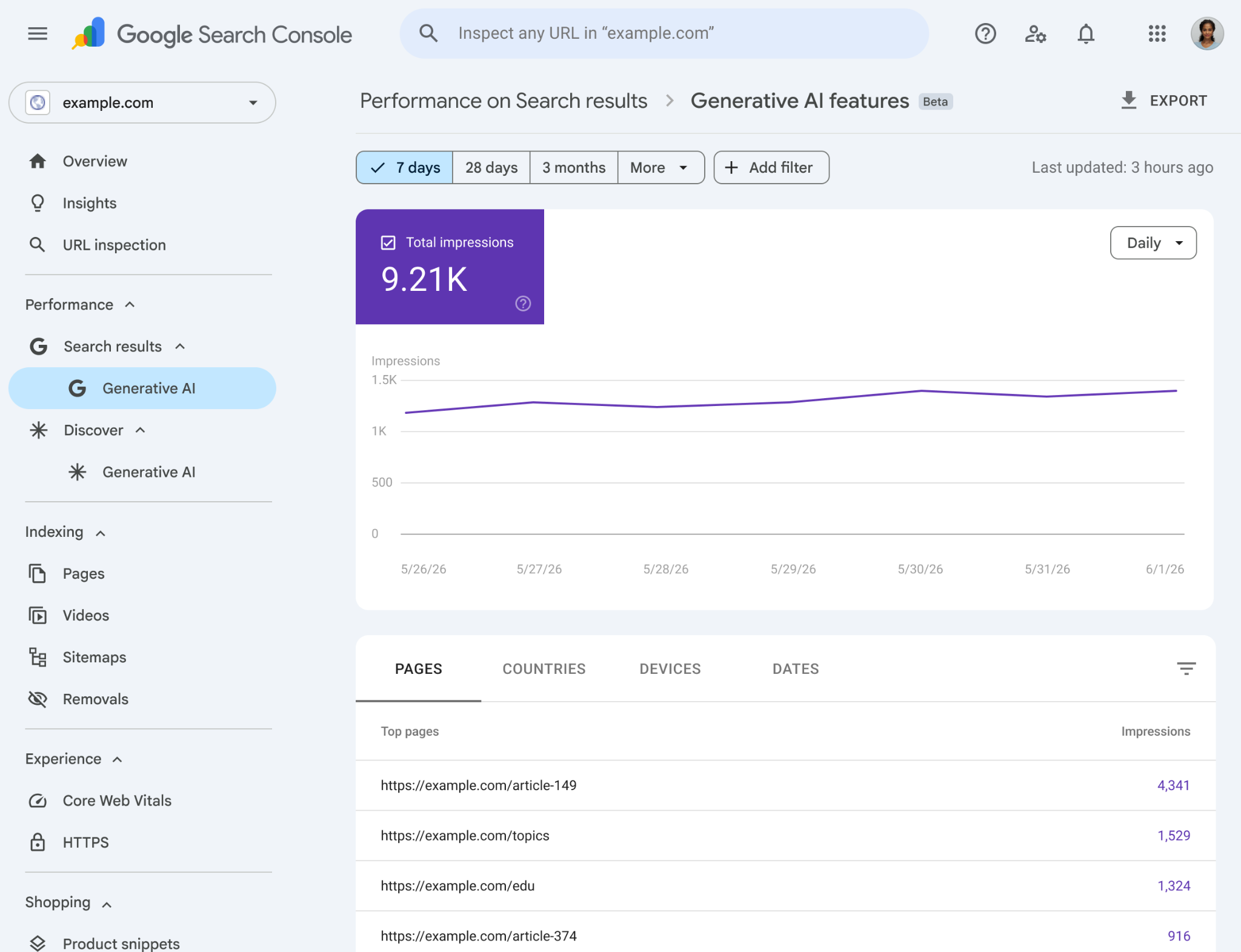
The correct screen has the path Performance → Generative AI features. The top of the report contains only one purple card for Total impressions. Below that is a chart over time. At the bottom of the screen, there are four tabs: Pages, Countries, Devices, and Dates.
If you still see the four cards for Clicks, Impressions, CTR, and Position, you are in the standard search report and have not yet accessed the AI report.
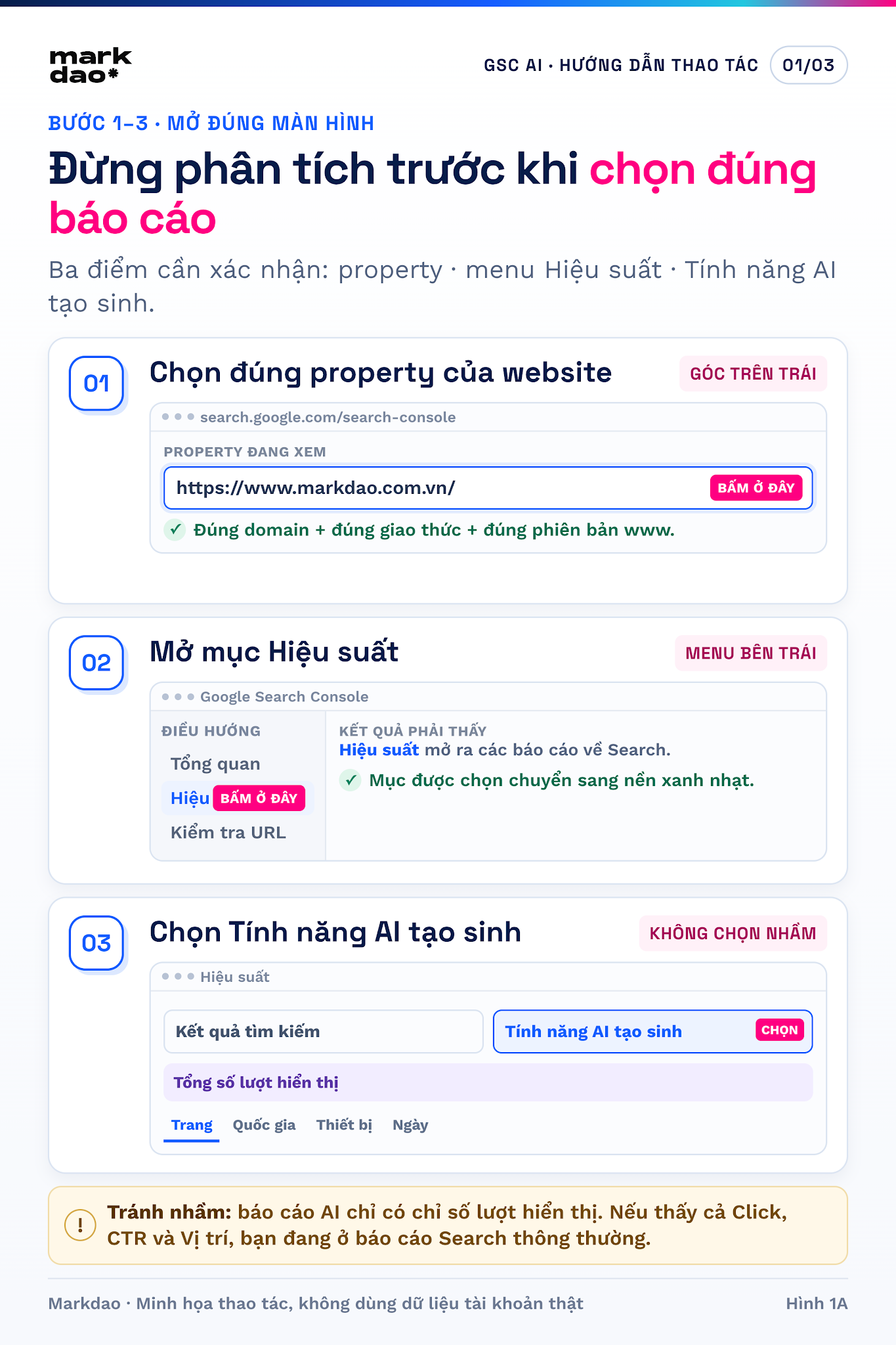
Step 4: Select a time range long enough to see trendsg
For websites with stable data, start with 28 days and compare it to the previous 28 days. For new websites or those with limited data, use 3 months to avoid drawing conclusions based on a few days of fluctuation. Do not use 24-hour data to make content changes, as the latest data may still be preliminary.
A simple way to read it: don't just look at the totals. Ask yourself if the chart line is rising steadily, falling steadily, or showing an unusual spike. A single spike might come from a trending topic; a sustained upward trend is usually more reliable.
Step 5: Open the Pages tab and find the URLs generating the most impressions
Select the Pages tab. Sort by Impressions from high to low. Record the top 10 URLs and categorize them by their role: definition articles, how-to guides, comparison pages, service pages, or product pages.
For example, if the majority of impressions are on an explanatory article like “What is an SEO Agency” but your SEO service page does not appear, Google recognizes your site's ability to explain the topic, but the journey from knowledge to service might be broken. The solution is not to stuff more keywords into the service page, but to add internal links, case studies, professional proof, and appropriate CTAs.
Step 6: Open the Countries tab to avoid incorrect market conclusions
A URL might see an increase in impressions because it is being shown in a non-target market. Therefore, check if Vietnam accounts for an appropriate proportion. If your website targets Vietnamese customers but impressions are primarily coming from other countries, you need to review your language, hreflang, local context, and business information.
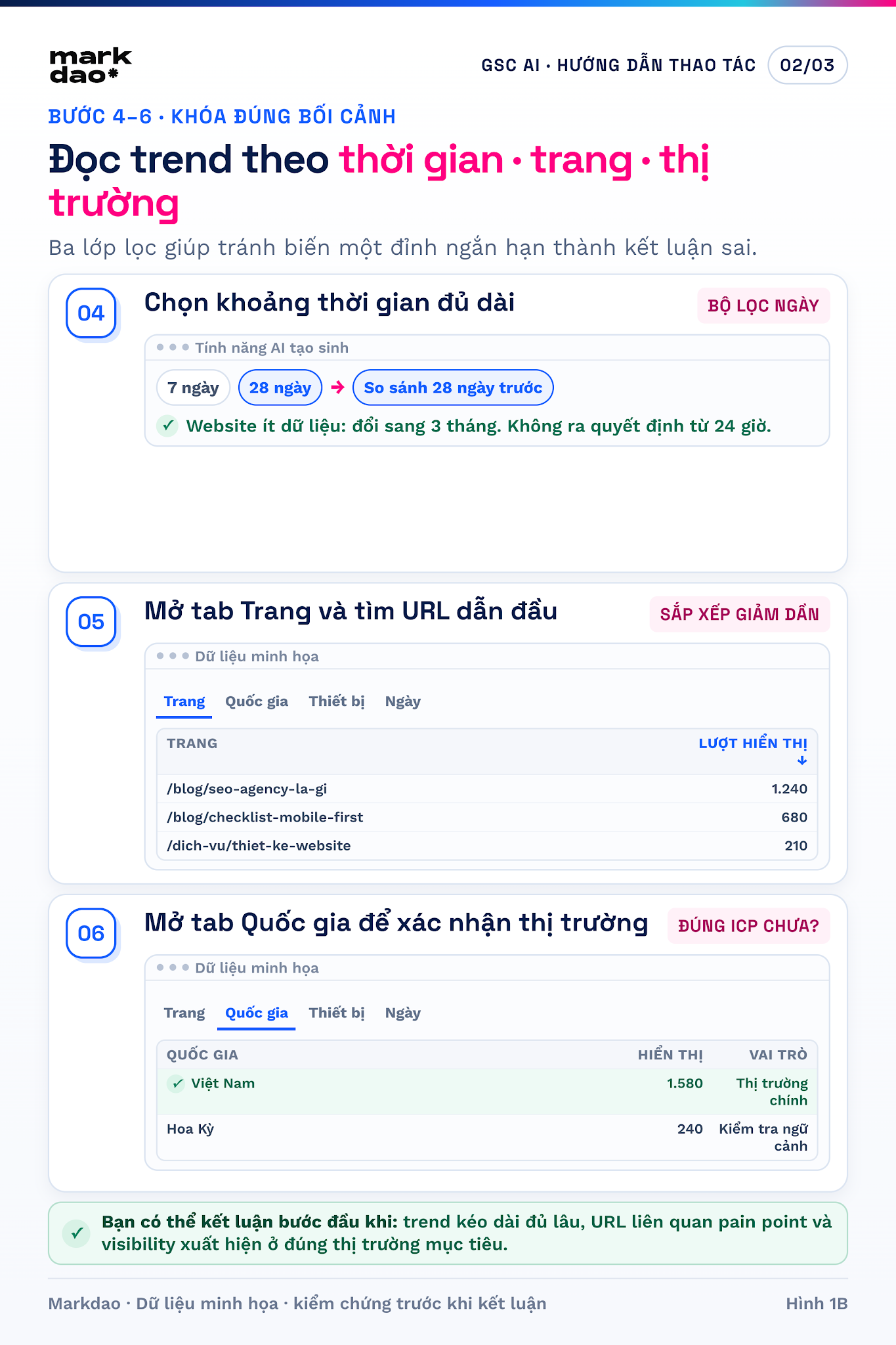
Step 7: Open the Devices tab to check for differences between mobile and desktop
If mobile accounts for the majority of impressions, priority pages should be checked on smaller screens first. Verify whether the main answer appears early, if the text is readable, if tables overflow, and if the CTA is pushed too far down the page.
Step 8: Open the Date tab and cross-reference with website change logs
Use the Date tab to identify significant spikes or drops. Cross-reference these with dates of new content publication, content updates, canonical changes, new design implementations, or market events. Search Console uses Pacific Time for date data, so changes made in Vietnam may appear on a different date in the report.
Step 9: Export data for analysis
Select Export in the top right corner and move the data to Google Sheets. Add columns for: topic group, funnel stage, page type, current CTA, related conversion, identified issues, recommended actions, person in charge, and re-check date.
There is no need to export thousands of rows from the start. For the first diagnostic round, the 10–20 URLs with the highest impressions are sufficient for prioritization.
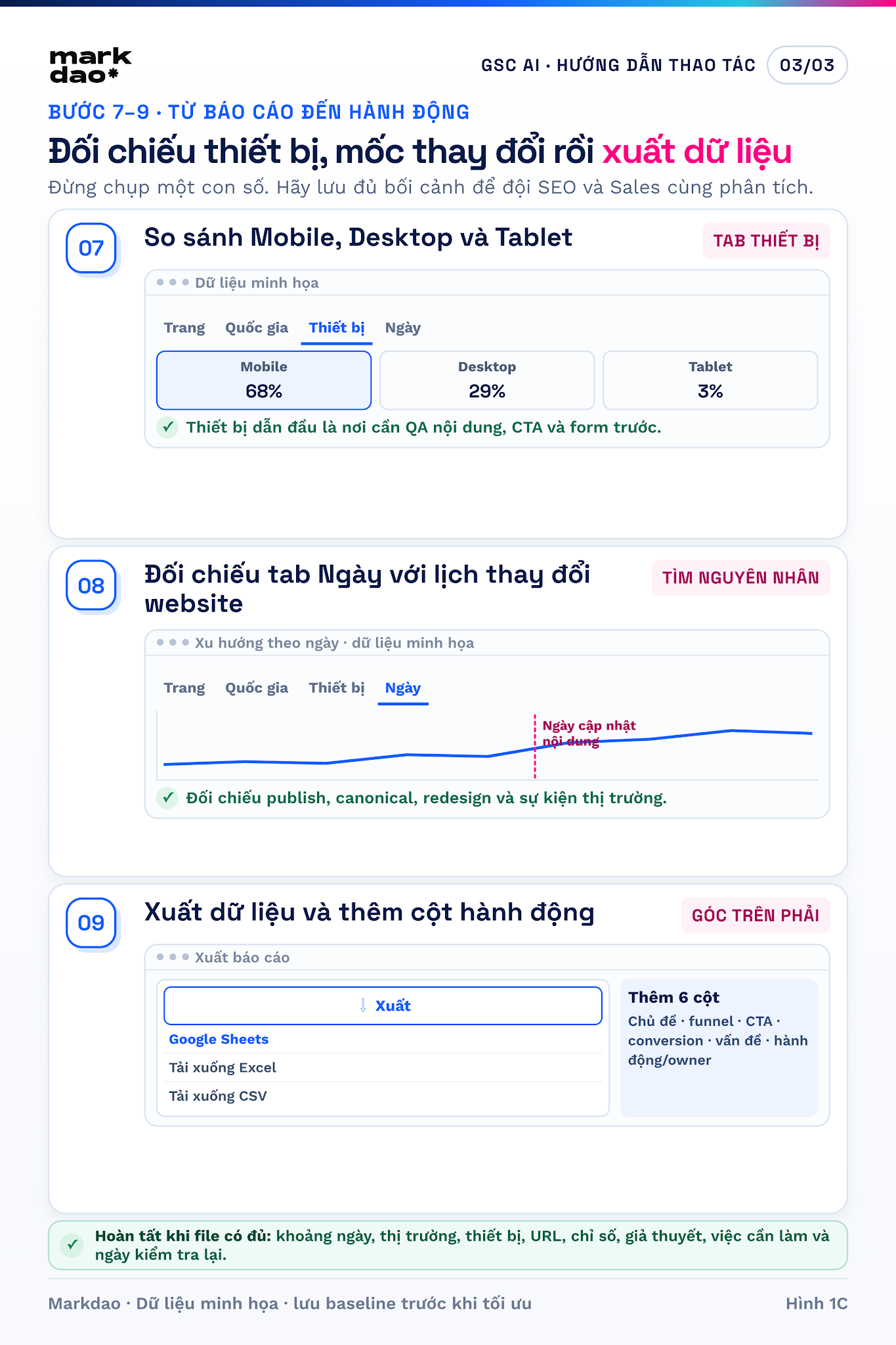
How to read each metric in Google Search Console without misunderstanding the data
1. Total impressions: a signal of visibility potentialy
An impression is recorded when content from your website appears in Google's AI features according to report rules. When the same website appears multiple times in a single experience, the aggregate chart may only count it as one impression for the site. Therefore, this is not the number of times a specific paragraph was cited.
The right question is not "Is 35,000 impressions good?", but rather "Which URLs, topics, and markets are these 35,000 impressions coming from, and are they increasing or decreasing compared to our own site's baseline?"
2. Pages: where to find content winners and content gaps
The Page tab helps identify two groups. Content winners are URLs that Google AI is currently selecting or displaying frequently. Content gaps are pages that are important to the business but have little to no visibility.
Do not edit content winners just because they are performing well. First, preserve the answers, data, examples, and structure that are currently providing value. Then, expand with supporting content and internal links rather than rewriting the entire piece.
3. Country: context before evaluating performancet
The same content may be suitable in Vietnam but not in other markets. The Country filter helps check whether Google is correctly understanding the content's target market. If the proportions are unusual, check the language, currency, addresses, case studies, and local signals.
4. Device: connecting AI visibility with real-world experiencet
AI Search can help users discover content, but the landing page must still load quickly and be easy to use. If mobile is the primary device, a page with a great answer will still struggle to generate leads if the contact buttons are small, forms are long, or tables are broken.
5. Date: look for trends, not minor fluctuationst
Daily data is useful for spotting trends and events. Do not turn every minor fluctuation into an algorithmic hypothesis. Compare at least two equivalent time periods and note the actual changes that have taken place on the website.
Six common scenarios and how to handle themm
Scenario 1: Impressions are increasing and the number of URLs appearing is also increasingg
This is the most positive sign: Google is not just using a single page but is expanding across multiple pieces of content within the same system. You should identify the growing topic clusters, add follow-up questions, link related articles, and maintain consistent entity information.
Scenario 2: High impressions but concentrated on only one or two URLsL
The website has a "star" but lacks topical depth. Build a content cluster around the problems users actually need to solve. For example, from an article on "What is Google Search Console," you can expand into how to read AI Search reports, how to prioritize URLs, how to connect GSC with GA4, and how to measure leads.
Scenario 3: Impressions are consistently decreasingc
Check in order: is there a data delay; is the URL still indexed; has the canonical changed; has the content been truncated or lost its evidence; have competitors updated with newer information; has search demand changed seasonally? Do not rewrite the article before identifying the cause.
Scenario 4: Impressions are up, but organic sessions are notg
This is not necessarily an error. AI reports currently do not provide click data. Check the landing page in GA4, source/medium, organic search, and AI Assistant channels from third-party platforms. If there is no evidence of sessions, this should only be recorded as an increase in visibility.
Scenario 5: Impressions are up, but leads are notg
Check the user journey after they arrive on the page: is the CTA aligned with their needs, is the form too long, are there sufficient case studies and social proof, and does the reader know what the next step is? A TOFU article might need a CTA to download a checklist or get a diagnosis instead of a "Buy Now" button.
Scenario 6: No report or no data visibleu
A lack of data is not proof that the website has been penalized or is completely absent from AI. The cause could be that the property hasn't reached the impression threshold, the content doesn't meet the criteria, the wrong property was selected, or the report doesn't have enough data to display. Check crawl, index, canonical, content quality, and the ability to answer queries before drawing conclusions.
Markdao's 30-minute SOP: from report to three prioritiesn
0–5 minutes: Establish baselinee
- Select a time range of 28 days or 3 months.
- Record total impressions and the upward/downward trend.
- Record the number of URLs with data.
- Take a screenshot of the chart and clearly note the property, device, country, and time range.
5–15 minutes: Categorize the top 10 URLsu
- Problem group: What pain point does the URL address?
- Intent group: Learning, diagnostic, comparison, or purchase?
- Funnel group: TOFU, MOFU, or BOFU.
- Value group: Does it support strategic services or products?
- Evidence group: Does it include original data, expert insights, case studies, or real-life illustrations?
15–25 minutes: Cross-referencing GA4 and CRM
For each URL, review organic sessions, engaged sessions, CTA clicks, form starts, form submissions, and qualified leads. Do not attempt to attribute AI Search clicks while Search Console does not yet provide that data. The goal is to find evidence-based correlations between visibility, on-page behavior, and conversions.
25–30 minutes: Choose exactly three tasksc
- One URL to protect: It is growing and valuable.
- One URL to expand: It has visibility but lacks depth or internal links.
- One URL to fix for conversion: It has traffic or visibility but weak CTAs and lead generation.
Each task must have an owner, a deadline, pre-optimization metrics, and a scheduled follow-up date. Without a baseline, "optimization" is just a feeling.
What insights can businesses derive from an AI Search report?
An AI Search report is not a revenue dashboard. Its true value lies in showing businesses which topics, pages, and markets Google is prioritizing; then, using GA4, form data, and CRM to verify if those signals translate into business demand. The correct way to read it always follows three layers: observable signals → hypotheses to be tested → measurable actions.
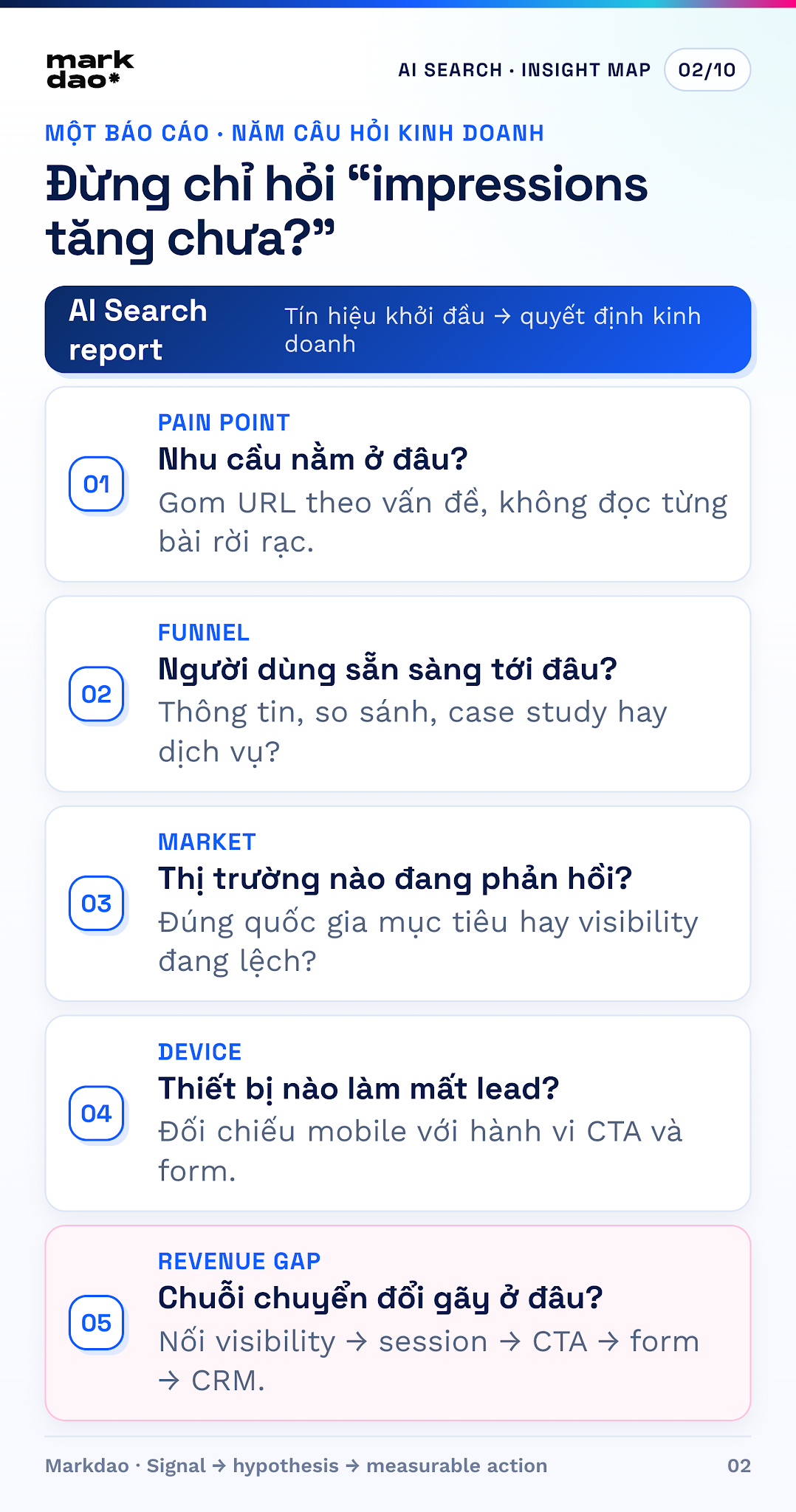
1. What is the primary focus of the current demand?
Open the Pages tab, identify groups of URLs with high or significantly increasing impressions, and categorize them by the problem the user is trying to solve, rather than looking at individual articles. For example, "slow website," "high LCP" and "WebP image optimization" might all belong to the same cluster of website speed pain points.
A single URL increase could be a short-term fluctuation. Multiple related URLs increasing over several weeks is more significant, as it indicates that Google recognizes the website's depth on a topic and that the market may be interested in that subject.
- Record the top 10–20 URLs and assign a pain point to each.
- Categorize by content type: definition, guide, comparison, case study, or service.
- Mark which URLs serve your ICP and align with services the business can sell.
- Only prioritize campaigns when both search signals and business relevance are high.
2. Where are users in their buying journey?
The type of page being displayed indicates where users might be in their journey. Definition and guide articles are usually near the problem-awareness stage. Comparison articles, pricing tables, and case studies are typically near the evaluation stage. Service or sign-up pages are usually closer to the decision stage.
This is an inference based on content type, not direct evidence of individual intent. Therefore, use it to choose the appropriate next step: a checklist for those just identifying a problem; a case study or benchmark for those considering options; or a consultation or audit for those ready to take action.
3. Which market is responding?
The Countries tab helps avoid wasting budget on the wrong market. If impressions are increasing in Vietnam and it is your target market, you can develop examples, data, landing pages, and calls to action tailored to the Vietnamese context. If impressions are increasing in a country you do not serve, check your language settings, hreflang tags, local information, and offer relevance before launching a campaign.
4. Which device is causing lead loss?
The Devices tab only shows impressions, but when linked with GA4, you can identify a very real bottleneck: mobile generates the majority of sessions, but the click-through rate for CTAs, form starts, or form completions is low. In this case, the problem is not a lack of traffic, but that the mobile experience is causing demand to drop off.
- Check if the CTA appears early, stands out sufficiently, and is easy to tap with one hand.
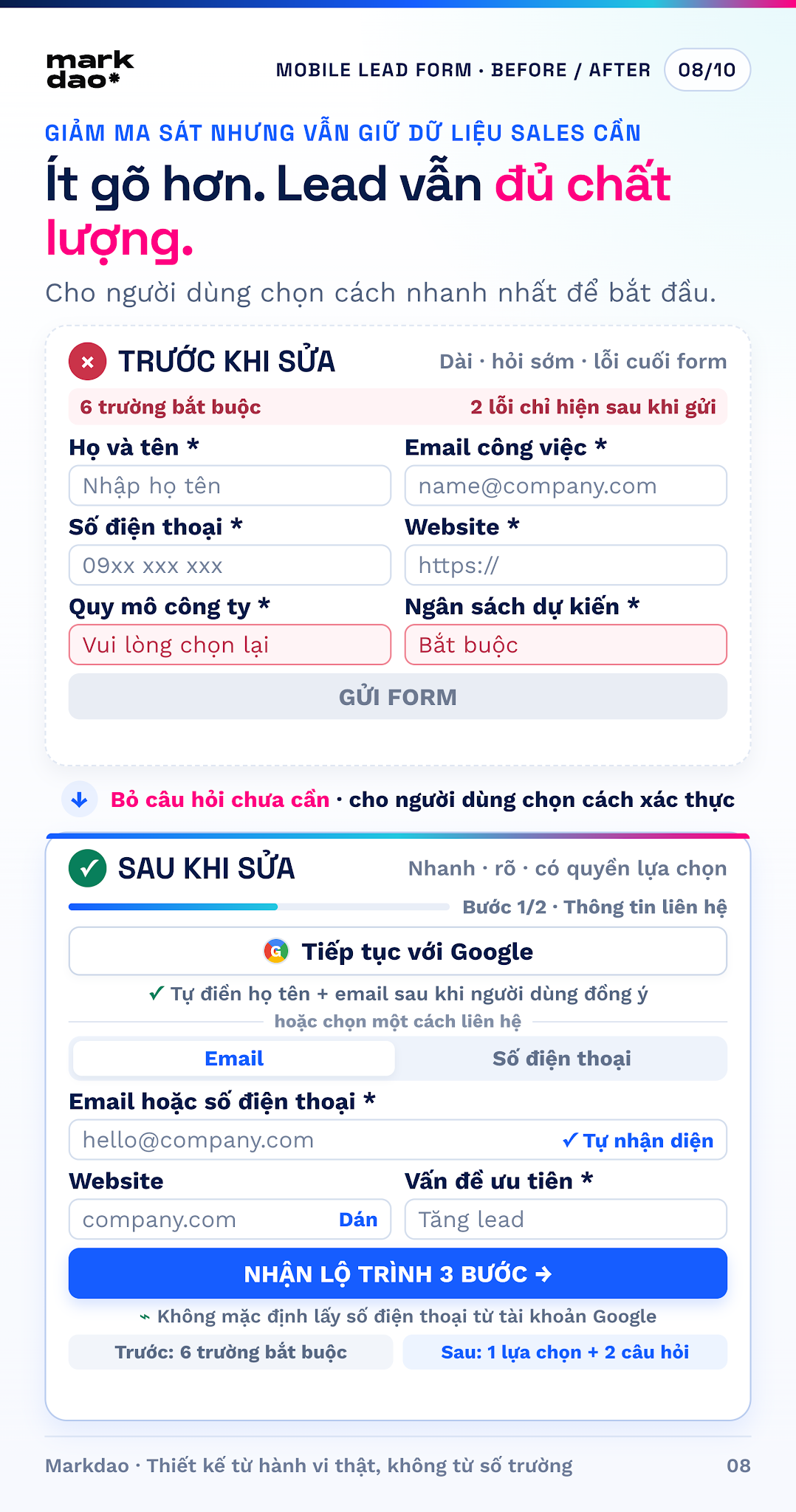
- Reduce the form to the minimum number of fields required for sales to still have enough information to qualify leads.
- Track form_start, form_submit, and form errors separately by device.
- Check speed, readability, keyboard behavior, error messages, and the thank-you screen.
5. Where is the gap between visibility and revenue??
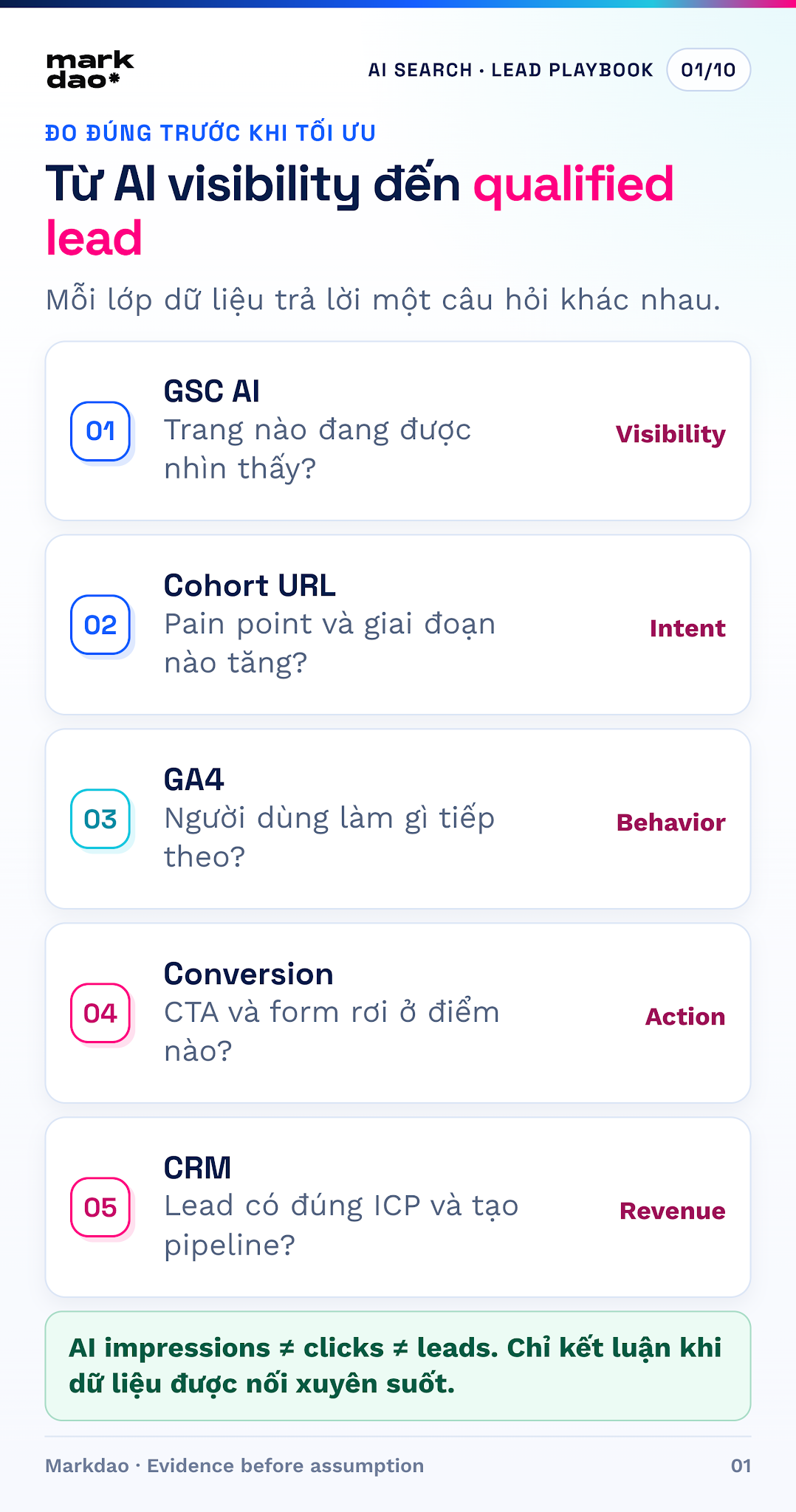
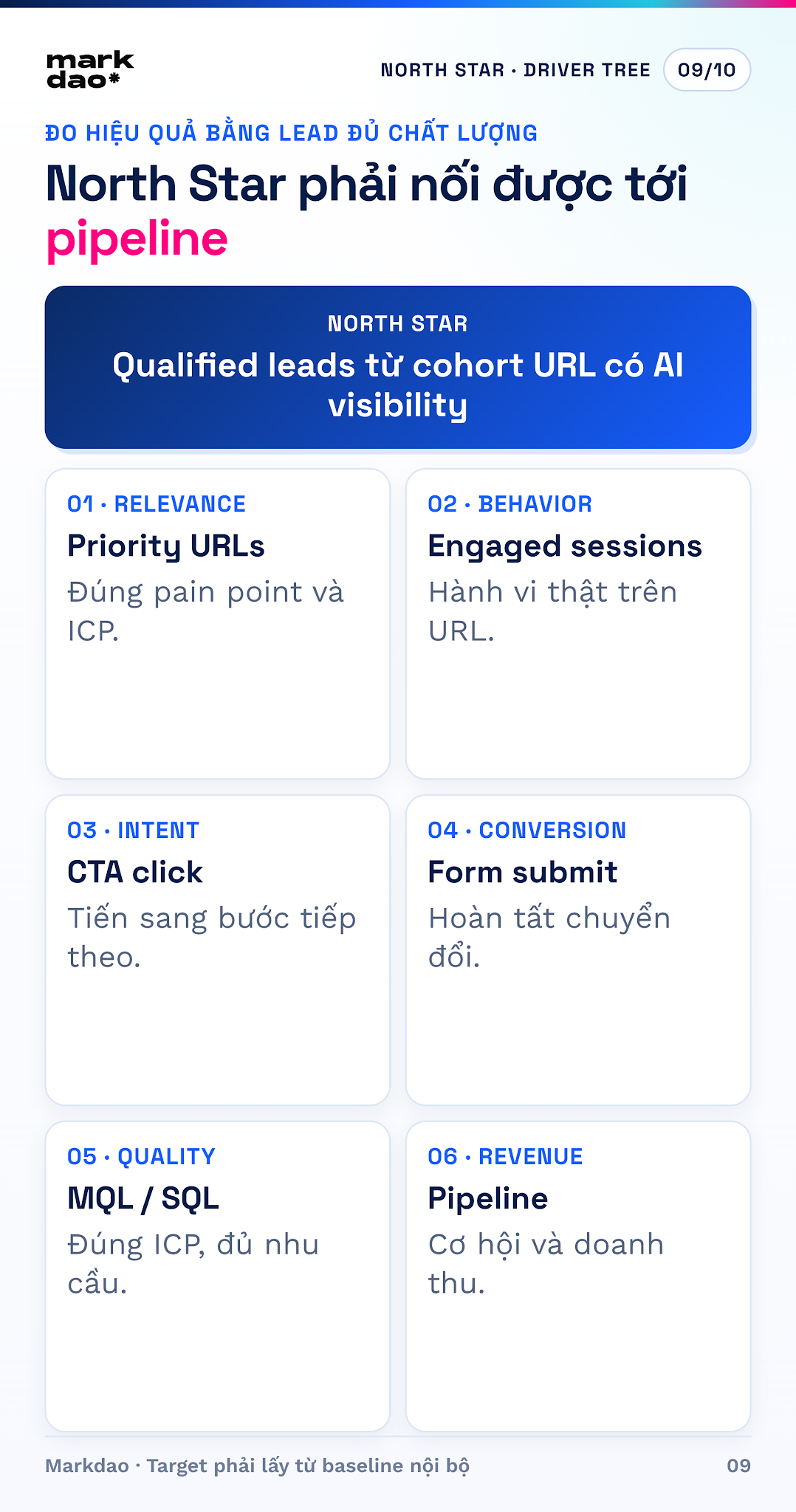
AI impressions are just the starting point. To determine if a signal has business value, create a cohort of URLs currently gaining AI visibility and track user behavior on that specific group of URLs in GA4 and your CRM. The measurement chain should be: AI-visible URL → engaged organic session → CTA click → form start → form submission → MQL/SQL → sales opportunity.
If the chain breaks anywhere, the campaign must be fixed at that point. High impressions but few sessions: continue protecting winning content and increase brand recall. Sessions but few CTA clicks: refine the messaging and CTA placement. Form starts but few submissions: reduce form friction. Leads but few SQLs: review your ICP, offer, and qualifying questions.
How to check user trends from AI Search reportsh
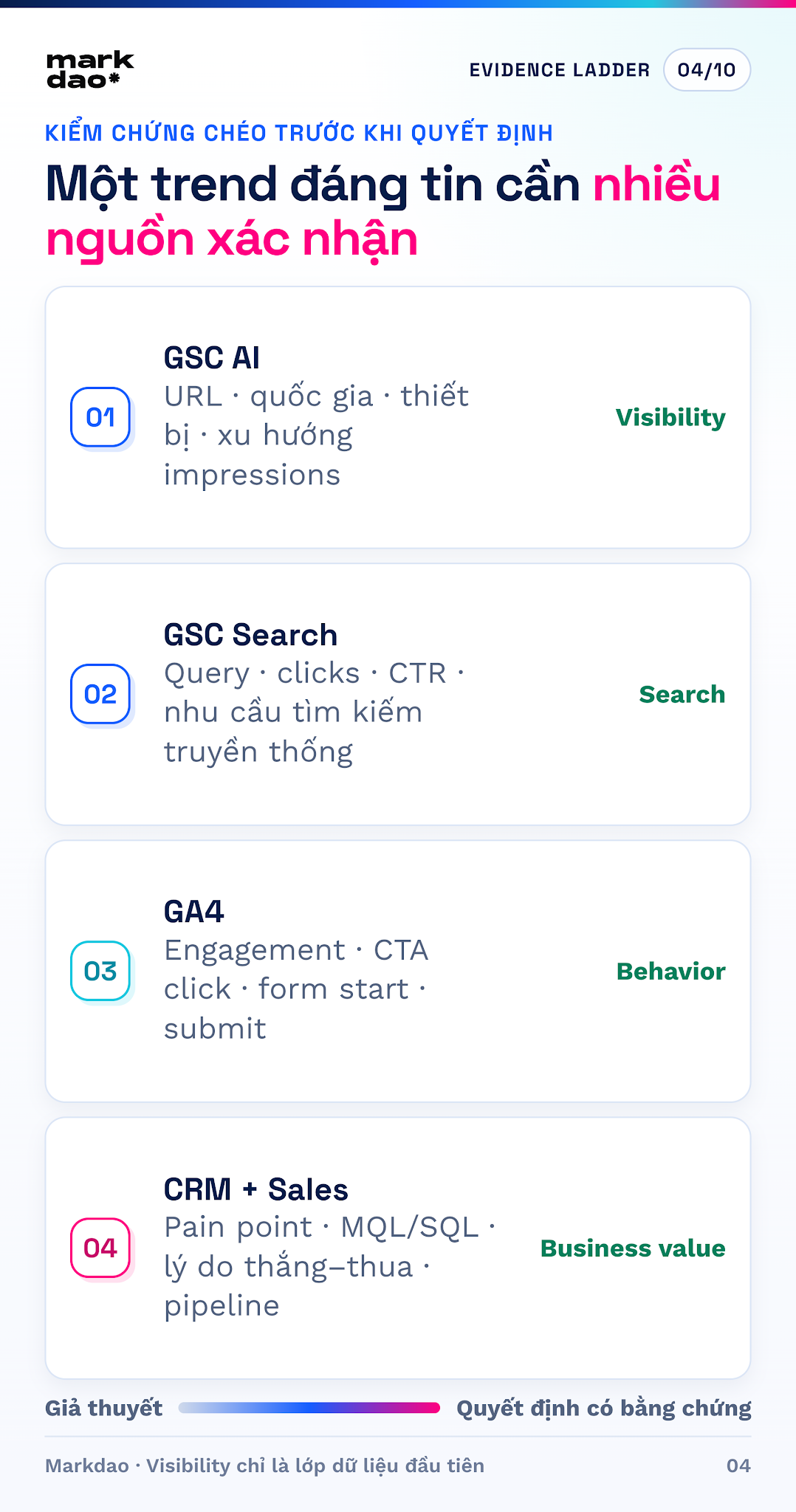
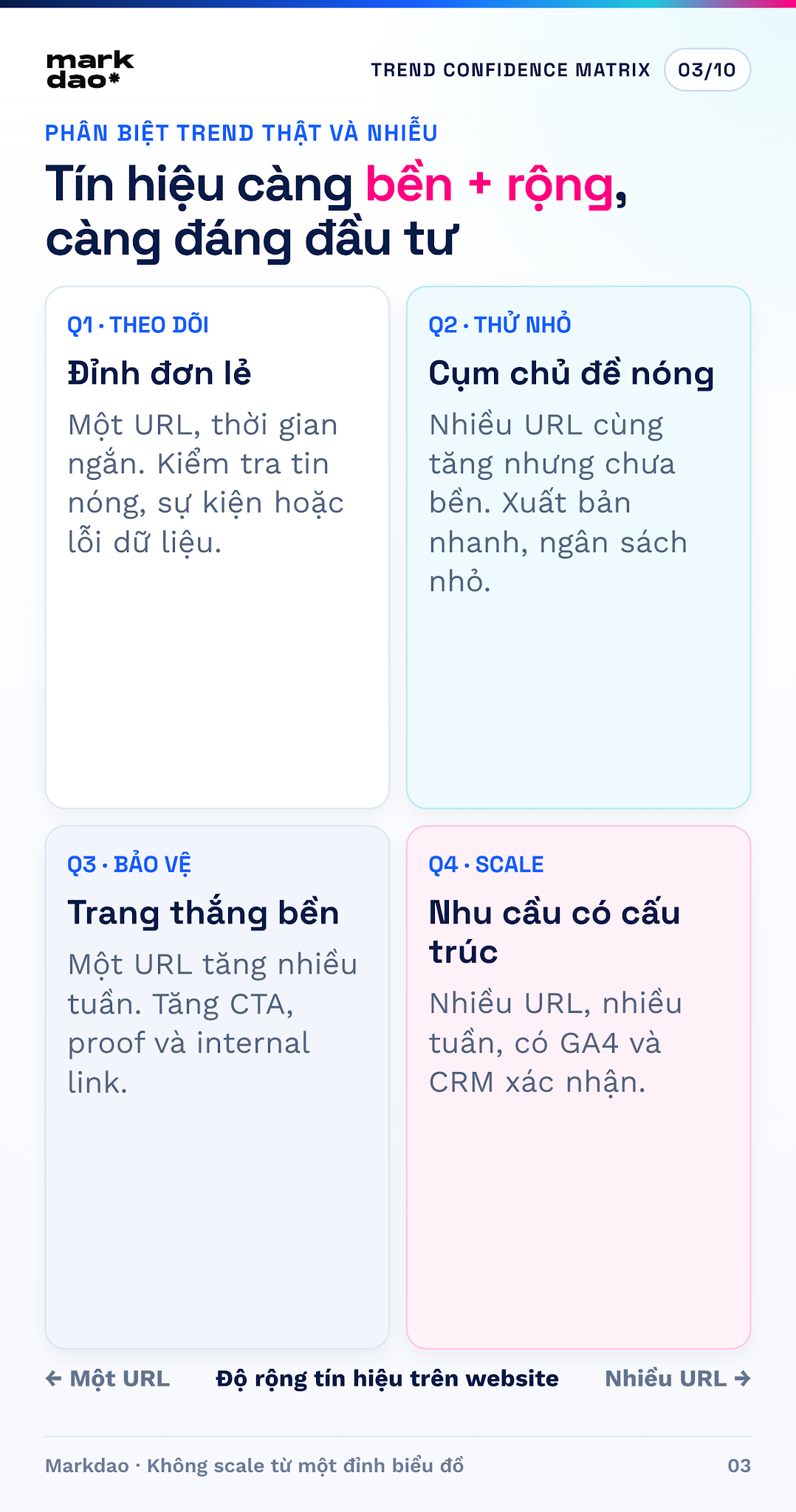
An upward chart line is not enough to call it a trend. Markdao suggests checking along two axes: how long the signal lasts and how widely it spreads across URLs or topic clusters. Only then should you cross-reference it with website behavior and actual customer inquiries.
Step 1: Establish a baseline
Start by comparing the last 28 days to the previous 28 days. If the data is sparse, expand to 3 months. Record total impressions, the number of URLs with data, and the primary countries and devices. A baseline helps the team distinguish real growth from the feeling that "the chart looks high today."
Step 2: Group URLs by pain point and funnel stage
Do not compare a single blog post against the entire website. Create clusters such as website speed, mobile-first design, B2B SEO, landing pages, or website quotes; then segment them into TOFU, MOFU, and BOFU. This grouping reveals what users are interested in and which links are missing from their journey.
Step 3: Score signal reliability
- High reliability: sustained growth over several weeks, appearing across multiple URLs for the same pain point, and confirmed by GA4 or CRM data.
- Medium reliability: growth across multiple URLs but over a short period; consider running a small pilot campaign.
- Low reliability: a single day, a single URL, or an isolated spike; do not change your strategy yet.
- Noise: growth in markets you don't serve, URLs irrelevant to your ICP, or a lack of follow-up behavior.
Step 4: Cross-verify with behavioral and sales data
Compare URL clusters with standard Search Console performance reports, public search trends, organic sessions in GA4, internal site searches, form inquiries, call transcripts, and win/loss reasons in your CRM. If multiple sources point to the same pain point, you have a solid foundation to invest in content and campaigns.
From insights to lead generation campaigns: a 5-step playbook
Step 1: Choose one ICP and one high-value pain point
A content cluster is only worth turning into a campaign if it answers four questions: who is experiencing the problem; what is the cost of the problem; does Markdao have the service or capability to solve it; and what data proves the demand is reliable? Do not run a campaign based solely on a single high-impression article.
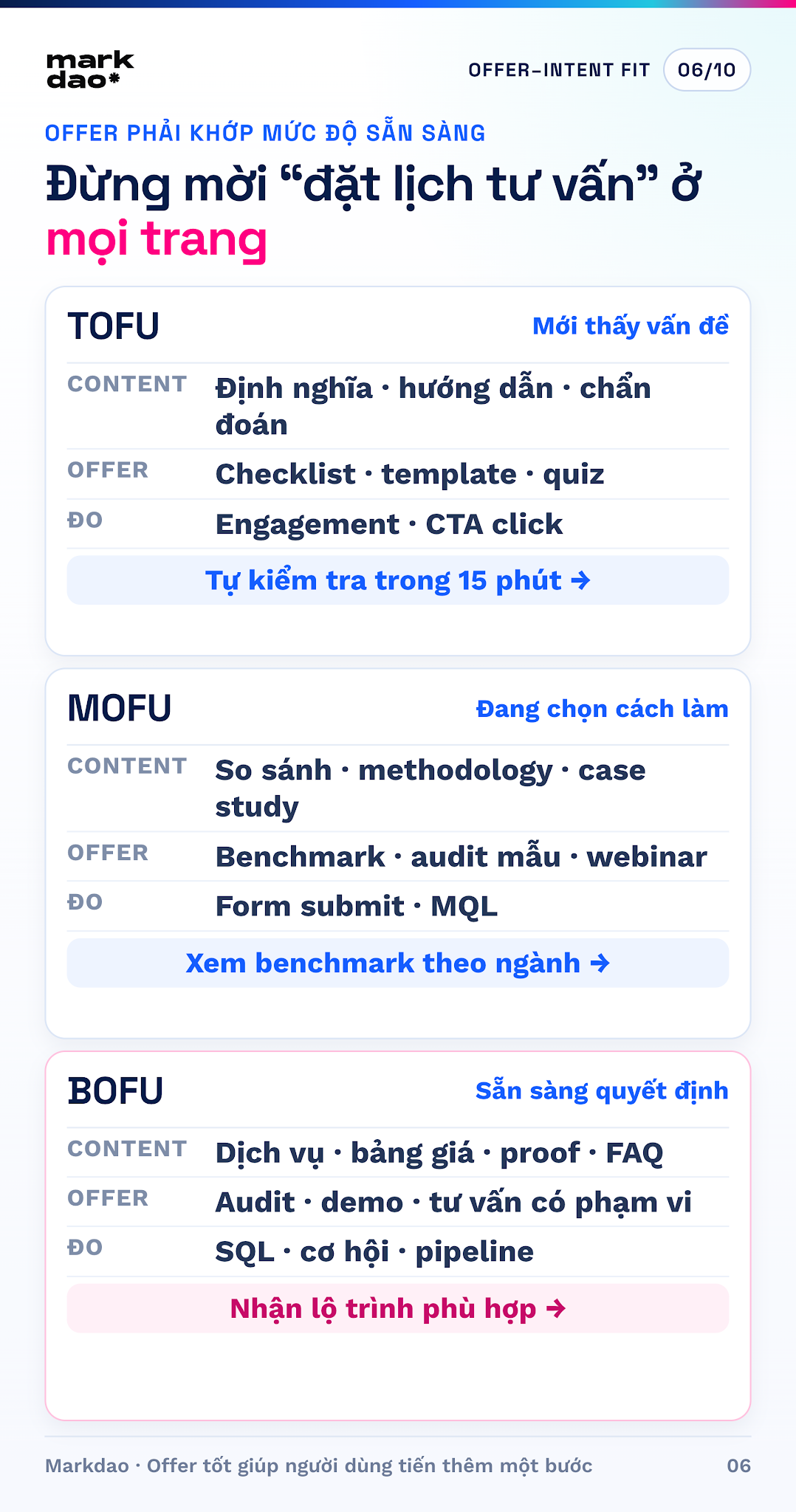
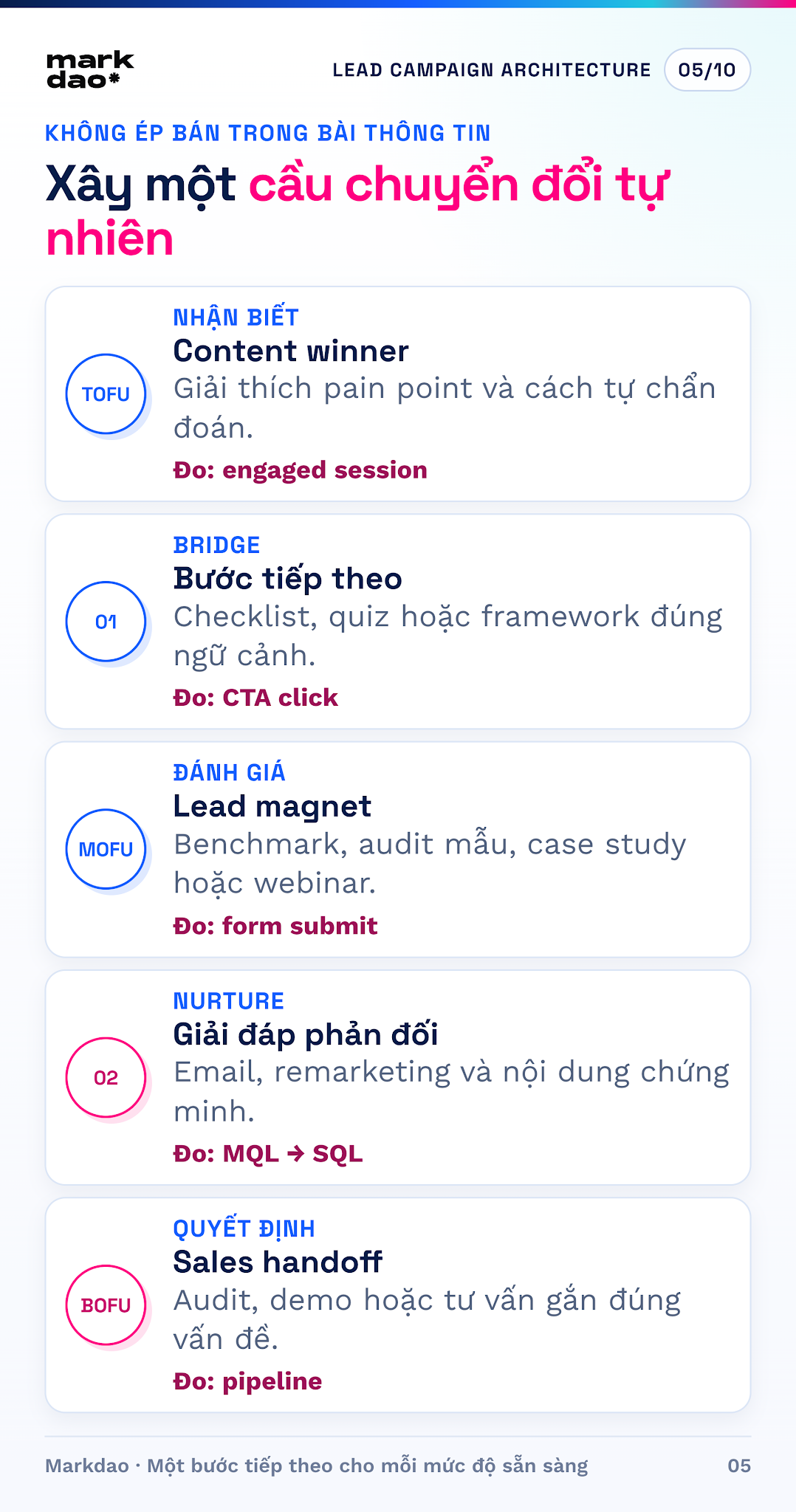
Step 2: Choose an offer based on readiness level
- TOFU – problem awareness: checklists, templates, diagnostic quizzes, or self-assessment guides.
- MOFU – seeking solutions: benchmarks, case studies, webinars, sample audits, or comparison tables.
- BOFU – selecting a provider: consultations, demos, scoped audits, or roadmap proposals.
- Your offer must help the user take the next step, not just exchange an email address for a generic file.
Step 3: Build conversion bridges directly into your contentg
Every URL with visibility needs a logical next step. After a diagnostic section, place a CTA leading to a checklist or self-assessment tool. After a methodology section, link to a case study or relevant service page. At the end of the post, use a primary CTA with clear benefits, scope, and expected outcomes. Keep the form short but include one or two ICP-qualifying questions.
Step 4: Redistribute insights instead of waiting for organic
Turn trending pain points into a series of LinkedIn posts, emails for your existing list, short webinars, sales enablement materials, and remarketing ads for those who visited related URL groups. This is about repurposing insights from reports; do not target ads directly at "AI Search users," as Search Console does not provide that audience list.
Step 5: Set hypotheses and stop criteria before running
Hypothesis example: "If readers of the mobile-first cluster are invited to download a 15-minute audit checklist immediately after the diagnostic section, the CTA click-through rate and form completion rate will increase compared to the cluster's baseline." Choose one key change at a time, set an evaluation cycle, and stop or pivot if leading indicators do not improve.
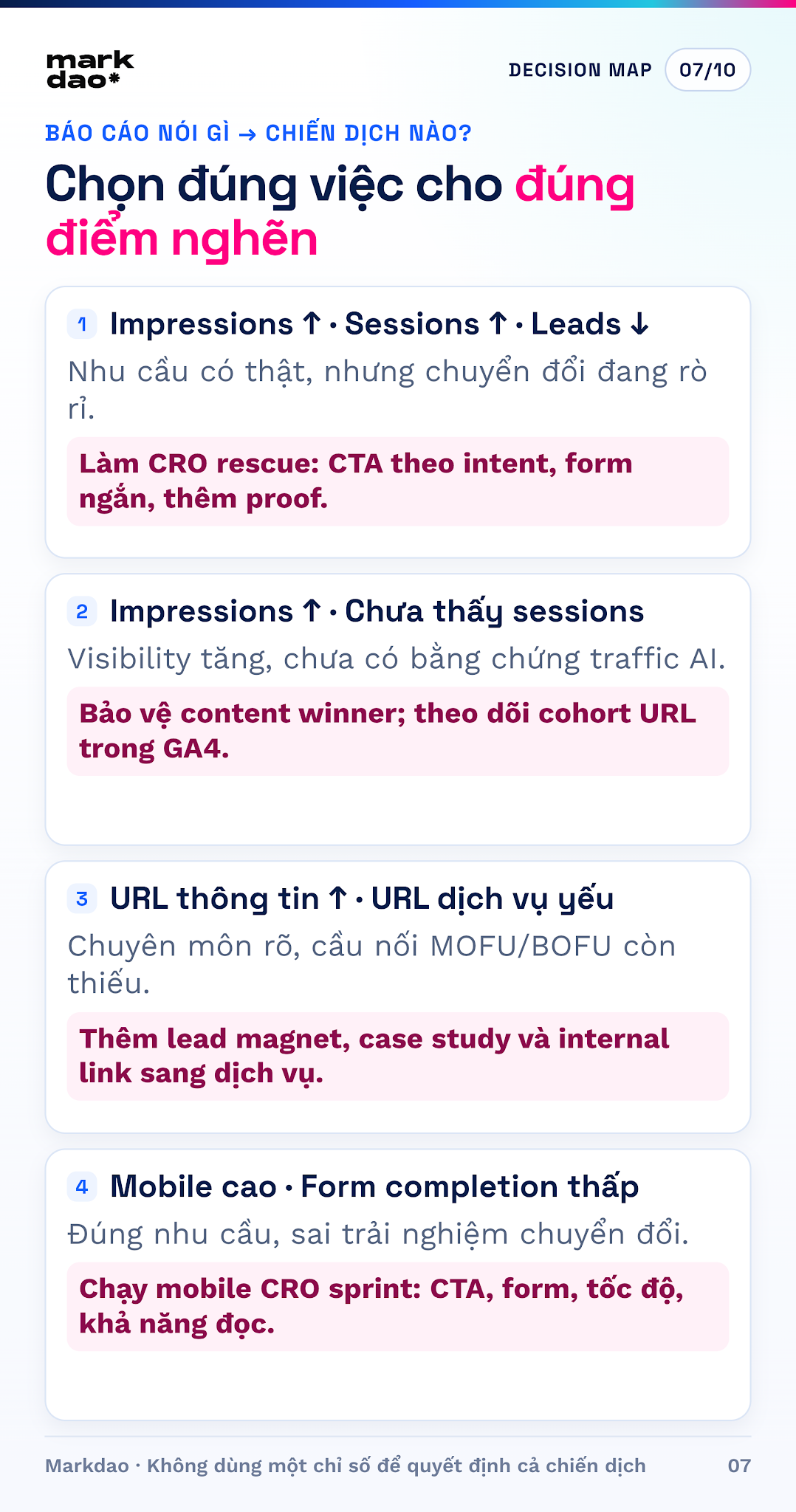
4 report-to-campaign scenarios to prioritize
Scenario A: Impressions up, sessions up, but leads are loww
Demand and traffic are real, but the conversion journey is leaking. Prioritize a CRO rescue sprint: align CTAs with page intent, shorten forms, add social proof near decision points, check mobile performance, and run remarketing for those who viewed content but did not convert.
Scenario B: Impressions are up, but session evidence is missings
Your website may be gaining visibility in AI experiences, but the reports don't yet prove that traffic is coming from AI. It isn't converting into leads or ROI. Protect your winning content, make your brand memorable, track URL cohorts in GA4, and monitor branded search, direct traffic, or assisted conversions as supporting signals—not as absolute proof of attribution.
Scenario C: Informational URLs are performing well, but service URLs are weaku
Google understands your expertise at the knowledge level, but the bridge to commercial solutions is missing. Prioritize lead magnets that address specific pain points, case studies, comparison pages, contextual internal links, and CTAs that lead to service pages. Don't turn informational articles into sales brochures; the goal is to help the reader take the next step.
Scenario D: Mobile dominates, but form completion is lowp
This is a signal for a mobile CRO sprint: use sticky CTAs that don't obscure content; keep forms short; allow users to continue with Google to auto-fill their name and email after consent; if not using Google, only require one contact method with Email/Phone options, enable autofill, and use appropriate keyboards; display errors directly at the field; ensure content is scannable; optimize images; and test load times and responsiveness on actual devices. Do not default to requesting a phone number from a Google account; screening questions should only appear after the user has completed the contact step.
North Star and performance metric tree
The appropriate North Star for this problem is "qualified leads from URL cohorts with AI visibility." This is a group-based measurement for growth management, not a claim that AI Search directly generates every lead within that group.
Leading indicatorst
- Number of priority URLs with AI visibility and coverage level by pain point.
- Impression trends over 28 days and by URL group.
- Organic engaged sessions on URL cohorts.
- CTA click rate, form start rate, and form completion rate.
- The conversion rate of readers moving from informational content to case studies or service pages.
Outcomemetrics
- Number of MQLs and SQLs from URL cohorts.
- MQL to SQL and SQL to sales opportunity conversion rates.
- Pipeline generated, sales cycle length, and won revenue.
- Lead quality based on pain points, industry, company size, and service interest.
Do not use a one-size-fits-all benchmark for every website. Establish internal baselines for each URL cluster, set phased improvement goals, and clearly document the start date, implemented changes, device, market, and measurement window.
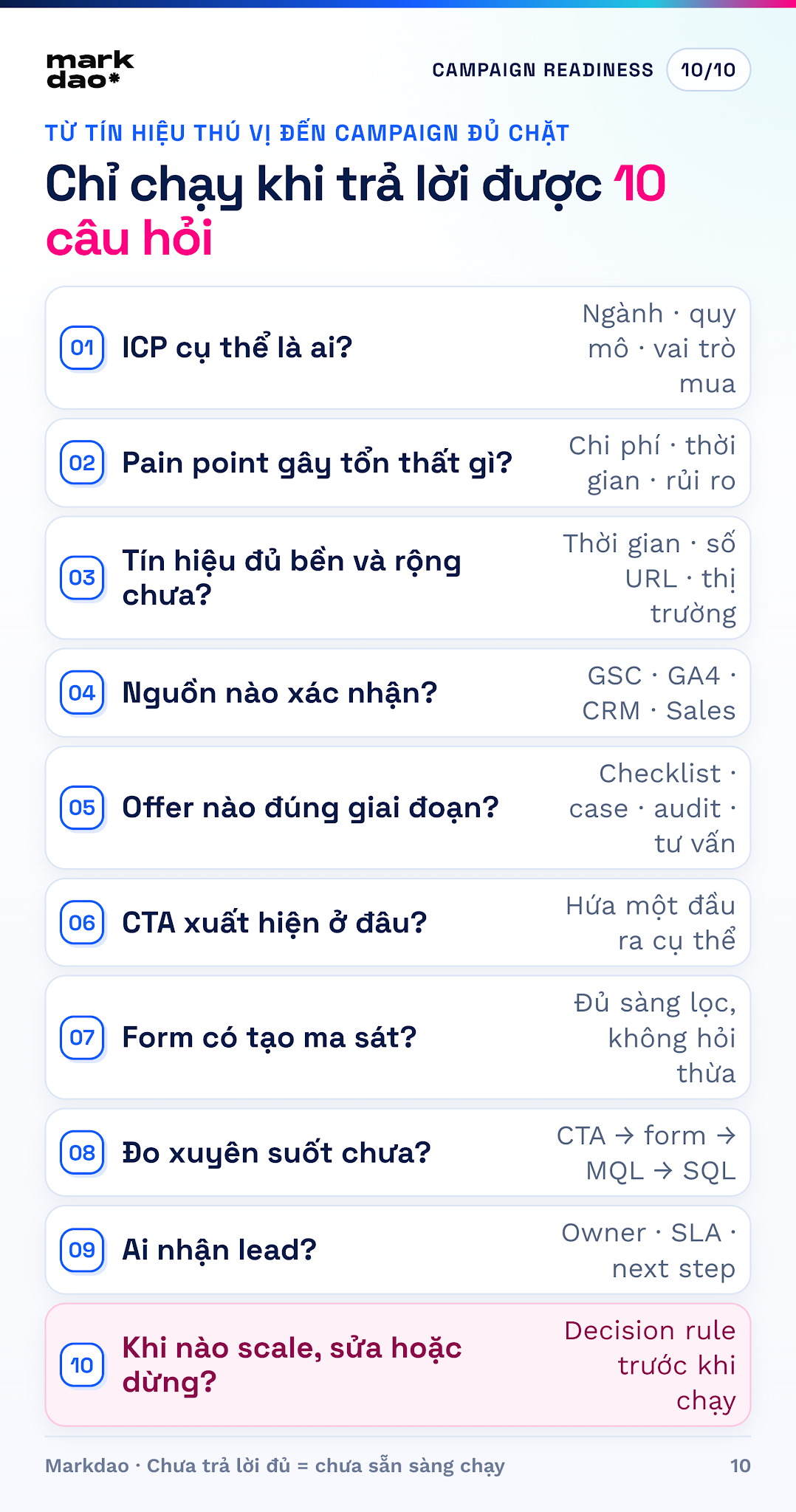
Pre-campaignquestionnaire
- Who is the specific ICP: industry, company size, buying role, and decision-making context?
- Which pain point is the URL cluster addressing, and what is the business cost of that pain point?
- How long does the signal persist, across how many URLs, and in which markets?
- What data sources beyond AI Search confirm this demand: GA4, standard Search Console, CRM, or sales feedback?
- What is the user's next logical step: a checklist, case study, benchmark, audit, or consultation?
- Where will the CTA appear, and is the value proposition specific enough?
- Which form fields are necessary for qualification without creating friction?
- Which events must be tracked: CTA clicks, form starts, submissions, MQLs, SQLs, and pipeline?
- Who receives the leads, what is the SLA response time, and what are the criteria for handing them over to sales?
- After how many days will performance be evaluated; what are the conditions for scaling, adjusting, or stopping?
If you cannot answer these questions yet, your business has an interesting signal but not a sufficiently robust lead generation campaign.
Three examples of applying GSC report data for AI in an easy-to-understand way for thousandsh
B2B service businessB
The article "What is an SEO Agency" is frequently displayed by AI, but the SEO service page is rarely seen. Lesson: users need to understand and evaluate the problem before buying. Marketers should place natural internal links from the diagnostic section to comprehensive SEO services, add case studies, implementation methods, and a "Get SEO Diagnosis" CTA instead of just adding sales keywords.
E-commerce
The "how to choose materials" guide is displayed, but the category page does not generate leads. Lesson: explanatory content must lead to product selection criteria, comparison tables, category links, and purchasing policies. Otherwise, the website has visibility but does not create a buying journey.
Education or SaaS
A page defining a concept is frequently selected by AI, but the demo page has low conversion. Lesson: add use cases, output samples, tutorial videos, solution selection questions, and timely trial CTAs. Do not force a demo CTA at the beginning of the article when the reader does not yet understand the problem.
What does a website need to optimize after reading a Google Search Console report for AI?
Provide a concise answer first, then a deep dive explanation.u
Every important heading should start with an answer that can be understood immediately. Follow this with the reasoning, examples, processes, and exceptions. This approach helps both readers and search engines quickly identify the core content.
Add evidence that competitors cannot easily copy.h
- Screenshots of actual tools with clear captions.
- The process or checklist that Markdao is currently using.
- Before-and-after data, including measurement dates and conditions.
- Case studies that include context, actions taken, and results.
- Expert insights, including their name and role.
- Examples tailored to specific industries and funnel stages.
Build internal links based on the user journey, not just keywords.a
Effective internal linking answers the question, "What should the reader know or do next after this section?" In this article, beginners should read about what Google Search Console is; those who already have data can explore comprehensive SEO services; and businesses needing to fix their foundation can check out SEO-friendly website design.
Keep the technical foundation solid.h
Great content cannot compensate for pages that are not crawlable, have incorrect canonical tags, hide main content behind JavaScript, or offer a poor mobile experience. After selecting your priority URLs, check for indexing, canonicalization, speed, readability, appropriate structured data, and internal linking.
Search Console, GA4, and CRM must work in tandem.u
Search Console tells you how your website appears on Google. GA4 tells you how users interact with your site. CRM tells you if your leads are qualified and generating revenue. Only by connecting these three layers can a business avoid optimizing for vanity metrics that don't drive actual results.
- Search Console AI: visibility in Google's AI Overviews and AI Mode.
- GA4 Organic Search: sessions from Google, where traffic from AI Overviews and AI Mode may still be categorized under Organic Search.
- GA4 AI Assistant: a channel group for certain third-party AI assistants; this should not be interpreted as representing all Google AI traffic.
- CRM: lead source, lead quality, sales opportunities, and revenue.
Common mistakes to avoid when reading AI Search reportsh
- Labeling long-tail queries in standard reports as "AI prompts." Long-tail queries are just a hypothesis, not evidence.
- Confusing impressions with clicks or citations. These are three distinct concepts.
- Comparing total figures between two websites of different scales to conclude which one is performing better.
- Overreacting to a single day of spikes and changing your entire content strategy.
- Modifying a winning URL without backing up its original structure and performance data.
- Setting an arbitrary threshold, such as 500 impressions, and treating it as a universal benchmark.
- Believing that llms.txt, FAQ schema, or keyword density can guarantee appearance in AI Search.
- Measuring visibility without checking CTAs, forms, and qualified leads.
Conclusion: don't just look at reports, turn them into decisionsh
AI Search reports help businesses see a new dimension of search behavior. But the value isn't in the impression count. The value lies in knowing which URLs Google AI is selecting, why those URLs are strong, what topics are missing, and which journeys are failing to generate leads.
Markdao doesn't optimize for AI Search by chasing a list of tips. We start with the ICP's pain points, build content that answers their questions, demonstrate expertise through data and real-world experience, and then connect visibility to behavior and qualified leads.
FAQ

Yes. Google Search Console now includes a dedicated report for performance within Google Search's generative AI features. In the Vietnamese interface, Markdao sees the Generative AI section under Performance.
No. The AI report currently lacks a query dimension. You should not use long-tail queries from standard search reports to assume they are AI prompts.
No. The GSC report currently focuses on impressions. To evaluate traffic and conversions, you need to cross-reference with GA4 and your CRM.
No. This report is exclusively for generative AI features within the Google Search ecosystem.
Your website may lack sufficient data, have no eligible impressions, be using the wrong property, or not yet meet the display criteria. Do not assume that the absence of this report means your website has been penalized.