




Website structure is a critical factor that cannot be overlooked when building a site. It is not just about organizing information to help users find content easily; it is also the foundation for optimizing SEO performance. A scientific and logical web structure provides a significant advantage in boosting search engine rankings, improving user experience, and optimizing conversion rates.
This article Markdao will help you understand what website structure is and provide a detailed 6-step guide to building a basic website structure to ensure it is fully optimized for your SEO.
What is website structure?
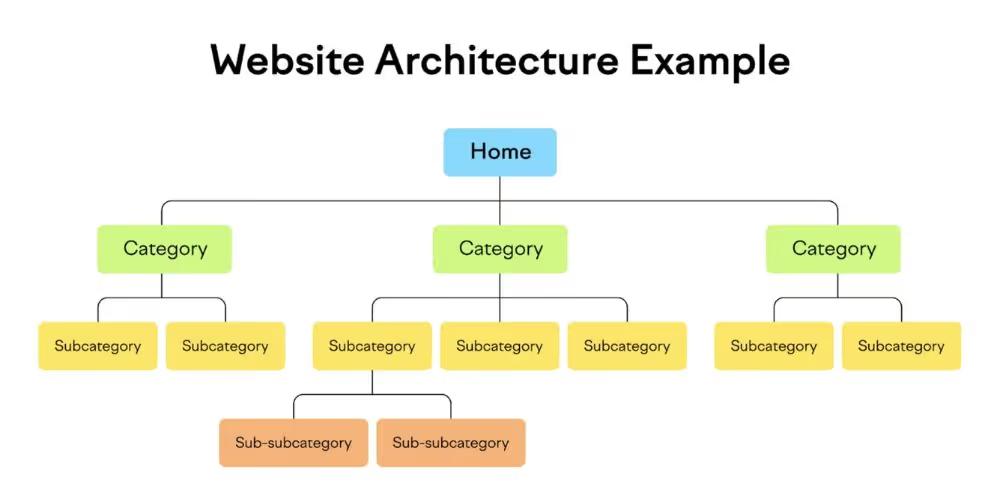
What is website structure? This term refers to how pages and content are organized and categorized on a website. Website structure defines how pages link to one another, creating a system that is easy to navigate and optimized for both users and search engines (SEO).
A good web structure helps users navigate through pages easily while helping search engines better understand the content and purpose of the site, thereby improving search rankings. Therefore, a website structure must ensure clarity, logic, and convenience for visitors when searching for information.
The importance of website structure
The importance of website structure is undeniable when it comes to optimizing user experience and SEO. The basic structure of a website plays a key role in improving navigation and information retrieval:
- Improving user experience (UX): A clear website structure helps users find information quickly, increasing satisfaction and reducing bounce rates, which in turn impacts SEO.
- Boosting SEO: A logical structure helps search engines accurately evaluate pages, improving indexability and rankings on SERPs.
- Increasing discoverability: A good structure makes it easy for users to find important sections and ensures valuable content is not overlooked.
- Ensuring stability and long-term growth: A solid website structure makes updates and scaling easy without compromising performance or UX.
Components of a website structure
A website structure is like a business's home, where everything is organized and arranged logically so users can easily find information. A website's structure consists of various components that come together to form a complete, SEO-friendly whole. Below are the main parts of a website structure:
Header
The header is the top section of a website, appearing on every page and playing a crucial role in user navigation. Basic components of a header include:
- Site ID: The website name or business logo, typically appearing in the top-left corner of the page.
- Scan columns: An area containing the menu, search box, product introductions, featured articles, contact information, and promotional banners.
- Search box: Designed to be compact, helping users easily find the information they need.
- Navigation menu: Contains links to various pages such as About Us, Products, Contact, etc.
- Shopping cart: A cart icon in the top-right corner displaying product information and the total payment amount.
- Banner: Eye-catching imagery used to advertise products or services.
- Slider: Located below the header, containing images or videos with call-to-action (CTA) buttons.

Content
This section contains the most important information and content on the website, helping users understand the products and services the business provides. Key components within the content section include:
- Page title: The name of each webpage, letting users know what the page is about.
- Breadcrumb navigation: Helps users easily navigate back to previous pages.
- Main content: The central area containing detailed information about products, services, or articles.
- Paging navigation: Helps users easily switch between pages when there is a large amount of content.
- Information bar: Provides additional information to users.
- Social media share buttons: Allows users to share content on social media platforms.

Page Footer
The page footer is the final section of the website, displayed at the bottom of every page. This section provides important information such as:
- Business information: Includes address, contact details, and basic company information.
- Table of Contents: Links to important pages on the website.
- Copyright Information: Provides information regarding the website's intellectual property rights.

Website Structure Classification
Currently, website structures are categorized into four main types, each suited to specific purposes and characteristics.
Note:
When implementing a website structure, prioritize alignment with your industry, target audience, and business goals.
Example: A database structure is suitable for businesses handling large amounts of data, while a hierarchical structure is ideal for companies with many products or categories.
Illustrations of website structure types:


6-Step Guide to Building an SEO-Friendly Website with Markdao
Step 1: Plan the website hierarchy
Before you start building your website, you need to design a clear and effective information hierarchy. This is a critical factor that directly impacts SEO and user experience. You can sketch out the hierarchy on paper, in Excel, or using tools like Visio to help organize your information.
A hierarchy is not just a logical way to organize information; it also impacts your website's navigation and URL structure. For best results:
- Keep the hierarchy simple: Don't overcomplicate it. A simple hierarchy makes it easier for search engine crawlers to index your site and for users to navigate it.
- Ensure relevance: Main categories should be distinct, and each subcategory must be closely related to its parent category.
- Limit main categories: Aim for 2 to 7 main categories. If you have more than 7, you should reorganize to simplify the structure.
- Ensure balance: Main and subcategories should have a similar number of items. For example, if one category has 14 subcategories while another has only 3, the hierarchy will be unbalanced.
Step 2: Build a clear hierarchical URL structure
Once you have designed your hierarchy, you need to set up a URL structure that matches your content levels. URL structures are typically built in two main formats:
- Hierarchical format: The URL clearly shows the position of each page within the hierarchy.
- Flat format: Each URL is independent and does not reflect a hierarchical relationship.
The hierarchical format is generally preferred because it is easier to manage and better for SEO.
Step 3: Design navigation using HTML or CSS
Website navigation should be written in HTML or CSS to ensure that search engine crawlers can easily read and index it.
Avoid using Javascript, Flash, or Ajax for navigation, as these technologies can limit crawlability.
Step 4: Ensure the hierarchy is not too deep
Your website structure should not exceed three levels. A deep hierarchy forces both users and search engines to click or navigate through too many steps to reach the desired content.
- Important content should be placed on the first level or second level.
- The golden rule: Users should be able to reach any content on your website in no more than three clicks.
Step 5: Create the main header menu
The main website menu should be located in the header, clearly displaying primary categories. Sub-items can be organized into CSS dropdown menus. Use anchor text instead of images for navigation to optimize SEO and improve accessibility.
Step 6: Build an internal linking system
Internal links are the "backbone" of a website. A robust internal linking system helps to:
- Facilitate easy user navigation.
- Build and reinforce the information hierarchy.
- Boost SEO performance by ensuring search engines can easily crawl your site.
Think of internal links as the muscles supporting your website's structure. A tightly knit linking framework creates a solid website, much like constructing a building with perfect architecture.
Conclusion
Following this guide on what website structure is, and the six steps to building a basic website structure shared by Markdao, you are fully equipped to create an optimized site with a clear hierarchy, coherent URL structure, user-friendly navigation, and powerful internal linking.
Ensure your website is tightly organized with a logical hierarchy, clear URL structure, and robust internal linking for sustainable digital growth.
A well-structured website serves as a solid foundation to help you achieve your long-term goals and drive effective online business strategies!


