You enter a few lines of description. Less than an hour later, the AI has generated a homepage, pricing table, illustrations, and a contact form. The website looks decent on a desktop screen, and the domain is already connected.
But when opened on a phone, the headlines wrap awkwardly. The submit button is unresponsive. The brand colors vary from page to page. The introduction sounds like hundreds of other companies. Visitors land on the site but still don't know which service to choose.
This is the gap between an AI-generated website and a website that actually works for your business.
AI helps shorten the time it takes to build a page. It cannot yet know what your customers are truly worried about, how your brand should be remembered, what evidence makes buyers trust you, or what information sales teams need before calling back. If these questions aren't answered, AI just creates a draft faster.
This article guides you through designing a website with AI step-by-step, choosing the right tools, and checking the parts AI often overlooks. You will also learn when you can do it yourself and when you should use AI as a supporting tool for a more comprehensive design process.
What is an AI website?
An AI website is a website created or built with the assistance of artificial intelligence. Users can describe their needs in plain language, and the AI tool will suggest page structures, layouts, content, images, or source code.
However, this term is currently used for three quite different approaches.
1. AI Website Builder: AI builds the website on an existing platform
You answer a few questions about your industry, goals, and style. The platform generates the site automatically, then allows you to drag and drop to make edits.
This approach is suitable for:
- Simple informational websites.
- Small shops with few products.
- Personal portfolio.
- Event page.
- Landing page for a short-term campaign.
The biggest advantage is speed and low technical barrier. In return, deep customization, source code control, and scalability are often limited by the platform.
2. Vibe coding: using natural language to have AI build your website
Vibe coding is where you tell an AI what your website needs to do, and let the tool generate the bulk of the code. You review the preview and continue to request changes through text prompts.
Example:
Create a website for a birthday cake shop. The homepage should include a banner, a cake filter, a price list by size, and an order form. The design should be mobile-first with a cream and burgundy color palette.
Vibe coding is more flexible than a template-based page builder. It can create custom interfaces, forms, admin panels, databases, or connect to external services. However, as functionality increases, users must perform more rigorous checks. A website that "works" does not necessarily mean it is secure, maintainable, or handles all edge cases.
3. AI-assisted website design
In this third approach, AI does not take full control of the project. Instead, it supports the team in specific areas such as:
- Synthesizing research data.
- Suggesting sitemaps.
- Generating multiple wireframe options.
- Drafting content.
- Generating code for specific components.
- Detecting repetitive errors.
- Creating handover documentation.
Humans remain responsible for strategy, user research, design, content, security, testing, and business outcomes.
This is the more suitable approach when the website represents a major brand, serves multiple user groups, or plays a critical role in lead generation.
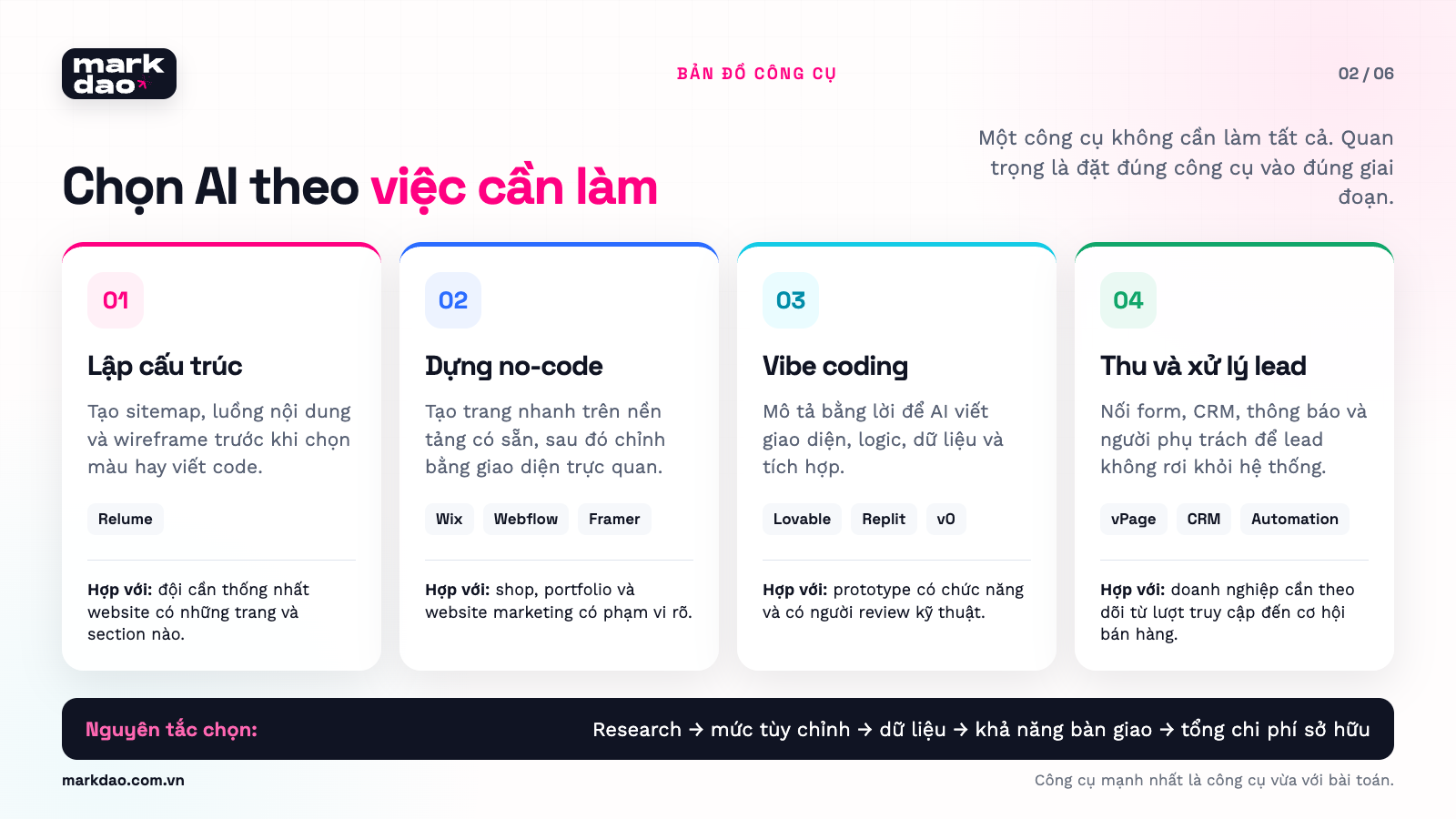
13 AI website builders worth considering
The list below does not rank tools by "which is best." Each tool addresses a different part of the AI website design process.
Features may change based on the plan and time. Please check the official website before choosing a platform for a live project.
1. Wix AI Website Builder: suitable for small shops and services
Wix allows users to describe their website through conversation, generating pages, content, and business components all on one platform. After the AI creates the initial draft, users can continue editing using AI or the drag-and-drop editor. View Wix AI Website Builder
Best for:
- When you need a website quickly.
- When you don't have a development team.
- When you need built-in features like an online store or appointment scheduling.
- When you want to manage updates yourself after launch.
Things to check:
- Costs for upgrading and scaling.
- Data export capabilities.
- Level of customization for brand design.
- Tracking and CRM integrations you require.
2. Webflow AI Site Builder: suitable for multi-page websites and visual editing
According to Webflow documentation updated in July 2026, the AI Site Builder can generate multi-page website structures, content, and themes based on descriptions of the purpose, required pages, and target audience. The generated draft remains fully editable within Webflow's design system. Webflow AI Site Builder Guide
Limitations to keep in mind before you start: The AI Site Builder is currently only available for creating new websites or continuing to edit sites originally built with the AI Site Builder. It cannot directly import an existing Webflow site built using the standard workflow into this AI process. If you do not have a paid Workspace or Site plan, websites are limited to two pages; with either plan, the AI generates up to five pages in the initial round, and you can add more later.
Best used when:
- The website has multiple content pages.
- The marketing team wants to manage and publish content independently.
- You need more layout control than template-based tools provide.
- You have someone familiar with Webflow to finalize responsiveness, CMS, and SEO.
Things to double-check:
- CMS structure before importing large amounts of data.
- Permissions and publishing workflows.
- Headings, canonical tags, redirects, and schema.
- Page speed for sites with complex images or effects.
3. Framer AI: ideal for landing pages, portfolios, and image-heavy websites
Framer AI can generate pages, sections, content, and images directly within your project. Notably, the results remain on the canvas, allowing designers to refine layouts, typography, interactions, and responsiveness. View Framer AI
Best used when:
- You need a landing page or marketing website.
- Visuals and motion are key priorities.
- Your team is comfortable with a Figma-like workflow.
- You want to move quickly from design to a live, functional site.
Additional checks needed:
- Whether the effects slow down the page.
- Manageability as the number of pages grows.
- Forms, CRM, and post-conversion data.
- Consistency when multiple people are editing.
4. Relume: ideal for creating sitemaps and wireframes before design
Relume focuses on the structural phase. AI can suggest sitemaps, content flows, and wireframes. Each section in the sitemap is linked to a wireframe section, helping the team visualize the relationship between structure and interface. Guide to creating a sitemap with Relume
Best used when:
- You are unsure which pages the website needs.
- You need to compare different content organization methods.
- You want to align on the sitemap with the client before detailed design.
- You need to export the structure to Figma or Webflow.
Keep in mind: Relume can generate a logical structure, but it does not replace client interviews and customer journey analysis.
5. Lovable: ideal for landing pages with forms, accounts, or data integrations
Lovable builds websites and applications using natural language, allowing for the addition of forms, user accounts, payments, databases, and integrations. The platform allows for ongoing edits via chat or visual tools, while supporting connections to CRM and marketing tools through integrations. See Lovable for websites
Best used when:
- The landing page requires more than just display functionality.
- Need to save form data.
- Want to create a prototype with interactive flows.
- Have someone capable of verifying logic, data, and security.
Need to check further:
- Data access permissions.
- Authentication and authorization.
- Environment variables and API keys.
- Form error states and integrations.
- Source code handover capability.
6. Replit Agent: suitable for those who want AI to plan, code, and debug within the same environment.
Replit Agent can plan, write code, explain, debug, and improve applications. Replit's own guidelines recommend that users provide specific descriptions, create plans, add context, test, and use checkpoints rather than just entering a single prompt and publishing. Build with Agent guide
Recommended when:
- You need a functional prototype.
- You want to view the code and the live preview simultaneously.
- You can test individual versions.
- The project requires multiple rounds of revisions.
Need to check further:
- Whether data is saved correctly after a reload.
- Whether error flows are working.
- Cross-account access permissions.
- Whether code and documentation are saved to Git.
7. v0: suitable for custom interfaces and projects within the Vercel ecosystem
v0 generates interfaces and applications from natural language, supporting everything from landing pages to full-stack projects that can be deployed on Vercel. View v0 documentation
In the Markdao project, v0 is used in layers: locking in the interface and components first, then connecting data, adding functionality, checking error states, and finally optimizing for production. This is Markdao's implementation method to reduce the scope of errors; it is not a guarantee that v0 will complete or verify each layer on its own.
Best used when:
- You need a unique interface or custom components.
- The project uses React, Next.js, or Vercel.
- The team wants to export and continue developing the source code.
- You need to create a prototype that closely resembles the final product.
Additional checks required:
- Component structure.
- Loading, empty, and error states.
- Preview and production environments.
- Database, authentication, and access permissions.
8. Elementor and Angie: suitable for businesses already using WordPress
Elementor's AI tools operate within the WordPress environment; the new agent product introduced by Elementor is called Angie. Angie can read the structure of a WordPress website, create or edit pages, widgets, CSS, JavaScript, and various administrative components. The results remain components that can be previewed, edited via the interface, or further refined through conversation. View Elementor and Angie for WordPress
Best used when:
- Your current website runs on WordPress and your team is already familiar with Elementor.
- You need to maintain the ability to edit using a visual interface.
- You want AI to assist with specific sections rather than replacing the entire platform.
- You need to integrate blogs, forms, and dynamic data within the WordPress ecosystem.
Things to check:
- The number of plugins and potential plugin conflicts.
- Individual user permissions.
- Update schedules for WordPress, themes, and plugins.
- AI image file sizes and their impact on site speed.
9. 10Web: suitable for AI-powered WordPress website creation or redesign
10Web can generate websites from prompts, import Figma designs, rebuild sites from URLs, and export the results into a WordPress environment with a visual editor. The platform also supports common features like forms, scheduling, and e-commerce. View 10Web AI Website Builder
Best used when:
- You want a quick start but still require WordPress.
- You need to convert Figma designs into editable pages.
- You need to test options for redesigning an old website.
- Your operations team is familiar with WordPress administration.
Things to check:
- Do not copy designs or content that your business does not own.
- Review the structure after importing from a URL or Figma.
- Test speed using real data, plugins, and images.
- Confirm backup, update, and hosting migration procedures.
10. Squarespace Blueprint AI: suitable for service websites and small brands needing a polished look.
Blueprint AI generates a website framework, content, and image suggestions based on basic business information. The results can be further customized within the Squarespace system. View Squarespace Blueprint AI
Best used when:
- You need a portfolio, service website, blog, or small online store.
- You want a clear starting point rather than staring at a blank page.
- You do not require complex application logic or data integrations.
Things to check:
- Flexibility to change the structure as the website grows.
- Integration with local CRMs, payment gateways, and tools in Vietnam.
- Data export rights and long-term maintenance costs.
11. Hostinger AI Website Builder: suitable when you want to bundle site creation, domain, and hosting.
Hostinger offers two methods: building a site with drag-and-drop editing, or using conversational "vibe coding." Hosting, SSL, and various management tools are all included in the system. View Hostinger AI Website Builder
Best used when:
- Shop owners want to get their website online all in one place.
- Ideal for portfolios, blogs, service pages, or small online stores.
- No dedicated technical team.
Things to check:
- Do not assume "SEO-ready" claims mean your SEO work is done.
- Verify platform migration and data export capabilities.
- Test forms, emails, and payment processing under real-world conditions.
12. Durable: suitable for local services needing a website and basic CRM.
Durable builds websites based on a few questions about your industry, business name, and goals. The platform includes image generation tools, CRM, and appointment scheduling, making it a great fit for those who need a simple system to get started. Check out Durable AI Website Builder
Best used when:
- Local services need a website to showcase their work and capture leads.
- You want to manage your website and basic leads within a single platform.
- Your content, structure, and integrations are straightforward.
Things to check:
- Quality of Vietnamese language support and the ability to adjust brand voice.
- Compatibility with the sales tools your business currently uses.
- Ownership of data, domain, and content after canceling your subscription.
13. WebPage.vn and vPage: Vietnamese options for quick deployment.
WebPage.vn uses AI to generate layouts, content, images, and products from your descriptions. vPage focus more on lead generation, customer management, appointment reminders, and reporting.
These two groups of tools are worth considering if you need a Vietnamese interface and workflows that align with how small local businesses operate.
Before making a choice, you should test the entire journey from accessing the site and submitting a form to receiving and processing the lead.
Which tool should you choose for your specific needs?
- Need: Introductory website for a small shop · Tools to try: Wix, WebPage.vn · Key note: Check domain, forms, and data export permissions
- Need: Landing page with striking visuals · Tools to try: Framer, Webflow · Key note: Keep effects balanced and check mobile speed
- Need: Sitemap and wireframe · Tools to try: Relume · Key note: Research thoroughly before finalizing the structure
- Need: Landing page with data or user accounts · Tools to try: Lovable, Replit Agent · Key note: Must verify authentication and data handling
- Need: Custom interface via code · Tools to try: v0, Lovable · Key note: Requires someone to review the code and libraries
- Need: WordPress website with AI support · Tools to try: Elementor/Angie, 10Web · Key note: Check plugins, performance, admin permissions, and maintainability
- Need: Service or portfolio website · Tools to try: Squarespace Blueprint AI, Hostinger, Durable · Key note: Check Vietnamese language support, forms, local integrations, and data export permissions
- Need: Lead generation website for a Vietnamese shop · Tools to try: vPage · Key note: Test the lead reception and follow-up process in practice
- Need: Brand website for multiple departments · Tools to try: AI-assisted professional team · Key note: Requires research, design systems, governance, and QA
Mini-SOP for using AI website builders in real projects
Button names and interface layouts may change with updates. Use the steps below as a workflow checklist, and cross-reference them with the current interface and the tool's official documentation before implementation.
SOP 1. Drag-and-drop AI Website Builders: Wix, Webflow, Framer, Squarespace, Hostinger, and Durable
- Create a test website; do not connect your primary domain right away.
- Input your goals, target audience, page list, brand voice, and mandatory features.
- Only create three to five essential pages in the first round.
- Check the sitemap and section order before modifying colors or effects.
- Replace all placeholder content with information confirmed by the business.
- Check the mobile view for every page; do not just look at the homepage.
- Test the form with correct, incorrect, and duplicate data; confirm that the data reaches the correct destination.
- Set up the title, description, URL, canonical, sitemap, and redirects if the tool supports them.
- Connect the domain name after completing the acceptance checklist.
- Save a backup, version, or rollback instructions before publishing.
Differences by tool:
- For Webflow: go to Dashboard → New site → AI Site Builder → describe the website → Generate → add or remove pages → Generate site → Continue building. Do not choose this flow if the goal is to apply the AI Site Builder directly to an existing website not created with AI.
- For Framer: double-check breakpoints, components, CMS, animations, and SEO settings on the canvas after the AI generates the initial version.
- For Squarespace: Blueprint AI can be used for free to create a draft, but a paid plan is required to publish the website.
- For Hostinger and Durable: check data export permissions, domain connection, forms, CRM, and maintenance costs before becoming dependent on the platform's ecosystem.
SOP 2. Sitemap and wireframe generation tool: Relume
- Create a new project and enter the company description, website goals, target audience, and required pages.
- Generate the sitemap and review only the homepage first to check the direction.
- Edit page names, section descriptions, and information order directly on the sitemap.
- Create an alternative sitemap option for comparison if the structure is not yet clear.
- Convert the approved sitemap into wireframes.
- Insert actual content into key sections before exporting to Figma or Webflow.
Conditions for moving to the next step: Every page must have a target audience, a core question, supporting evidence, and a specific CTA. If a page lacks a clear purpose, delete or merge it before starting the design.
SOP 3. Vibe coding tools: Lovable, Replit, and v0
- Enable Plan mode or ask the AI to create a plan before making any changes to code or data.
- Clearly define what "done" looks like, what is out of scope, and how to test it.
- Connect Git or a versioning system before making major changes.
- Each prompt should address only one category of issues: structure, components, data, forms, or responsiveness.
- Review the diff or the list of changed files; do not rely solely on the preview.
- Create a checkpoint after every stable state.
- Use an environment variable management system for secrets; never paste API keys directly into the interface or client-side code.
- For accounts and databases, test each role and its permissions for reading, creating, updating, and deleting data. With Lovable/Supabase, you must review RLS policies before publishing.
- Run tests on preview or staging environments using mock data.
- Only push to production once the main flow, error handling, and rollback procedures have been fully tested.
A testable implementation prompt:
Before writing any code, create a plan for the B2B quote request form. The scope includes the mobile interface, email or phone number validation, UTM tracking, sending data to the CRM, and displaying three states: loading, success, and error. Do not change the navigation, design tokens, or existing data schema. List the files expected to change, the definition of done, test cases, and the rollback procedure. Wait for my approval of the plan before you begin building.
SOP 4. AI in WordPress: Elementor/Angie and 10Web
- Create a staging environment and a full backup before installing or allowing AI to modify the website.
- Document the versions of WordPress, themes, plugins, and PHP.
- Only test AI on a single representative page or component.
- Verify the HTML, CSS, JavaScript, responsiveness, and forms after the AI generates them.
- Remove any plugins, libraries, or code snippets that are no longer in use.
- Test for conflicts, caching, administrative permissions, and speed using real data.
- Review on staging, create a new backup, and then push changes to production.
A final sign-off gate before hitting Publish.
- Use a preview URL or a staging environment separate from the live website.
- Maintain a stable version for rollback.
- Remove all placeholder content, images with unclear usage rights, or unapproved claims.
- Users can complete primary actions on mobile devices using cellular data.
- Forms retain data upon error and route leads correctly to the CRM or the responsible person.
- Test accounts can only view and edit authorized data.
- No secrets in browser-side code.
- Google URL Inspection or Rich Results Test can see the main content and important links.
- For real user data, the Core Web Vitals targets are LCP under 2.5 seconds, INP under 200 milliseconds, and CLS under 0.1 at the 75th percentile, checked separately for mobile and desktop.
- Assign an owner, set up alert channels, and define response times for website or integration errors.
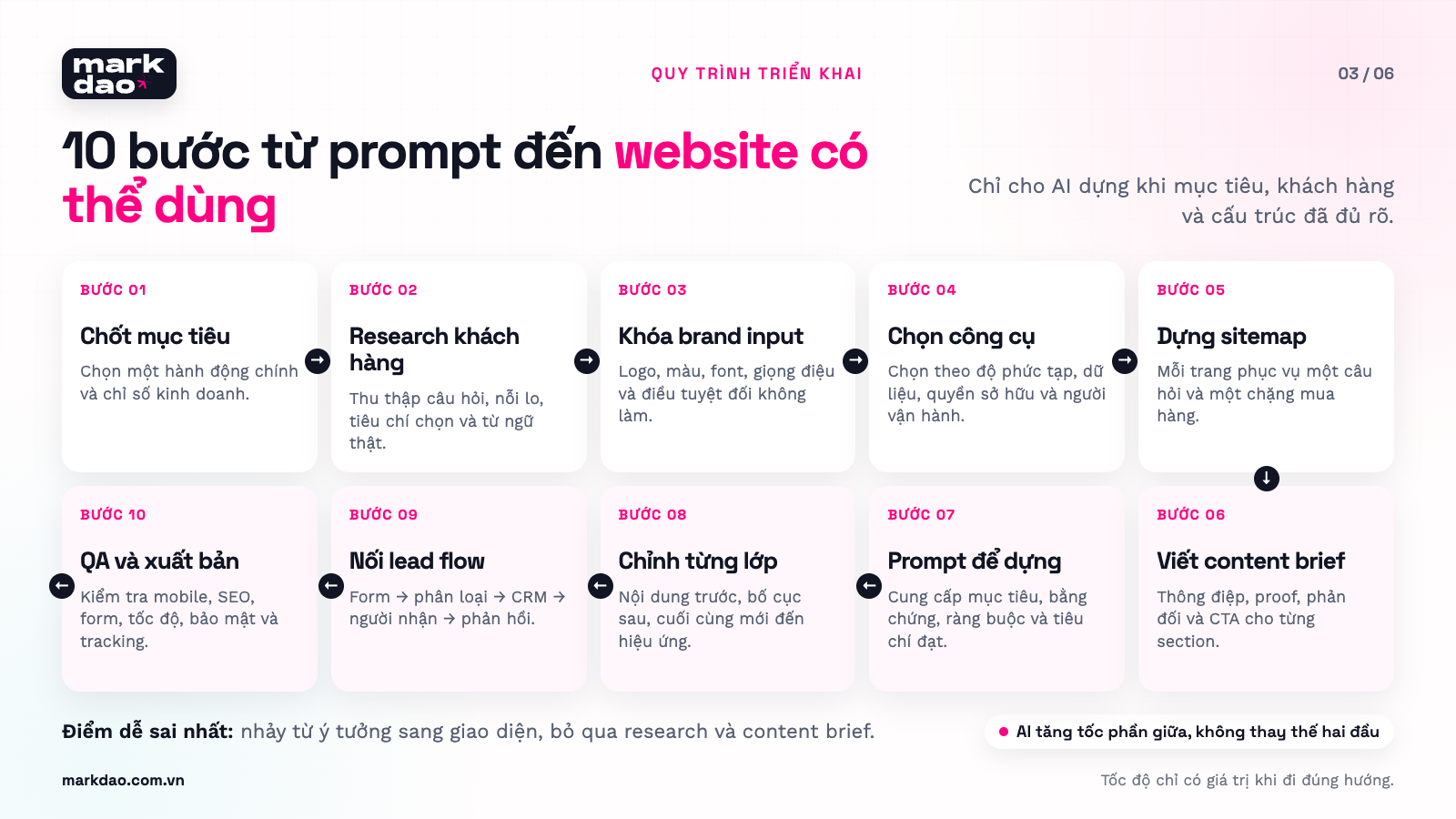
10-step guide to designing a website with AI
This section uses a consistent example: Moc Nhien, a roasted coffee shop in Ho Chi Minh City that wants a website to showcase products, take orders, and collect requests for office coffee supply.
Step 1. Choose a primary outcome for the website
Don't start with "I want a beautiful website." Complete the following sentence:
This website needs to help [target audience] take [a primary action] so the business can achieve [a measurable result].
Choose a primary result:
- Drive phone calls.
- Collect consultation leads.
- Receive orders.
- Book appointments.
- Download company profile.
- Sign up for a trial.
Moc Nhien's example:
The website helps home coffee buyers choose the right beans and place orders, while also allowing offices to submit quote requests.
These two customer groups have different journeys. Retail buyers need to see flavor profiles, brewing methods, and prices. Office buyers need to see supply capacity, volume, delivery schedules, and invoicing. If you don't separate them from the start, AI often blends both needs into one long page.
The output should include:
- One primary goal.
- One or two key conversions.
- How to measure conversions.
- The person responsible for receiving the results.
Step 2. Conduct minimal research before opening AI tools
AI cannot know what your customers are thinking unless you provide the data.
Spend one to two hours on these four simple sources:
- Ask your three most recent customers: Why are they looking to buy, what are they comparing, and what gives them peace of mind?
- Read sales messages: Record the ten most frequently asked questions.
- Ask the sales manager or store staff: Which leads are likely to buy, and what information is needed before providing a consultation?
- Check Google: Note how users refer to the product, related questions, and which pages are ranking at the top.
For Moc Nhien, research might reveal that customers don't ask "Arabica or Robusta" first. They usually ask "which one is less acidic," "can it be used in a machine," and "how long does one bag last." This is the language that needs to appear on the website.
Need to collect:
- What does the business sell?
- Who is the primary customer?
- What do customers usually ask before buying?
- What are they still hesitant about?
- What is a provable point of difference?
- What is the primary action on the website?
- Are there real photos, price lists, reviews, or projects available?
Quick research questionnaire:
- What event triggers their search?
- What problem are they trying to solve?
- What methods have they already tried?
- What are they afraid of buying by mistake?
- What proof do they need to see?
- Who else is involved in the decision?
- What makes them willing to leave their phone number or email?
Step 3. Create a brand data package for AI
Don't ask for "modern, premium, professional." These three words are too broad and can produce thousands of different results.
Prepare a concise package including:
- The correct version of your logo.
- Color codes and fonts.
- Three words that describe your brand personality.
- Three things your brand should not be like.
- Real photos that can be used.
- Tone of voice.
- Approved content samples.
- A list of forbidden words.
Example: Moc Nhien is approachable and knowledgeable about coffee, but not condescending. Do not use heavy black backgrounds, flying coffee bean imagery, or the phrase "awaken all your senses." Prioritize photos of real coffee brewing setups, morning light, and concise copy.
The output should include: A one-to-two-page brand input data sheet.
Step 4. Choose tools based on complexity, not popularity
For Moc Nhien:
- If you only need an introduction page and a chat button, Wix or WebPage.vn should suffice.
- If you need high-quality visuals and campaign landing pages, Framer is a better fit.
- If you need a sitemap before starting the design, use Relume.
- If you need to store quote requests and categorize retail versus office clients, consider Lovable, Replit, or a platform with built-in CRM.
- If the website is to become your primary sales channel, you will need a designer, developer, and tester to take responsibility.
Before choosing, answer these five questions:
- Do you need to export the source code?
- Do you need the flexibility to switch platforms in the future?
- Who will be responsible for weekly website updates?
- What data needs to be stored?
- If a form breaks, who can fix it?
Step 5. Create a sitemap before designing the interface
Sample prompt for Relume, Webflow, or an AI assistant:
I run Moc Nhien, a roasted coffee shop in Ho Chi Minh City. We have two customer groups: home coffee drinkers and offices that need a recurring coffee supply. The website needs to help retail customers choose beans based on their taste preferences and help offices submit quote requests. Please propose a sitemap with a maximum of eight pages. For each page, clearly state the target audience, the main question it needs to answer, the necessary social proof, and the appropriate CTA. Do not create any pages that do not have a clear purpose.
Proposed sitemap:
- Homepage.
- Coffee selection by taste profile.
- Product catalog.
- Coffee for offices.
- Roasting methods and bean origins.
- Brewing guide.
- Frequently asked questions.
- Contact.
After AI suggestions, review the following:
- Are there any pages that exist only because other websites have them?
- Is a single page trying to serve two conflicting needs?
- Can customers go from their question to taking action in three clicks or less?
- Which pages will receive traffic from Google?
- Which pages will generate leads or orders?
Step 6. Write a content brief for each page
Each page needs a short brief before AI writes the content.
Content brief template:
- Reader: who are they?
- Context: where are they coming from?
- Main question: what do they need to know?
- Barriers: what is stopping them from taking action?
- Evidence: what images, data, or case studies are needed?
- CTA: what is the next step?
- Keywords: which phrases must appear naturally?
Example for the “Office Coffee” page:
- Target audience: office managers, HR personnel, or small business owners.
- Key questions: consumption levels, machine types, delivery schedules, and invoicing.
- Pain points: fear that the coffee won't suit everyone's taste, inconsistent deliveries.
- Proof: sampling process, delivery schedule, and photos of real clients.
- CTA: get a trial pack and estimate consumption.
Step 7. Write clear requirements for the AI to generate the first draft
A good prompt should include six parts:
- Business context.
- Primary user.
- Page objectives.
- Required content.
- Visual and brand guidelines.
- Mobile states, forms, and error handling.
Full sample prompt:
Design an “Office Coffee” page for Moc Nhien. The target audience is HR, office managers, and business owners with 10 to 100 employees. The goal is to help them estimate coffee consumption and sign up for a trial pack. The page should include: common pain points, three packages based on company size, how to choose beans, delivery schedules, invoicing, a seven-day trial process, FAQs, and a form. The tone should be approachable and professional, avoiding flowery language. Use cream, wood brown, and deep green from the provided color palette. On mobile, the CTA must be visible after the introduction. The form should only ask for name, email or phone number, office size, and start date. Include states for submitting, success, and error. Do not use stock photos of people shaking hands in an office.
Key takeaway: the more specific your requirements, the less the AI has to guess. Don't just enter “create a modern and professional website” as the results will be generic; provide clear details on:
- Brand style.
- Primary and secondary colors.
- Fonts.
- How to use images.
- Customer type.
- Content hierarchy.
- Primary CTA.
- Priority device.
Replace placeholder content and images with real data, and check:
- Business name.
- Address.
- Phone number.
- Pricing.
- Policies.
- Product information.
- Team photos.
- Projects and customer testimonials.
- Terms and privacy policy.
If the page is used for advertising or lead generation, refer to the SEO-friendly landing page design guide to check message structure, CTAs, and searchability.
Step 8. Adjust layer by layer; do not ask AI to "make it look better."
After the first draft, break down the editing process into rounds:
- Structure cycle: Is the content order logical?
- Content cycle: Is the copy accurate and on-brand?
- Branding cycle: Are colors, fonts, imagery, and spacing consistent?
- Conversion cycle: Are the CTAs, forms, and social proof sufficient?
- Responsive cycle: Does it work on mobile, tablet, and desktop?
- Technical cycle: SEO, speed, accessibility, and security.
Requests to "make it look better" often lead AI to add gradients, cards, animations, or icons without solving the actual problem. Please describe the observed issue:
The headline takes up almost the entire mobile screen. Reduce it to a maximum of four lines at 390px, keep the CTA above the fold, and ensure the font size is no smaller than 18px.
Example for checking a website on mobile
Check at least:
- Is the headline being cut off?
- Is the button covered by the chat widget?
- Is the form easy to fill out?
- Does the menu open and close properly?
- Are the images loading too slowly?
- Is the content overflowing horizontally?
- Can users navigate with one hand?
Step 9. Build the form and lead workflow
A well-functioning form doesn't end with a "Submission successful" message.
Map out the entire journey:
User clicks CTA → starts filling out form → submits form → data validation → lead saved → notification sent to owner → confirmation sent → track results
Set up the form and lead capture journey
Keep the form simple by only requesting:
- Name.
- Email or phone number.
- Primary need.
After submission:
- The user receives a confirmation.
- The lead is saved in the correct system.
- The person in charge receives a notification.
- The source and landing page are recorded.
- There is a clear response deadline.
For Moc Nhien, retail customers and office clients should be separated:
- Retail customers are directed to products or the shopping cart.
- Office-based leads are added to the CRM or consultation list.
- Requests from companies with over 100 employees are routed to the B2B manager.
- Form submitters receive a confirmation email and know when to expect a response.
Reduce form friction:
- Accept either an email address or a phone number when only one contact method is needed.
- Enable autofill.
- Use the correct keyboard type for email and phone number fields on mobile.
- Do not ask users to re-enter data you already have.
- Only ask for information that truly changes how you consult.
- Explain why each piece of sensitive information is required.
- Retain data when a form error occurs.
Step 10. Test as a real customer before publishing
Don't just look at the homepage and hit Publish.
Run through at least five scenarios:
- A new visitor arriving from Google who is unfamiliar with the brand.
- A visitor viewing on an iPhone using a mobile network.
- A visitor entering an incorrect email or leaving a required field blank.
- A visitor submitting the form twice.
- An employee receiving the lead and opening it in the CRM.
Checklist:
- Correct Title, H1, and meta description.
- Each page has a clear, primary H1 following the project's editorial guidelines; this is for maintaining a logical structure, not an absolute "ranking hack."
- Links and menus are functional.
- Images have appropriate alt text.
- No horizontal overflow on mobile.
- Buttons are not obscured by popups or chat widgets.
- Forms have loading, success, and error states.
- Leads are directed to the correct destination.
- Confirmation emails do not land in spam during testing.
- Cookies and consent banners align with the data being collected.
- No API keys or sensitive data are exposed.
- Backups are in place and a point of contact is assigned.
- For JavaScript-heavy websites, verify content and links in the rendered HTML using URL Inspection or the Rich Results Test; prioritize server-side rendering or pre-rendering where appropriate.
- Check LCP, INP, and CLS on mobile; do not rely on a single Lighthouse score as a substitute for real user data.
Vibe coding: why a working website might not be ready for production.
Vibe coding is useful for testing ideas, creating prototypes, or building small internal tools. Risks arise when these prototypes are pushed directly to production without proper system design and independent testing.
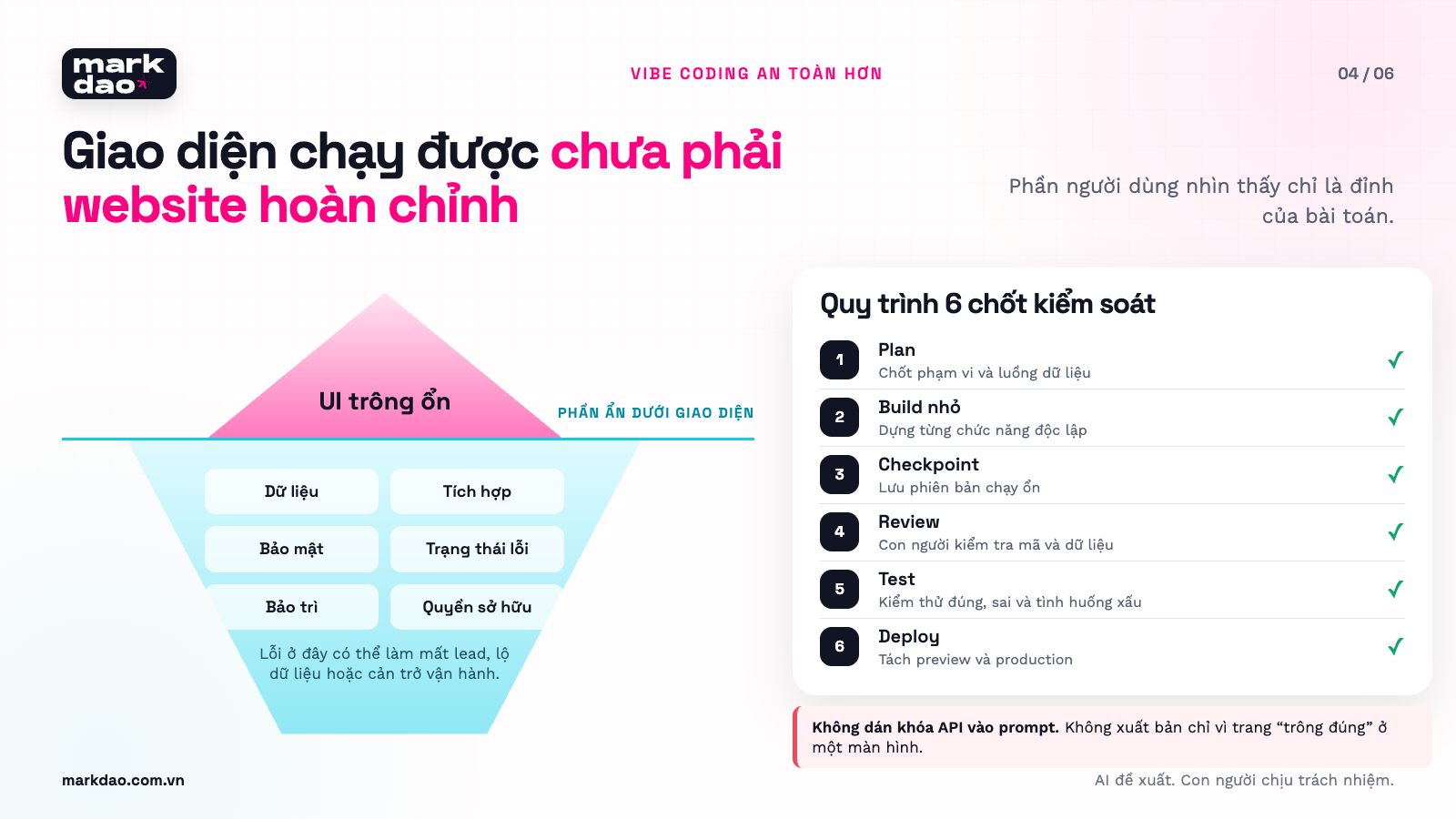
AI only processes the context it is given.
If the prompt doesn't mention permissions, AI might create a login function without properly isolating user data. If the prompt only says "create a contact form," AI might build a beautiful form without handling spam, logging errors, or connecting to a CRM.
Fixing one part can break another.
Changing a form structure can break existing tracking. A new library might conflict with current ones. A UI update might look great on desktop but cause overflow issues on mobile.
Code may function correctly but be difficult to maintain.
Common mistakes include:
- Duplicate components.
- Inconsistent variable naming.
- Scattered logic.
- Unused libraries.
- Lack of installation documentation.
- Uncertainty about which version is actually running in production.
Security risks that are not visible to the naked eye.
A pre-print study published on arXiv in June 2026 identified recurring error patterns in the vibe-coded applications surveyed, such as placeholder logic, unfiltered inputs, and sensitive information exposure. While these findings serve as a notable warning, they should not be interpreted as representative error rates for all tools or projects. The study also notes that while better prompts can reduce errors, they do not entirely eliminate risks. Understanding the (In)Security of Vibe-Coded Applications
OWASP recommends that all AI-generated changes require human oversight, library verification, secret protection, the use of restricted environments, and that AI-written tests should not be considered the sole proof of security. OWASP Secure Coding with AI
How to use vibe coding more safely
- Plan before you build.
- Break the project into smaller parts.
- Save checkpoints frequently.
- Connect to Git early.
- Separate preview and production environments.
- Do not paste API keys into prompts or source code.
- Run dependency and secret checks.
- Write tests for critical user journeys.
- Have someone else review security and data handling.
- Document who approved each change.
10 common mistakes in AI website design and how to fix them
1. Interface looks like every other website
Signs: A hero section in the middle, blue-purple gradients, three feature cards, and stock photos that look like common templates.
Cause: Prompts only use broad terms like "modern," "tech," or "premium."
How to fix: Provide reference images, layout principles, real photos, and a list of "don'ts."
2. Colors and fonts change between pages
How to fix: Create design tokens for colors, typography, spacing, border radius, buttons, and states. Instruct the AI to use only these tokens instead of choosing new values.
3. Content sounds fluent but lacks substance
Signs: Many sentences like "delivering comprehensive solutions" without specifying outputs, processes, or requirements.
How to fix: Every claim must be supported by evidence, examples, acceptance criteria, or real data.
4. The website does not address customer questions
How to fix: Gather questions from sales calls, messages, old forms, Search Console, and interviews. Include the customer's exact language in the content brief.
5. Sitemap based on company structure
Signs: the website is organized by department, leaving customers unsure where to start.
How to fix: organize by user tasks, pain points, industry, use cases, and buying stages.
6. Every CTA is "Contact Us"
How to fix: create CTAs based on readiness levels:
- Researching: view guides.
- Evaluating: view case studies or checklists.
- Ready to buy: book a meeting or request a quote.
7. The form looks good but doesn't generate leads
How to fix: check the flow from submission to CRM, confirmation emails, and the recipient. Measure form starts, errors, and successes.
8. Mobile is just a shrunken desktop version
How to fix: determine which content should appear first on small screens, which CTAs should be accessible with one hand, and which elements should be removed.
See also Markdao's 2026 Mobile-First Checklist.
9. SEO is limited to titles and meta descriptions
How to fix: check heading structure, internal links, canonical tags, sitemaps, rendering, appropriate schema, unique content, and actual page speed.
See more guides on building an SEO-standard website structure.
For websites with multiple service groups and long search journeys, comprehensive SEO services help connect demand research, page structure, content, and lead measurement into a single system instead of optimizing individual keywords separately.
10. No one is responsible after publication
How to fix: assign owners for content, technical aspects, data, and conversions. Every issue must have a priority level, a person in charge, and a follow-up deadline.
Who is an AI website suitable for?
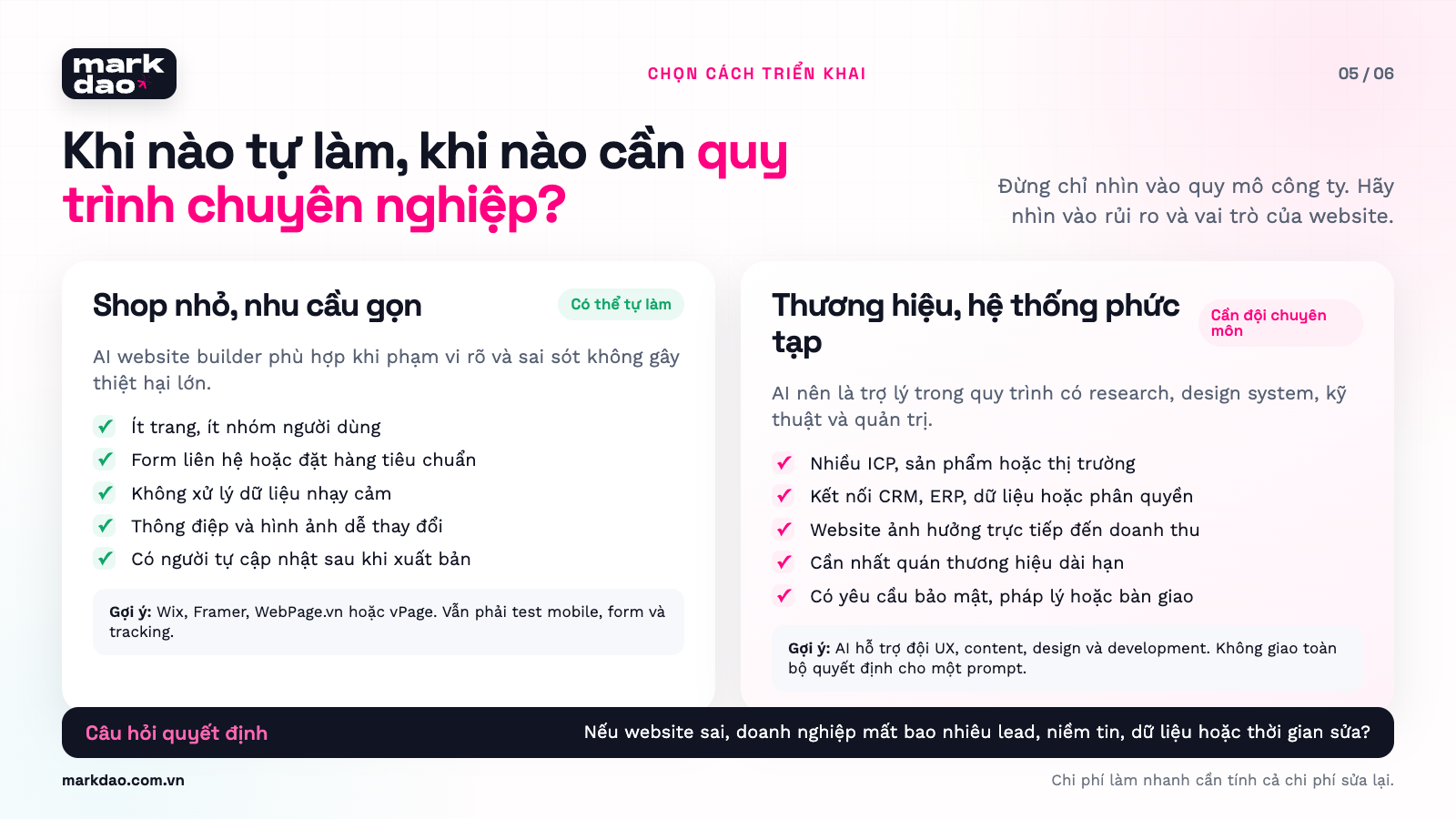
Suitable for DIY with AI when
- The website has few pages.
- Goals are simple and easy to track.
- No sensitive data processing.
- No complex system integrations.
- The website is not yet a primary revenue source.
- The owner is comfortable using existing platforms and components.
- There is someone to test content, forms, and mobile responsiveness before launch.
Suitable examples:
- A bakery needing a menu and an order button.
- A freelancer needing a portfolio.
- A coffee shop needing a map and table reservations.
- A small shop needing a page to showcase a collection.
- An event needing a registration page for a limited time.
You should have a professional team when
- The website represents a large-scale brand.
- There are multiple customer segments and markets.
- The buying journey is long.
- You need to connect CRM, ERP, payment gateways, or internal systems.
- There are user accounts, permissions, or personal data involved.
- The website is a critical lead generation channel.
- Multiple departments need to update content.
- Errors can impact your reputation or revenue.
For example, a factory needs more than just an "About Us" and "Products" page. Buyers need technical specifications, certifications, production capacity, export markets, quality control processes, and a point of contact for consultation. Different groups, such as engineers, procurement officers, and executives, evaluate suppliers based on different criteria.
AI can build those pages. However, it doesn't inherently know which documents are reliable, which buyers are decision-makers, or which leads should be routed to export sales.
From AI websites to lead-generating websites
A lead-generating website is more than just a form. It must help the right people realize that the business understands their problems, provide sufficient evidence, and offer a manageable next step.
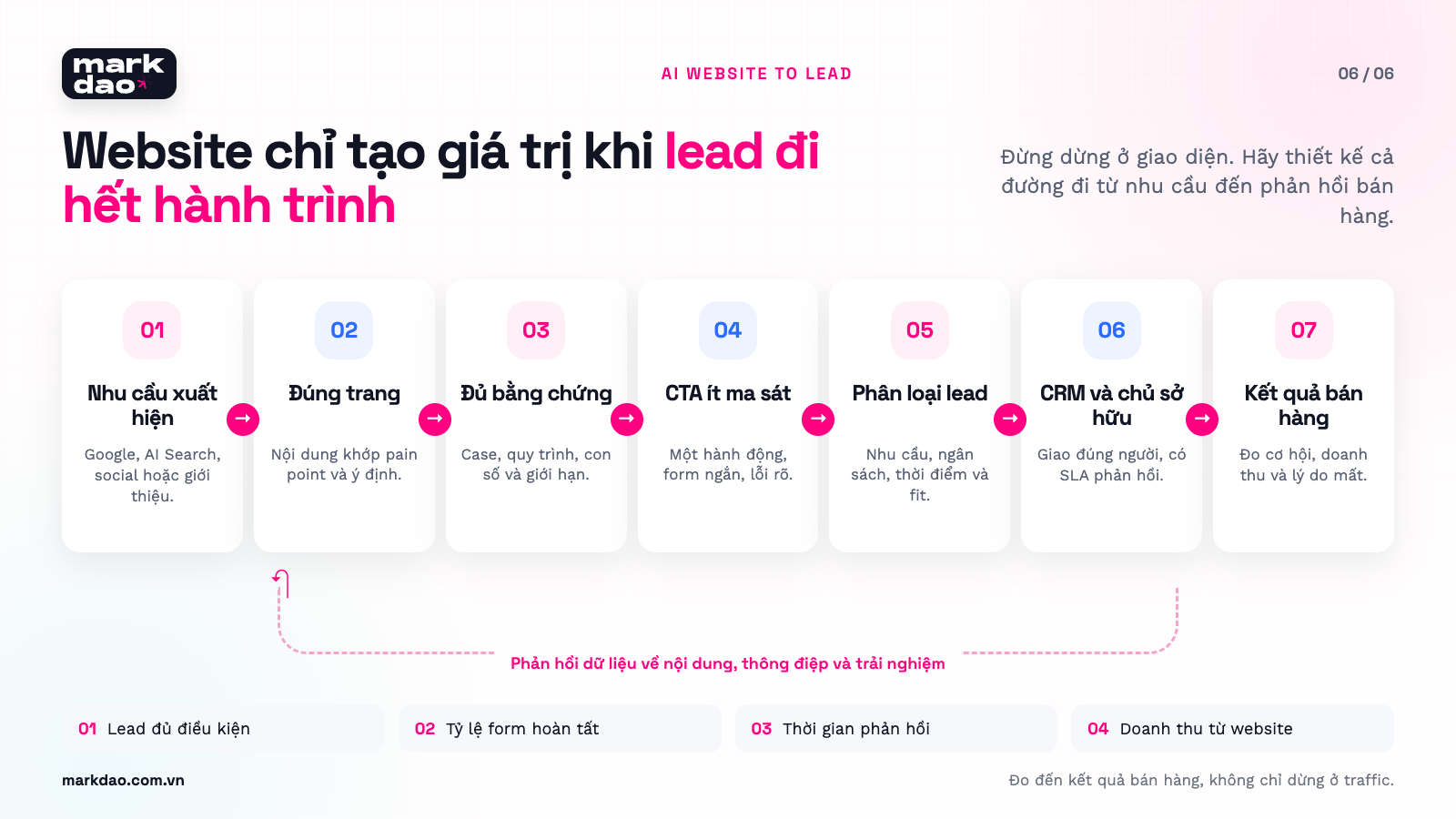
1. Being found by the right intent
Content should stem from actual customer questions. Keywords are simply how that intent is phrased on Google.
2. Helping customers self-qualify
The website needs to clarify:
- Who the service is for.
- Who it is not for.
- What the deliverables include.
- Terms and scope.
- How results are measured.
3. Providing evidence at the right time
New prospects need guidance. Those comparing options need case studies, processes, and criteria. Those ready to decide need scope, timelines, costs, and risk mitigation strategies.
4. Collecting just enough information
Forms should only ask for information that helps tailor the consultation. If sales still has to call and ask everything from scratch, the current form isn't providing enough value.
5. Handing off leads with context
Sales should receive:
- Lead source.
- First page and conversion page.
- Service of interest.
- Content viewed.
- Form responses.
- ICP fit level.
- Timeline for implementation.
6. Feeding sales results back into the website
If many leads are rejected due to budget, scope, or industry mismatch, the website needs to adjust its content and screening questions. If a case study generates many high-quality appointments, you should increase internal links to it and move it closer to the CTA.
The Markdao Method: turning your AI website into a lead generation system
AI can build a page in just a few minutes. Businesses still have to answer the harder questions: who is the page for, why should the buyer trust it, where do the leads go, and what data will the team use to improve the website?
Markdao's website design services disclose five layers of work: content strategy, UX/UI, technical development, SEO foundation, and testing and handover. In AI website projects, Markdao translates these layers into eight implementation gates. Each gate must have clear inputs, outputs, and approval criteria. AI is only used when it shortens the work without compromising the basis for decision-making.
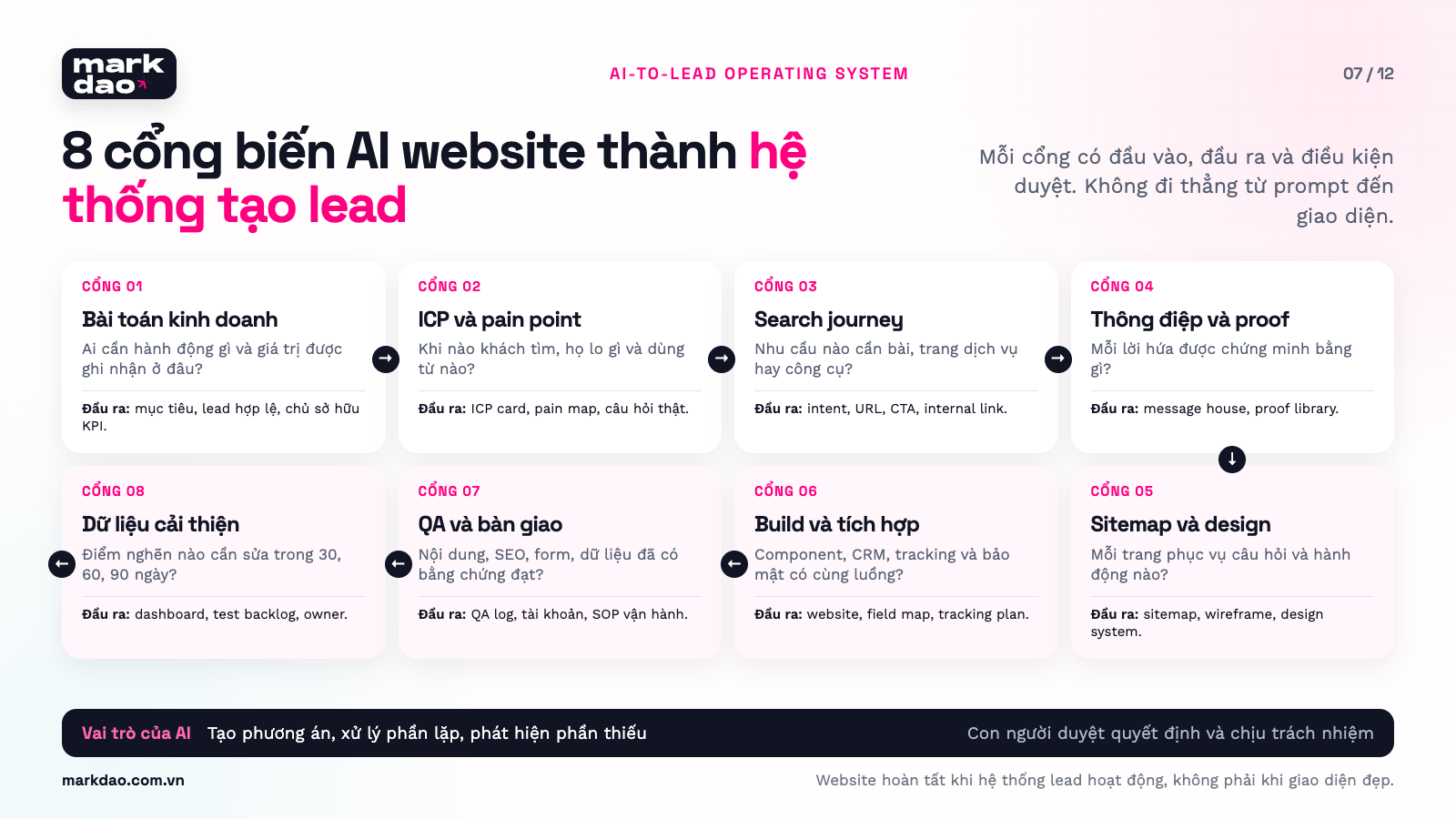
Markdao's four principles for maintaining quality
Principle 1: Start with business decisions, not tools.
If the goal is to generate B2B quote requests, the structure, evidence, and forms will differ from a website selling a low-cost product. Choosing a tool before finalizing your goals often leads to a website that fits the platform's features but not the way your business sells.
Principle 2: Organize the website around customer questions, not departmental charts.
Customers don't wake up thinking, "Today I'm going to read the Company Capabilities page." They look for answers to specific situations, such as "Can the supplier meet the production volume?", "What does the cost include?", or "How long does it take to implement?". The website needs to guide them to those answers in the fewest steps possible.
Principle 3: Real content comes before beautiful design.
If only placeholder text is used, the design team cannot know if a headline needs two lines or four, how many columns a specification table requires, or how many images a case study needs. Markdao integrates real content into wireframes early so that the layout can be tested with exactly what the user will read.
Principle 4: Measure leads and sales opportunities.
Traffic, time on page, and rankings are initial signals. The final result must account for the number of qualified leads, booking rates, conversion rates into opportunities, and reasons why leads are unqualified. If sales data does not flow back to the website, the marketing team only knows that people are visiting, not whether the site is actually creating value.
Phase 1. Define business objectives and lead criteria
A website can only be designed correctly when the business agrees on what constitutes a valuable result.
Markdao asks:
- What goal is the website serving over the next 12 months?
- What are the characteristics of a qualified lead?
- Which products or services are the priority?
- Who receives the leads and what is the required response time?
- If the website were down for a day, which department would be affected?
- Which parts of the site does the business want to manage independently after handover?
Example: An interior design firm might say their goal is to "increase inquiries." This is not specific enough for design. Markdao needs to clarify which inquiries are more valuable: a client needing an apartment design, a developer requesting a bulk quote, or someone just asking to buy a single item. These three groups require different landing pages, social proof, and form questions.
AI support: Summarize meeting minutes, group requirements, identify unanswered questions, and generate test scenarios.
Required deliverables:
- A one-page website objectives document.
- Definitions of qualified leads and unqualified leads.
- One primary conversion for each customer segment.
- List of systems to be connected.
- Owner of each metric after the website goes live.
Gate criteria: Everyone involved must be able to answer one question: “Who is the website helping to perform what action, and where is the result recorded?”
Phase 2. ICP research and pain point mapping
An ICP is the customer segment that a business can serve effectively and generate appropriate business value. Markdao goes beyond age, job title, or company size. Our research team dives deep into the triggers for demand, the jobs the buyer is trying to get done, their concerns, and the evidence they need to see before providing their information.
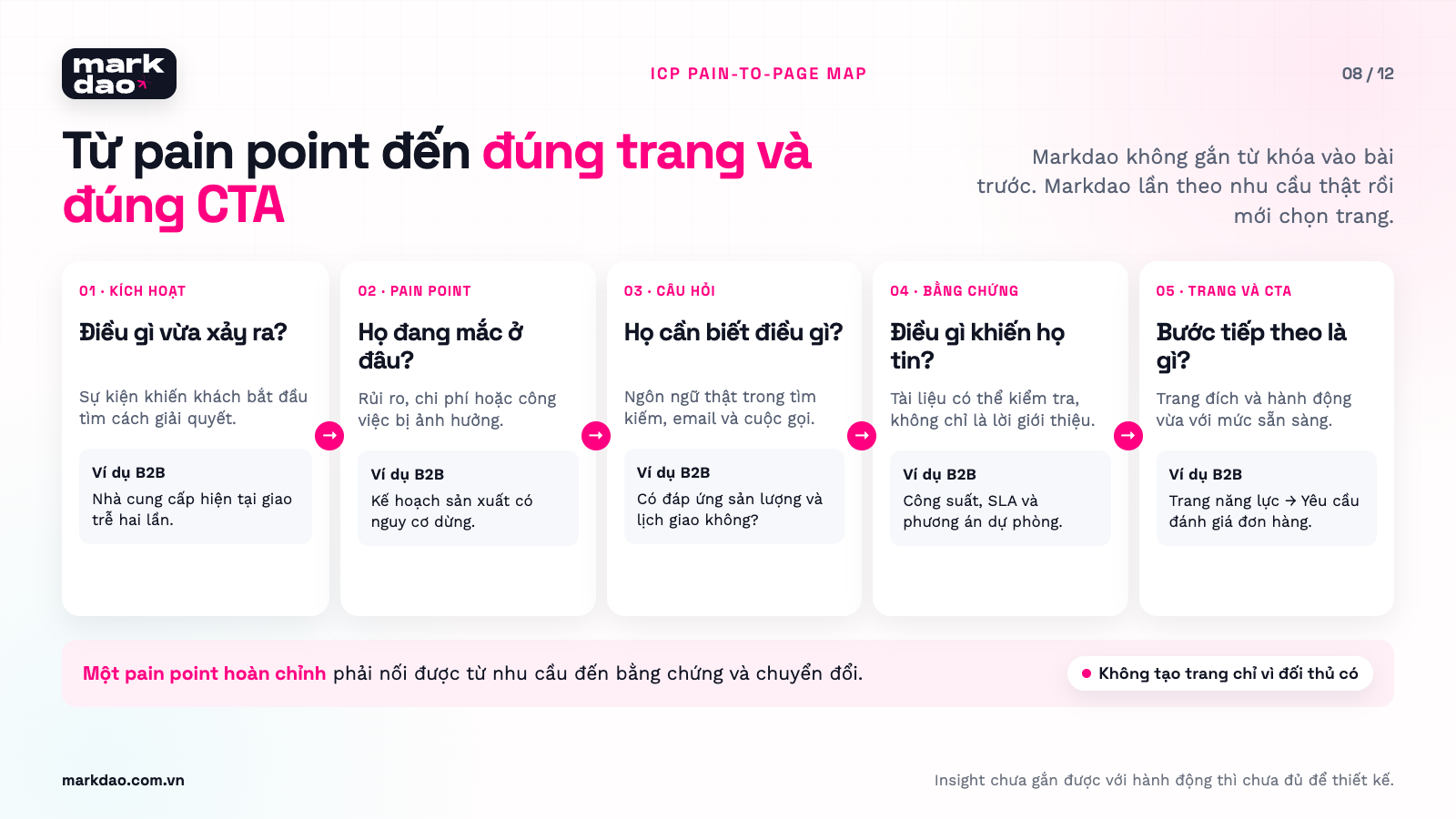
Six layers of data Markdao collects:
- Triggering situation: what just happened that caused the buyer to start searching?
- Job to be done: what outcome do they want to change in their work or life?
- Current bottleneck: where is their current method causing a loss of time, money, opportunities, or trust?
- Selection criteria: do they compare providers based on price, speed, experience, technology, or partnership capability?
- Decision-making concerns: what are they afraid of choosing incorrectly, and who will be held responsible if the project fails?
- Search language: What terms do they use on Google, in emails, messages, and sales calls?
Recommended sources of evidence:
- Interviews with customers who have purchased and those who have declined.
- Call notes, emails, sales conversations, and form questions.
- Google Search Console, Google Ads Keyword Planner, and internal search data.
- Google Analytics 4 and heatmap tools to see where users pause, scroll, or leave the page.
- Public reviews, industry forums, and competitor sites, while distinguishing isolated opinions from recurring patterns.
Simulated example for a B2B packaging manufacturing business:
- ICP: Purchasing Manager · Trigger event: Current supplier is delivering late · Real question: Can you meet production volume and delivery schedules? · Evidence needed: Capacity, SLAs, contingency plans · Page and CTA: Capabilities page → Request an order assessment
- ICP: Engineering Manager · Trigger event: New product requires different materials · Real question: Do you meet the exact specifications and certifications? · Evidence needed: Datasheets, samples, standards · Page and CTA: Technical solutions page → Request a sample
- ICP: Business Director · Trigger event: Need to reduce supply chain risk · Real question: What are the risks if we switch suppliers? · Evidence needed: Transition process, case studies, dedicated point of contact · Page and CTA: Industry solutions page → Schedule an audit
This is a simulated example to explain the methodology, not a case study or actual results from a Markdao client.
AI support: Transcribing interview content, grouping similar questions, proposing hypotheses, and comparing language across groups. Researchers must still review the original sources, check for outliers, and decide which insights are sufficiently supported by evidence.
Required deliverables: ICP cards, pain maps, lists of actual questions, proof inventory, and landing page hypotheses.
Gate criteria: No more single "target customer" for the entire website. Each key group has its own needs, evidence requirements, and actions.
Phase 3. Connecting search intent with the buying journey
Markdao does not create a keyword list and demand a post for every keyword. The SEO team starts with the ICP's pain points and questions, then uses search data to confirm how users express those needs.
Implementation process:
- Gather questions from customer research.
- Check Keyword Planner, Search Console, search suggestions, and actual SERPs.
- Group by intent: how-to, comparing options, pricing, choosing a provider, or troubleshooting.
- Assign each primary intent to a suitable URL.
- Choose a CTA based on the reader's readiness.
- Identify internal links that guide the reader to the next step.
Example: The term "AI website design" can encompass at least three different needs:
- Wanting to know which tools can build a site automatically.
- Wanting to learn the process of designing a website using AI.
- Considering whether to do it yourself or hire a professional agency.
A single guide can answer all three if the structure is clear enough. The term "AI website design services" tends to be more commercial and requires a service page featuring scope, process, proof, and a consultation CTA. Separating intents correctly helps prevent two of Markdao's own pages from competing with each other.
AI support: categorize question lists, suggest topic clusters, and create a draft keyword-to-page map. AI must not fill in search volume, difficulty, or traffic forecasts without data from actual tools.
Deliverables must include: a needs map, keyword clusters, intent, destination URLs, CTAs, incoming and outgoing internal links, and metrics to track.
Gate criteria: Each URL must have one search mission and one conversion mission; do not create pages just to house a keyword variation.
Phase 4. Building messaging and evidence architecture
Many AI-generated websites sound fluent but fail to build trust because the content is entirely self-promotional. Markdao breaks messaging down into four layers.
- Problem: accurately describes the situation the reader is facing.
- Promise: the results the business can help achieve.
- Mechanism: explains the methodology and scope of responsibility.
- Proof: real projects, actual photos, processes, sample outputs, data, or clear limitations.
The bigger the promise, the more specific the proof required. "SEO-optimized website" is more than just a label. The content must show the reader where they can edit titles, canonical tags, headings, alt text, schema, and redirects; who will perform the work; and how the final sign-off process works.
The proof test:
- If you remove the Markdao logo, could this sentence appear on any other agency's website?
- How can the buyer verify this claim?
- Are there actual photos, real documents, or genuine processes included?
- Are there any limitations that should be stated upfront so the client can assess fit?
AI support: generates multiple ways to phrase the same proof, detects generic statements, and lists claims that lack supporting documentation.
Required deliverables: message house, proof library, objection map, CTA ladder, and a list of content the business needs to provide.
Gate criteria: Every key claim must have at least one piece of evidence or be rewritten to be verifiable.
Phase 5. Designing sitemaps and wireframes based on pain points
A sitemap is a map of questions, not just a list of pages. A wireframe is a test of logical flow, not just a colorless design.
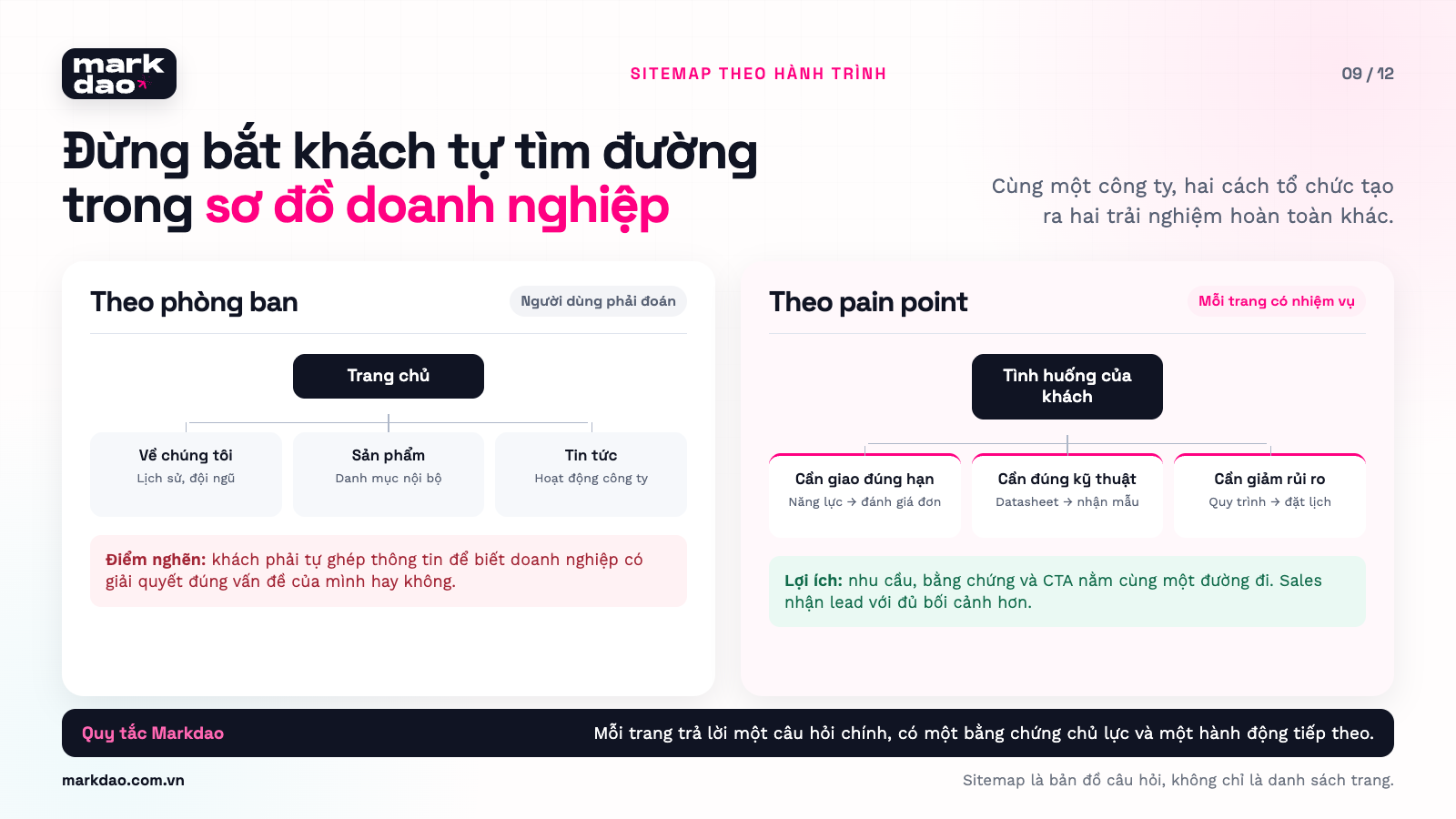
How Markdao builds each page:
- Clearly define the ICP and the context of the visit.
- Select one primary question the page must answer.
- Arrange secondary questions according to the cognitive sequence.
- Place evidence next to the claim it needs to support.
- Select primary and secondary CTAs.
- Connect the page to the preceding and subsequent content in the journey.
Example of a B2B service page structure:
Customer situation → Desired outcome → Scope of service → Implementation process → Evidence → Qualification criteria → FAQs → CTA
Not every page requires this exact order. If a customer has high intent and only needs pricing, the scope table should appear early. If the product is new and complex, the page needs more space for how it works and examples.
AI support: test multiple sitemaps, create rough wireframes, and check if every question has a designated answer. Designers and strategists determine the final order based on the journey, actual content, and mobile priority.
Required deliverables: sitemap, page brief, desktop and mobile wireframes, internal link table, content inventory, and a list of reusable components.
Gate criteria: Someone not involved in the project can look at the wireframe and explain who the page is for, what question it answers, and what the user is expected to do next.
Phase 6. Building the design system and creating the website with controlled AI
This is when AI website builders, no-code platforms, or vibe coding tools are integrated into the implementation process.
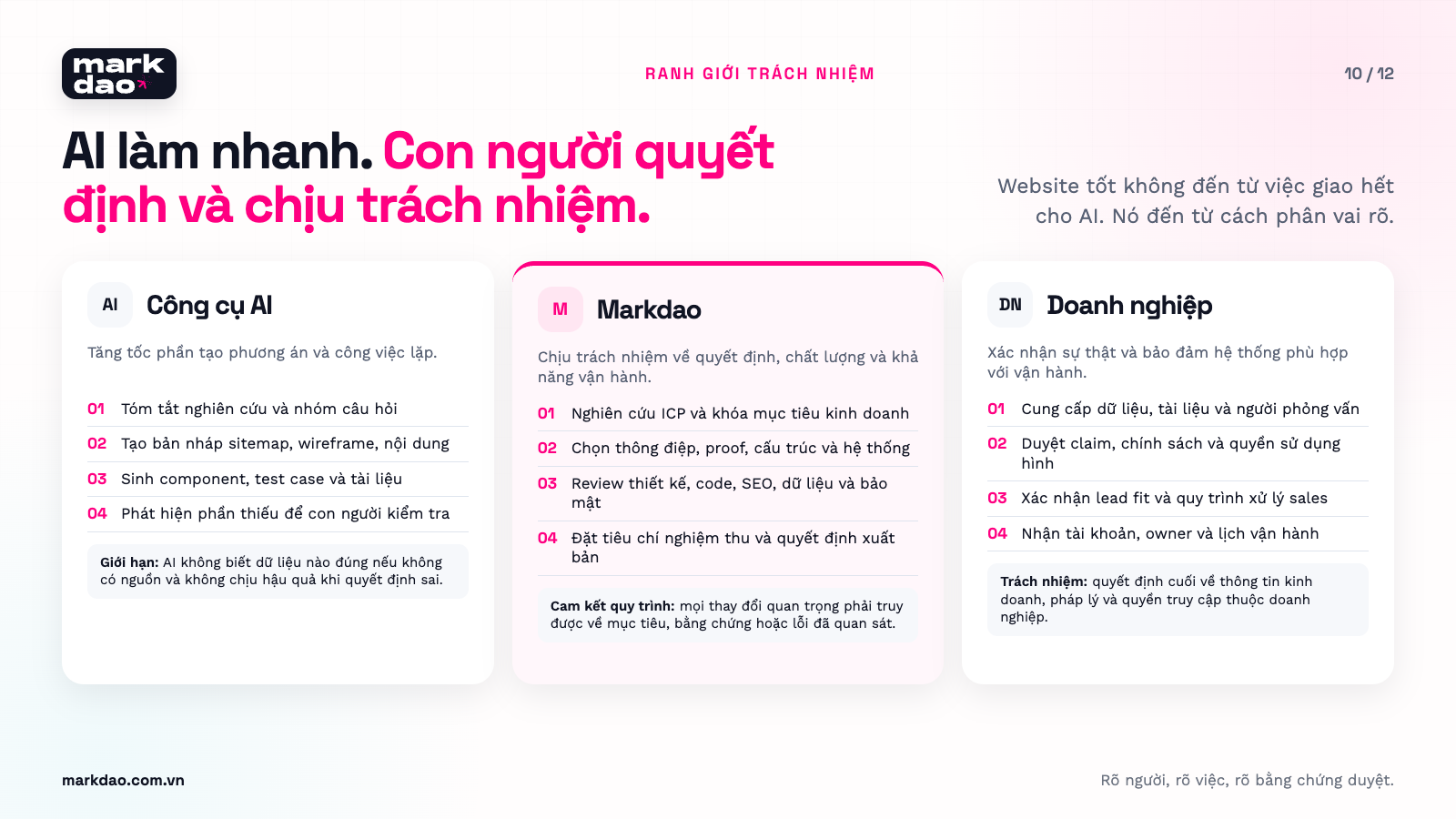
A minimum viable design system must include:
- Brand colors and status colors.
- Typography, font sizes, and line-break rules.
- Spacing, grids, and content dimensions.
- Buttons, links, forms, cards, and navigation.
- Hover, focus, loading, success, error, and disabled states.
- Guidelines for images, icons, animations, and videos.
- CMS page templates for internal team scalability.
Markdao delegates the following to AI (for AI-powered website design services):
- Generating layout options for comparison.
- Drafting components or repetitive code.
- Converting content briefs into initial page wireframes.
- Suggesting missing UI states.
- Generating placeholder data to test layouts.
Markdao does not allow AI to independently decide on:
- Customer insights and brand positioning.
- Brand promises, evidence, and legal information.
- Data access and permissions.
- Long-term technical architecture.
- Acceptance criteria and launch decisions.
Layered editing approach:
- Review information structure and hierarchy.
- Review actual content.
- Review visual system and branding.
- Review responsiveness across key breakpoints.
- Review interactions and all component states.
- Lock components before scaling to remaining pages.
Gate criteria: No more ad-hoc colors, fonts, spacing, or components created on a per-page basis. All core elements must have defined rules and states.
Phase 7. Technical development and lead generation system integration
A lead generation website must function like a pipeline that can be tested from end to end.
Minimum path:
Traffic source → Landing page → CTA → Form → Data validation → CRM → Assigned lead owner → Follow-up → Opportunity status
Markdao checks every handoff point:
- Are UTMs and traffic sources being captured?
- Does the form retain data when an error occurs?
- Are emails or phone numbers normalized before being saved?
- How are duplicate leads handled?
- Who are leads assigned to based on service or industry?
- Is there an alert if the CRM integration fails?
- Do senders receive a confirmation and an estimated response time?
- Can sales representatives record the reason why a lead is unqualified?
AI support: generate data validation code, API documentation, test cases, field mapping, and lead assignment rule drafts. Developers must verify the logic, secrets, access permissions, personal data, and error scenarios.
Deliverables must include: data flow diagrams, field lists, lead assignment rules, tracking plans, error notifications, confirmation emails, and the owner for each step.
Gate criteria: A test lead travels from the website to the correct person, retains full source and context information, and is traceable for troubleshooting.
Phase 8. QA, handover, and post-launch improvements
Markdao does not perform acceptance testing by simply opening the homepage on a laptop and declaring the website finished. QA is divided into six gates, each with a designated owner and verification evidence.
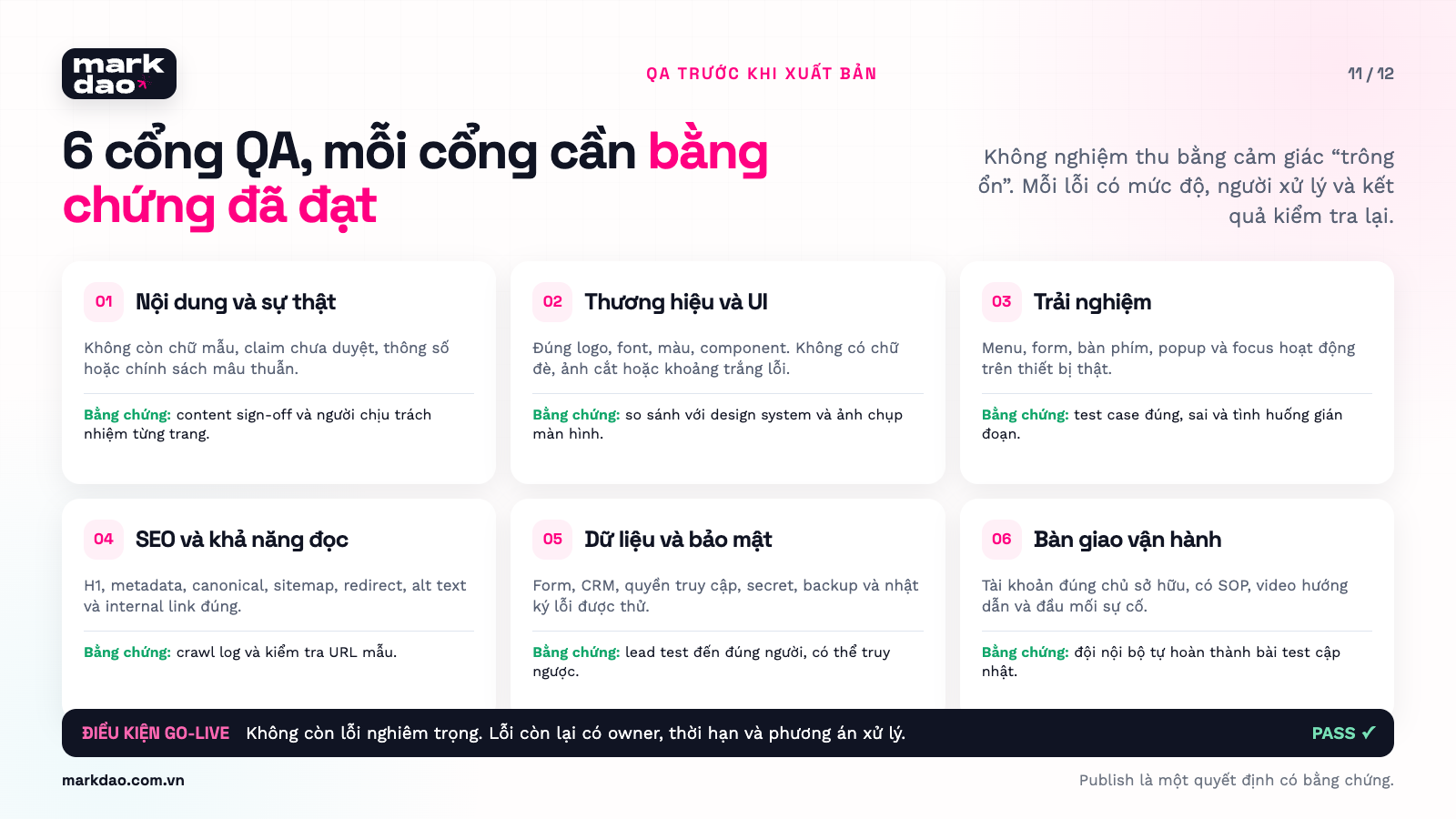
1. Content and accuracy
- No placeholder text, dummy figures, or unapproved claims.
- Consistent product names, specifications, addresses, and policies.
- Each page has a designated content owner.
2. Brand and interface
- Use the correct logo, colors, fonts, and design tokens.
- No overlapping text, incorrectly cropped images, or unusual whitespace.
- Animations do not obscure content or slow down interactions.
3. Experience and accessibility
- Test on actual devices, not just by resizing the browser.
- Includes focus states, form labels, and readable contrast.
- Menus, popups, keyboard navigation, and back buttons function correctly.
4. SEO and readability
- Each page has a clear primary H1 and unique metadata.
- Canonical tags, robots.txt, sitemaps, and redirects are correctly configured.
- Main content is crawlable and internal links are functional.
- Images have alt text and are properly sized and formatted.
5. Forms, data, and security
- Test with valid, invalid, empty, duplicate, and disconnected data.
- Secrets are not exposed in client-side code.
- Access permissions, backups, and error logs have been verified.
6. Operations and handover
- Accounts are registered under the correct business entity.
- The internal team knows how to edit content, add posts, and view leads.
- Documentation, video tutorials, and a point of contact for issues are provided.
Deliverables must include: QA log, bug list by severity, proof of fixes, account credentials, operational documentation, and post-launch audit schedule.
Gate criteria: No critical bugs remaining; all other bugs have an assigned owner, deadline, and business-approved mitigation plan.
30, 60, and 90-day cycles: the website journey doesn't end at launch
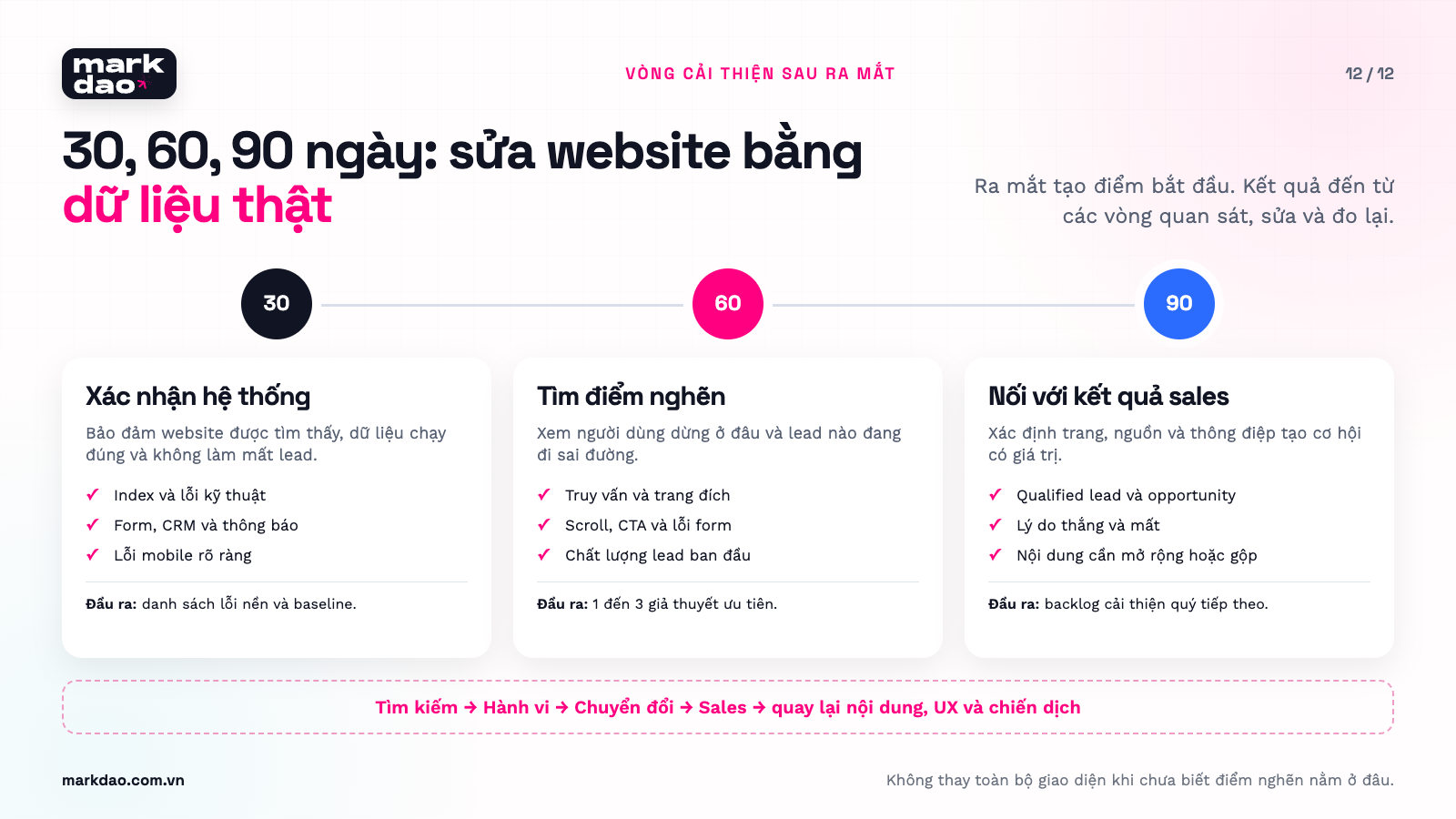
In the first 30 days: verify that data is tracking correctly, leads are not being lost, pages are indexed, and users aren't encountering obvious mobile errors. Avoid drawing major conclusions about content while data volume is still low.
From day 31 to 60: review actual search queries, drop-off points, CTA click-through rates, form errors, and lead quality. Select one to three evidence-backed bottlenecks to fix; do not overhaul the entire page at once.
From day 61 to 90: connect marketing data with sales results. Compare page groups, traffic sources, and lead-generating messaging. Decide which content to expand, which pages to merge, and which experiments to continue.
Four metric categories tracked by Markdao:
- Measurement layer: Discoverability · Question: Are the right people seeing the page? · Suggested metrics: Impressions, search queries, position, CTR
- Measurement layer: On-page behavior · Question: Do readers understand the content and move forward? · Suggested metrics: Scroll depth, CTA clicks, user paths, UX errors
- Measurement layer: Conversion · Question: Are the right people completing the next step? · Suggested metrics: Form starts, form completions, bookings, valid leads
- Measurement layer: Sales results · Question: Do leads turn into opportunities and revenue? · Suggested metrics: Qualified leads, opportunities, close rates, pipeline value
There is no universal benchmark that applies to every business. Markdao uses the website's own baseline data, lead quality, and transaction value to set appropriate goals.
The Markdao documentation package required for a latest AI website project
A website only truly belongs to a business when the team can understand, update, and audit it after the agency has left the project.
- Documentation category: Strategy · Minimum requirements: Objectives, ICP, pain map, customer journey, and KPIs · Primary users: Leadership, marketing, sales
- Profile group: Content · Minimum documentation: Sitemap, page brief, content inventory, proof library · Primary users: Marketing, content
- Profile group: Design · Minimum documentation: Design system, components, responsive rules, source files · Primary users: Designers, marketing
- Profile group: Technical · Minimum documentation: Architecture, integrations, environment variables, deployment guide · Primary users: IT, developers
- Profile group: Conversion · Minimum documentation: Form map, field map, lead routing, tracking plan · Primary users: Marketing, sales operations
- Profile group: Operations · Minimum documentation: Accounts, permissions, backups, SOPs for updates and troubleshooting · Primary users: Website owner, IT
- Profile group: Measurement · Minimum documentation: Dashboards, metric definitions, review schedule, and owners · Primary users: Leadership, marketing, sales
Three questions to help your business determine if you need Markdao
- Does your website just need to exist online, or does it need to generate leads and support sales?
- Do errors on your website result in lost data, missed opportunities, or damaged brand trust?
- After six months, does your team need to add pages, content, and campaigns while maintaining system integrity?
If the answer is simply "we need a basic landing page," an AI website builder might be a better fit. If your website plays a role in revenue, branding, and customer data, the challenge isn't just building the pages. The challenge is making the right decisions and keeping the entire system consistent.
AI website pre-launch checklist
Goals and audience
- The website has one clear primary goal.
- Each user group has a tailored journey.
- Content answers the actual questions of your customers.
Content and branding
- No placeholder text or unverified data remains.
- Logo, colors, fonts, and tone of voice are consistent.
- Images have clear sources and usage rights.
- Every important claim is backed by evidence.
Experience
- The page is readable on mobile devices.
- CTAs are not obscured.
- Menus, popups, and forms are operable with one hand.
- Errors are explained in plain language.
SEO
- One clear H1 tag per page.
- Unique title and meta description.
- Short, readable URLs.
- Correct canonical tags and sitemap.
- Internal links use descriptive anchor text.
- Main content is readable by Google after rendering.
- URL Inspection or Rich Results Test reports no rendering errors that hide main content.
- Core Web Vitals are measured separately for mobile and desktop; prioritize real-world data at the 75th percentile.
Forms and Data
- Collect only necessary data.
- Forms retain information when errors occur.
- Leads are saved to the correct system.
- Includes spam protection and duplicate prevention.
- Ensure appropriate consent and privacy policies are in place.
Technical and security
- Do not store secrets in client-side code.
- Dependencies have been audited.
- Authentication and authorization have been tested.
- Backups and rollback procedures are in place.
- There is a designated person responsible for reviewing AI-generated changes.
Measurement
- Track CTA clicks.
- Track form starts and completions.
- Track valid leads and qualified leads.
- Trace leads back to their source pages and campaigns.
- Schedule reviews at 7, 30, and 90 days.
Should you build your website with AI or hire a professional team?
If you need a simple website to test an idea, showcase a store, or collect basic contact information, AI can significantly reduce development time. Choose a suitable platform, define the scope, and thoroughly test everything before publishing.
If your website is where customers evaluate your brand, submit data, request quotes, or initiate high-value transactions, AI should only be a supporting tool. Research, strategy, design, content, and final quality assurance still require human expertise.
A website doesn't generate leads just because it's built with new technology. It generates leads when users find the right information, see sufficient proof, and can complete the next step without friction.
Sign up for a website audit with Markdao
Have you built a website with AI but aren't sure if the structure, content, mobile responsiveness, forms, and tracking are working correctly?
Markdao can help you check:
- Is your website reaching the right target audience?
- Which content is still too generic or lacks supporting evidence?
- Where are your CTAs and forms losing leads?
- Does your website maintain consistent brand identity?
- Is data being tracked and measured correctly after form submissions?
- Should you optimize your current platform or redesign from scratch?
FAQ

Not all tools require coding skills. Wix, Webflow, Framer, and several AI website builders allow for visual creation and editing. With tools like Lovable, Replit, or v0, non-coders can build functional prototypes, but projects involving sensitive data or critical functions should still be reviewed by professionals.
AI can generate titles, meta descriptions, headings, and basic sitemaps. However, an SEO-optimized website also depends on search intent, original content, URL structure, internal linking, rendering, canonical tags, site speed, indexability, and post-publication data.
Vibe coding is great for prototypes, small internal tools, or websites with a limited scope. For websites involving user accounts, personal data, payments, complex integrations, or direct brand impact, you need code reviews, testing, and professional oversight.
Choose based on your needs. For simple brochure sites, try Wix or WebPage.vn. For design-focused landing pages, try Framer. If you need a sitemap before building, use Relume. If you need custom forms or specific functionality, consider Lovable, Replit, or v0, but ensure you have technical oversight.
Consider a redesign when the structure is outdated, the codebase is difficult to maintain, forms and data frequently fail, brand consistency cannot be upheld, or the cost of piecemeal repairs exceeds the cost of a planned rebuild.