A 2026 website needs to do more than just be found. It must help customers make decisions, ensure Google and AI can retrieve accurate information, and allow internal teams to make updates safely after every launch.
A great website doesn't just look good on screen. It helps the right people understand your value, enables search engines and AI to extract the right information, and allows your internal team to make updates without breaking what is already working.
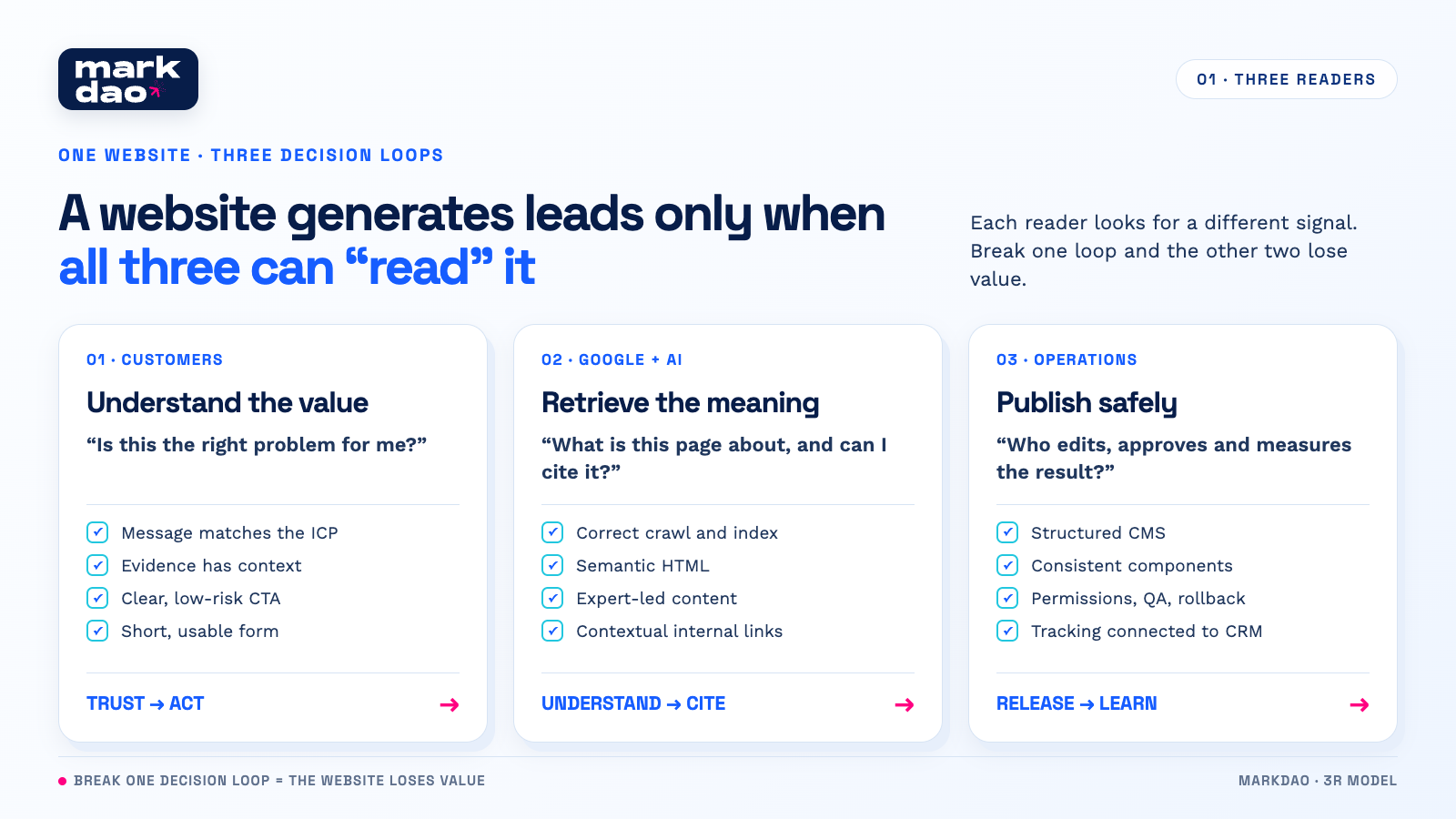
Simply put, a website is like a store visited by three different types of people. Customers want to know, "Can you solve my problem?" Google and AI want to know, "What is this information about, is it credible, and can it be cited?" The operations team wants to know, "Where do I make changes, how do I do it, and how do I know if the changes are an improvement or a setback?"

Designing for only one audience often leads to dangerous trade-offs:
- A hero section with too many effects might be visually impressive, but it can slow down core elements and obscure your message.
- Over-personalizing content might be helpful for one group of customers, but it can leave the default version thin on information or difficult to crawl.
- A CMS that is too unrestricted allows for fast publishing, but it easily leads to multiple H1 tags, duplicate URLs, broken links, and off-brand elements.
- Installing too many chatbots, heatmaps, and tracking tools might provide more data, but it can also slow down response times and test your users' patience.
Therefore, the right question isn't "Is the website live?" The right question is: after 90 days and dozens of updates, is the website still clear to customers, readable by machines, and manageable for your operations team?
Designing for Audience 1: Customers need to know they are in the right place
Customers don't read a website like a book. They scan it quickly to find three signals: the right problem, sufficient proof, and a low-risk next step.
A hero headline like "Comprehensive digital solutions for businesses" sounds safe, but it doesn't help anyone identify themselves. A more specific hero headline immediately answers three questions: Who does Markdao help, what results are improved, and how?
Illustrative example:
- Before: "We create distinctive digital experiences."
- After: "B2B website design that helps marketing teams generate leads, update content independently, and track the conversion journey."
The latter version doesn't need flowery language, but a marketing manager can immediately recognize that this page is relevant to their work.
Every important page should follow a logical decision-making flow:
- State the exact situation or pain point the customer is experiencing.
- Explain the cause using their own language, without forcing them to learn agency jargon.
- Provide evidence that matches the risk level of the decision: real projects, processes, acceptance criteria, or contextualized results.
- Provide a clear next step: view a project, download a checklist, get a diagnosis, or sign up for a consultation.
Evidence should be more than just client logos. For website projects, better evidence is a short story covering the context, bottlenecks, design decisions, and post-implementation changes. Readers can view Markdao's website and SEO projects to compare our capabilities against real-world scenarios.
Forms are also part of content design. Only ask for the data needed for the initial consultation, use clear labels, provide inline error validation, and enable autofill where appropriate. If you need more data to qualify a lead, consider a two-step collection process rather than forcing users to complete a long form on their first visit.
KPIs for Reader 1 shouldn't stop at page views. Track CTA click-through rates, form completion rates, qualified leads, scheduled appointments, and reasons for lead disqualification. A page with low traffic that generates many ICP-aligned leads can be more valuable than a page with high readership that leads to no action.
If you need a deeper review of messaging, CTAs, and form friction, you can use CRO principles for UX/UI as a supplementary checklist.
Designing websites for Reader 2: Google and AI need to retrieve the right meaning
Optimizing a website for AI Search doesn't start with a secret file or a special type of schema. Google's current guidance emphasizes that familiar SEO foundations still apply: pages must be crawlable, indexable, eligible for snippets, contain key content in text format, and use internal links to help discover related pages.
The change lies in how queries are expanded. A complex question can be broken down by the system into multiple sub-queries to explore different aspects. Therefore, a website needs to cover a topic comprehensively with genuine expertise, rather than creating a series of thin pages for every keyword variation.
For example, someone searching for "B2B website design for lead generation" might also need answers about positioning, service page structure, evidence, forms, CRM, speed, and how the marketing team can self-update. An article that just repeats keywords won't be enough. A content cluster with a pillar page, case studies, technical guides, and service pages linked in the correct context is more useful.
Five layers to check:
- Accessibility: robots.txt, noindex, canonical tags, sitemaps, status codes, JavaScript rendering, and mobile versions that do not block Googlebot.
- Understandability: a clear H1, a hierarchical heading system, titles and descriptions that match user intent, main content present in HTML, and structured data that matches visible content.
- Credibility: clear authorship or responsible entity, real experience, verifiable sources, reasonable update dates, and evidence for important claims.
- Discoverability: links using <a> tags with href attributes, anchor text that clearly describes the destination, and placement within a contextual paragraph.
- Usability: fast, stable, and easy-to-navigate pages where important content is not obscured by popups or hidden behind unpredictable interactions.
For Core Web Vitals, the current good thresholds at the 75th percentile, segmented by device, are an LCP of 2.5 seconds or less, an INP of 200 milliseconds or less, and a CLS of 0.1 or less. Lab data helps identify issues, but real-user data reveals the actual experience. If LCP is the bottleneck, check out our LCP optimization guide before indiscriminately preloading resources.
Internal links must do two things at once: tell readers what to expect and help Google understand the relationship between pages. Instead of using "read more" or "click here," use specific anchor text like 9 criteria for SEO-friendly website design, Technical SEO or 2026 Mobile-First checklist.
An important note: Google does not currently require websites to create llms.txt files, segment content into "AI-ready snippets," add custom AI schemas, or rewrite entire articles just to appear in AI Search. While those files and techniques may serve other purposes, they should not be sold as mandatory requirements for Google to understand your website.
Designing websites to be AI-agent friendly often makes them easier for humans to use as well
AI Search and AI agents are not the same thing. Search finds, synthesizes, and cites sources; agents can attempt to interact with the interface. Current agents can read screenshots, raw HTML, and accessibility trees. Therefore, a well-structured semantic interface helps both machines and users interact more accurately.
- Use buttons for actions and anchor tags for navigation; do not turn a meaningless div into a clickable button.
- Every icon needs a meaningful label. "Send consultation request" is clearer than an unlabeled arrow icon.
- Keep the layout stable; avoid having banners or popups appear suddenly, which causes clickable targets to shift position.
- Indicate success, failure, and processing states with text, not just by changing colors.
- Name form fields clearly and link labels correctly to inputs so that screen readers, password managers, and agents can understand them.
This is not a separate optimization layer. It is the intersection of accessibility, UX, semantic HTML, and automation readiness.
Designing websites for readers 3: The operations team needs updates without creating technical debt
Many websites deteriorate not because the initial code was poor, but because the system lacks rules on what can be changed, who is responsible, and how quality is verified.
A good CMS isn't one where every field is editable. It should lock parts that need consistency and open only what the marketing team truly needs to change.
There should be at least six operational layers:
- Content model: Define mandatory fields for articles, services, projects, authors, FAQs, and CTAs. Do not allow editors to create new structures for every page.
- Design system: Use components and tokens for colors, typography, spacing, buttons, forms, cards, and states. Update at the system level instead of manually editing each page.
- Permissions and approvals: Clearly define roles for writers, subject matter reviewers, SEO specialists, publishers, and those authorized to modify core components.
- Performance budget: Set limits for hero images, fonts, third-party scripts, animations, and the number of tracking tools before they slow down the site.
- Release process: Implement staging, pre-publish checklists, version history, rollback plans, and clear accountability for errors.
- Lead data: Standardize sources, campaigns, landing pages, CTAs, lead statuses, and data transfer to the CRM to ensure context is never lost.
If the marketing team has to ask a developer to change a headline, the website is too rigid. If anyone can change the layout, schema, and tracking on a live site, it’s too loose. Good operational design lies in the middle: autonomy within a safe zone, and control in high-risk areas.
Businesses needing a team to support periodic updates can refer to our website maintenance service; while teams wanting to manage their own Webflow site should clearly define ownership, hosting, account access, and handover procedures from the start.
Markdao's 3R website design framework: Readable, Retrievable, Releasable
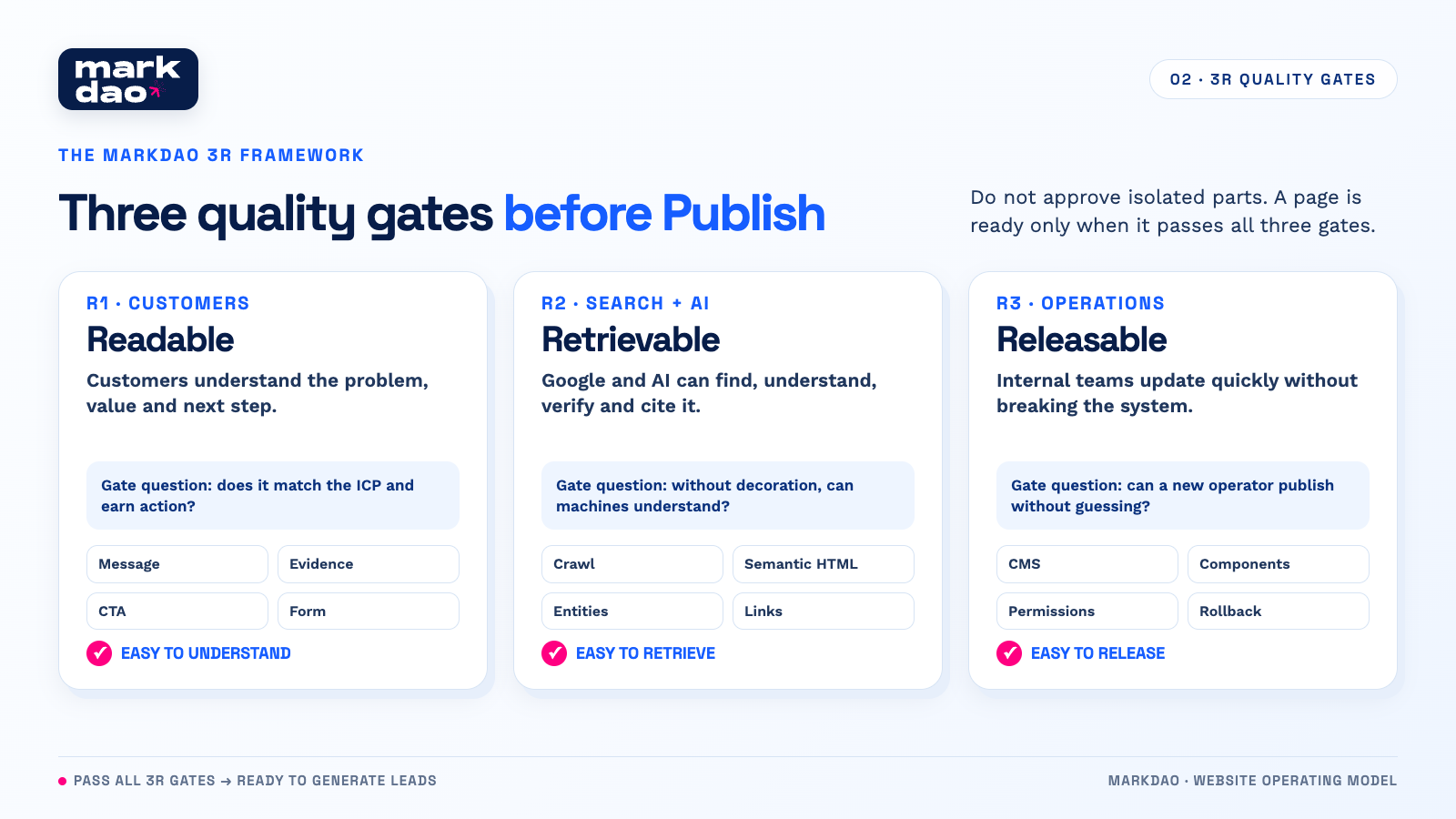
Markdao uses the 3R framework as an acceptance gate throughout the project, rather than performing disjointed checks at the end.
- Readable, easy for customers to understand: targets the right ICP, addresses the right job-to-be-done, delivers specific messaging, provides strong evidence, clear CTAs, and low-friction forms.
- Retrievable, easy for Search and AI to access: crawlable, indexable, semantic HTML, clear entities, contextual internal links, in-depth content, and verifiable data.
- Releasable, easy for the operations team to deploy: structured CMS, rule-based components, clear permissions, full staging and QA, intact tracking, and rollback capabilities.
Three questions at the acceptance gate:
- If a target customer only sees the first screen for a few seconds, do they recognize the problem and know the next step?
- If you strip away the design, can Google or an agent still understand the content, links, and primary actions?
- If a new team member updates the page next month, can they do it correctly without guessing and without breaking the structure?
Only when the answer to all three questions is “yes” is the page ready to be published.
7-stage SOP for building a website that serves all three types of readers
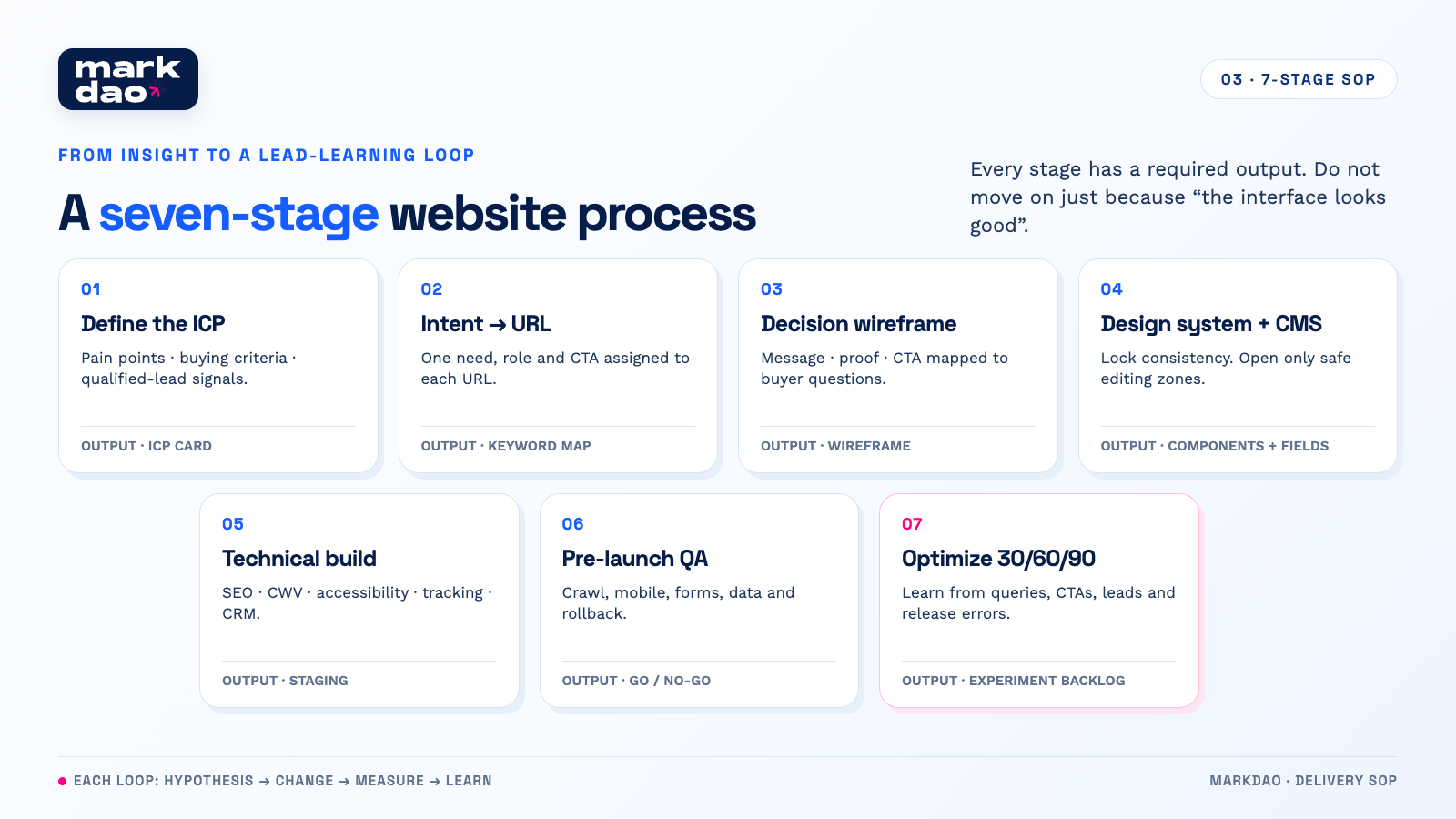
Stage 1. Define the ICP and the jobs the user needs to get done
Interview sales, customer success, and customers. Collect pre-purchase questions, reasons for hesitation, selection criteria, the actual language buyers use, and the signs of a qualified lead.
Required deliverables: ICP card, list of pain points by priority, job-to-be-done, common objections, and desired conversion actions.
Stage 2. Map intent, keywords, and URLs
Group keywords by the same intent, not just because they share a word. Each URL should have one primary intent, a specific role in the journey, and a CTA. Identify pillar pages, service pages, case studies, support articles, and the links between them to avoid cannibalization.
Required deliverables: keyword-to-URL map, information architecture, breadcrumbs, and internal-link map.
Stage 3. Build wireframes based on customer decisions
Organize content according to the questions buyers need answered: what is this, who is it for, what problem does it solve, where is the proof, what is the process, what is the cost or scope, and what is the next step? Place CTAs after sufficient risk has been mitigated, not just at the top and bottom of the page.
Required deliverables: wireframes with messaging, proof placement, form states, and measurement goals for each block.
Stage 4. Build the design system and content model
Create components with defined variants, design tokens, and rules for imagery and typography. In the CMS, lock required fields, set reasonable character limits, and create templates for services, projects, articles, authors, and FAQs.
Required deliverables: component library, CMS schema, naming conventions, and editing permissions.
Stage 5. Develop the technical foundation
Implement semantic HTML, responsive design, accessibility, canonical tags, robots, sitemaps, appropriate structured data, image and font optimization, event tracking, consent management, and CRM integration. Only preload critical resources.
Required deliverables: staging environment, tracking plan, technical SEO checklist, and performance budget.
Stage 6. QA before launch
Test on real devices, keyboards, screen readers when necessary, slow network speeds, and error states. Crawl the entire site to identify orphan pages, broken links, incorrect redirects, duplicate titles, multiple H1 tags, unintended noindex tags, and mismatched structured data.
Mandatory deliverables: an error report categorized by severity, assigned owners, proof of resolution, and a go/no-go decision.
Phase 7. 30, 60, and 90-day operations
Once real data is available, review queries, entry pages, CTA behavior, lead quality, speed, and operational errors. Each optimization cycle must document the hypothesis, changes made, tracked metrics, and conclusions. Avoid changing too many variables at once, as this makes it impossible for the team to determine what drove the results.
Mandatory deliverables: dashboard, experimentation backlog, change log, and lead-based learning report.
Hypothetical real-world example: transforming a beautiful website into a lead-generating machine
Suppose a company providing management software for factories uses the hero headline "Comprehensive Digital Transformation." The website has traffic, but form submissions are low, and sales receives many unqualified inquiries.
Through interviews, the team discovers that buyers aren't searching for "digital transformation." They want to reduce the time spent compiling production reports, connect data between the factory floor and the office, and need to know if the system can integrate with their existing software.
The project team can make the following adjustments:
- Update the hero to address the specific role and outcome: "Connect production data so factory managers can spot issues before the shift ends."
- Add a data flow diagram and a case study that clearly outlines the context, legacy systems, integration process, and acceptance criteria.
- Create support articles for questions regarding integration, implementation timelines, security, and total cost; link these to the solution page using descriptive anchor text.
- Change the generic CTA "Contact Us" to "Get a Data Readiness Assessment."
- Update the form to ask for the user's role, number of factories, and current systems; tag the data with the page source and push it to the CRM so sales can prepare relevant questions.
In this example, SEO does not stand alone. Insights from the ICP determine keywords and content; UX reduces friction; technical SEO ensures the page is crawlable; and the CRM helps measure lead quality. This is what a complete lead-generating website journey looks like.
How to measure without optimizing for the wrong things?
The North Star metric should be the number of qualified organic leads, not total traffic. Then, break down leading indicators for three different audiences.
- Clients: CTA CTR, form start and completion rates, booking rates, qualified lead rates, and reasons for form abandonment.
- Search and AI: indexed pages, queries and impressions, organic clicks, converting landing pages, crawl errors, Core Web Vitals, and referrals from AI platforms where measurable.
- Operations: time from request to publish, number of post-publish errors, component reuse rate, number of rollbacks, and number of pages missing an owner or overdue for updates.
AI Search reports in Google Search Console can help the team read new search signals, but they shouldn't be viewed in isolation from lead data. An increase in query impressions only becomes a business insight when we know what stage the searcher is in, which page they land on, and whether they generate a high-quality sales conversation.
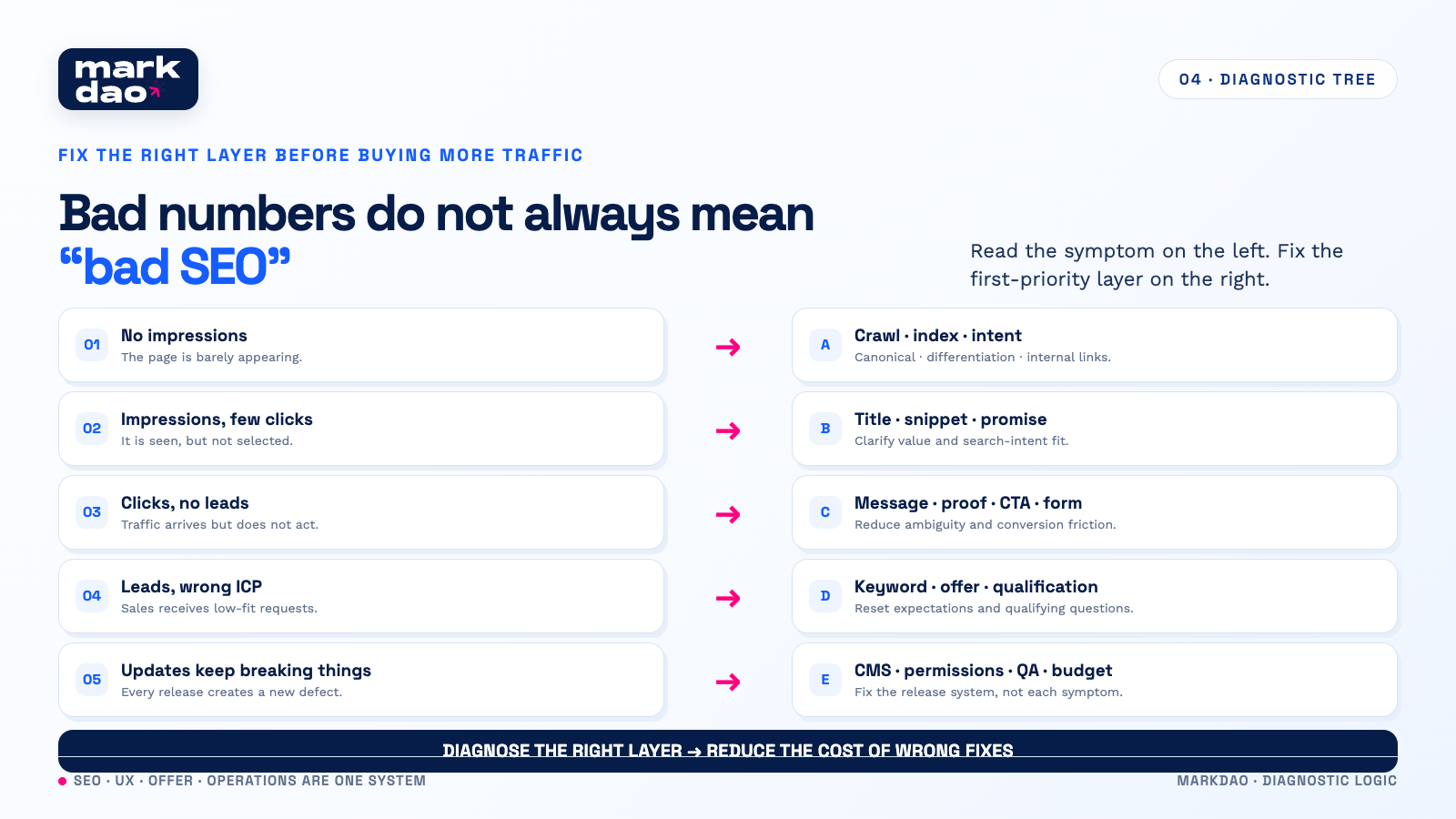
Decision tree: what to fix first when metrics look bad?
- No impressions: check crawl, index, canonical, search intent, content uniqueness, and internal links.
- Impressions but few clicks: check title, snippet, intent match, and the clarity of the value proposition.
- Clicks but no leads: check messaging, social proof, CTA, forms, speed, and mobile experience.
- Leads but mostly unqualified: review ICP, keywords, offer, expectation-setting content, and qualifying questions.
- Errors arise with every update: review content model, components, publishing permissions, QA checklist, and performance budget.
This decision tree prevents the team from blaming everything on SEO. Sometimes the root cause is indexing; other times it's the promise, the offer, or the lead handling process.
Quick pre-publication checklist
- Each URL serves one primary intent and does not compete directly with other Markdao articles.
- Primary keywords appear naturally in the title, H1, introduction, at least one heading, and the body content.
- A concise answer is provided at the top of the page before diving into deep analysis.
- Includes examples, experience, processes, or evidence that generic summary articles lack.
- Important content exists as text, not locked within images or hidden behind interactions.
- Internal links use descriptive anchor text, point to the correct destination, and are not clustered into a meaningless block at the end of the post.
- Images are appropriately sized with alt text describing their function or content, without keyword stuffing.
- A single H1; H2 and H3 follow a logical hierarchy; headings are not used just for font sizing.
- Forms work on mobile, include labels, error states, success messages, and source data tracking sent to the CRM.
- Includes an owner, next review date, tracking, staging, and a rollback plan.
Conclusion: A good website is a learning system.
A 2026 website doesn't need to try to please a mysterious algorithm. It needs to help customers make decisions, provide clear and verifiable information for Search/AI, and provide the operations team with a secure publishing system.
When all three readers are served, SEO is no longer a post-design fix. It becomes part of the information architecture, experience, content, CMS, measurement, and lead-learning loop.
If your business is preparing to refresh its website or has traffic but isn't generating high-quality leads, please register for a website design consultation with Markdao. The starting point isn't choosing an interface, but diagnosing your ICP, search journey, conversion bottlenecks, and post-launch operational capabilities.
FAQ

They should not be treated as three separate projects. SEO builds the foundation for pages to be crawled, understood, and ranked; AEO emphasizes direct answers; GEO is often used for visibility in generative search experiences. For Google, the foundation remains useful content, proper crawling and indexing, clear links, a good experience, and credible evidence.
No. Use structured data supported by Google when it fits your content type and ensure the data matches what the user sees. Don't add schema just to create an "AI-ready" impression.
According to current Google Search guidelines, llms.txt is not used for Google Search. Businesses can experiment with it for other purposes, but it should not be considered a requirement or a higher priority than crawling, indexing, content, and internal linking.
Usually, no. Start with semantic HTML, properly labeled forms, buttons and links with clear roles and states, stable layouts, and accessible key content. These are also great improvements for accessibility and UX.
Marketing owns the content and business results; SEO is responsible for discoverability; design and development maintain the system, performance, and accessibility; sales or revenue operations verify lead quality; and one final owner manages the backlog and decides on priorities.