



What is Exit Rate?
What is Exit Rate? Exit Rate is a key website analytics metric that represents the percentage of visits where a specific page was the last one a user viewed before leaving your site.
Every page on your website has its own Exit Rate, which helps you identify which pages are causing users to leave. A high Exit Rate on a specific page may indicate that the content is not engaging enough or that there are issues with the user experience.
For example: If a product page has a high Exit Rate, it might mean that users aren't finding enough information or that the checkout process is too complicated, causing them to drop off.
How to calculate Exit Rate
The formula for calculating Exit Rate is:

Example:
- Page A has 500 sessions, with 200 sessions ending on this page.
- The Exit Rate for Page A is (200 / 500) × 100 = 40%.
This means that 40% of users leave the website after visiting page A.
The difference between Exit Rate and Bounce Rate
One of the common misconceptions when analyzing website data is the difference between Exit Rate vs Bounce Rate.
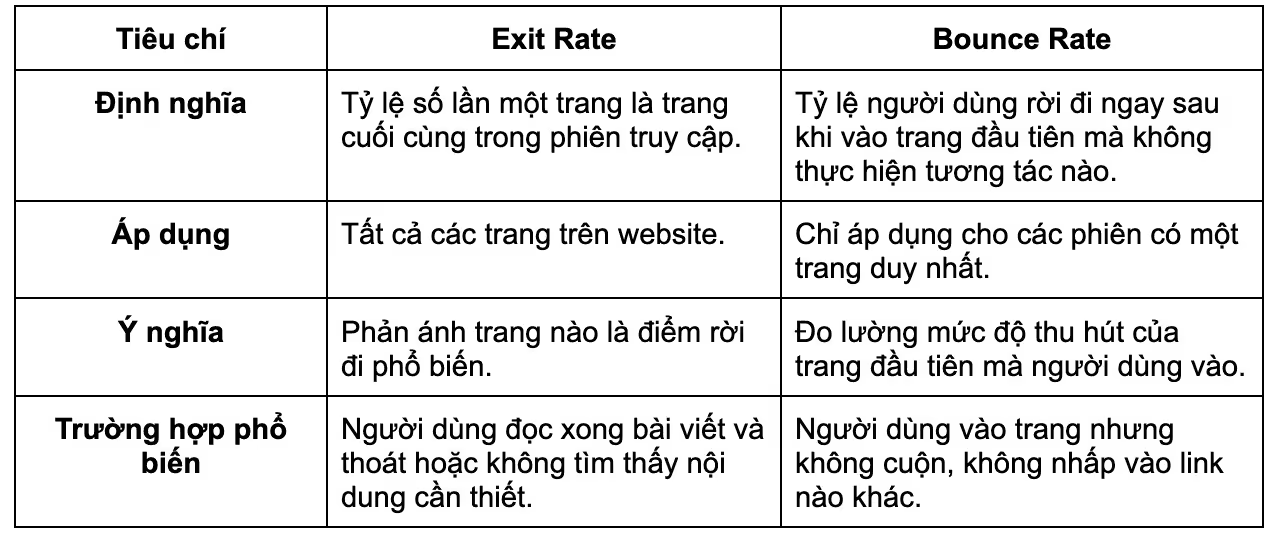
Specific example:
- If a user visits a blog post, finishes reading, and leaves → High Exit Rate.
- If a user visits the homepage and leaves immediately without any interaction → High Bounce Rate.
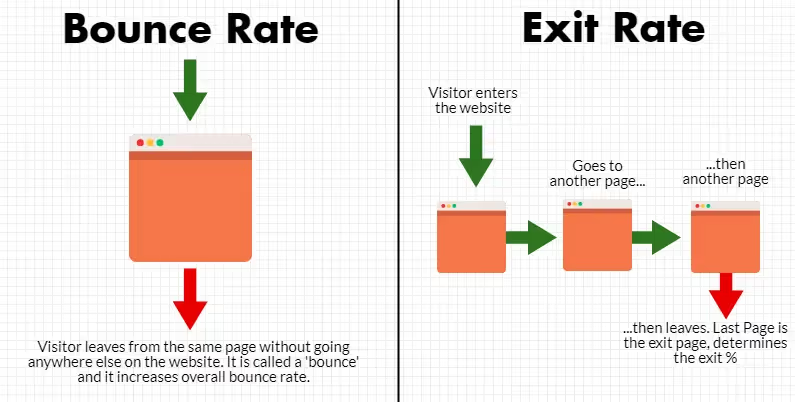
Is a high Exit Rate a negative sign?
Not always High Exit Rate is also a negative signal. This depends on the type of page and its purpose:
A high Exit Rate can be normal if:
- The page is the final step in the user journey (order confirmation page, contact page, thank you page).
- The page content has already provided all the information the user needs (long-form blog posts, tutorial pages).
A high Exit Rate is a problem if:
- Important pages like product or service pages have a high Exit Rate, which may be due to poor UX/UI, unengaging content, or a complex conversion process.
- Users leave from cart or checkout pages without completing the transaction.
Therefore, it is necessary to carefully analyze the website's Exit Rate to identify the causes and improve the user experience to optimize conversions.
5 Reasons for a high Exit Rate
1. Poor user experience (UX/UI) and confusing navigation
- The website has a non-intuitive design that is difficult to navigate.
- Users do not know what to do next after landing on the page.
- The menu is complex and lacks breadcrumbs to facilitate easy navigation.
2. Slow page load speed
- Slow-loading pages cause users to lose patience and leave.
- Google ranks pages with slow load speeds lower, which negatively impacts SEO.
3. Content does not meet user needs
- Users land on the page but cannot find the information they are looking for.
- The content is unengaging or lacks depth.
4. Lack of compelling or clear CTAs
- The website lacks a call-to-action (CTA) or the CTA is not compelling enough.
- The CTA is not prominent, leaving users unsure of what to do next.
5. Technical errors or intrusive pop-ups
- The website has errors such as broken links, pages failing to load, or 404 errors.
- Pop-ups appear too frequently or too early, causing frustration for users.
5 ways to reduce Exit Rate to improve conversion rates
Once you understand what Exit Rate is, you need to know how to reduce this rate to improve user experience and increase conversion rates. Below are 5 effective methods to optimally reduce your website's Exit Rate.
Improve UX/UI and optimize site navigation
One of the main reasons users leave a page is a poor experience. If the interface is not intuitive or the navigation is confusing, users will quickly exit.
How to optimize:
- Intuitive, user-friendly website layout: The website needs a simple design that is easy to read and navigate on both desktop and mobile devices. Avoid using too many colors or distracting fonts.
- Use breadcrumbs to help users navigate easily: Breadcrumbs are a navigation system that helps users know where they are on the website. For example: An e-commerce site with breadcrumbs like Home > Laptops > Dell Laptops will help customers easily return to the main category without needing to click the browser's back button.
- Design clear menus and CTA buttons: The menu should be intuitive and straightforward. CTA (Call to Action) buttons like "Buy Now" or "Sign Up Now" should be prominent and easily recognizable.

Example: On an e-commerce website, if the menu is unclear or the shopping cart is difficult to access, users may leave immediately.
Increase page loading speed
Slow loading speed is a primary reason for high bounce rates. Statistics show that if a website takes more than 3 seconds to load, the bounce rate can increase significantly.
Optimization tips:
- Check page loading speed using Google PageSpeed Insights: This tool helps analyze speed-related issues and suggests ways to improve performance.
- Optimize images and use WebP compression: Large images can slow down a page. For example, a blog post using a 3MB JPEG image can be reduced to 300KB using WebP without sacrificing quality.
- Use a CDN (Content Delivery Network): A CDN distributes content from the server closest to the user, improving load times. For instance, when accessing an international website without a CDN, data may have to be fetched from a distant server, negatively impacting speed.

Example: If a news website loads slowly, readers may leave before the content is fully displayed.
Optimize content to increase user retention
If content is unengaging or fails to meet search intent, users will quickly leave.
Optimization tips:
- Create high-quality, engaging content that aligns with search intent: A well-structured article, broken down into short paragraphs with subheadings, helps readers follow along easily.
- Use internal links to guide users to related content: For example: An article on "How to choose solar panels" can include a link to "Top 5 reputable solar panel brands" to keep readers engaged longer.
- Embed videos or images to increase engagement: Content with visual aids like videos or images is easier to understand. For instance, a recipe website with only text is less engaging than one featuring step-by-step video tutorials.
Example: On an e-commerce site, if there are only product descriptions without images or review videos, users may lose interest and leave.
Optimize CTAs (Call To Action) and improve conversions
CTAs play a crucial role in guiding users toward the next step. If a CTA is unclear or unappealing, users may leave without taking any action.
How to optimize:
- Place clear, compelling CTAs with standout colors: CTAs should be placed in visible locations with colors that contrast against the background to grab attention. For example, an orange "Buy Now" button on a white background is usually more eye-catching than a gray one.
- Use strong calls to action: Phrases like "Claim your offer" or "Sign up for free today" create a greater sense of urgency than "Read more."
- Use A/B testing to determine the most effective CTA: For example, a registration page could test two CTA versions, "Sign up now" and "Get started for free," to see which one yields a higher click-through rate.
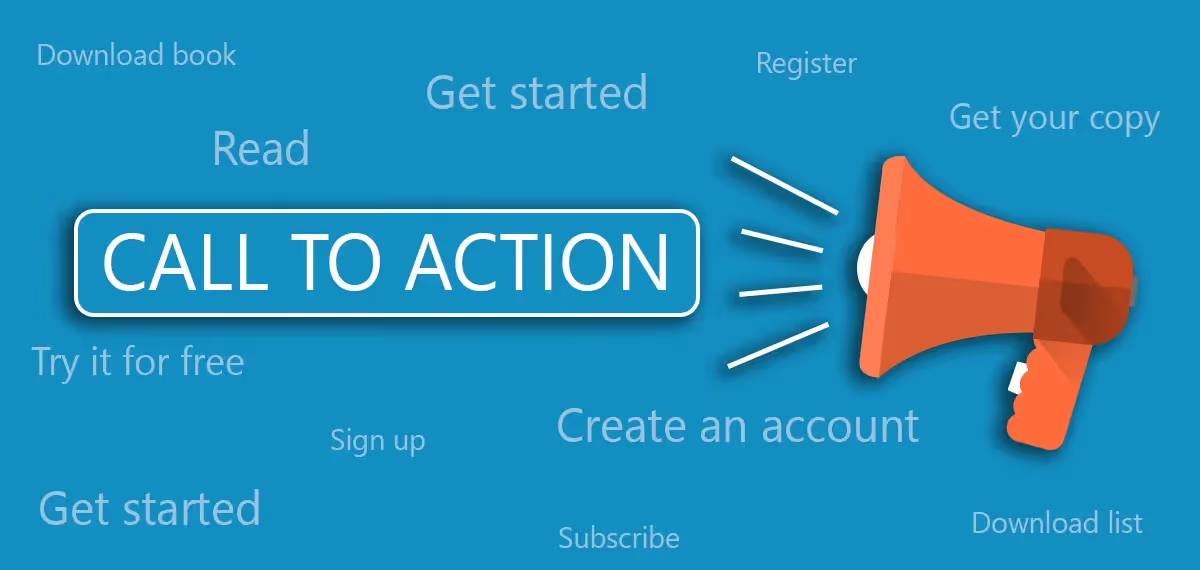
Example: On a sales page, if there is only an "Add to cart" button without a CTA encouraging an immediate purchase, users might leave without completing the transaction.
Reduce annoying elements (pop-ups, ads, technical errors)
Users generally dislike being interrupted by constant pop-ups or advertisements. If they encounter technical errors, they are also likely to leave the page immediately.
Best practices:
- Limit pop-ups that appear too early or too frequently: Pop-ups should only appear when truly necessary, such as when a user is about to leave the page or has been viewing content for a certain amount of time.
- Ensure there are no technical errors or broken links: Perform regular checks using Google Search Console to detect and fix 404 errors (page not found).
- Check for distracting elements like ads or auto-playing audio: For example, a news website with too many ads popping up in the middle of an article can frustrate readers and cause them to leave.
Example: On an e-commerce website, if there is a payment error or product information is not displayed correctly, users may leave without completing their order.
How to track and analyze Exit Rate in Google Analytics
1. Guide to checking Exit Rate in Google Analytics 4 (GA4)
To track your website's Exit Rate, you can use Google Analytics 4 (GA4). In GA4, Exit Rate is not displayed directly as it was in Universal Analytics, but you can view the number of exits for each page by going to:
Reports > Engagement > Pages and Screens.
Here, check the "Exits" column to see the total number of exits for each page. For deeper analysis, you can create an Exploration Report to compare Exit Rate vs Bounce Rate to identify which pages are problematic.
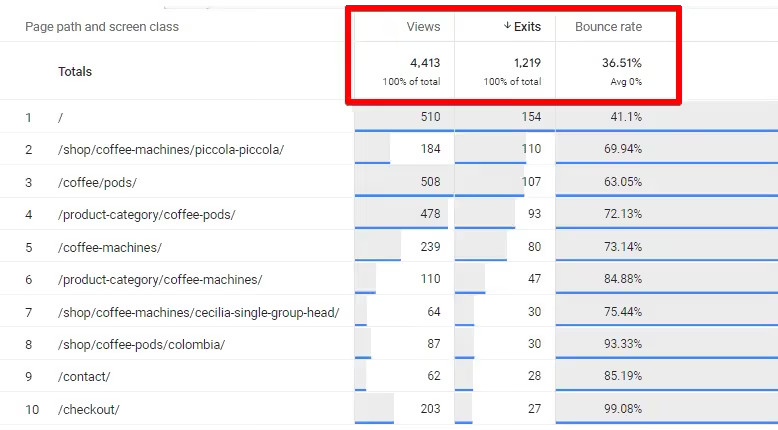
2. Analyze pages with the highest Exit Rate for optimization
Once you have identified the page with a high Exit Rate, you need to analyze why users are leaving. If it is a checkout page, the purchasing process might be too complex or there could be technical errors. If it is a blog post, the content might not be engaging enough or it may lack clear navigation to the next step.
Use Session Recording from tools like Hotjar or Microsoft Clarity to see how users interact with the page before exiting, and make adjustments accordingly.
3. Develop a testing strategy and measure effectiveness
After optimizing pages with a high Exit Rate, you should conduct A/B testing to measure the results.
For example: If a product page has a high exit rate, try changing the CTA, layout, or optimizing page load speed. Monitor this metric after each change to evaluate the level of improvement. If the website Exit Rate decreases after optimization, it proves your strategy is working. Conversely, you need to continue testing until you find the best solution.
Conclusion
Understanding what Exit Rate is and reducing your website's Exit Rate not only helps improve user experience but also increases conversion rates. To achieve this, you need to optimize everything from the interface (UX/UI) and page load speed to content and CTAs. At the same time, regularly monitor the Exit Rate in Google Analytics to detect pages with high exit rates and test improvement methods. By implementing the right strategies, you can keep users on your site longer, increase engagement, and effectively drive revenue.


