



In the field of SEO, Google Penalty is a term that haunts website administrators. It is a penalty applied by Google when a website violates quality guidelines, resulting in a drop in rankings or even removal from search results. Understanding Google Penalty and common causes such as low-quality content, keyword stuffing, or unnatural links will help you protect your website from potential risks while maintaining stability in your SEO strategy.
Essential knowledge about Google Penalty
What is a Google Penalty?
Google Penalty is a penalty imposed by Google on websites that do not comply with search engine quality guidelines. This penalty can be enforced by lowering search rankings, reducing visibility, or even removing the website from Google's search index.
The causes of Google Penalty often stem from the use of non-standard SEO techniques, such as keyword stuffing, building unnatural links, or using low-quality content. To avoid being penalized, websites must adhere to the optimization guidelines provided by Google, ensuring they provide useful content and a good user experience.
The impact of a Google Penalty
Being hit with a Google Penalty can have serious consequences for a website, including:
Lower search engine rankings
When hit with a Google Penalty, a website will lose its high rankings on search engine results pages (SERPs). This makes it difficult for users to find the website, reducing its ability to attract traffic.
Reduced organic traffic
Organic search traffic typically accounts for a significant portion of a website's total traffic. When rankings drop or a website is removed from the index, organic traffic plummets, resulting in fewer opportunities to reach potential customers.
Impact on revenue and business reputation
Google Penalty not only affects traffic but also diminishes a business's revenue and reputation. Customers may lose trust when they cannot find your website on Google, leading them to switch to competitors.
Types of Google Penalties
Google penalties are divided into two main categories based on how they are applied:
1. Manual Penalty
A manual penalty occurs when Google's quality control team detects violations on a website. These violations may include:
- Duplicate or low-quality content.
- Unnatural links or link spam.
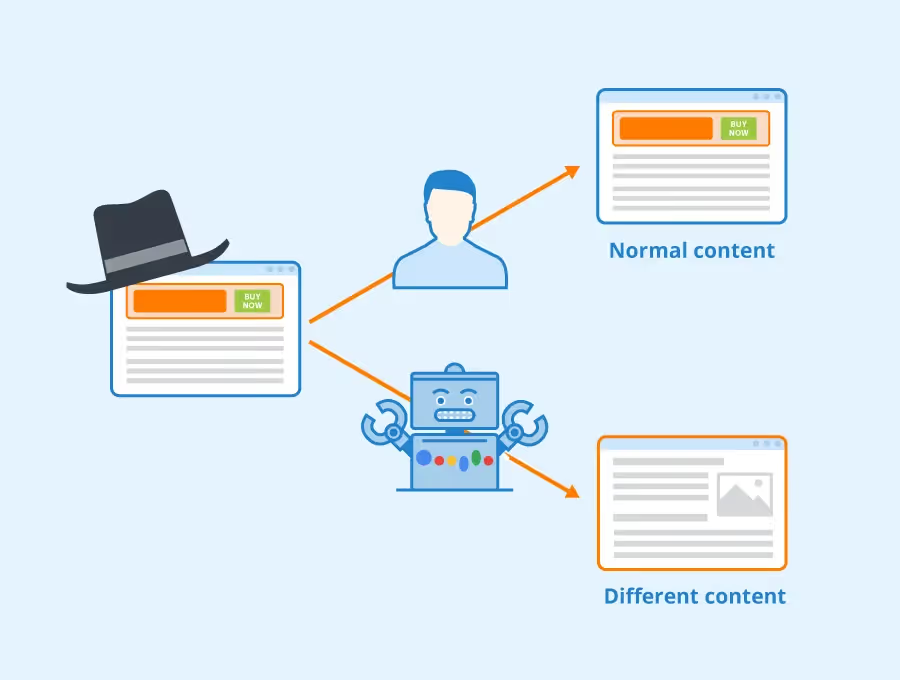
- Cloaking (displaying different content to Google and users).
Notifications regarding a manual penalty are typically sent directly via Google Search Console, where website owners can check the status and receive instructions from Google on how to resolve the issue.
2. Algorithmic Penalty
An algorithmic penalty occurs automatically when a website violates the criteria Google uses for ranking, through algorithms such as:
- Google Panda: Targets low-quality or duplicate content.
- Google Penguin: Targets unnatural links or link spam.
- Google Hummingbird: Improves the understanding of search query semantics, targeting improper content optimization.
Algorithmic penalties usually come without specific notifications, but you can identify them through a sudden drop in rankings or traffic following a Google algorithm update.

10 common reasons why websites get hit with a Google Penalty
Google Penalty is a major concern for many website owners and SEO managers, as even a small mistake can lead to serious consequences. Below are 10 common reasons why websites receive a Google Penalty and how to avoid them:
1. Low-quality or copied content (Duplicate/Thin Content)
Duplicate content or low-quality content is one of the leading causes of a Google Penalty, particularly through the Google Pandaalgorithm.
- Content duplicated across multiple pages: When the same content appears on multiple URLs, Google struggles to identify the original source, which leads to a decrease in website authority.
- Content that provides no real value: Content that fails to meet user needs or is too short and incomplete is easily flagged as "thin content."
How to prevent it:
- Invest in high-quality, unique, and useful content.
- Use tools like Copyscape to check for duplicate content.
- Optimize low-quality pages by adding more valuable information.
2. Keyword Stuffing
Keyword stuffing is the practice of unnaturally overusing keywords in content to manipulate search rankings.
- It degrades the user experience because the content feels unnatural.
- It is easily detected by Google's algorithms, which may result in penalties.
Example: "Google Penalty is a significant issue. When hit with a Google Penalty, your website can face many problems due to the Google Penalty."
.avif)
How to avoid it:
- Use keywords naturally, prioritizing context.
- Focus on relevant keywords and diversify your phrasing.
3. Unnatural Links
Google is very strict regarding unnatural backlinks, which are often detected by the Penguinalgorithm.
- Buying and selling backlinks: Backlinks from untrustworthy sites or link exchange services.
- Link schemes: Participating in link-building networks to manipulate rankings.
How to prevent it:
- Build natural links through high-quality content.
- Use the Google Disavow Tool to disavow untrustworthy backlinks.

4. Comment Spam or Auto-Generated Content
Comment link spam: Leaving spam links in the comment sections of other websites.
Auto-generated content: Using content generation tools that provide no real value.
Prevention:
- Control comments by using CAPTCHA or manual approval.
- Focus on useful content instead of using automated content.
5. Cloaking and Deceptive Redirects
Cloaking: is the act of showing different content to users and search engines.
Deceptive redirects: Directing users to irrelevant or spammy pages.
Example: A homepage displays technology content to users but provides irrelevant content when crawled by Google.
Prevention:
- Check that redirects and displayed content are consistent.
- Use tools like Google Search Console to detect cloaking.
6. Ads that affect user experience
Too many ads or intrusive advertisements that annoy users can also lead to website penalties.
Example:
- Full-screen pop-ups.
- Ads that appear on the screen but are difficult to close.
How to avoid:
- Limit the number of ads on the page.
- Prioritize ads that do not disrupt the user experience.
7. Mobile Unfriendliness
Google prioritizes mobile experience through its Mobile-First Indexingalgorithm. Websites that are not optimized may face a Google Penalty.
.avif)
How to avoid:
- Use a responsive design so the website displays well on all devices.
- Check mobile performance using the Google Mobile-Friendly Testtool.
8. Structured Data Violations
Structured data helps Google better understand your page content. However, misuse or misleading information can lead to penalties.
Example: Using schema to declare fake reviews.
How to avoid:
- Ensure your structured data is accurate and complies with Google's guidelines.
9. Slow Page Speed
Slow page loading speeds not only degrade the user experience but also negatively impact your website's rankings.

How to avoid:
- Optimize images and source code.
- Use tools like Google PageSpeed Insights to analyze and improve your speed.
- Abusing backlinks from PBNs (Private Blog Networks)
Using Private Blog Networks (PBNs) to build backlinks is a form of ranking manipulation that is easily detected and can lead to a Google Penalty.
How to avoid:
- Build backlinks from reputable and natural sources.
- Don't rely on PBNs; focus on high-quality content instead.
How to recover from a Google Penalty
When your website is hit by a Google Penalty, acting quickly and effectively is key to restoring your rankings and traffic. Here is a detailed guide on how to resolve this issue.
Detecting a Google Penalty
To address a penalty, the first step is to identify the exact cause. There are two main types of penalties: Manual Penalty and Algorithmic Penalty.
How to detect them:
Use Google Search Console to check for notifications:
- Go to Google Search Console, and navigate to the Manual Actions section to see if your website has received any violation warnings.
- The notifications will clearly state the reason for the penalty, such as "Unnatural links" or "Thin content."
Monitor for unusual fluctuations in rankings and traffic:
- Use analytics tools like Google Analytics or Ahrefs to check for sudden drops in traffic and keywords.
- If traffic drops significantly after a Google algorithm update, you are likely affected by an Algorithmic Penalty.
Fixing violations
Once you have identified the cause, you need to resolve the issues that triggered the Google Penalty.
Steps to fix:
Remove or improve low-quality content:
- Check for duplicate content, content that lacks value, or content that does not meet user needs.
- Improve content quality by adding detailed information, images, and reliable references.
Disavow bad backlinks:
- Use the Disavow Tool from Google to disavow links from untrustworthy sources.
- Before that, you can check your backlinks using tools such as Ahrefs, SEMrush, or Google Search Console to identify bad links.
Improve page load speed and optimize for mobile friendliness:
- Use Google PageSpeed Insights to check your page speed and implement the suggested improvements.
- Ensure your website displays well on mobile devices by applying a responsivedesign.
Submit a Reconsideration Request
After fixing the violations, if you have received a Manual Penalty, the final step is to submit a reconsideration request to Google.
How to submit a request:
- Access Google Search Console, go to the Manual Actionssection.
- Click the Request Review button.
- Provide a detailed explanation of the steps you have taken to resolve the violation, including:
- Removing or improving the affected content.
- A list of disavowed backlinks (if applicable).
- The changes you have implemented to prevent the violation from recurring.
- Maintain an honest and detailed tone, demonstrating your commitment to following Google's guidelines.
Note:
- The review process may take several days or weeks.
- If your request is denied, carefully review Google's feedback to identify any unresolved issues and continue making improvements.
Conclusion
A Google Penalty is not just a warning, but a lesson to help you optimize your website in the right direction. By identifying the causes of penalties early—such as duplicate content, spammy links, or slow page load speeds—you can quickly rectify them and improve your SEO performance. Investing in quality content, building natural backlinks, and adhering to Google's guidelines are the keys to maintaining your rankings and achieving sustainable growth.


