



What is Open Graph? A detailed guide to adding Open Graph to your website
Did you know that how your content appears on social media can significantly impact user attention and engagement? That is why Open Graph has become an essential tool for anyone looking to stand out in the digital world. Join Markdao as we explore how to set up Open Graph to turn your links into compelling "snippets" that grab attention from the very first glance!
What is Open Graph?
Open Graph (OG) is a protocol developed by Facebook that allows websites to control how their content is displayed when shared on social media platforms.
By using special meta tags in the head section of your HTML code, Open Graph lets you define the title, description, image, and other elements to create a richer, more engaging sharing experience.
This not only increases the visibility of your links but also helps improve engagement and drives more users to your content.
Open Graph properties
Open Graph includes several basic types of properties:
- og:title: The title of the content you are sharing, optimized to under 95 characters for the best display on social platforms.
- og:type: Define the type of content you are sharing, such as a video, photo, blog post, etc.
- og:description: Describe the content in about 297 characters. Focus on creating a compelling description to attract attention and engagement rather than just stuffing it with keywords.
- og:image: The representative image that will be displayed when your content is shared, helping it stand out and attract viewers.
- og:url: The canonical URL of the page, ensuring that all shares point to a single link.
- og:image: The name of the website; optional, but helps identify the source of the content.
- fb:admins: Link your Facebook account to your website to help you track data from Facebook Insights.
Benefits of using Open Graph
1. Enhanced visibility on social media
Open Graph helps improve the appearance of your content when it is shared on social media. By defining the title, description, and representative image, your content will be more prominent and engaging.
This increases the likelihood of users clicking on the link and interacting with your content, thereby improving your presence on social platforms.
2. Improved SEO and traffic
Although Open Graph While not a direct ranking factor for SEO, optimizing how your content appears on social media can increase your click-through rate (CTR).
When your content looks more appealing and professional, users are more likely to click the link, leading to increased traffic and improved discoverability through search engines.
3. Create consistency in information sharing
Using Open Graph ensures that whenever your content is shared, it will always feature the correct image, title, and description.
This consistency not only helps maintain your brand image but also creates a uniform and professional user experience, which helps build trust and encourages users to return to your content.
Detailed guide on how to add Open Graph to your website
Want to make your links stand out when shared on social media? Learn the detailed steps to add Open Graph to your website to improve display and attract users right here:
Check your website's current structure
Before adding Open Graphtags, check if your website already has them and, if so, whether they are formatted correctly. You can use tools like Facebook Sharing Debugger to verify this information.
This tool helps you see how Facebook "reads" your page and identifies any issues with existing Open Graph tags.
How to add Open Graph tags to HTML source code
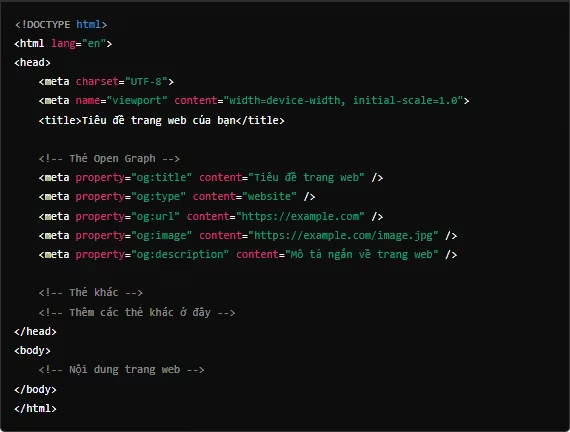
To add Open Graph, you need to insert the HTML code into the <head> section of your website. Common tags include:
Using plugins or support tools

If you use content management systems (CMS) like WordPress, adding Open Graph is easier thanks to support plugins. Here are some popular plugins:
- Yoast SEO: A powerful plugin that helps optimize SEO and Open Graph for your website.
- Rank Math: Another SEO plugin that offers similar features to Yoast SEO.
- All in One SEO Pack: Also a good choice for managing SEO tags and Open Graph.
For other CMS platforms, you can also find similar tools or plugins.
Testing and verification
After adding the Open Graphtags, verify that they are working correctly. Use tools such as:
- Facebook Sharing Debugger: Helps check and debug Open Graphtags.
- Twitter Card Validator: Twitter's tool for verifying how tags appear when shared on their platform.
Use these tools to preview and fix any errors if necessary, ensuring that your content is displayed correctly on social media.
Notes on using Open Graph
Avoid common mistakes
1. Incorrect Open Graph Tags
- Missing basic tags: Ensure that tags such as og:title, og:image, og:url, and og:description are fully populated.
- Incorrect tag formatting: Use the correct format, such as <meta property="og:title" content="Title" />.
- Inconsistent information: Avoid duplicating or contradicting information between tags.
2. Facebook unable to load images

- Image size and format: Use images of at least 1200x630 pixels in JPG or PNG format.
- Image accessibility: Ensure images are publicly accessible and not restricted by firewalls or security settings.
3. Duplicate or Inconsistent Tags
- Check and synchronize tags: Use tools like the Facebook Sharing Debugger to verify and ensure information consistency.
Update Open Graph information regularly

Maintaining and updating Open Graph content is essential to ensure that information is displayed accurately and attractively on social media:
- Update when content changes: Whenever there are changes to the title, description, image, or URL, update the corresponding Open Graph tags to ensure users see the latest information.
- Periodic checks: Use testing tools like the Facebook Sharing Debugger or Twitter Card Validator to ensure that tags are working correctly and displaying the most recent information.
Comply with the regulations of each social network
Each social network has unique requirements for how shared content is displayed, and understanding these rules is key to optimizing your communication effectiveness. Below are the points to note for optimizing content display on popular social networks.

1. Facebook
When sharing links on Facebook, you need to ensure that the Open Graph tags such as og:title, og:type, og:image, og:url, and og:description are correctly configured. This ensures that the title, content type, thumbnail image, URL, and description are displayed properly on users' newsfeeds.
For example, if you do not include an og:image tag with a clear image path, Facebook may fail to display an image when your link is shared, which reduces its ability to attract users.
2. Twitter
On Twitter, using the twitter:card tag is crucial for determining how your content appears when shared.
These tags require you to select the appropriate card type, such as a Summary Card with a Large Image or a standard Summary Card, and provide details like image dimensions and descriptions.
If you do not configure the twitter:card tags correctly, your post may not display the image or full title, which impacts the appeal of your link on Twitter.
3. LinkedIn
LinkedIn uses Open Graph tags to pull information from your website. Ensuring that tags like og:title, og:image, and og:description are correctly set up helps LinkedIn display the title, image, and description accurately.
Otherwise, LinkedIn may display incomplete or incorrect information, which affects how users perceive and interact with your content on the platform.
Leveraging Open Graph tags is a key strategic step to improve the effectiveness of your social media content sharing. Similar to how marketers optimize for Facebook, correctly implementing Open Graph tags helps you display complete information with engaging thumbnails, titles, and descriptions.
Don't miss the opportunity to optimize your display; start configuring and updating your tags today to increase engagement and build stronger connections with your users.


