



Did you know that page load speed and user experience are no longer just secondary factors, but have become top-tier ranking metrics for Google? Core Web Vitals are the key to optimizing your website, retaining customers, and climbing to the top of search rankings. But how do you truly understand and improve these metrics? Let’s join Markdao to explore everything about Core Web Vitals and the secrets to making your website a "shining star" in Google's eyes right now!
Official announcement from Google regarding Web Vitals
In May 2020, Google announced Core Web Vitals as a crucial part of its efforts to enhance user experience on websites. This set of metrics focuses on measuring and optimizing key factors such as loading speed, interactivity, and visual stability. Since 2021, Core Web Vitals has become an official ranking factor, directly impacting a website's SEO performance.
Google emphasizes that Web Vitals are not just technical metrics but also a measure of the quality of the user experience when visiting your site. This means that if you want to achieve high rankings, Core Web Vitals is an element you cannot afford to ignore.

What are Web Vitals?
Google always prioritizes improving user experience in every algorithm update. Web Vitals are a set of essential standards designed to measure website quality through specific metrics. This tool helps evaluate a website's performance, from page load speed to user satisfaction during interaction.
The Web Vitals standard set includes 7 key metrics:
1. Largest Contentful Paint (LCP): The time it takes to load the largest content element – a decisive factor for display speed.
2. First Input Delay (FID): The time it takes for the site to respond to the user's first interaction.
3. Cumulative Layout Shift (CLS): The visual stability of the page layout while content loads.
4. Mobile-Friendly: The level of optimization for mobile devices.
5. Safe-Browsing: Ensuring the website is safe to visit, free from malware or deceptive content.
6. HTTPS: Verifying whether the website uses the secure HTTPS protocol.
7. No Intrusive Interstitials: Minimizing pop-ups or intrusive advertisements.
These metrics not only help your website meet technical standards but also enhance user experience, providing a competitive edge in search rankings.
What are Core Web Vitals?
Definition
Among the Web Vitals metrics, Core Web Vitals are considered the most critical group, which Google focuses on to evaluate performance and user experience. This group measures three core factors:
- LCP (Loading): Evaluates how quickly the main content on the page is displayed.
- FID (Interactivity): Measures the responsiveness and smoothness of user interactions.
- CLS (Visual Stability): Ensure that page elements do not shift while loading.
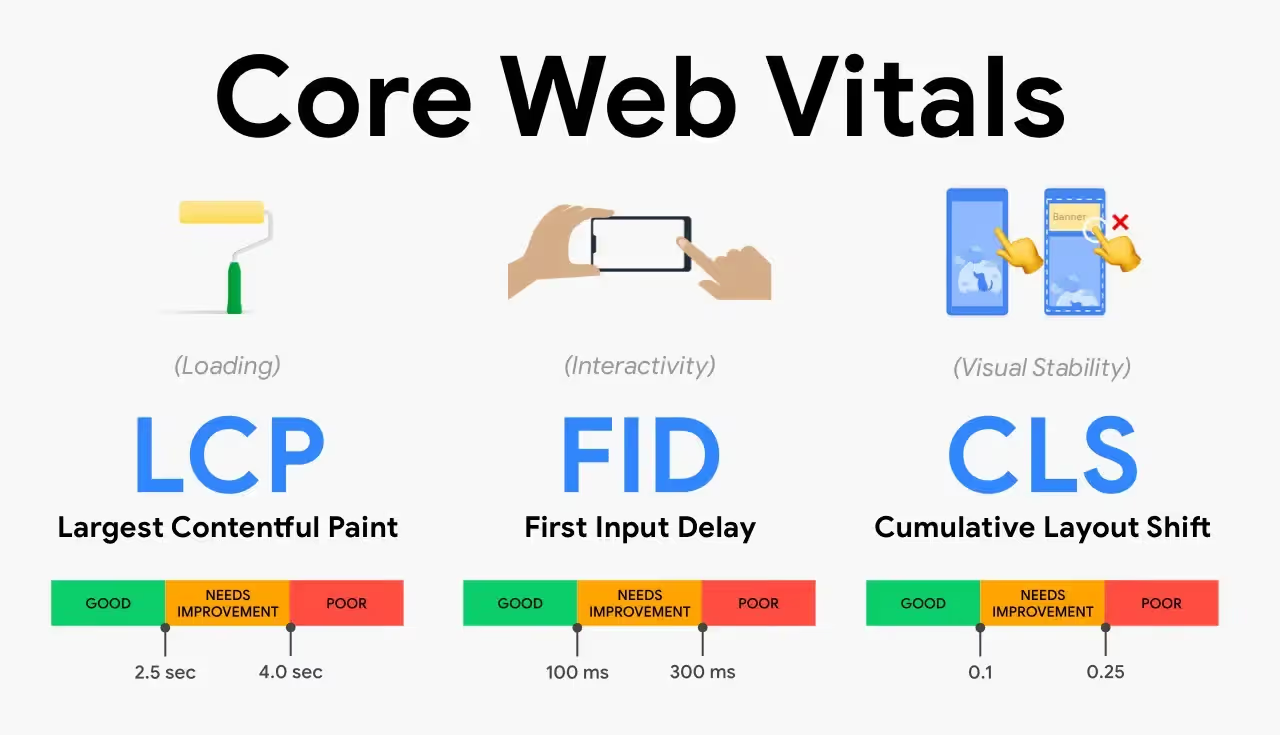
These metrics are not just technical; they significantly impact how users perceive your site. A website that loads quickly, runs smoothly, and avoids annoying layout shifts creates a better impression and keeps visitors engaged longer.
Core Web Vitals are more than just a "new standard"—they are the key to maintaining your position in Google search rankings.
The Role of Core Web Vitals in SEO
Core Web Vitals are not just technical metrics; they are essential benchmarks that help your website "score points" with both Google and your users. Here are the key roles Core Web Vitals play in your SEO strategy:
- Direct impact on search rankings: Google officially announced Core Web Vitals as a ranking factor in 2021. This means that if your website achieves high scores in metrics such as LCP, FID, and CLS, your chances of improving your search ranking will increase significantly.
- Improving User Experience (UX): Core Web Vitals focus on optimizing key elements like loading speed, responsiveness, and content stability. When these metrics are improved, users enjoy a better (UI UX) experience while browsing, which reduces bounce rates and increases time on site.
- Boost your SERP competitiveness: In a world where every business is vying for the top spot, optimizing Core Web Vitals gives you a significant competitive edge. A faster, smoother website not only delights users but also earns higher rankings from Google.
- Increase conversion rates: Studies show that slow page load speeds can significantly decrease conversion rates. Core Web Vitals not only help your site perform efficiently but also positively influence user purchasing and sign-up behavior.
- Align with Google standards: Core Web Vitals are part of the Page Experience signals that Google uses to evaluate website quality. Optimizing these metrics means you are meeting the requirements of Google's algorithm, thereby securing your search rankings.
The 3 key Core Web Vitals metrics
Core Web Vitals are three essential metrics Google uses to measure website performance, with a focus on user experience. These metrics not only impact your page's ranking potential but also determine user satisfaction upon arrival.
1. Largest Contentful Paint (LCP) – Loading performance
LCP measures the time it takes to load and render the largest piece of content on the screen, such as an image or a large block of text. This metric reflects the page loading speed as perceived by the user.
Significance: Reflects the ability to deliver information to users quickly, which is especially critical for e-commerce sites or news platforms.
Ideal time: Under 2.5 seconds.
%20%E2%80%93%20Th%E1%BB%9Di%20gian%20hi%E1%BB%83n%20th%E1%BB%8B%20n%E1%BB%99i%20dung%20l%E1%BB%9Bn%20nh%E1%BA%A5t.avif)
Reasons for low scores:
- Large, unoptimized images or videos.
- Inefficient CSS or JavaScript code.
- Slow server response times.
How to improve:
- Use a CDN (Content Delivery Network) to increase loading speed.
- Optimize images using modern formats like WebP.
- Minimize unnecessary JavaScript code.
2. First Input Delay (FID) – Interactivity
FID measures the time from when a user first interacts with a page (such as clicking a link or tapping a button) to the time when the browser is actually able to begin processing event handlers in response to that interaction. It is a key metric for evaluating the smoothness of the interactive experience.
Significance: Ensures users do not experience "lag" when interacting with the site.
Ideal time: Less than 100 milliseconds.
%20%E2%80%93%20Kh%E1%BA%A3%20n%C4%83ng%20ph%E1%BA%A3n%20h%E1%BB%93i%20khi%20t%C6%B0%C6%A1ng%20t%C3%A1c.avif)
Causes of low scores:
- JavaScript blocking the response process.
- Too many third-party scripts running simultaneously.
How to improve:
- Optimize script loading order, prioritizing critical scripts.
- Use lazy loading to load content only when needed.
- Optimize server performance and reduce request processing time.
3. Cumulative Layout Shift (CLS) – Visual stability
CLS measures how much a webpage's layout shifts during loading, which can frustrate users when elements move unexpectedly. For example, when you are about to click a button but an image above it suddenly appears, pushing the button down.
Significance: Ensures a stable layout that does not confuse or annoy users.
Ideal score: Below 0.1.
%20%E2%80%93%20%C4%90%E1%BB%99%20%E1%BB%95n%20%C4%91%E1%BB%8Bnh%20b%E1%BB%91%20c%E1%BB%A5c.avif)
Common causes for low scores:
- Images or videos without fixed dimensions.
- Fonts that load slowly or cause layout shifts when rendered.
- Ads or pop-ups that appear unexpectedly.
How to improve:
- Set fixed dimensions for images and videos.
- Use system fonts or preload web fonts via CSS.
- Avoid using poorly controlled ads or pop-ups.
The importance of Core Web Vitals
These three metrics are not just technical factors; they are critical to the success of your SEO strategy. By optimizing them:
- LCP: Increases page load speed and keeps users engaged longer.
- FID: Improves interactivity and boosts user satisfaction.
- CLS: Provides a smooth browsing experience and creates a professional impression.
Understanding and optimizing these metrics not only helps improve your website's search rankings but also builds a reliable brand image in the eyes of your users.
5 Tools to test and evaluate Core Web Vitals
Core Web Vitals are essential metrics for evaluating website performance and user experience. Using the right tools not only helps you monitor these metrics but also supports effective optimization. Below are the most widely used tools:
1. Google PageSpeed Insights (PSI)
PageSpeed Insights is a tool provided by Google that focuses on analyzing website performance based on both real-world data and simulations.
Benefits:
- Measures Core Web Vitals metrics: LCP, FID, and CLS.
- Analyzes real-user data (Field data) from the Chrome UX Report.
- Provides specific improvement recommendations such as image optimization, minifying CSS/JavaScript code, and improving server response times.
How to use:
- Visit: Google PageSpeed Insights.
- Enter the URL you want to analyze to receive a detailed report for both mobile and desktop devices.
.avif)
Optimization tips:
- Prioritize addressing high-impact issues as suggested by PSI.
- Use PSI regularly to track your website's improvement progress.
2. Google Search Console (GSC)
Search Console is a free tool that helps you monitor your website's performance on Google, specifically through Core Web Vitals reports.
Benefits:
- Provides real-world data from Chrome users (Chrome UX Report).
- Groups URLs by status: Good, Needs improvement, or Poor.
- Integrates detailed error reports so you know exactly what the issue is for each URL.
How to use:
- Visit: Google Search Console.
- Go to the "Core Web Vitals" section in the "Experience" menu.
- View the report to identify problematic URLs and receive instructions on how to fix them.
.avif)
Optimization tips:
- Focus on fixing errors on your most important URLs (homepage, product pages).
- Perform regular checks to ensure no new issues arise on your URLs.
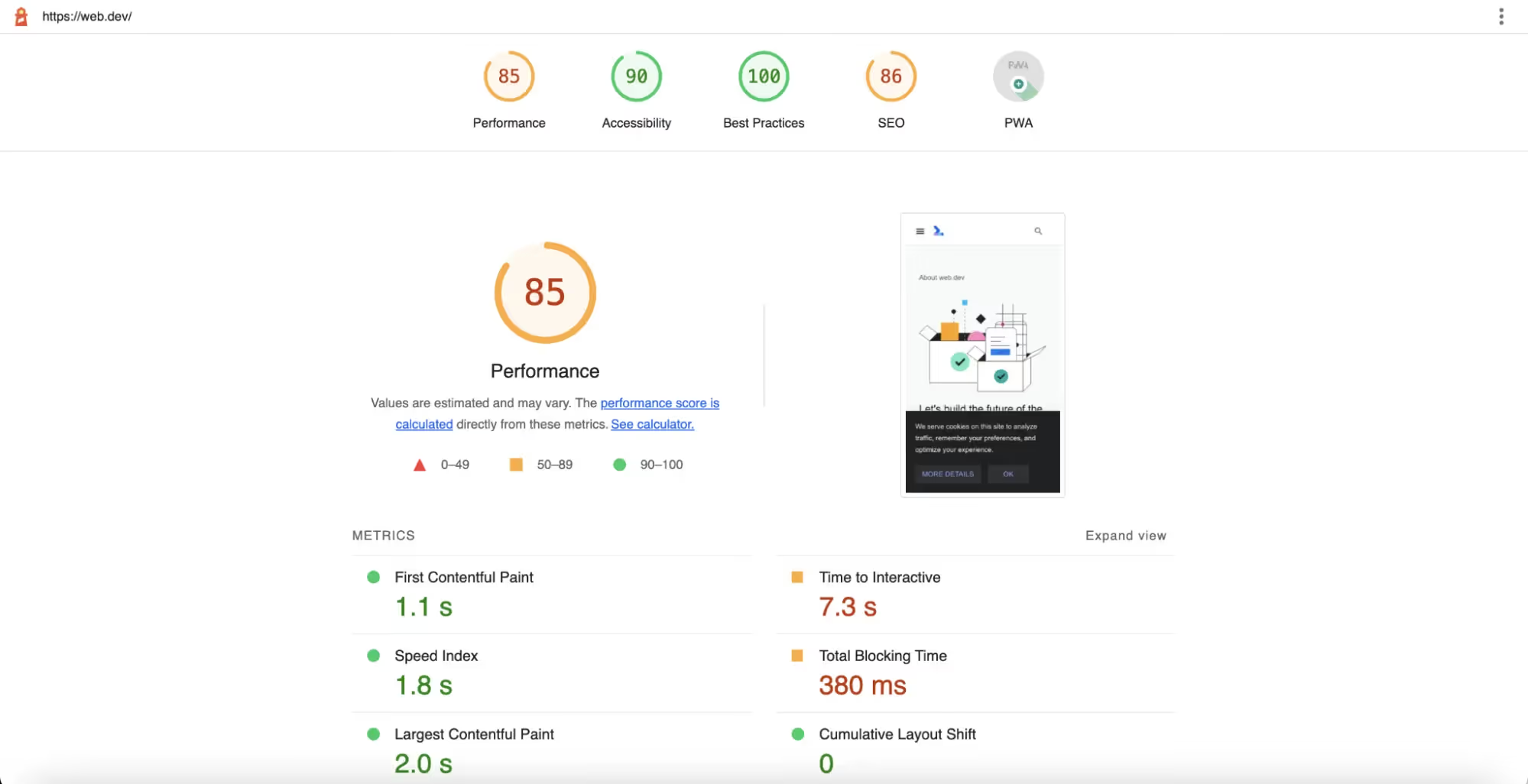
3. Lighthouse
Lighthouse is a powerful tool built into Chrome DevTools that helps you audit and improve user experience.
Benefits:
- Provides detailed reports on LCP, CLS, and other influencing factors.
- Pinpoints technical causes such as slow scripts, unoptimized CSS, and large images.
- Evaluates various other aspects like SEO, Accessibility, and Progressive Web Apps.
How to use:
- Open your website in Chrome → Press F12 to open DevTools.
- Go to the Lighthouse tab → Select your device (Mobile/Desktop) and start the analysis.
Optimization tips:
- Use Lighthouse for quick testing during the website development process.
- Combine with other tools for a more comprehensive overview.
4. WebPageTest
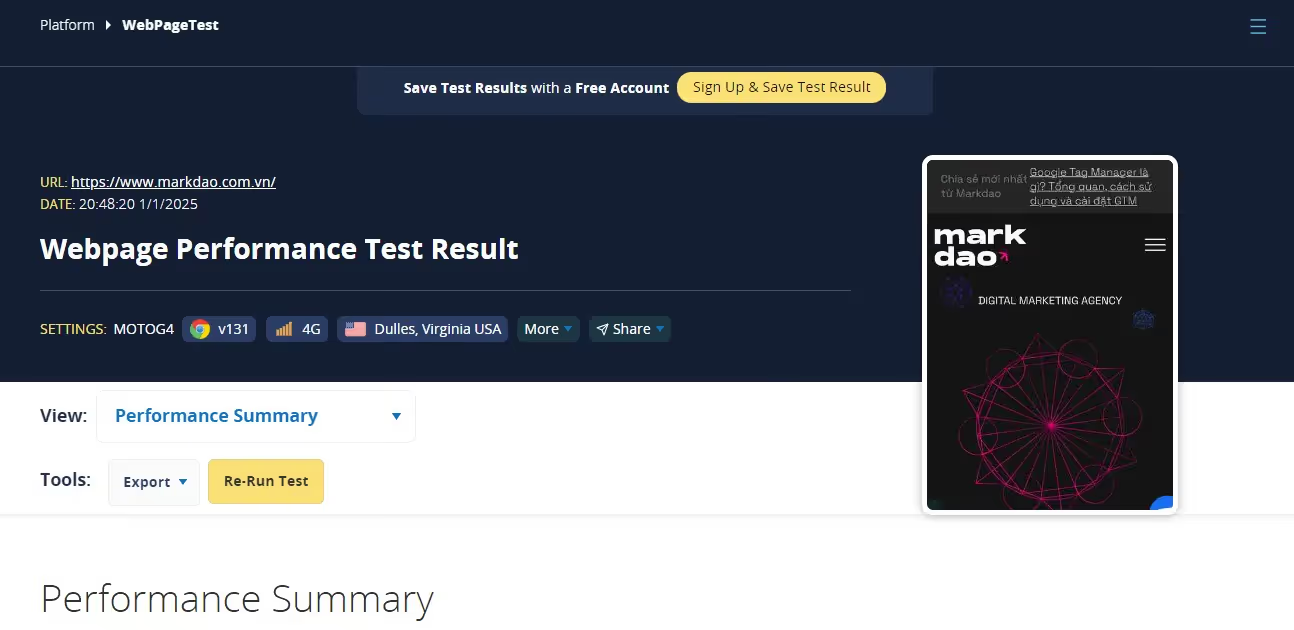
WebPageTest is an in-depth website performance testing tool that allows for measurements from various locations and device types.
Benefits:
- Analyze Core Web Vitals metrics from multiple geographic locations.
- Supports testing across different browsers and network speeds.
- Provides Waterfall charts to understand the page loading process in detail.
How to use:
- Visit: WebPageTest.
- Enter the URL you want to test, then select the location, device type, and network speed.
- Receive a detailed report on LCP, CLS, FID, and other issues.
Optimization tips:
- Use it to compare your website's performance against your competitors.
- Test on various connection types (3G, 4G) to optimize the user experience in all environments.
5. GTmetrix
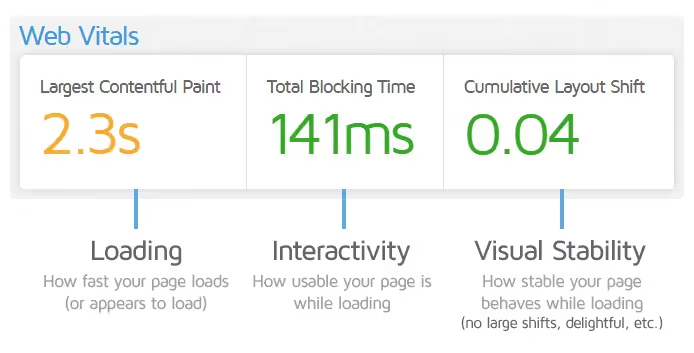
GTmetrix is one of the most popular website performance analysis tools, supporting the evaluation of Core Web Vitals metrics.
Benefits:
- Displays detailed LCP, CLS, and factors causing page slowdowns.
- Provide optimal recommendations for everything from servers and images to source code.
- Support performance testing across multiple geographic regions.
How to use:
- Visit: GTmetrix.
- Sign up for a free account to access advanced features.
- Analyze a URL to receive a detailed report.
Optimization tips:
- Focus on easy-to-implement recommendations first (Quick Wins).
- Save reports to track improvement progress over time.
Conclusion
Focusing on Core Web Vitals is not just an SEO strategy; it is a way to build a more user-friendly and effective website for your customers. We hope this article has helped you better understand "website scores." These metrics not only help your website meet technical standards but also enhance user experience, creating a competitive advantage in search rankings.


