


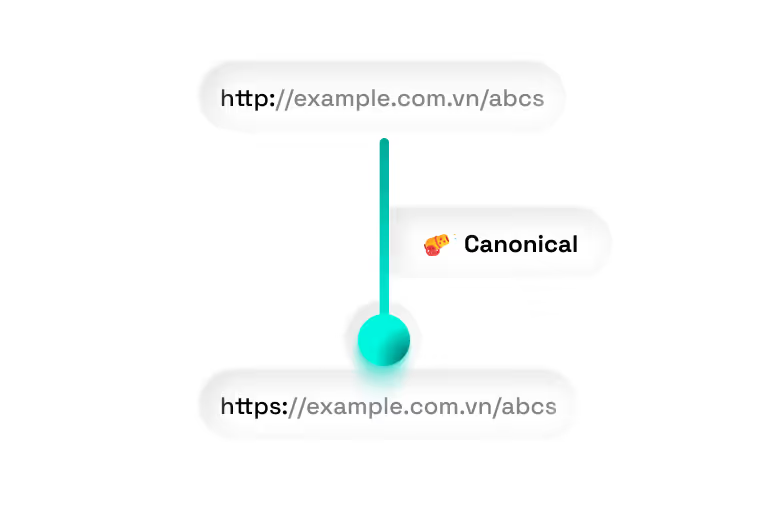

Canonical tags play a crucial role in addressing duplicate content issues on websites. When multiple pages contain similar or identical content, using a canonical tag helps specify the official URL, allowing search engines to identify and prioritize the primary version. This not only protects your SEO value but also improves your site's search engine rankings. So, what is a canonical tag and how can you use it effectively? Let's explore this with Markdao in the article below!
What is a canonical tag?
A canonical tag (also known as "rel=canonical") is an HTML element used to declare the official URL (canonical URL) of a webpage when duplicate content occurs. This tag instructs search engines like Google and Bing on which version is the original that should be prioritized for indexing.
You should use a canonical tag when content on your website is duplicated or identical across multiple URLs. In this case, the canonical tag allows you to specify one official version, helping search engines focus SEO value on that URL while avoiding issues related to duplicate content.
Canonical tag structure
The canonical tag structure consists of two parts:
- link rel=”canonical”: The link within this tag is the original version of the page
- href=”https://example.com/sample-page/””: Access the original version here

How canonical tags work
Search engines like Google use canonical tags to:
- Prioritize primary content: If a page has multiple different URLs but the same content, search engines will look at the canonical tag to decide which URL is the primary version.
- Prevent duplicate content: When search engines crawl similar URLs, the canonical tag ensures that SEO signals are not diluted across secondary URLs.
- Consolidate link equity: Backlinks pointing to different versions of content will be consolidated into the main URL, boosting the ranking power of the designated page.
Example of a Canonical tag in HTML
A typical Canonical tag is placed within the <head> section of a webpage as follows:
<link rel="canonical" href="https://www.example.com/main-page">
In this code snippet:
- rel="canonical": Specifies that this is a Canonical tag
- href="https://www.example.com/main-page": The official URL you want search engines to prioritize
Practical example: If a product page has multiple versions such as:
- https://www.example.com/product?id=123
- https://www.example.com/product?ref=google
→ You can use a Canonical tag to specify the official URL:
<link rel="canonical" href="https://www.example.com/product">
Top 3 reasons why Canonical tags are important for SEO
Understanding what a Canonical tag is and the role of this tag is a crucial step in enhancing the user experience on your website. Here are three reasons why the Canonical tag is essential to your SEO strategy:
Preventing duplicate content
Duplicate content is one of the most common issues website administrators face. When multiple URLs lead to the same or similar content, search engines may struggle to determine which version is the primary one.
The Canonical tag solves this by consolidating SEO signals from similar pages into a single authoritative URL. This not only prevents the dilution of SEO value but also ensures that search engines focus on one primary version, maximizing the site's ranking potential.
Optimizing website rankings
Without a Canonical tag, search engines may treat each duplicate URL as a separate page, leading to fragmented SEO value. As a result, none of the pages may achieve a high ranking in search results.
By using the Canonical tag, you direct search engines to rank the primary URL, concentrating your SEO authority on a single page. This is especially important for e-commerce sites, blogs, or websites where content is shared across multiple channels.

Improving the search experience
One of the primary goals of SEO is to provide the most relevant content for user needs. The Canonical tag helps search engines understand which content should be displayed, significantly improving the user's search experience.
When you clearly specify an authoritative URL, users can easily find the exact content they need without being distracted by different versions of the same material. This increases trust and user satisfaction with your website.
6 specific cases where you should use the Canonical tag
Below are the cases where you should use a Canonical tag to optimize your website for SEO:
1. Websites with multiple versions
When a website has multiple versions such as mobile, AMP, or subdomains, the Canonical tag helps specify the primary version.
Example:
- https://markdao.com/dich-vu-thiet-ke-website
- https://m.markdao.com/dich-vu-thiet-ke-website
- https://amp.markdao.com/dich-vu-thiet-ke-website
2. Dynamic URLs with search or filter pages
URLs with dynamic parameters, such as search results or filters, can cause duplicate content. Using a Canonical tag helps specify the primary URL.
Example:
- https://markdao.com/?s=seo
- https://markdao.com/?utm_source=google
3. Blog systems that automatically generate multiple URLs with different categories
When the same post appears in multiple categories, using a Canonical tag helps identify the official page.
Example:
- https://markdao.com/seo-lien-ket-voi-thuong-hieu/
- https://markdao.com/marketing-online/seo-lien-ket-voi-thuong-hieu/
4. Content syndicated across multiple domains
If you syndicate content across multiple domains, a Canonical tag helps indicate the official URL of the article.
Example:
- https://markdao.com/canonical-tag-la-gi
- https://blogs.markdao.com/canonical-tag-la-gi
5. Content across web variants (http/https or www/non-www)
Website variants, such as http/https or www/non-www versions, can cause duplicate content. The Canonical tag helps specify the official URL.
Example:
- https://markdao.com/seo-la-gi
- https://www.markdao.com/seo-la-gi
6. Multi-part content
When a long article is split into multiple parts, the canonical tag helps specify the primary URL for the entire piece.
Example:
- https://markdao.com/seo-la-gi
- https://markdao.com/seo-la-gi-phan-2
- https://markdao.com/seo-la-gi-phan-3
Properly implementing canonical tags in these cases helps search engines understand which content is the primary version and prevents the dilution of SEO value across different URLs.
How to implement canonical tags to effectively reduce duplicate content
3-step guide to implementing canonical tags
Implementing canonical tags requires precision to ensure effectiveness. Below are the detailed steps:
Step 1: Add the canonical tag to the <head> section of the page's HTML
Place the canonical tag within the <head> section of your HTML code, as follows:
<link rel="canonical" href="https://www.example.com/your-page">
Step 2: Ensure the URL in the canonical tag uses the standard format
- The URL must include the full protocol (https://).
- Avoid using extra characters or incorrect URLs.
- Standardize the URL to a single format (HTTPS, without www if that is your preference).
Step 3: Verify using support tools
Use tools such as Google Search Console to confirm that the canonical tag has been correctly identified by the search engine.
Tools for checking and optimizing canonical tags
Some useful tools to help you check and optimize canonical tags:
- Google Search Console: This free tool from Google allows you to check for issues related to canonical indexing and provides guidance on how to fix any errors.

- Screaming Frog: This software crawls your entire website, detects implementation errors with canonical tags, and provides detailed reports.

- Ahrefs/Semrush: These SEO tools not only help analyze the impact of canonical tags on SEO performance but also suggest ways to optimize them.


Understanding what a canonical tag is and how to implement it correctly will help you avoid risks associated with duplicate content while improving your website's SEO performance. Combine these support tools with best practices for using canonical tags to ensure all content on your site is optimally managed and ranks highly on search engines.
What should you keep in mind when using canonical tags?
Important considerations when using canonical tags
→ Do not use a canonical tag if the content between pages is completely different.
→ Do not point a canonical tag to a non-existent URL.
→ Apply a unique canonical tag to each individual page.
→ Use a self-referencing canonical tag.
→ Choose the correct HTTPS or HTTP domain version.
→ Ensure URLs use lowercase letters.
→ Use absolute URLs instead of relative URLs.
Common mistakes to avoid
While canonical tags are a useful tool, errors such as specifying an incorrect URL (linking to the wrong or an invalid URL) often prevent search engines from identifying the primary content.
Additionally, inconsistency between URL versions (HTTP vs. HTTPS, www vs. non-www) can dilute your SEO value.
Another common mistake is failing to declare canonical tags on necessary pages, especially when dealing with duplicate content.
Conclusion
What is a canonical tag? It is an essential tool for managing duplicate content and optimizing your website for SEO. By clearly specifying the official URL for pages with similar content, you help search engines understand and focus on the most important version. Understanding and correctly using canonical tags will not only improve your SEO performance but also provide a better search experience for your users.


