Google Lighthouse is an open-source tool developed by Google for the automated quality assessment of web pages. Reports focus on Performance, Accessibility, Best Practices, and SEO, while providing explanations for failed audits. Lighthouse is useful for identifying issues in a testing environment; results should be cross-referenced with real-user data before prioritizing fixes.
In this article, we will explore what Google Lighthouse is, how to use it, and tips for effectively optimizing your website.
What is Google Lighthouse?
Google Lighthouse is an open-source tool developed by Google that helps audit and evaluate a website's performance, accessibility, SEO, and user experience (UX). This tool is particularly useful for web developers and SEO professionals to optimize websites, ensuring they run smoothly, remain user-friendly, and meet Google's standards.
With Lighthouse SEO, users can analyze a website based on various critical criteria such as page load speed, code optimization, mobile responsiveness, and search engine friendliness. Based on these metrics, Google Lighthouse provides recommendations to help improve performance and boost the website's visibility in search results.
Key features of Google Lighthouse
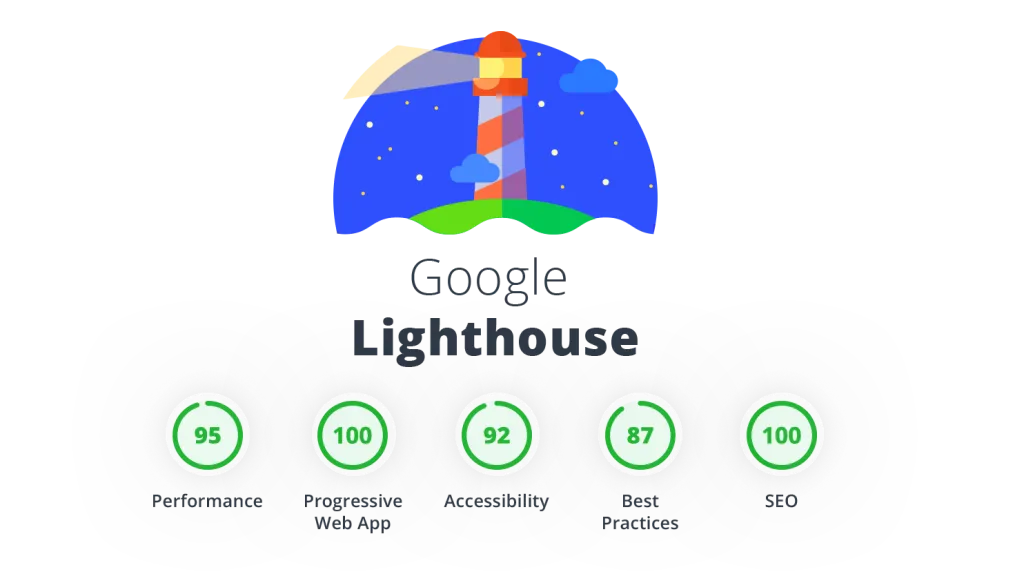
- Performance: Measures page load speed and overall website efficiency.
- Accessibility: Evaluates how easily a website can be used by all users, including those with disabilities.
- Best Practices: Checks for elements such as security, code quality, and other standard web development practices.
- SEO: Assesses a website's SEO readiness, including the use of proper HTML tags and site structure.
Lighthouse previously included a Progressive Web App (PWA) audit category, but Chrome has discontinued support for this specific check. If you need to evaluate installability or offline capabilities, you should use specialized PWA documentation and testing tools instead of relying on the legacy Lighthouse report.
Why is Google Lighthouse important for SEO?
1. Improve website performance:
SEO Lighthouse helps measure factors that affect page load speed, including First Contentful Paint (FCP), Largest Contentful Paint (LCP), and Cumulative Layout Shift (CLS).
Optimizing page load speed not only enhances user experience but is also a key factor in Google's ranking.
2. Optimize accessibility:
Lighthouse evaluates website accessibility, helping to ensure that everyone, including people with disabilities, can easily use the site.
Elements such as color contrast, image descriptions (alt text), and keyboard navigation are analyzed to improve the experience for all users.
3. Check and improve best practices:
This tool identifies issues related to security, HTTPS, JavaScript, and code handling to ensure the website adheres to the best web development standards.
This helps the website run smoothly, avoid security vulnerabilities, and improve the user experience.
4. Enhance SEO with Google Lighthouse:
SEO Lighthouse helps check critical elements such as title tags, meta descriptions, URL structure, and Google indexability.
The tool also checks whether the website uses appropriate schema markup, which helps improve visibility in search results.
Guide on how to use Google Lighthouse for SEO optimization
Google Lighthouse generates automated reports for four main categories: Performance, Accessibility, Best Practices, and SEO. Each category consists of multiple criteria; the scores help identify areas for improvement and are not a guarantee of rankings or the actual experience for every user.
Below is a detailed guide on how to use Google Lighthouse to effectively test and optimize your website.
Install Google Lighthouse
There are several ways to use Google Lighthouse, depending on your needs and testing methods.
1. Use in Chrome DevTools
Google Lighthouse is built directly into the Google Chrome browser, allowing you to quickly audit your website without installing any additional software.
How to do it:
- Open the website you want to audit in Google Chrome.
- Press F12 or right-click and select Inspect to open DevTools.
- Switch to the “Lighthouse”tab.
- Select the categories you want to audit: Performance, Accessibility, Best Practices, and SEO.
- Click “Analyze page load” to let Lighthouse run the analysis on your website.
2. Using Lighthouse CLI (Command Line Interface)
If you want to test your website via the command line, Google Lighthouse supports running in a Node.js environment.
How to do it:
- Install Node.js if you haven't already: npm install -g lighthouse
- Run Lighthouse using the command: lighthouse https://example.com --view
- Once finished, Lighthouse will display the report in your browser or export it as a JSON/HTML file for analysis.
3. Use the Lighthouse Extension for specific needs
Chrome recommends using Lighthouse in DevTools for most cases. The extension is only suitable if you have specific reasons; it does not test local pages or pages requiring login as effectively as DevTools.
Lighthouse is available as an extension on the Chrome Web Store.
How to do it:
- Download and install Lighthouse Extension from the Chrome Web Store.
- Open the website you want to test.
- Click the Lighthouse icon on the Chrome toolbar and select "Generate Report" to start the test.
.webp)
Process for generating a report with Google Lighthouse
1. Select the type of report to test:
- Performance: Check page load speed.
- SEO: Analyze SEO-standard elements.
- Accessibility: Evaluate website accessibility.
- Best Practices: Check source code and security.
2. Click "Generate Report" to let Lighthouse begin the analysis.
3. Wait for the audit to complete, and Lighthouse will display a detailed report with scores and improvement suggestions.
Analyzing results from the Google Lighthouse report
After generating the report, you need to understand how to read and apply Lighthouse suggestions to optimize Lighthouse SEO.
1. Performance (Website performance)
- Key metrics:
- First Contentful Paint (FCP): The time it takes for the first content to appear on the page.
- Largest Contentful Paint (LCP): Largest Contentful Paint (LCP).
- Time to Interactive (TTI): The time it takes for the page to become fully interactive.
- Cumulative Layout Shift (CLS): The visual stability of the interface while the page loads.
- Goal: Minimize page load time to enhance the user experience.
2. Accessibility
- Evaluate website accessibility for users with disabilities.
- Check color contrast, image descriptions (alt text), and keyboard navigation.
- Improving accessibility makes the website more user-friendly for everyone.
3. SEO (Search Engine Optimization)
Lighthouse checks key SEO factors such as:
- Clear website structure.
- Proper use of meta tags.
- Image optimization to increase page load speed.
- Search engine-friendly URL structure.
- Using Schema Markup to improve visibility on Google.
Lighthouse SEO helps identify SEO errors and provides improvement guidelines to boost website rankings.
4. Best Practices
- Check security elements such as HTTPS, CORS, and website source code.
- Ensure the website has no JavaScript errors that affect performance.
- Verify the validity of the source code and web development standards.
Things to keep in mind when using Google Lighthouse
When using Google Lighthouse, there are several important points to consider to ensure accurate results and effective website optimization.
First, run tests in real-world environments because Lighthouse results can vary depending on network conditions and devices. Testing on multiple devices (desktop, mobile, tablet) with different network speeds will help you get a more accurate assessment of your website's actual performance.
Next, instead of trying to optimize everything at once, focus on improving one section at a time based on priority. You can start with Performance to improve page load speed, then optimize SEO to increase search engine visibility, followed by Accessibility to ensure the site is user-friendly for everyone.

After each optimization, run the test again to measure the results and compare them before and after improvements to determine the effectiveness of your adjustments. Finally, do not rely solely on Google Lighthouse, as it is only a supporting tool.
Combine it with other tools such as Google PageSpeed Insights, Google Search Console, GTmetrix, and especially real user behavior analysis to develop the best optimization strategy.
Most importantly, do not just chase a high Lighthouse score; prioritize user experience to ensure the website runs smoothly and achieves optimal performance on search engines.
Conclusion
Google Lighthouse is an automated testing tool that helps identify issues with performance, accessibility, development practices, and basic SEO. The report should be used to create a priority list, which should then be verified against real user data, PageSpeed Insights, Google Search Console, and your own website measurement tools.
A high Lighthouse score does not guarantee Google rankings or conversion rates. When preparing to launch your website, combine the report with a website testing and handover timeline along with a process On-page SEO to address issues correctly based on their impact.