



Understanding user search trends is now the key to optimizing SEO, content marketing, and advertising strategies for businesses. Google Trends—a free search trend analysis tool from Google—allows you to track user interest over time, by region, and by topic. So, what is Google Trends? How can you use this tool to identify search trends and maximize your business potential? Let’s join Markdao to explore the details in this article!
What is Google Trends?
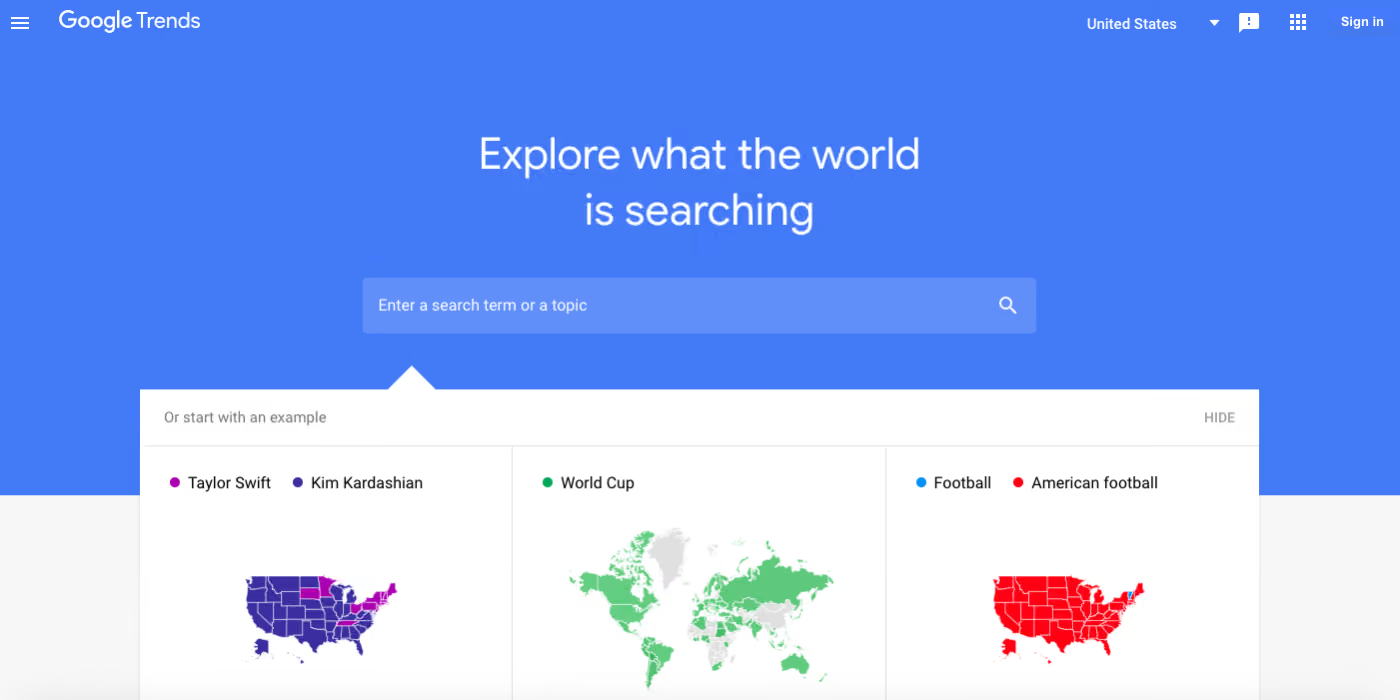
Google Trends is a free tool from Google that allows users to analyze the popularity of search terms over time. This tool helps identify search trends, compare interest levels between different topics, and discover the most popular keywords by region.
Beyond supporting SEO, Google Trends helps businesses, marketers, and market researchers understand user search behavior, thereby optimizing content and advertising strategies.
The history and purpose of Google Trends
Google Trends was first launched in 2006 and has been improved many times to provide more visual and accurate data. Initially, the tool only displayed simple charts of keyword interest over time. Today, Google Trends has evolved into a powerful tool with many advanced features, helping users explore search trends by category, location, and platform (Google Search, YouTube, Google Shopping, etc.).
The main purpose of Google Trends is to provide data on user search behavior, helping businesses, researchers, and content creators:
- Identify the latest search trends.
- Compare interest levels across different topics.
- Predict consumer trends based on search data.
The importance of Google Trends in SEO, marketing, and market research
- For SEO
- Finding potential keywords: Google Trends helps identify trending keywords, allowing you to optimize website content accordingly.
- Seasonal trend analysis: Helps plan content tailored to specific times of the year.
- Local content optimization: Identifies popular keywords by region to optimize local SEO.
- For Marketing
- Ad campaign optimization: Determines the most effective times to run Google Ads.
- Customer research: Understands search trends to build outreach strategies that meet user needs.
- Market trend forecasting: Detects products/services gaining interest to adjust business strategies.
- For market research
- Consumer trend tracking: Google Trends helps identify market demand over time.
- Brand comparison: Businesses can analyze interest levels between their brand and competitors.
- Business decision support: Helps businesses identify potential business opportunities.
How Google Trends works
Google Trends is a powerful search data analysis tool that helps users track search trends over time. But how does Google Trends collect and process data? And what do the metrics in Google Trends mean? Let's dive into the details!
Google Trends collects and processes search data
Google Trends does not provide absolute search volume figures; instead, it displays relative indices, which reflect changes in keyword interest levels over time.
Google Trends data is gathered from various sources, including:
- Google Search – Google's primary search engine.
- Google News – Articles and news related to the keyword.
- Google Images – Popular image search trends.
- Google Shopping – Search behavior for products and services.
- YouTube Search – Video search trends on YouTube.
Google Trends aggregates data from billions of searches and normalizes the data as a percentage based on the total number of Google searches within a specific timeframe. This helps accurately reflect search trends rather than simply displaying raw search volume.
Key metrics in Google Trends
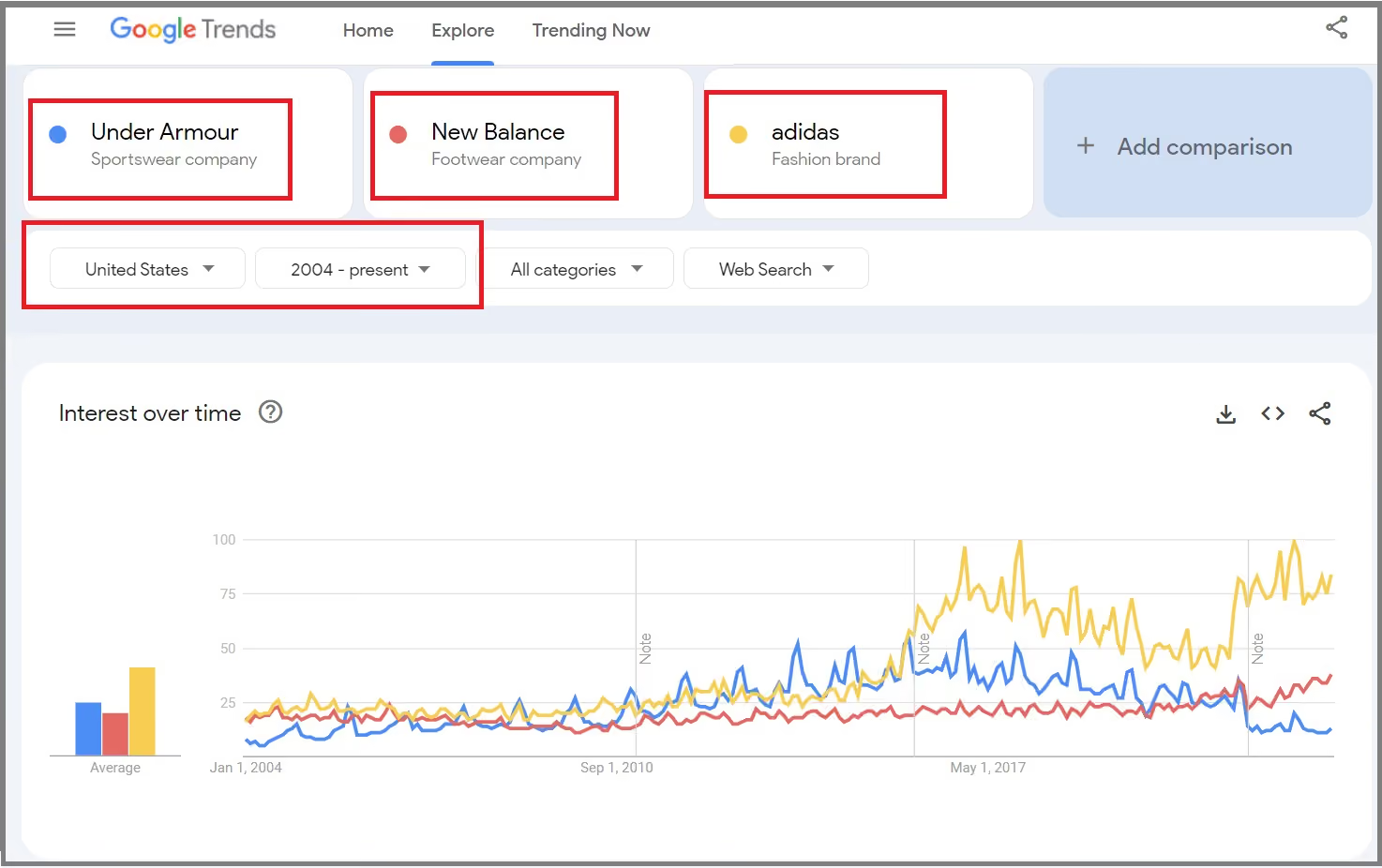
1. Interest Over Time
This is the main chart in Google Trends, which shows the search interest for a keyword over time.
How to read the data:
- The index ranges from 0 – 100 (100 is the peak popularity).
- If a keyword is trending upward, it means user interest is growing.
- If a keyword is trending downward, that topic may be losing popularity.
Practical applications:
- Identify seasonal keywords to optimize your content.
- Predict market trends to plan your business strategy.
Example: If you search for "Black Friday," you will see interest spike every November, reflecting the shopping demand during that period.
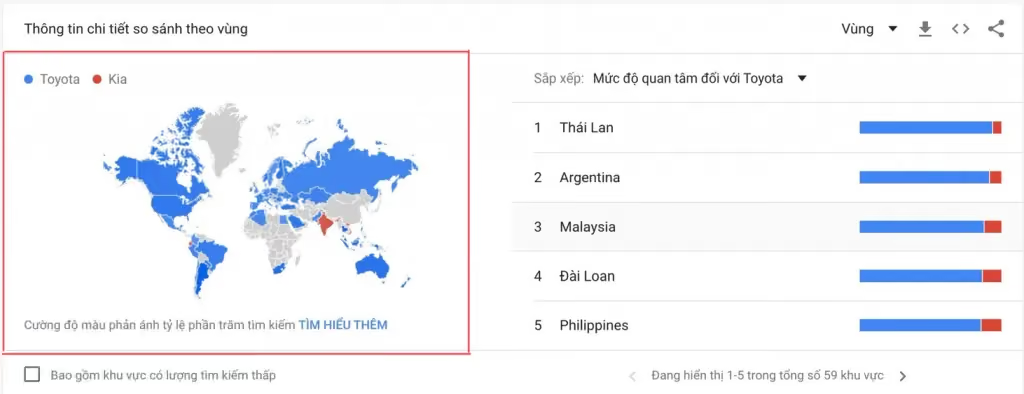
2. Interest By Region
Google Trends allows you to view data by specific country, city, or region.
How to read the data:
- The map chart displays interest levels by region.
- Darker colors indicate areas with the highest search volume.
Practical application:
- Support Local SEO – optimizing keywords by region.
- Helping businesses identify potential markets for running ads.
Example: If you are in the travel business, you can search for "Da Lat tours" to see which areas have the highest demand, and then optimize your promotional strategy accordingly.
3. Related Queries
This is a list of keywords related to your main keyword that users are searching for.
How to read the data:
- Keywords may be displayed with a percentage growth rate (e.g., +200%).
- Keywords with the "Breakout" tag mean they are experiencing a sudden surge in interest.
Practical application:
- Search new content ideas for blogs and websites.
- Discover potential keywords for SEO optimization.
Example: If you search for "solar power," Google Trends might suggest related queries like "solar power prices 2025," helping you generate more article ideas.
4. Trending Searches
This is a list of keywords experiencing the fastest growth in search volume over a short period.
How to read the data:
- Google displays a list of trending topics by day or in real-time.
- You can filter by category: News, Entertainment, Sports, Technology, etc.
Practical application:
- Quickly jump on trends to create viral content.
- Update market news to adjust business strategies.
Example: If you create content on YouTube, you can track Trending Searches to produce videos that align with current trends, helping to increase views quickly.
5. Category & Search Type
Google Trends allows you to filter results by different categories and search types, including:
Popular categories:
- Technology
- Business
- Health
- Fashion
- Entertainment
Search types:
- Web Search (Google Search)
- Image Search (Image Search)
- News Search (News search)
- YouTube Search (YouTube search trends)
- Google Shopping (Shopping trends)
Practical applications:
- If you are a blogger, use News Search to find trending topics.
- If you create YouTube content, filter by YouTube Search to see which videos are trending.
Example: When searching for "iPhone 15", if you select Google Shopping, you will see search trends related to pricing, retailers, product reviews, and more.
How to use Google Trends to identify search trends
Google Trends is not only for tracking search trends but is also a powerful tool for SEO, Google Ads, and market research. Here is how to use Google Trends to optimize your content and advertising strategies.
Keyword research for SEO
Google Trends is a useful tool for identifying keyword trends, which helps you optimize your content for SEO. You can use Google Trends to:
1. Identify long-term and short-term keyword trends
Google Trends allows you to track keyword changes over time. This helps you:
- Spot trending keywords to optimize your content early.
- Avoid declining keywords so you don't waste resources.
For example: If you search for "AI in marketing" on Google Trends, you can see that interest is rising. This indicates it is a promising topic for blog posts or video content.
2. Find keywords by region to optimize local content
Google Trends allows you to analyze search trends by specific countries, cities, or regions. This is especially important for local SEO.
How to do it:
- Enter a keyword into Google Trends.
- Select a specific region (Vietnam, Hanoi, Ho Chi Minh City, etc.).
- Analyze the level of interest by region.
For example: If you are optimizing content for "solar power installation," you might find that this keyword is more popular in the Central and Southern regions. You can then create content targeting potential customers in these areas.
3. Analyze seasonal keywords to plan your content
Many keywords see a sharp increase in search volume during specific seasons (holidays, events). Google Trends helps you determine when to produce relevant content.
For example:
- "Valentine's Day gifts" usually spikes in February.
- "Beach travel" increases during the summer (May – August).
- "Black Friday" explodes every November.
Practical application:
- Plan your blog posts or landing pages well before the peak season.
- Run ads at the right time to optimize costs.
Supporting Google Ads & Content Marketing strategies
Google Trends not only helps with SEO optimization but also supports Google Ads and effective content strategy development.
1. Choose the best keywords for your ads
Google Trends helps compare keywords to select those with high search volume and reasonable competition.
Example: You are running Google Ads for a "water purifier" product. When comparing two keywords:
- "RO water purifier"
- "Nano water purifier"
If the keyword "RO water purifier" has a higher search trend, you should prioritize this keyword for your ad campaign.
2. Determine the most effective time to run ads
Google Trends helps you identify when search demand is highest during the year to optimize your advertising budget.
Example:
- If you sell mooncakes, you should run ads from July to September.
- If you sell Christmas decorations, start your campaign in November.
Practical application:
- Save on advertising costs by running ads at the right time.
- Increase ROI by precisely targeting customer needs.
3. Predict trends to create viral content
Google Trends helps identify emerging trends to create content with viral potential.
How to do it:
- Visit Google Trends.
- Check the "Trending Searches" section to find hot topics.
- Analyze breakout keywords (those with a sudden surge in interest).
Example:
- When "ChatGPT" started gaining popularity, websites quickly published articles like "What is ChatGPT?", which significantly boosted traffic.
- The "green tourism" trend is growing rapidly, leading many travel businesses to create content about sustainable travel to attract customers.
Compare trends between keywords & brands
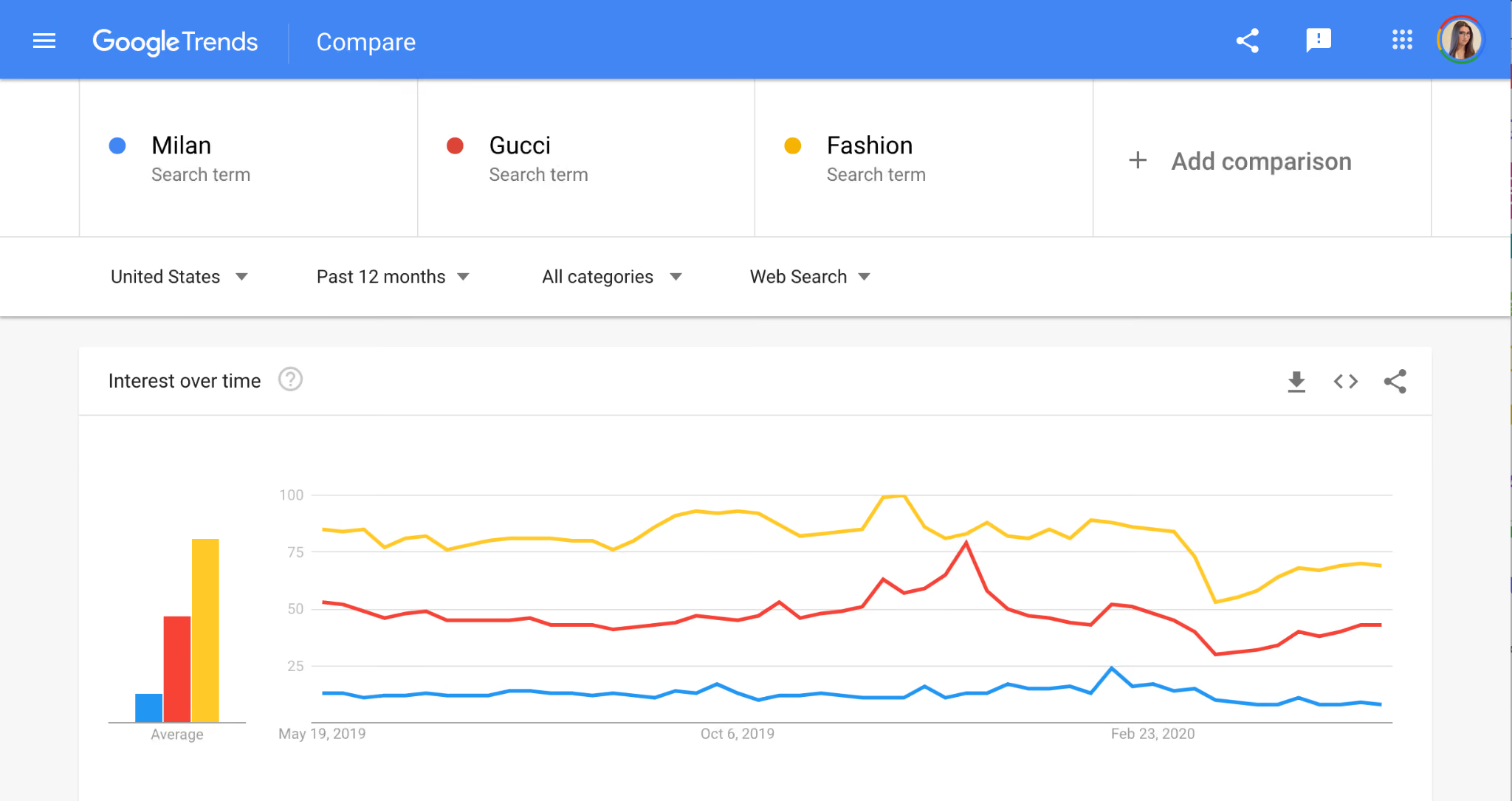
Google Trends features a keyword comparison tool that helps evaluate the popularity of two or more keywords simultaneously.
1. How to use the comparison feature to evaluate keywords
How to do it:
- Go to Google Trends.
- Enter the first keyword (e.g., "solar power").
- Enter the second keyword to compare (e.g., "wind energy").
- View the chart to see which keyword has a higher search trend.
Example: If you want to write about renewable energy, you might find that "solar power" has a higher search volume than "wind energy," allowing you to focus on this topic for better SEO optimization.
2. Monitor competitor brands with Google Trends
Google Trends allows you to compare interest levels between your brand and your competitors to assess your market position.
How to do it:
- Enter your brand name into Google Trends.
- Enter the competitor's brand name.
- View the comparison data to see which brand is generating more interest.
Example:
- If you work in e-commerce, you can compare "Lazada vs Shopee vs Tiki" to see which brand is currently leading.
- If you are an SEO agency, you can compare "Mona Media vs Admatrix" to gauge their relative popularity.
In summary, Google Trends is a powerful tool for optimizing SEO, Google Ads, and Content Marketing. To use Google Trends effectively, you should:
- Analyze keywords by time and location to optimize SEO.
- Find trending keywords to create content that attracts traffic.
- Identify the best times to advertise to optimize your budget.
- Compare keywords and brands to develop a sound competitive strategy.
If you know how to use Google Trends, it will be a powerful weapon to help you beat your competitors and quickly capture market trends.
Tips for getting the most out of Google Trends from Markdao
Limitations of Google Trends you need to know
Google Trends is a useful tool, but to use it effectively, you need to understand its limitations:
- Google Trends displays relative data, not exact search volumes. Metrics are shown as a percentage from 0 to 100 rather than actual search counts.
- The data does not fully reflect user purchasing behavior. A keyword may have a high search volume, but that does not necessarily mean many people intend to buy the related product or service.
- Search trends can be influenced by special events such as breaking news, major advertising campaigns, or Google algorithm updates, which may result in data that does not accurately reflect long-term trends.
4 tips to maximize the potential of Google Trends
- Combine Google Trends with other tools like Google Keyword Planner and Google Search Console to get more comprehensive data on search volume and keyword performance.
- Analyze data intelligently to spot business opportunities. If a keyword shows a consistent upward trend over several months, it could be a potential market to tap into.
- Use Google Trends to optimize content and advertising strategies for seasonality. Keywords with seasonal trends, such as "Tet gifts," "summer tours," or "Black Friday sales," should be planned in advance to capitalize on user demand.
- Compare search trends between keywords or brands to evaluate popularity and adjust your SEO and marketing strategies accordingly.
Google Trends is a powerful tool for capturing search trends, but to fully leverage its potential, it should be combined with other tools and interpreted with a sound data-reading approach. When used effectively, Google Trends can become a valuable asset for your SEO, content marketing, and advertising strategies.
Conclusion
Google Trends is a powerful tool that helps you analyze search trends and effectively optimize your SEO, content marketing, and advertising strategies. However, to maximize its potential, you need to combine it with other tools like Google Keyword Planner and Google Search Console, and interpret the data appropriately.
By applying the right methods, you will not only capture trends but also create high-quality content, increase your reach to potential customers, and enhance your competitive advantage in the market.


