



HTML is the core foundation of every website on the Internet. Whether you are a beginner or an experienced web developer, a solid understanding of HTML is essential. So, what is HTML? How does it work, and what are its pros and cons?
In this article, Markdao will guide you through everything from the basics to the overall structure of HTML, helping you master the art of building professional websites. If you are looking for an easy-to-understand and comprehensive guide to HTML, this is the article for you.
What is HTML? An overview of HyperText Markup Language
HTML (HyperText Markup Language) is a markup language that serves as the foundation for building every website on the Internet. It helps browsers understand and display web content by using tags to format text, images, links, tables, and many other elements.
Unlike programming languages such as JavaScript or Python, HTML does not have the ability to process logic or conditions. Instead, it serves solely to organize and structure content on a webpage. When combined with CSS (Cascading Style Sheets) and JavaScript, HTML can create professional, visually appealing, and highly interactive websites.
%20l%C3%A0%20ng%C3%B4n%20ng%E1%BB%AF%20%C4%91%C3%A1nh%20d%E1%BA%A5u%20si%C3%AAu%20v%C4%83n%20b%E1%BA%A3n.webp)
The history of HTML
HTML was first developed in 1991 by Tim Berners-Lee, a British computer scientist and the "father" of the World Wide Web (WWW). Since then, HTML has undergone many upgrades, adding new features, improving content display, and providing better support for modern web technologies.
Key versions of HTML include:
- HTML 1.0 (1993): The first version, supporting simple text and links.
- HTML 2.0 (1995): Added forms for online data entry.
- HTML 3.2 (1997): Added support for tables, scripts, and design elements.
- HTML 4.01 (1999): Widely used with support for multimedia and CSS.
- XHTML (2000): A stricter version of HTML that follows XML rules.
- HTML5 (2014 - present): The latest version with powerful enhancements such as support for video, audio, 2D & 3D graphics, and better compatibility across mobile devices.
How HTML works in the browser
When a webpage is loaded, the web browser reads the HTML code and interprets each tag to display the corresponding content. This process follows these steps:
- The user enters the website address (URL) into the browser.
- The browser sends a request to the server hosting the website.
- The server responds by sending the HTML file to the browser.
- The browser reads and displays the content according to the HTML structure.

Thanks to this mechanism, HTML helps create static webpages that can be read and displayed on any device with an Internet connection without the need for additional specialized software.
The role and applications of HTML in web development
Is HTML a programming language?
HTML is often mistaken for a programming language, but in reality, it is just a markup language. This means that HTML cannot perform logical operations like programming languages (JavaScript, Python, PHP). Instead, HTML plays the role of creating the structure and formatting content on a webpage, helping the browser display it exactly as the designer intended.
The relationship between HTML, CSS, and JavaScript
In web design, HTML does not work independently but is usually accompanied by CSS and JavaScript:
- HTML: Builds the website structure, defining content and layout.
- CSS: Formats, styles, layouts, and designs the user interface.
- JavaScript: Adds dynamic features and interactivity, such as visual effects and event handling.
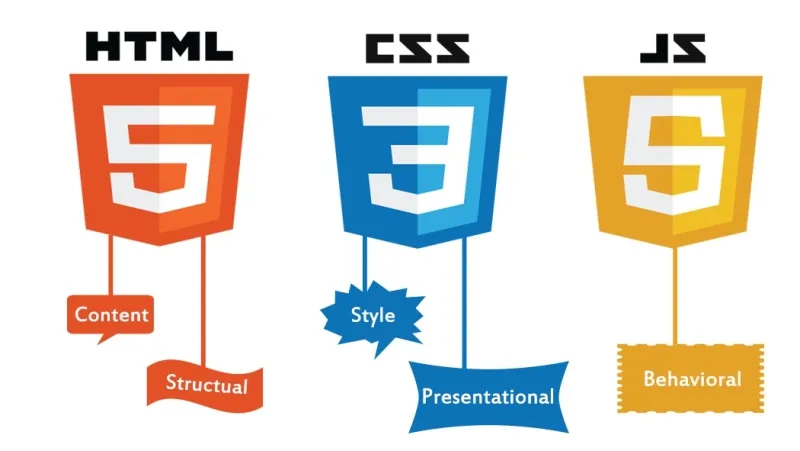
This trio works together to create a complete, user-friendly website.
What can HTML do?
HTML plays a crucial role in:
- Displaying content: Text, images, videos, tables, forms, and more.
- Structuring websites: Organizing layouts into sections like headers, main content, navigation bars, and footers.
- SEO optimization: Using proper HTML tags helps search engines understand website content, improving rankings on Google.
- Integrating with other technologies: Helps create modern, mobile-responsive web applications.
Fields of application for HTML
Thanks to its flexibility and ease of use, HTML is present in many technology sectors:
- Website design: HTML is the foundation for every website on the Internet.
- Web application development: Combining HTML with frameworks like React, Angular, and Vue.js to build web apps.
- Email marketing: HTML helps design professional emails with images, buttons, and beautiful layouts.
- User Interface (UI) design: HTML is an essential tool in software and content management systems (CMS) like WordPress and Joomla.
Given this vital role, HTML is not just for programmers but is also essential for anyone working in technology, design, and digital marketing.
Basic structure of an HTML document
An HTML document is organized according to a standard structure, which helps browsers understand and display web content accurately. Below are the main components of an HTML file:
1. Overview of an HTML document structure
A basic HTML file typically includes the following parts:
<!DOCTYPE html>
<html lang="en">
<head>
<meta charset="UTF-8">
<meta name="viewport" content="width=device-width, initial-scale=1.0">
<title>Website Title</title>
<link rel="stylesheet" href="styles.css"> <!-- Link to CSS file -->
</head>
<body>
<header>
<h1>Welcome to my website</h1>
</header>
<nav>
<ul>
<li><a href="#">Home</a></li>
<li><a href="#">About</a></li>
<li><a href="#">Contact</a></li>
</ul>
</nav>
<section>
<p>This is the main content area of the page.</p>
</section>
<footer>
<p>© 2024. All rights reserved.</p>
</footer>
</body>
</html>

2. Explanation of each component in an HTML document
- <!DOCTYPE html>: Declares the HTML document type, informing the browser that this is an HTML5 page.
- <html lang="en">: The opening tag of an HTML document; the lang="en" attribute indicates that the webpage uses English.
- <head>: Contains information about the webpage, such as the title, character set, description, and links to CSS or JavaScript files.
- <meta charset="UTF-8">: Specifies the UTF-8 character encoding to support English and other languages.
- <meta name="viewport" content="width=device-width, initial-scale=1.0">: Ensures the webpage displays correctly on mobile devices.
- <title>: Defines the title of the webpage (displayed on the browser tab).
- <link rel="stylesheet" href="styles.css">: Links to a CSS file for styling the interface.
- <body>: Contains all the visible content of the webpage.
- <header>: The header section, typically containing the logo, title, and navigation menu.
- <nav>: The navigation bar, containing links to other pages.
- <section>: The main content area of the page.
- <footer>: The footer, containing copyright or contact information.
3. Other important HTML tags
Beyond the tags mentioned above, HTML includes many other important tags that help organize webpage content effectively:
- Heading tags: <h1> through <h6> are used to define headings with decreasing levels of importance.
- Paragraph tag: <p> is used to display text content.
- List tags:
- <ul> (unordered list),
- <ol> (ordered list),
- <li> (list item).
- Link tag: <a href="url"> is used to create links to other pages.
- Image tag: <img src="image.jpg" alt="Image description"> to display images on a page.
- Table tags: <table>, <tr>, <td>, <th> to create data tables.
- Form tags: <form>, <input>, <button> to collect data from users.
Understanding HTML structure will help you create professional, easy-to-manage websites that are better optimized for search engines.
Pros and cons of HTML
HTML is the core foundation of every website, but like any technology, it has certain strengths and limitations. Below are the pros and cons of HTML that you should know.
Advantages of HTML
1. Easy to learn and use: HTML has a simple, intuitive syntax, even for beginners. With just a few lines of code, you can create a basic webpage without needing extensive programming knowledge.
2. Completely free: HTML is an open standard that requires no licenses or special software to use. You only need a text editor like Notepad++ or Visual Studio Code to write HTML code.
3. Compatible with all browsers: Web browsers like Google Chrome, Firefox, Edge, and Safari all support HTML, ensuring your website displays correctly across various platforms.
4. Easily integrates with other technologies: HTML can be combined with CSS to create beautiful interfaces and with JavaScript to add dynamic features. Additionally, HTML can integrate with programming languages like PHP, Python, and Java to build complex web applications.
5. Effective SEO support: Using the correct HTML tags (h1, h2, meta descriptions, image alt text, etc.) helps search engines understand your website's content and improves your Google rankings.
6. Lightweight and fast: A simple HTML webpage loads much faster than sites that rely heavily on JavaScript or content management systems (CMS) like WordPress.
Disadvantages of HTML
1. Only creates static content: HTML cannot handle dynamic data or complex interactions like programming languages. To achieve that, you need to combine it with JavaScript or a server-side programming language like PHP or Python.
2. Requires CSS for attractive design: HTML only provides the basic structure of a webpage; without CSS, the interface would be very plain and unappealing.
3. Time-consuming to build complex websites: If you only use plain HTML without frameworks or CMS platforms like WordPress, building a large website will require a significant amount of effort.
4. Cannot perform backend tasks: HTML cannot process databases, authenticate users, or perform server-side tasks. If you want to create a website with login functionality or data storage, you need to use additional backend technologies like PHP, Node.js, or Python.
5. Prone to errors if standards are not followed: Although HTML is simple, if you write incorrect syntax or do not follow the latest standards (HTML5), the website may not display correctly across some browsers.
3. Is HTML the best choice?
HTML is a must-know language in web design, but it cannot function independently. To create a professional website, you need to combine HTML with CSS, JavaScript and backend technologies such as PHP, Node.js, Python.
Despite some limitations, with advantages like being easy to learn, free, and SEO-friendly, HTML remains a vital foundation in the world of web development.
HTML versions and the improvements of HTML5
When working with HTML, you will frequently encounter technical terms related to this language. Below is a list of essential HTML terms that every web developer should know:
- HTML (HyperText Markup Language): A markup language used to create and structure content on a webpage.
- HTML Tags: Tags used to format and display content in a browser, such as <h1> (headings), <p> (paragraphs), <a> (links), and <img> (images).
- HTML Elements: Consist of an opening tag, content, and a closing tag, such as <p>This is a paragraph.</p>.
- HTML Attributes: Provide additional information about HTML tags, for example <a href="https://markdao.com.vn">Visit Markdao</a>, where href is the attribute that specifies the URL.
- HTML Headings: The <h1> through <h6> tags used to define heading levels on a webpage.
- HTML Paragraphs: Use the <p> tag to display text content.
- HTML Links: Use the <a> tag to create links to other webpages or within the same page.
- HTML Images: Use the <img> tag to display images, with the src attribute specifying the image path and the alt attribute providing a description of the image content.
- HTML Lists: Consist of unordered lists <ul> and ordered lists <ol>.
- HTML Forms: Used for data entry, such as registration or login, using <form>, <input>, <label>, and <button> tags.
- HTML Tables: Use the <table> tag to display data in a table format with <tr> (row), <th> (column header), and <td> (data cell) tags.
- Content division tags (div and span): <div> is used to group multiple elements into a block, while <span> is used to group content inline.
- Meta Tags: Contains information about the webpage such as descriptions, keywords, and authors via <meta> tags.
- HTML5 Semantic Tags: Includes <header> (header section), <nav> (navigation), <section> (content division), <article> (independent article), and <footer> (footer).
- Canvas & SVG: Two HTML5 tools that support displaying graphics and drawing images on a webpage.
Understanding these terms will help you master HTML and build websites more effectively.
7 popular HTML programming software today
To work with HTML effectively, developers often use software that supports coding, debugging, and code optimization. Below are some popular HTML programming tools:
1. Visual Studio Code (VS Code)
- Developed by Microsoft, VS Code is one of the most powerful code editors available today.
- Supports many extensions that improve the HTML, CSS, and JavaScript programming experience.
- Features a user-friendly interface, Git integration, and IntelliSense for smart code suggestions.
.webp)
2. Sublime Text
- A lightweight, fast, and minimalist code editor.
- Supports numerous keyboard shortcuts to help developers work quickly.
- Allows for plugin installation to extend functionality.
3. Atom
- Developed by GitHub, Atom is a powerful open-source code editor.
- Supports interface customization, numerous extension packages, and easy Git integration.
- Suitable for both beginners and professional developers.
4. Notepad++
- A lightweight source code editor that supports many programming languages, including HTML.
- Features syntax highlighting to make reading and editing code easier.
- Requires no complex configuration, making it ideal for those new to programming.
5. Brackets
- An open-source editor focused on web design with HTML, CSS, and JavaScript.
- Includes a "Live Preview" feature to instantly see changes in the browser.
- Developed by Adobe and optimized for web development.
6. Dreamweaver
- A professional HTML development tool developed by Adobe.
- Supports both coders and those with less experience thanks to its visual drag-and-drop design features.
- Integrates the ability to work with various programming languages and is optimized for web development.
7. WebStorm
- Professional IDE for web development with HTML, CSS, and JavaScript.
- Features powerful tools such as code autocompletion, error checking, and debugging support.
- Ideal for large-scale projects that require managing multiple source code files.
Each of these software options has its own unique advantages, so you can choose the best tool for your needs to code HTML efficiently.
Conclusion
HTML is the core foundation of every website, playing a vital role in building and presenting content on the Internet. Whether you are a beginner or an experienced developer, understanding the structure, pros and cons, versions, and supporting tools of HTML will help you optimize your web development process.
With the rapid evolution of HTML5, the web has become increasingly flexible, modern, and interactive. If you are looking to pursue web development, start with HTML today to build a solid foundation for your career!


