




An overview of the Spline tool for 3D websites
Spline is a 3D design tool and web design 3D tool for creating and editing 3D objects in the browser. Because it is a vector-based tool, objects are created and edited using mathematical curves. Spline is highly versatile, allowing you to easily create complex shapes.
Spline was founded in 2020 by a team of former Google employees. The company's mission is to make 3D design in general, and 3D web design in particular, accessible to everyone. Even if you have no prior 3D design experience, Spline is designed to be extremely simple for beginners to get started with 3D design.
1. What is Spline 3D? - Getting started with 3D websites
Spline is a 3D design tool for creating and editing 3D objects in the browser. Because it is a vector-based tool, objects are created and edited using mathematical curves. Spline is highly versatile, allowing you to easily create complex shapes.
2. Features of Spline 3D for 3D websites:
Some of Spline's features include:
- Real-time collaboration: Spline 3D supports real-time collaboration, so you can work on projects with others simultaneously. This is great for teams or anyone looking to get feedback on their work.
- AI tools: Spline includes several AI tools that can help you create 3D objects faster and more easily. For example, you can use the AI Prompt tool to generate 3D objects by describing what you want to create.
- Export options: Spline allows you to export your designs in various formats, including JPG, PNG, MP4, GIF, GLTF, and USDZ. This makes it easy to share your designs with others or integrate them into your projects.
- Easy to learn: Spline is designed to be easy to learn, even if you have no prior 3D design experience. The interface is intuitive and the tools are user-friendly.
- Affordable pricing: Spline 3D offers a free plan for individual users and subscription plans for teams. The subscription plans are very affordable, making Spline an excellent choice for businesses and creative professionals.
3. How does Spline 3D work?
Spline 3D is a vector-based 3D design tool. This means that mathematical curves are used to create and edit objects. Spline is highly versatile because it allows you to easily create complex shapes. This is why it is a design tool that supports 3D websites quite well for beginners.
To create a 3D object in Spline, you must first create a spline curve. Spline curves are very "smooth" for design and can also be used to create a variety of different shapes. Once you have created a spline curve, use the Extrude tool to convert it into a 3D object.
Spline also offers several other tools you can use to create and edit 3D objects. These include:
- Move tool: This tool allows you to move 3D objects around the scene.
- Rotate tool: This tool allows you to rotate 3D objects within the scene.
- Scale tool: This tool allows you to scale 3D objects up or down.
- Simplify tool: This tool allows you to reduce the number of vertices in a 3D object, making it easier to work with.
- Smoothing tool: This tool allows you to smooth the edges of a 3D object.
4. Who is Spline 3D for?
Spline is a fantastic solution for everyone, regardless of skill level, who wants to build 3D objects. It is an excellent choice for beginners, hobbyists, and professionals in the field, including 3D web designers.
Spline is a great choice for teams. Its real-time collaboration features make working together on projects simple.
Spline is an excellent 3D design tool that is both powerful and easy to use.
Spline 3D Guide for 3D Websites
Getting started with Spline for 3D websites
To start using Spline, create an account on the Spline website. Once your account is set up, you can log in and begin creating your first 3D object.
The Spline interface is very user-friendly. The main toolbar contains all the tools needed to create and edit 3D objects. You can also modify object properties, such as size, color, and material, using the Properties panel.
The Spline tool can be used to create a basic 3D object. You can use the Spline tool to draw a spline curve, which is a smooth, continuous line. This spline curve can then be converted into a 3D object using the Extrude tool.
Using AI tools in Spline to support 3D website design
Spline includes several AI tools to help you create 3D objects faster and more easily. For example, you can use the AI Prompt tool to generate 3D objects by describing what you want to create.
Simply enter a description of the object you want to create into the text field to use the AI Prompt tool. Based on your description, Spline will generate a 3D object.
Exporting your designs
Once your 3D model is built, you can export it in various formats. Supported formats include JPG, PNG, MP4, GIF, GLTF, and USDZ.
Click the Export button on the toolbar to export your design. Then, select the format you want to export your design in.
Tips for using Spline 3D
Tips for using AI tools
Use the AI Prompt tool to create 3D objects by describing what you want to generate. This is a great way to get started if you don't have a specific design in mind.
Use the AI Denoiser tool to remove noise from your 3D objects. This can make your objects look cleaner and smoother.
Use the AI Upscaler tool to increase the resolution of your 3D objects. This can make your objects look more detailed.
Tips for optimizing your workflow with Spline 3D
Use the layers panel to organize your 3D objects. This can help you keep track of your work and make editing your objects easier.
Use the undo/redo buttons to experiment with different changes without losing your work. This can help you find the best way to create your 3D objects.
Use keyboard shortcuts to speed up your workflow. There are several shortcuts you can use to quickly access various tools and features.
Troubleshooting common 3D website design issues with Spline 3D
If you encounter issues with a specific tool, check the Spline documentation. The documentation contains detailed guides on how to use all the tools.
If you are still having trouble, you can ask for help in the Spline community forum. The community forum is a great place to get help from other Spline users.
Spline pricing plans
Spline offers 3 pricing plans:
- Personal: $19 per month
- Team: $49 per month per user
- Enterprise: Custom pricing upon request
The Personal plan is for individual users. The Team plan is for teams of up to 10 users. The Enterprise plan is for teams larger than 10 users or larger businesses.
Comparing Spline 3D with other 3D design tools - Which 3D website design tool should you choose?
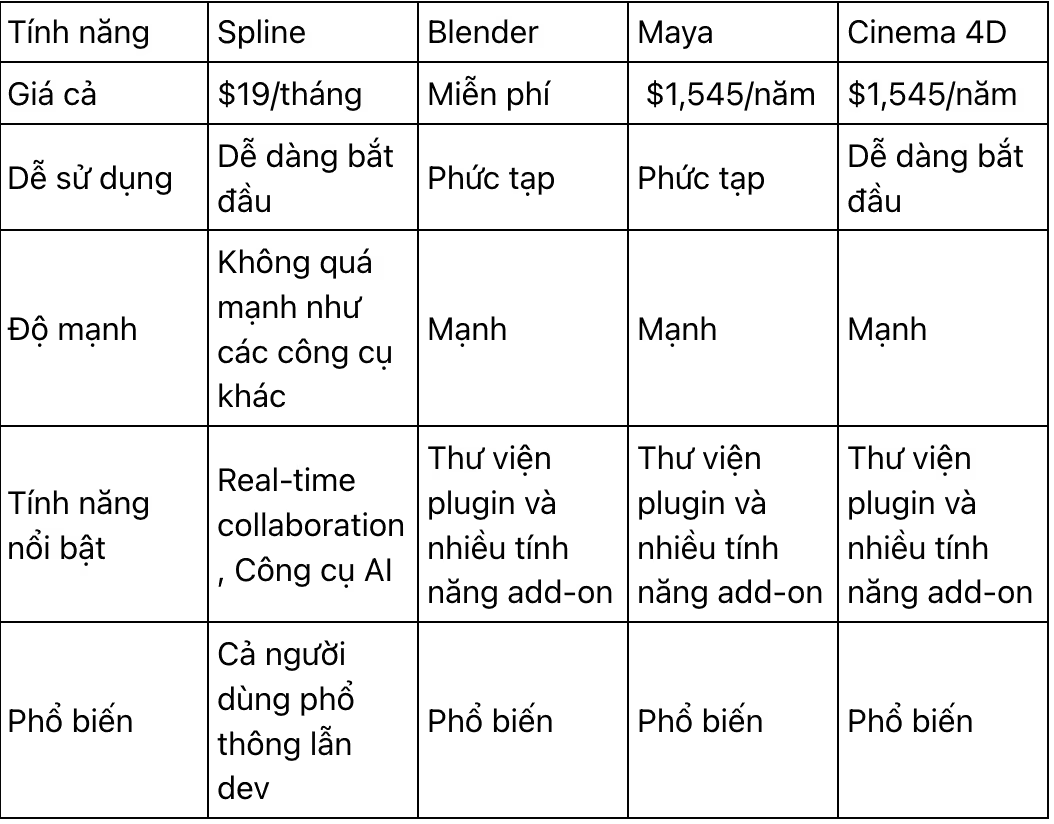
Discussing the future of Spline in web 3D
Spline is a powerful and versatile 3D design tool with immense potential. The company has several exciting features planned for the future, including:
- Real-time collaboration: This feature will allow multiple users to work on the same 3D object simultaneously. It will be a fantastic way to collaborate on projects with teams or other creative professionals.
- New AI tools: Spline is developing new AI tools to make creating 3D objects easier. These include a text-to-mesh AI tool that can generate 3D objects from text descriptions and an AI animation tool that can automatically animate 3D objects. These tools will enable you to create 3D objects without manual modeling, saving both time and effort.
- Performance improvements: Spline is constantly working to improve the tool's performance. This will make it faster and more responsive while also reducing its memory usage, making it easier to use Spline on less powerful devices.
These are just a few of the exciting things in store for Spline 3D. I believe this tool will continue to grow and expand in the coming years, and I am eager to see what it can achieve.
In my opinion, Spline has the potential to become a truly groundbreaking 3D design tool. It has the potential to be used to build more realistic and detailed 3D assets, as well as more interactive and engaging 3D objects. I believe Spline will continue to evolve and expand in the coming years, and I am very excited to see what it can do for the design industry in particular.
Pros and cons of Spline
Here are some pros and cons of Spline 3D to consider when using it for your web 3D projects:
Pros:
- Easy to use
- Real-time collaboration
- AI tools
- Multiple export options
Cons:
- Can be expensive for some users
- Not as powerful as some other 3D design tools
Conclusion
In summary, Spline 3D is a powerful and versatile 3D design tool with a lot of potential. It has several exciting features planned for the future, including real-time collaboration, new AI tools, and performance improvements. It provides excellent support for web 3D projects. I believe Spline has the potential to become a truly revolutionary 3D design tool, and I am excited to see what it can achieve in the years to come.
If you are interested in learning more about Spline, I encourage you to visit the Spline website or sign up for a free trial. With Spline, you can create stunning 3D objects that will amaze your friends and colleagues.


