



In the age of digital data, analyzing and presenting information visually is the key to making effective decisions. Google Data Studio, with its free and user-friendly capabilities, is a powerful tool that helps you turn complex numbers into clear and impressive reports. Are you ready to explore this tool? Let's dive in with Markdao !
What is Google Data Studio?
Google Data Studio is a free data visualization tool developed by Google that helps users transform complex data into visual, easy-to-understand, and engaging reports. This tool was created to help individuals and businesses grasp information from various data sources, thereby optimizing decision-making.
Google Data Studio allows you to connect directly to familiar data platforms such as Google Analytics, Google Ads, Google Sheets, BigQuery, and a host of other third-party tools. With its friendly, simple, and easy-to-use interface, even beginners can create professional reports without needing extensive knowledge of programming or data analysis.
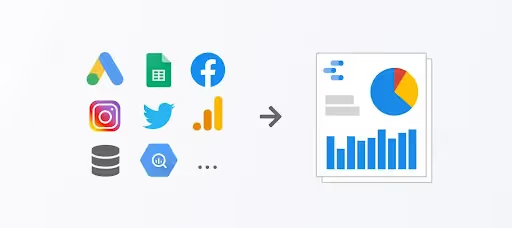
This tool is especially useful for marketers, project managers, and anyone who wants to present data clearly and coherently. If you are looking for a cost-effective and efficient solution for processing and presenting data, Google Data Studio is the ideal choice.
5 Benefits of Google Data Studio
Google Data Studio offers many outstanding benefits, helping users optimize their data-related workflows. Here are the most notable benefits:
1. Easy data visualization: This tool helps you turn dry numbers into vivid, visual charts, graphs, and tables. You can choose from a variety of chart types, such as line charts, bar charts, pie charts, or heat maps, to suit each type of data. This not only makes reports easier to understand but also increases persuasiveness when presenting to teams or clients.

2. Flexible connectivity with multiple data sources: With its diverse integration capabilities, Google Data Studio allows you to connect data from familiar sources such as Google Analytics, Google Ads, Google Sheets, BigQuery, and over 800 third-party sources via Data Connectors. This feature helps you consolidate data from various sources into a single report, saving time and minimizing errors associated with manual data processing.
3. Easy collaboration and sharing: Designed for effective teamwork, you can share your reports with colleagues, clients, or partners with just a few clicks. Additionally, the tool allows you to manage access permissions to ensure that sensitive data is only viewed or edited by authorized individuals.
4. Free and easy to use: One of the biggest advantages of this tool is that it is completely free. Whether you are an individual or a business, you can use it without incurring any costs. Furthermore, the interface of Google Data Studio is designed to be user-friendly, making it easy to navigate even if you don't have much experience with data visualization tools.
5. Flexible and unlimited customization: Google Data Studio gives you the creative freedom to design reports, from choosing colors, fonts, and layouts to adding logos or brand imagery. This feature ensures your reports are not only visually appealing but also professional and tailored to your specific work or business needs.

A beginner's guide to using Google Data Studio
Google Data Studio features an intuitive and user-friendly interface, making it suitable even for those new to data visualization tools. Below is a step-by-step guide to help you get started effectively:
How to create a Google Data Studio account
To get started, you need a Google account. If you already have a Gmail account, you can sign in and start using the tool immediately.
- Step 1: Visit the website Google Data Studio at https://datastudio.google.com/.
- Step 2: Click the "Use it for free" or "Sign In" button.
- Step 3: Sign in with your Google account.
- Step 4: Once logged in, you will be directed to the main interface of Google Data Studio, where you can create reports or view available report templates.

Connecting data sources
Google Data Studio allows you to connect to various data sources. This is a crucial step to begin building your reports.
- Step 1: From the main interface, click the "Create" button and select Report.
- Step 2: A pop-up window will appear for you to select a data source. Click the "Add data source".
- Step 3: Select the type of data source you want to connect, for example:
- Google Analytics: Track and analyze website performance.
- Google Ads: Track advertising campaign effectiveness.
- Google Sheets: Use data from Google spreadsheets.
- Third-party tools: You can use Data Connectors to integrate other data sources such as Facebook Ads, MySQL, etc.
- Step 4: Log in and grant access permissions to connect the data source to Google Data Studio.

Create a basic report
Once your data source is connected, you can start creating a basic report.
- Step 1: Click "Create report" from the main interface.
- Step 2: Select a data source that you connected in the previous step.
- Step 3: Drag and drop elements such as charts, data tables, and visualizations into your report. Some suggestions:
- Use bar charts to compare data over time.
- Use heat maps to illustrate data by geographic location.
- Use pie charts to present percentages.
- Step 4: Name your report and save it.

Customize and optimize your report
Google Data Studio offers a wide range of customization options so you can design reports that suit your specific needs and personal aesthetic.
- Change layout and colors:
- Select "Theme and layout" to adjust colors, fonts, and layout settings.
- Use colors that align with your brand or project.
- Add additional elements:
- Include titles, annotations, or logos to give your report a more professional look.
- Insert data filters to allow viewers to interact with the report, for example, by filtering by date or region.
- Check for consistency: Ensure the data in your report is accurate and free of duplicates or errors.

Share and collaborate on reports
Once your report is complete, you can share it with colleagues or clients to analyze the data together.
- Step 1: Click the "Share" button in the top right corner of the report interface.
- Step 2: Enter the email address of the person you want to share with.
- Step 3: Set permissions for the recipient:
- View only: The recipient can only view the report and cannot make edits.
- Can edit: The recipient can edit the report (suitable for teamwork).
- Step 4: Click "Send" to share the report. You can also copy the link to send via other platforms like Slack or email.
Additionally, you can export the report as a PDF or print it directly to present to your team or clients.
Things to keep in mind when using Google Data Studio
Although Google Data Studio is a powerful and convenient tool, there are still some important points to consider to ensure you use it effectively and achieve the best results. Here are some key points to keep in mind:
Understand your data sources
Ensure that the data you use is accurate, error-free, and free of duplicates. Inaccurate data will undermine the reliability of your reports.
Some third-party data sources may require more complex setup or permissions. You should double-check that your data sources are fully updated before you start building your reports.
Consider privacy and security
When sharing reports, clearly define who has viewing or editing access to prevent sensitive data from being exposed. Avoid displaying personal information or critical data in reports unless necessary. Use filters or redact information to ensure security.
Avoid overcomplicating your reports
When designing reports, prioritize information that is important and directly relevant to your goals. Including too many charts or unnecessary data will reduce the effectiveness of your report.
Choose the right type of chart or table for each type of data. For example, pie charts are suitable for showing proportions, while bar or line charts are better for time-series data.

Optimize report performance
Reports with too much data can slow down loading times and negatively impact the user experience. Only display necessary data or use filters to narrow down the scope of information.
If you are using live data sources from platforms like Google Analytics or BigQuery, ensure these sources are stable and not experiencing connection issues.
Update reports regularly
Data in reports should be refreshed frequently to ensure accuracy and relevance. This is especially important if you are using reports for marketing campaigns or tracking business performance.
As your data analysis needs change, you may need to adjust the charts, tables, or layout of your reports. Always ensure that your reports remain aligned with your current goals.
Leverage advanced features
Features like date filters, regional filters, or data controls make it easy for viewers to customize reports to their needs. This is especially useful when sharing reports with partners or team members.
If you use platforms like Google Analytics, Google Ads, or a CRM, take advantage of the connection features to optimize your data analysis.
Learning and improving your skills
Google Data Studio has a help center and detailed documentation, making it easy for you to learn more about features or troubleshoot technical issues. Google Data Studio provides pre-built report templates that you can use to learn how to design and present data effectively.
Conclusion
Google Data Studio is a powerful data analysis and visualization tool that helps you easily create professional and intuitive reports. With its ability to connect to diverse data sources, flexible customization features, and user-friendly interface, Google Data Studio is not only suitable for professionals but also an ideal choice for beginners.
If you are looking for a free yet effective solution for data presentation, Google Data Studio is definitely an option you shouldn't overlook!


