



When you visit a website, what makes you want to explore further or leave immediately? The secret lies in layout smart, harmonious arrangement of elements like text, images, and whitespace. A standard layout not only makes a strong impression but also guides the eye, making it easy for users to find the information they need.
So, what is a layout and how important is its role in retaining customers? Join Markdao to discover how to turn your website into a tool that attracts customers at first sight!
What Is a Layout?
1. Definition
In website design, layout is understood as the "skeleton" of the site—where elements like text, images, buttons, and links are intentionally arranged to create an intuitive user experience.
A layout is not just a random arrangement but a way for components to connect and support each other to guide customer attention, helping them find information quickly and effectively. With a good layout, a website becomes accessible, professional, and makes a strong first impression.

2. What is the difference between a template and a layout?
The difference between layout and template is a common question in website design because these two concepts share many similarities but have different natures and roles.
A template is a complete interface model, including the layout and detailed design elements such as colors, fonts, images, and decorative styles. Templates usually come with sample content and pre-designed components, ready to be used to create a website quickly.
Layout is like a sketch, defining the skeleton and arrangement of the page, focusing on the composition and organization of the main sections.
Template is like a finished house—it not only has the layout but also the paint, furniture, and decorative details; you just need to add content to use it immediately.
3. Key components of a website layout
A standard website layout consists of four main components, each playing a vital role in navigating and guiding the user:
- Header: The header is the first point of contact for visitors to your website. It is where you can place your logo, brand name, and slogan to create a unique identity. Many websites also integrate a search bar and primary navigation buttons here so users can easily explore other parts of the site.
- Main Content: This is where all attention is focused, as it contains the most important information you want to convey to your users. Depending on the website's purpose, the main content can include articles, images, videos, or products. Designing the main content to be readable and visually appealing is a key factor in retaining visitors.
>> See more: What is content? How to write content that attracts readers
- Navigation menu: A smart navigation menu helps users easily move between different pages and sections of the website. Menus can be horizontal or vertical and should be designed to be intuitive and clear. This tool helps customers not only find the content they need but also discover other offerings on your site.
- Footer: Although located at the bottom, the footer plays an equally important role. It is typically where contact information, secondary links, and social media links are housed. The footer serves as a final touchpoint, making it easy for users to access additional information or navigate back to the main pages of the website.

What is the role of layout in website design?
Layout is not just about arranging elements on a page; it plays a core role in shaping the user experience. An effective layout helps visitors easily find the information they need while creating a smooth journey, which improves user retention and increases conversion rates.
Below are the primary roles that a layout provides for a website:
- Creating a first impression: A clean, visually appealing layout creates a positive impression from the moment a user visits, making them feel comfortable and conveying professionalism.
- Optimizing user experience: The layout guides how users move through the sections of a website. By logically arranging areas such as main content, navigation menus, and calls-to-action, the layout helps users find information effortlessly.
- Supporting SEO optimization: A user-friendly layout helps search engines better understand the page structure, which improves the website's SEO ranking. Placing important information in prominent areas can also help increase engagement metrics and time spent on the site.
- Defining brand identity: Each layout carries its own unique style, helping to convey the brand's identity. A layout can make a brand appear powerful, professional, or creative, depending on how the elements are arranged and coordinated.
Common website layout styles
There are many different types of layouts, each suited to specific content and goals. Below are some popular layouts in website design:
Single Column Layout: This is a simple layout often found on blogs or content-heavy websites. All content is arranged in a single vertical column, making it easy for users to scroll. This layout is ideal for text-focused websites.
Two-Column Layout: This typically uses a main column for content and a secondary column for navigation or supplementary information. It is a popular layout because it is easy to follow and can be optimized for both mobile and desktop devices.
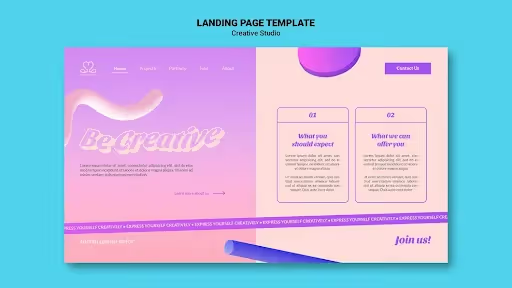
Grid Layout: This layout organizes elements into squares or rectangles, creating a clean and modern feel. Grid layouts are perfect for product catalogs, image galleries, or news websites.
.avif)
Carousel Layout: This layout style typically displays important content as sliding images, creating an engaging effect. Fashion, photography, or creative websites often use carousel layouts to showcase featured images or products.
Card Layout: This layout displays content in small rectangular blocks (cards), with each block representing a topic or article. Card layouts make it easy for users to select and click on the content they want to view. This style is very popular on news sites, blogs, and social media.
Hierarchical Layout: This layout organizes content in order of priority, with the most important information at the top or in the most visible position. It is an ideal layout for sales pages or landing pages, where specific elements need to be emphasized to encourage user action.
How to build a layout that suits your website
1. What are the rules of layout design?
To design a harmonious and engaging layout, you need to keep the following basic rules in mind:
- Consistency: Ensure that the layout of all pages on your website follows a uniform structure and style. This helps users navigate easily and remember key information.
- Use white space: White space between elements not only makes content easier to read but also creates a comfortable, uncluttered experience for the viewer. Effective use of white space also helps highlight important content.
- Ensure balance and harmony: Balancing large and small elements, as well as text and images, makes the layout visually balanced and easy to view. Pay attention to the proportions of components to avoid overwhelming the user.
- Optimize for accessibility: A good layout must ensure that everyone can use the website, including people with disabilities. This includes using readable fonts, clear colors, and appropriate formatting tags.
- Emphasize Call-to-Action (CTA): If your website needs to encourage users to take a specific action, place CTA buttons in prominent positions, such as in the center of the page or at the top. CTAs should be highlighted with eye-catching colors or typography to grab attention.
2. How to design an effective website layout

Beyond following the rules, here are the steps to design a layout that optimizes your website's performance:
- Step 1: Define the website's goal: First, you need to clearly define the purpose of your website: is it to attract customers, sell products, or provide information? This goal will determine the overall structure and design style of the layout.
- Step 2: Choose the right layout style: Select a layout style that suits your website's primary content. For example, blogs often use a single-column layout to make text stand out, while e-commerce sites might prefer a grid layout to display multiple products.
- Step 3: Sketch the layout and allocate space: Sketching your layout on paper or using design software helps you visualize how elements will be arranged. This also allows you to verify that important sections are placed in optimal positions.
- Step 4: Choose harmonious colors and fonts: Colors and fonts influence how users perceive your brand. Choose appropriate colors and readable fonts to make your layout look professional and user-friendly.
- Step 5: Test and refine: Don't forget to run tests to see how the layout performs on different devices (desktops, phones, tablets). Gather user feedback and adjust elements to perfect the layout.
By following these rules and applying an effective design process, you can create a suitable, engaging, and easy-to-use website layout that helps your site stand out and attract more users.
Markdao - A fast and professional website design agency
Once you clearly understand "what a layout is" and its importance in website design, the next step is to find a reputable design agency to bring your ideas to life. Markdao is the perfect choice if you are looking for a professional, fast, and effective website design partner.

With nearly 10 years of experience in website design and development, Markdao provides more than just modern website design services; we also optimize layouts for every site, ensuring your website is not only visually appealing but also user-friendly and search engine optimized (SEO).
Whether you need a corporate website, an e-commerce store, or a personal blog, Markdao guarantees high-quality design with unique layouts that are easily adaptable to any type of website. Let us help you build a powerful website that meets all your customers' needs and maximizes your business performance.


