



Did you know that a Meta Description can boost your click-through rate (CTR) on Google by up to 30%? However, if it's poorly written or stuffed with keywords, your description tag might just fade into the background among thousands of other search results.
So, what is a Meta Description? How do you write an SEO-friendly, engaging description that makes your website stand out on Google? In this article, Markdao will reveal 8+ best practices for writing optimized meta descriptions to help you increase traffic and capture users' attention at first glance.
What are Meta tags?
Meta tags are HTML snippets that provide descriptive information about a webpage's content to search engines and users. While they don't appear directly on the page interface, they play a crucial role in helping Google and other search engines understand your content.

Some common Meta tags include Meta Title, Meta Description, Meta Robots and Meta Keywords. Among these, the Meta Description is considered one of the most important elements for on-page SEO optimization.
What is a Meta Description?
Meta Description is a short paragraph (typically 150-160 characters) that describes the main content of a webpage. This is the text Google displays below the page title in search results (SERPs), helping users quickly understand what your site has to offer before they click.
Example of an SEO-friendly meta description:
<meta name="description" content="Tìm hiểu Meta Description là gì và 8+ cách tối ưu thẻ mô tả giúp tăng CTR, cải thiện thứ hạng website trên Google.">A Meta Description that is well-crafted not only helps improve click-through rate (CTR) but also influences user experience and your site's visibility on search engines.
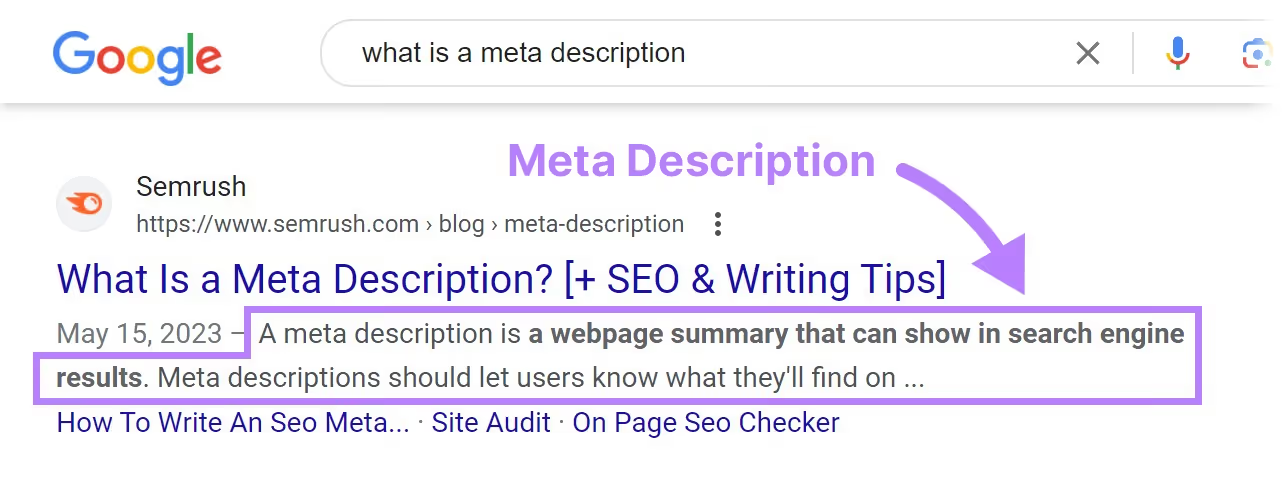
The importance of Meta Descriptions in SEO
Increase click-through rate (CTR): When a Meta Description is written compellingly, includes relevant keywords, and directly addresses user needs, it can encourage them to click on your site instead of your competitors'.
Improve user experience: A clear description helps readers quickly understand the page content, thereby reducing bounce rates.
Impact on SEO rankings: Although Google does not use the meta description as a direct ranking factor, if it helps increase your CTR, your site may be ranked higher in search results.
Support Social SEO: When sharing links on Facebook, Twitter, or other social media platforms, the Meta Description is often used as a default excerpt, helping your content look more professional.
How to check and display Meta Descriptions on Google
To check the Meta Description of a webpage, you can use one of the following methods:
- View HTML source code: Press Ctrl + U (Windows) or Cmd + Option + U (Mac), then search for the line containing <meta name="description" content="...">.
- Use Google Search: Search on Google using the syntax site:yourdomain.com to see how Google is displaying your description tag.
- Use SEO tools: Tools such as Yoast SEO (WordPress), Ahrefs, SEMrush, or Screaming Frog can help you check and optimize your Meta Description more easily.
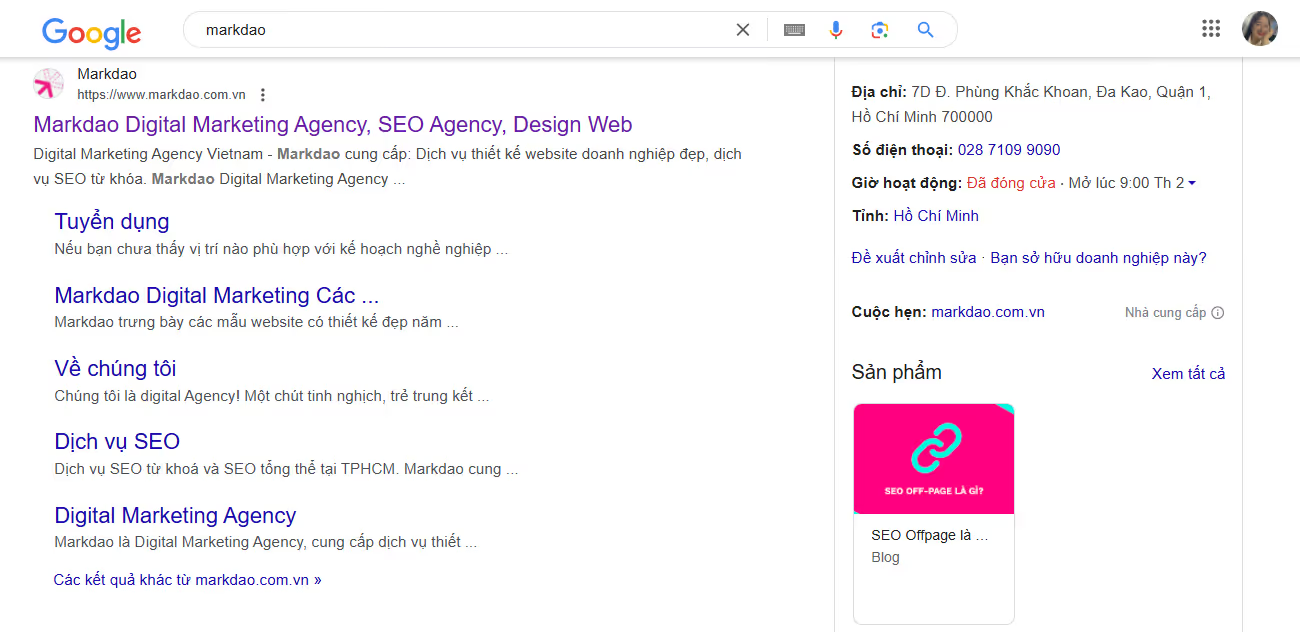
Additionally, keep in mind that Google may sometimes automatically generate an alternative description if it determines that your Meta Description is not accurate or helpful enough. Therefore, optimizing this content is crucial to ensure the information you want is displayed correctly.
8+ Ways to Write SEO-Friendly Meta Descriptions
Meta Description is not just a short description; it is a key element that helps attract users and improve your click-through rate (CTR). A well-optimized meta tag can make a significant difference in your SEO strategy. Below are ways to help you write SEO-friendly, engaging, and effective meta descriptions.
1. Ideal length: Neither too short nor too long
When writing a Meta Description, you need to ensure the length is appropriate so that the content is fully displayed on Google. Typically, Google displays about 150-160 characters on desktop and about 120 characters on mobile devices. If it is too short, the description may not be engaging enough. If it is too long, Google will truncate it, causing the content to appear incomplete.
Correct example:
- "Learn what a Meta Description is. A guide to optimizing meta tags to increase CTR and improve SEO effectively."
Incorrect example:
- "What is a Meta Description? This is a text snippet describing website content, helping Google understand your site better." (Too generic, does not attract users)
Note that you can use tools like Google SERP Simulator to check if your meta description will be truncated in search results.
2. Include the main keyword naturally
Keywords play a crucial role in SEO and Meta Description is no exception. When the main keyword appears in the description, Google will bold that keyword in search results, helping your website stand out.
However, avoid keyword stuffing, as this can make your content feel unnatural and unappealing. Aim for clarity and readability.
Correct example:
- "What is a Meta Description? Learn how to optimize your meta tags to boost rankings and attract more users."
Incorrect example:
- "What is a Meta Title? Meta Title helps with SEO optimization, Meta Title is important for websites, Meta Title needs to be written correctly." (Excessive keyword stuffing)
3. Write compelling descriptions that spark curiosity
Meta Description acts as your first impression on readers. If it's too dry, users might skip your site for a more interesting result. Therefore, write descriptions that are engaging, pique curiosity, and motivate users to click.
A formula for writing attractive descriptions:
- Ask a question that sparks curiosity.
- Make a promise regarding the value your website provides.
- Use strong verbs to create a sense of action.
Correct example:
- "Want to boost your traffic fast? Discover 8 ways to write Meta Descriptions that are SEO-friendly and grab readers' attention at first glance."
Incorrect example:
- "Meta Titles help improve SEO. Here is how to write a standard Meta Title to optimize your website." (Lacks appeal, fails to spark curiosity)
4. Add a Call to Action (CTA) to increase CTR
One of the most effective ways to increase your click-through rate (CTR) is by using a Call to Action (CTA). When your Meta Description includes a call to action, users feel more motivated to click through to your website.
Some common CTAs you can use:
- "Learn more now!"
- "Discover the secrets here!"
- "See the detailed guide!"
- "Don't miss out on these helpful tips!"
Correct example:
- Looking to optimize your Meta Titles? Check out our detailed guide to help your website climb the Google rankings!
Incorrect example:
- "What is a Meta Description? Here is how to optimize it for better SEO." (No CTA, lacks a call to action)
5. Ensure uniqueness for every page
Google values websites with Meta Descriptions that are unique to each page. If you use a generic description across multiple pages, Google may ignore your meta tag and replace it with automatically generated content from the page.
To avoid this, ensure each page has a distinct description tag that accurately reflects its specific content.
Correct example:
- Product page: "Buy authentic sneakers at a great price! Explore our hottest collection of the year now."
- Blog page: "Discover 8 ways to optimize your Meta Description to boost CTR and achieve better SEO results."
Incorrect example:
- Using the same description for all pages: "Welcome to our website. Here, you can find a lot of useful information." (Does not reflect the content of individual pages)
6. Avoid using special characters or unnecessary information
Google may not display special characters like *, #, or %, or overly wordy text. Instead of trying to stand out with excessive exclamation marks or special characters, focus on concise, easy-to-understand content.
Correct example:
- "Discover 8 ways to write Meta Descriptions that effectively boost CTR on Google."
Incorrect example:
- Boost your CTR by 200%!!! Learn the #1 way to optimize your Meta Description now!!! (Overusing special characters looks unprofessional)
7. Ensure accuracy and avoid misleading information
A major mistake when writing Meta Descriptions is misleading users, causing them to click without finding the content they expected. This can increase your bounce rate and negatively impact your SEO.
Make sure your description tag aligns with the actual content of the page. Don't just focus on attracting clicks while forgetting the core value the page provides.
Good example:
- "A detailed guide on how to write Meta Descriptions to boost CTR and effectively improve SEO." (Accurate to the article content)
Bad example:
- "Learn how to double your traffic with just one Meta Description tag!" (False advertising, leads to reader disappointment)
8. Preview before publishing and track performance
Finally, after writing your description tag, don't forget to preview it and track its performance to optimize if necessary. Some ways to check:
- Use a Google SERP Simulator to preview how it appears in search engines.
- Monitor click-through rates (CTR) in Google Search Console to evaluate performance.
- Run A/B tests with different versions to see which one performs better.
3 Ways to Add Meta Descriptions in WordPress
If you are using WordPress, adding Meta Descriptions is very simple thanks to powerful SEO plugins. Below is a detailed guide to help you easily add and optimize meta descriptions for every post, page, or category.
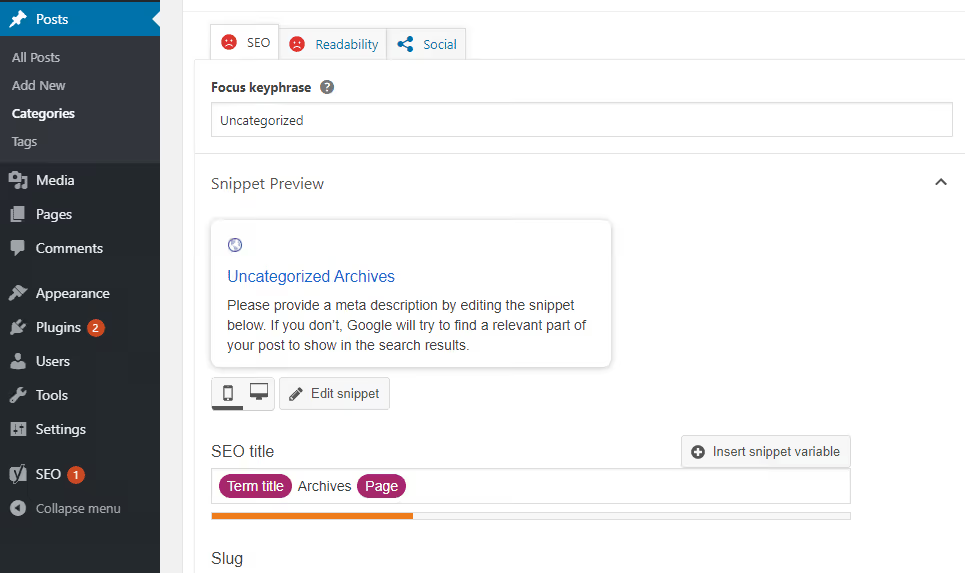
1. Add a Meta Description using Yoast SEO
Yoast SEO is one of the most popular plugins for on-page SEO optimization, including meta descriptions.
How to do it:
- Install and activate the Yoast SEO plugin:
- Go to your WordPress Dashboard → Plugins → Add new.
- Search for Yoast SEO, click Install and then Activate.
- Add a Meta Description to a post or page:
- Open the post or page you want to edit.
- Scroll down to the Yoast SEO section below the editor.
- Enter the Meta Description into the Meta description field.
- Yoast SEO will display a Google preview so you can adjust the length accordingly.
- Save changes:
- After entering the description, click Update or Publish to save.
2. Adding a Meta Description with Rank Math SEO
Rank Math is a modern SEO plugin with many powerful features, including support for Meta Description.
How to do it:
- Install and activate Rank Math SEO just like Yoast SEO.
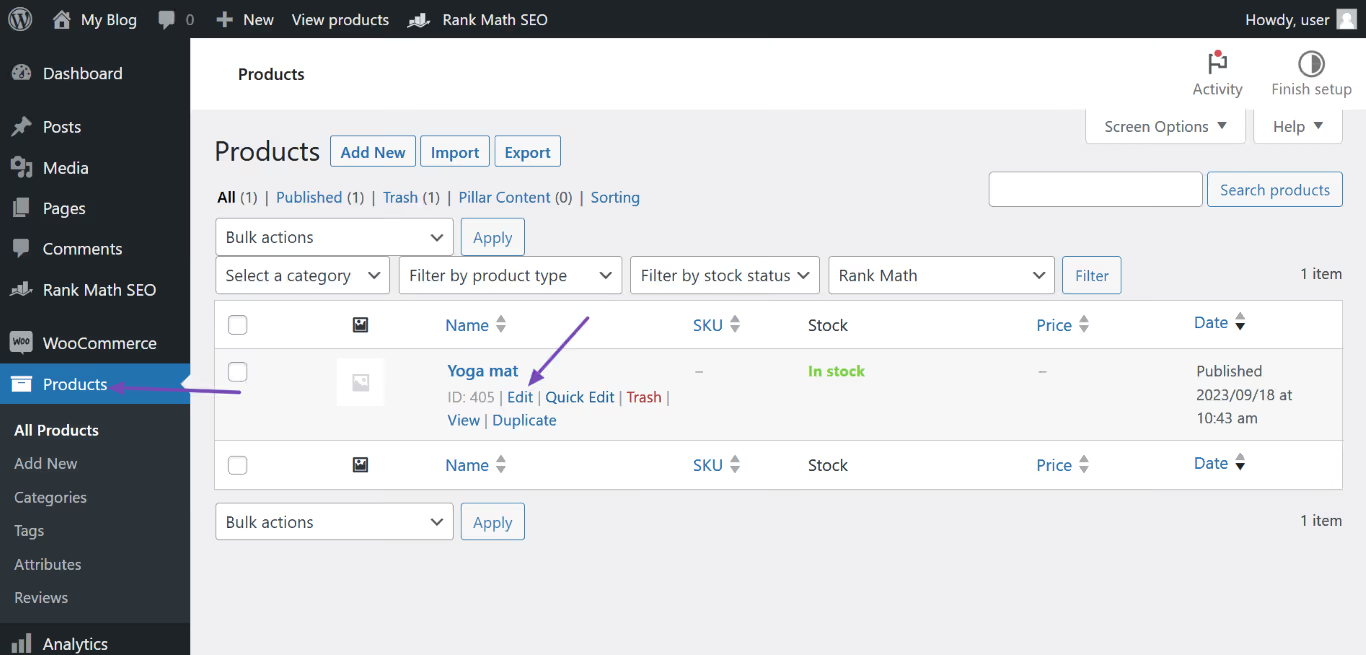
- Edit your post or page, then find the Snippet Preview by Rank Math.
- Enter the Meta Description into the meta description box.
- Check the Google preview and adjust if necessary.
- Click Save Changes or Update to finish.
3. Manually add a Meta Description by editing theme files
If you prefer not to use a plugin, you can add the meta description tag manually by editing the header.php file in your theme.
How to do it:
- Go to your WordPress Dashboard → Appearance → Theme File Editor.
Edit the header.php file, and insert the following code into the
<head>:
<meta name="description" content="
<?php if (is_single() || is_page()) {
	echo get_the_excerpt();}
else {
echo "Mô tả chung cho toàn trang web của bạn";} ?>">- Save your changes and check the display by viewing the page source (Ctrl + U).
Conclusion
An SEO-optimized meta description not only helps users understand the page content but also gives you the opportunity to stand out in Google search results.
Remember, writing a Meta Description is not just about briefly describing content; it is an art that combines appeal, useful information, and keyword optimization. By using the tips and methods guided in this article, you will easily create high-quality meta descriptions, thereby bringing long-term benefits to your SEO strategy.
Start optimizing the meta descriptions for every page and post on your website right away. You will certainly see a clear difference in improving user experience and increasing traffic.


