



Did you know that a beautiful website with engaging content still isn't enough to reach the top of Google's rankings? That is when Technical SEO becomes an essential requirement to help you outperform millions of competitors. In this article, Markdao will explore with you what Technical SEO is, why it matters, and most importantly, provide a checklist of optimization steps to turn your website into a 'perfect search engine machine' in the eyes of Google!
What is Technical SEO?
Technical SEO (Search Engine Optimization) is the process of optimizing the technical elements of a website to improve crawling, indexing, and ranking by search engines like Google, Bing, or Yahoo.
Instead of focusing on content or link building (backlinks), Technical SEO focuses on optimizing aspects such as page load speed, URL structure, security, mobile compatibility, and many other technical factors. The main goal is to ensure the website runs smoothly, is easily accessible, and is friendly to both users and search engines.
For example, if your website content is valuable but the page load speed is slow, or it cannot be indexed due to a misconfigured robots.txt file, the website will struggle to achieve high rankings. Therefore, Technical SEO is the foundation that ensures all other SEO efforts achieve optimal results.

Why is Technical SEO important?
Technical SEO plays a crucial role in an overall SEO strategy for the following reasons:
Help search engines better understand and index your website
Search engines use bots (crawlers) to gather information from websites. If your site has a solid technical structure, bots can easily understand your content, navigate your pages, and index them correctly. Conversely, if your site has issues like broken links, an unclear structure, or blocks crawlers, search engines may overlook important pages.
Improve user experience (UX)
A technically optimized website loads quickly, is mobile-friendly, and functions without errors. This helps keep users engaged longer, reduces bounce rates, and sends positive signals to search engines.
Increase your competitive edge in rankings
In a highly competitive market, small technical details can make a big difference. A website with a sound structure, fast loading speeds, and no technical errors will be ranked higher by Google compared to competitors who neglect these aspects. Technical SEO.
Meet Google's evolving requirements
Google frequently updates its algorithms to enhance user experience, such as prioritizing HTTPS-secured or mobile-friendly websites. If you don't optimize these technical elements, your site may fail to meet these standards and see a drop in rankings.
Serve as the foundation for other SEO strategies
Technical SEO is the first and most critical step in any SEO strategy. If your website's technical foundation isn't solid, other efforts like content optimization or backlink building will struggle to achieve the desired results.
In short, Technical SEO doesn't just make your website "perfect" in the eyes of search engines; it also creates the best possible experience for users, helping you get closer to your goals of higher rankings and increased traffic.
9 fundamental elements of Technical SEO
Technical SEO encompasses many technical factors that help optimize a website. Below are the most important elements you need to focus on:
1. Page Speed
Page speed is a core factor in Technical SEO because it impacts user experience and search engine rankings.
- Slow-loading websites increase bounce rates and decrease user satisfaction.
- Search engines, especially Google, prioritize ranking websites that load quickly.
2. SEO-friendly URL structure
URL structure affects how search engines understand and access content.
- URLs should be concise, readable, and include primary keywords.
- Avoid using special characters, question marks, or elements that make it difficult for search engine bots to crawl.

3. HTTPS and website security
Google prioritizes websites with an SSL (Secure Sockets Layer) certificate, indicated by the HTTPS protocol.
- HTTPS ensures data security between users and the website while building customer trust.
- Failing to use HTTPS can result in your website being flagged as "Not secure."
4. Robots.txt file
The robots.txt file instructs search engines on which parts of your website are allowed to be crawled and indexed for Technical SEO.
- Incorrect configuration of this file can lead to important pages being accidentally blocked.
- Perform regular checks to ensure that content requiring indexing is not being blocked.
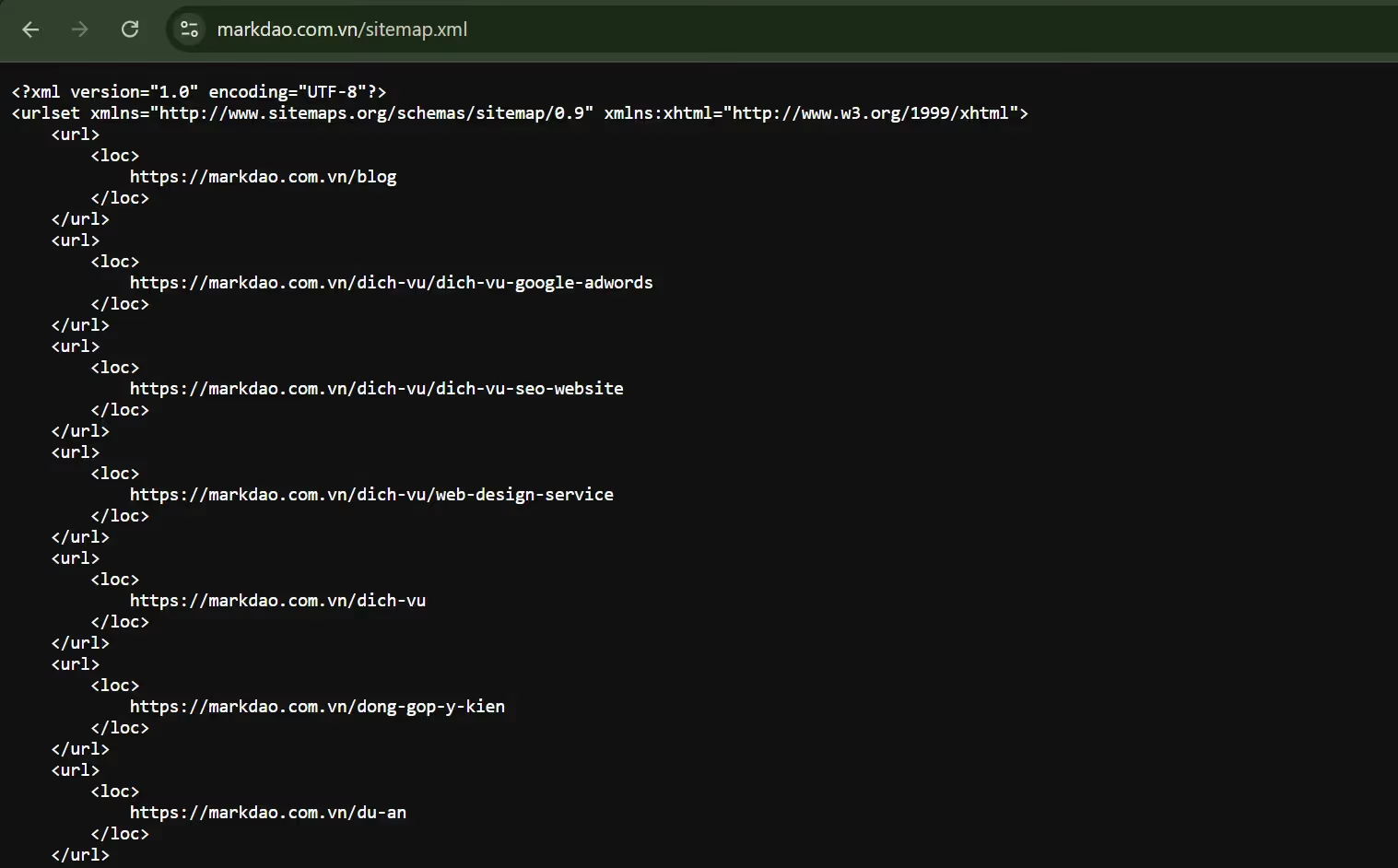
5. XML Sitemap
An XML sitemap provides a list of URLs that search engines need to crawl.
- Sitemaps help search engines understand your website structure and index it more comprehensively.
- Ensure your sitemap is always updated whenever new content is added.
6. Mobile-Friendliness
Google prioritizes ranking websites that are mobile-friendly.
- Your website must display and function properly on small screens like smartphones or tablets.
- Responsive design is the optimal approach, allowing your website to adapt to any screen size.
7. Structured Data
Structured data uses Schema Markup to provide more detailed information about website content and implement Technical SEO.
- Structured data helps search engines better understand your website content, which can lead to rich snippets appearing in search results.
- Optimizing structured data increases visibility and attracts more users.
8. Handling 404 Errors and Redirects
404 errors disrupt the user experience and negatively impact SEO.
- Use 301 redirects to guide users and search engines to a new URL if the old one no longer exists.
- Limit the use of 302 redirects unless absolutely necessary.

9. Optimizing duplicate content
Duplicate content makes it difficult for search engines to determine which page should be prioritized for ranking.
- Use canonical tags to specify the original version of the content.
- Audit and remove duplicate content across the entire website.
10-step technical SEO optimization checklist
Below is a comprehensive and detailed checklist for optimizing Technical SEO, designed to help you easily execute each step:
1. Analyze and audit the entire website
Before you begin optimizing, you need to clearly understand the current state of your website:
- Use technical audit tools: Use tools like Screaming Frog, SEMrush, or Ahrefs to crawl your entire website.
- Review the overall SEO report: Check for issues such as page load speed, broken links, crawl errors, indexing status, and URL structure.
- Identify key issues: Note the errors that need immediate attention, such as slow page load speeds, duplicate URLs, or broken sitemaps.
2. Optimize page load speed
Page speed not only improves user experience but also significantly impacts Technical SEO on search engines:
.avif)
- Compress images: Use tools like TinyPNG or Squoosh to reduce image file sizes without compromising quality.
- Minify code: Remove unnecessary whitespace and characters from CSS, JavaScript, and HTML files.
- Enable caching: Set up browser caching to reduce load times for returning visitors.
- Use a CDN (Content Delivery Network): A network of servers that helps load pages faster for users in different geographic locations.
- Check page performance: Use Google PageSpeed Insights to measure speed and receive improvement suggestions.
3. Ensure the website is mobile-friendly
Google and Technical SEO prioritize websites that display well on smartphones and tablets:
- Responsive Design: Use a layout design that automatically adjusts to fit any screen size.
- Mobile device testing: Use the Google Mobile-Friendly Test tool to check for and fix issues related to the mobile experience.
- Optimize fonts and buttons: Fonts must be easy to read, and buttons should be large enough and spaced out for easy interaction.
.avif)
4. Install HTTPS and secure the website
Security is a mandatory requirement, especially for e-commerce websites:
- Install an SSL/TLS certificate: Switch the website from HTTP to HTTPS.
- Check for mixed content: Ensure all resources (images, videos, CSS, JS) are loaded over HTTPS.
- Monitor and renew SSL periodically: Ensure the security certificate is always active.
5. Create and update an XML sitemap
An XML sitemap in Technical SEO is a map that helps search engines understand the website structure:
- Create an XML sitemap: Use tools like Yoast SEO (on WordPress) or Screaming Frog to generate a sitemap.
- Check the sitemap: Ensure the sitemap only contains important URLs and no error pages (404).
- Submit sitemap to Google Search Console: Go to Google Search Console > “Sitemaps” > Enter the sitemap URL to update it with Google.
- Monitor indexing status: Periodically check if Google has fully indexed your URLs.
6. Configure the Robots.txt file
The robots.txt file instructs search engines on which parts of your website should or should not be crawled:

- Check the robots.txt file: Ensure you are not accidentally blocking important pages (e.g., "/important-page/").
- Allow access to necessary resources: Ensure CSS and JavaScript files are not blocked so search engines can fully understand your website's layout and functionality.
- Verify with Google Search Console: Use the robots.txt tester feature in Search Console to verify your configuration.
7. Add Structured Data
Structured Data in Technical SEO helps search engines better understand your website content:
- Identify the required Schema type: Choose the appropriate Schema, for example: “Article” for blog posts, “Product” for products, or “LocalBusiness” for local businesses.
- Add Structured Data: Use JSON-LD to add Schema to your website's source code.
- Validate your data: Use the Google Rich Results Test to ensure your data structure is error-free.
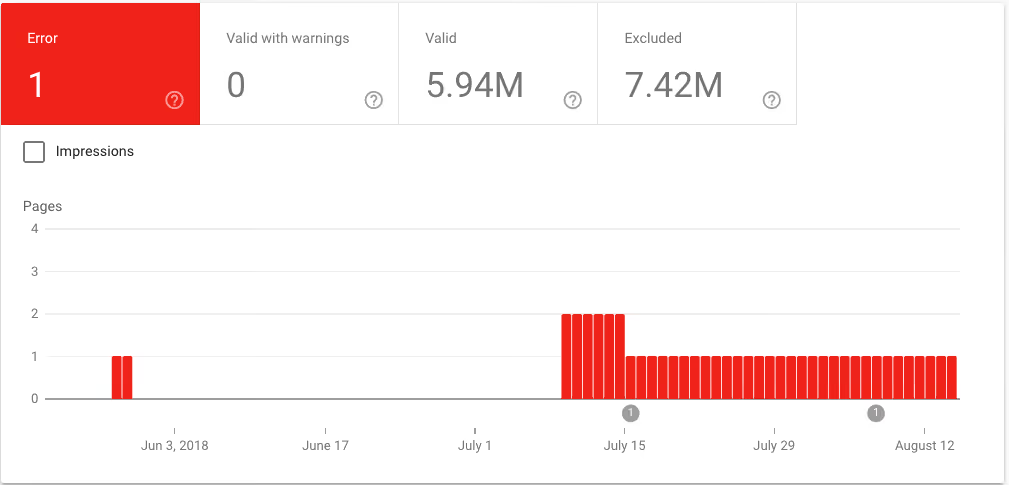
8. Fix Crawl Errors
Crawl errors prevent search engines from indexing your site correctly:
- View Crawl Error reports: Go to Google Search Console > "Coverage" to check for errors.
- Fix 404 (Not Found) errors: Redirect broken URLs to relevant pages.
- Resolve server errors (500): Contact your hosting provider to resolve server-side issues.
Fix Crawl Errors
9. Manage duplicate content and URLs
Duplicate content can negatively impact your SEO:
- Add Canonical tags: Specify the original URL for pages with similar content.
- Check for duplicate URLs: Use tools like Screaming Frog to identify pages with duplicate URLs.
- Use Redirects: Use 301 redirects for replaced pages.
10. Periodic monitoring and testing
After optimization, you need to maintain and check regularly:
- Monitor website performance: Check speed metrics, indexing, and data in Google Search Console and Google Analytics.
- Algorithm updates: Stay updated on Google algorithm changes to make timely adjustments.
- Periodic error scanning: Use website auditing tools monthly to detect new errors.
This checklist ensures every step of Technical SEO is thoroughly optimized, helping your website not only be search engine friendly but also enhance user experience.
Differences between Technical SEO and On-page SEO

In short, Technical SEO focuses on building the "technical foundation" for the website, while On-page SEO focuses on making the "content" on the page engaging and relevant to both users and search engines. Combining both will help the website achieve optimal SEO performance.
Conclusion
Technical SEO is not just a stepping stone but a solid foundation for your website to shine in search rankings. When combined with other SEO strategies, especially On-page SEO, you will create a complete ecosystem that ensures optimal performance and a superior user experience. Start with the specific checklist shared and take your website one step closer to sustainable success in the digital world!


