




Did you know that a website needs to be more than just beautiful—it needs to truly 'understand' its users? That is the power of UI/UX: capturing attention, guiding emotions, and keeping visitors engaged. But how do you optimize that experience? Join Markdao as we explore the secrets to making your website not only visually stunning but also a magnet for customer trust!
What is UI/UX?
Explaining the concepts of UI (User Interface) and UX (User Experience)
UI (User Interface) – This is the visual element that users see and interact with on a website or application. UI includes elements such as layout, colors, typography, buttons, and images. A well-designed interface will captivate users from the very first glance.
UX (User Experience) – This encompasses the entire feeling a user has when using a product or service. UX focuses on how a website or application meets user needs in an easy, smooth, and efficient way.

Simply put, UI is the "look," while UX is the "feel" that users experience when using a product.
The difference between UI and UX
Although UI and UX are often mentioned together, they have distinct roles and focuses:
- UI (User Interface) focuses on visual elements. This is the appearance of the website, including colors, images, typography, and layout. UI answers the question: “What does this website look like?” For example, a button with a striking color and an easy-to-read font is the result of good UI design.
- UX (User Experience) focuses on the user's journey and feelings while using the website. UX addresses the question: “How does the user feel when interacting with the website?” Good UX ensures that users can easily find the information they need, navigate smoothly, and achieve their goals quickly.
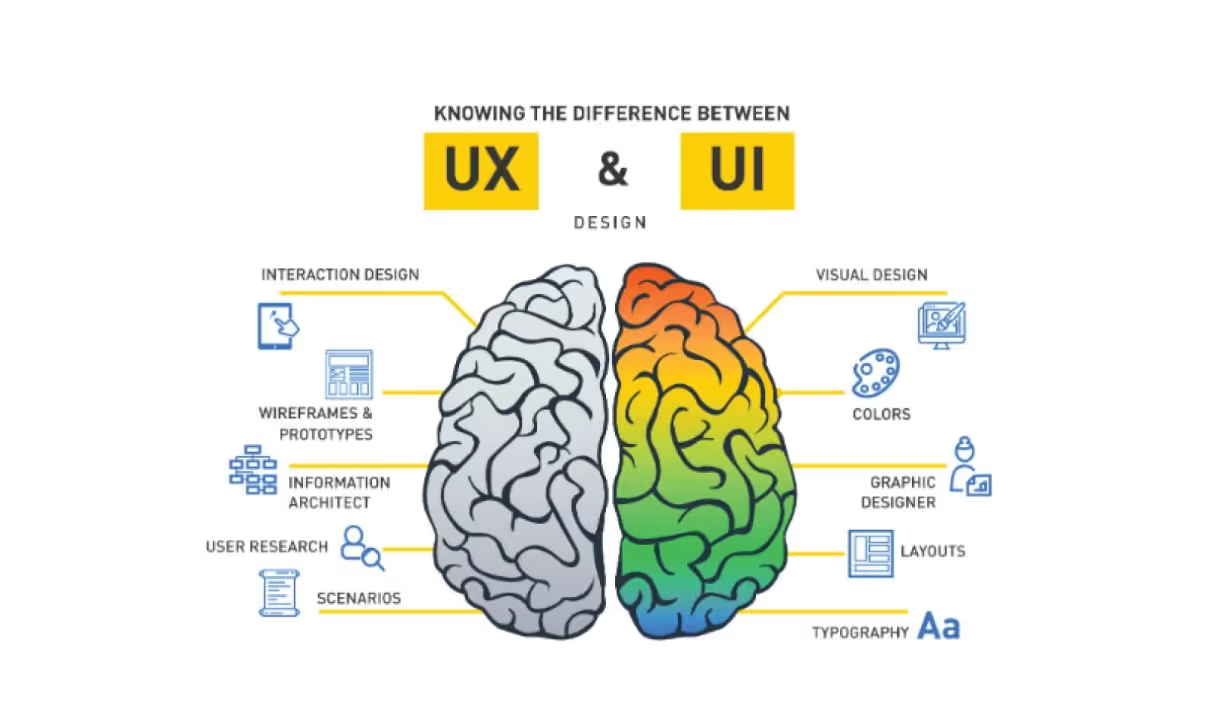
The easiest way to visualize it is:
- UI is like the beautiful paint job on a car. It gives the car a luxurious and eye-catching look at first glance.
- UX is like the engine and the driving experience. It determines whether the car runs smoothly and satisfies the driver.
Specific example: A button on a website might be beautifully designed (UI), but if clicking it doesn't take the user to the right page or results in an error (poor UX), the entire experience becomes frustrating.
This difference shows that UI and UX are inseparable. An eye-catching interface without an optimized experience diminishes the website's value, while good UX with an unappealing UI struggles to retain users from the start.
The role of UI and UX in website design
UI and UX are not just supplementary elements, but the core foundation that determines a website's effectiveness:
- Enhancing user experience: A clear, intuitive interface combined with smooth navigation makes it easy for users to achieve their goals, thereby increasing satisfaction.
- Boosting brand value: A website with well-invested UI and UX helps a brand create a professional, modern, and trustworthy impression.
- Driving user action: Increasing click-through, purchase, or lead generation rates thanks to an engaging experience.
Why are UI and UX important for websites?
UI and UX play a core role in shaping the effectiveness and appeal of a website. Below are specific reasons why they are indispensable in modern website design:
Creating a strong first impression: Users only take a few seconds to decide whether to stay on a website or not. A beautiful interface, clear layout, and professional color scheme will immediately capture attention, making users feel confident and eager to explore further.
Improve user experience and increase satisfaction: Good UX makes it easy for users to find information or complete tasks, such as filling out forms or making purchases. This not only saves time but also creates a sense of satisfaction, which increases the likelihood that they will return or recommend the website to others.

Boost conversion rates: A smooth interface and user experience help reduce bounce rates and increase conversion rates. Elements such as prominent call-to-action (CTA) buttons, a fast checkout process, and clear navigation menus all contribute to encouraging users to take desired actions, such as making a purchase or signing up for a service.
Boost SEO rankings and improve marketing effectiveness: Google prioritizes websites that provide a good user experience. Factors such as fast page load speeds, logical navigation structures, and mobile compatibility are all key criteria that help improve search engine rankings.
Furthermore, a good user experience helps reduce bounce rates, a factor that directly impacts the effectiveness of advertising and marketing campaigns.
Build brand identity and increase trust: A website with a well-crafted UI/UX design not only provides a positive experience but also reflects the professionalism of the business. Users tend to trust and remember brands that invest care into their websites.
Create a competitive advantage in a crowded market: In a highly competitive environment, a website with superior UI/UX is the advantage that helps a business stand out from its competitors. Users will prefer to use websites that are easy and comfortable to navigate, rather than dealing with difficult interfaces or clunky experiences.
In summary, UI/UX not only affects the image and professionalism of a website but also determines user satisfaction, engagement, and business performance. Investing in UI/UX is an investment in the customer experience and the future of your business.
Tips for optimizing website UI/UX
To build an impressive website that attracts users, optimizing UI/UX is essential. Here are some key tips to help you achieve this goal:
Understand user needs
The first and most important tip is to put the user at the center of the design process. You need to understand who they are, what their goals are, and how they behave when visiting your website.
- Use surveys or user interviews to gather information.
- Analyze behavior using tools like Google Analytics or heatmaps to identify the strengths and weaknesses of your website.
Understanding user needs and expectations helps you create a relevant experience that delivers real value.

Design a simple and intuitive interface
A beautiful interface doesn't always have to be complex. A simple yet effective design is easier to use and less likely to confuse users.
- Minimize unnecessary elements to avoid distracting the user.
- Use familiar design elements, such as icons and colors with intuitive meanings.
- A clear layout and logical content hierarchy make it easy for users to navigate and find information.
Test every aspect of UI/UX
No design is perfect from the start. Regular testing and experimentation are key to identifying issues and optimizing the experience.
- Use A/B testing to compare the effectiveness of design elements.
- Conduct usability testing with real user groups to evaluate how they interact with the website.
- Refine and improve based on feedback and collected data.

Optimize page load speed
Page load speed directly impacts user experience and SEO rankings. A slow website will cause users to lose patience and leave.
- Optimize images and videos to reduce file size while maintaining quality.
- Use caching systems and content delivery networks (CDNs).
- Minify HTML, CSS, and JavaScript code to increase processing speed.
Ensure compatibility across all devices
With the rapid growth of mobile devices, responsive design is a must. Your website needs to function seamlessly across all screen sizes and browsers.
- Use a fluid grid system to adjust layouts to fit every device.
- Ensure buttons and forms are large enough for easy interaction on touchscreens.
- Test your website on popular browsers like Chrome, Safari, and Firefox to prevent display issues.
Focus on content and navigation
UI/UX is not just about aesthetics; it is also about how content is presented and how users are guided.
- Content must be clear, concise, and provide real value. Use headings and short paragraphs to make it easy for users to scan.
- Navigation should be intuitive and user-friendly. Ensure categories, menu bars, and calls to action (CTAs) are logically placed.
- Use breadcrumbs and search functionality so users don't get lost while exploring your website.

Markdao and website UI/UX optimization
When it comes to optimizing UI/UX for a website, the goal is to provide users with the most intuitive, smooth, and efficient experience possible. With Markdao, improving UI/UX not only makes your website visually appealing but also ensures that users can easily find information and complete desired actions. Here are some specific tips that Markdao applies to optimize UI/UX:
Understand user needs
To optimize the user experience, you must first understand your website's audience. Markdao uses analytics tools and gathers user feedback to study their behavior. This helps us design features and interfaces that are relevant, creating an intuitive and easy-to-use environment.
Design a simple, user-friendly interface
A website interface should be simple yet accessible, avoiding any confusion for the user. Markdao always emphasizes minimizing complexity in interface elements such as menus, buttons, and toolbars. This allows users to navigate easily and complete tasks without spending too much time searching.
Continuously test and improve UX
Every element of a website's UI/UX needs to be tested and improved continuously. Markdao applies A/B testing and collects user feedback to analyze areas for improvement, from page load speeds to content layout. These tests ensure that every change is based on real data and provides genuine value to the user.

Increase page load speed
Page load speed directly impacts user satisfaction and conversion rates. Markdao focuses on image optimization, using caching and minimizing unnecessary code to ensure the website loads quickly without frustrating the user.
Ensure compatibility across all devices
With the growing number of users accessing websites from mobile devices, responsive design is essential. Markdao ensures that every element of the website is optimized for desktops, laptops, and mobile devices, providing users with a seamless experience regardless of the device they are using.
Optimize content and navigation
A great website needs more than just a beautiful interface; it must also be easy to navigate and provide clear content. Markdao always focuses on organizing content in an intuitive, easy-to-find way. Navigation bars, menus, and calls to action (CTAs) are optimized so users can find the information they need and take desired actions with ease.

In summary, UI/UX optimization is a critical factor in enhancing user experience and improving website performance. With these tips, website design services at Markdao help businesses optimize their websites, deliver real value to users, and boost business performance.
Conclusion
UI/UX optimization is not just a design element; it is a decisive factor in a website's success. An aesthetically pleasing and user-friendly interface creates an excellent user experience, keeps visitors engaged longer, and drives desired actions. Through this article, we have explored the fundamental principles and tips for optimizing UI/UX to improve website effectiveness.
If you want your website to be not only beautiful but also easy to use, effective, and optimized for user experience, do not hesitate to apply these strategies. By understanding your users, designing a smart interface, and optimizing performance, you will create a website that not only attracts visitors but also delivers sustainable value to your business. UI/UX optimization is an ongoing process and a key factor in helping your website thrive in an increasingly competitive digital landscape.


