



In an era where speed and user experience determine the success or failure of a website, choosing the right design tool has become more critical than ever. Webflow not only accelerates development time but also empowers designers, marketers, and businesses with maximum creative freedom. So, what is Webflow? Why are more companies and freelancers switching to Webflow instead of WordPress or Wix? Let's explore the true power of Webflow in modern web design in the article below!
What is Webflow?
Webflow is a powerful website design and development platform that allows users to create interactive, modern websites without writing a single line of code. With its intuitive drag-and-drop interface, Webflow makes it easy for designers, marketers, and businesses to turn ideas into reality, from landing pages and blogs to complete corporate websites.
The unique strength of Webflow lies in its ability to combine in-depth UI/UX design with clean, SEO-friendly HTML/CSS/JS code generation. This allows Webflow to transcend the limitations of traditional design tools like Figma or Adobe XD (which only create prototypes) and CMS platforms like WordPress (which rely heavily on plugins and backend code).
Webflow provides an all-in-one solution covering design, development, content management (CMS), hosting, and SEO optimization, all integrated into a single platform.

Why is Webflow becoming increasingly popular?
- Create professional websites without coding skills
- Save time and development costs compared to hiring front-end developers
- Easily update content and layouts without worrying about "breaking the design"
- Aligned with modern design trends: responsive, animation, and high interactivity
In short, Webflow is not just a website design tool but a comprehensive platform for design and marketing teams who want to master the web development process without relying on programmers.
7 standout features of Webflow
Webflow is more than just a standard drag-and-drop website builder. It is a comprehensive ecosystem that combines design, front-end development, a content management system (CMS), hosting, and SEO optimization tools, all in one place. Here are the standout features that make Webflow unique and increasingly popular:
1. Intuitive, pixel-perfect drag-and-drop design
Webflow allows users to build website interfaces using easy drag-and-drop actions within its Visual Editor. However, unlike simpler tools like Wix or Squarespace, Webflow offers a higher level of granular control, helping you fine-tune every element—such as padding, margin, positioning, and responsiveness—with pixel-perfect precision.
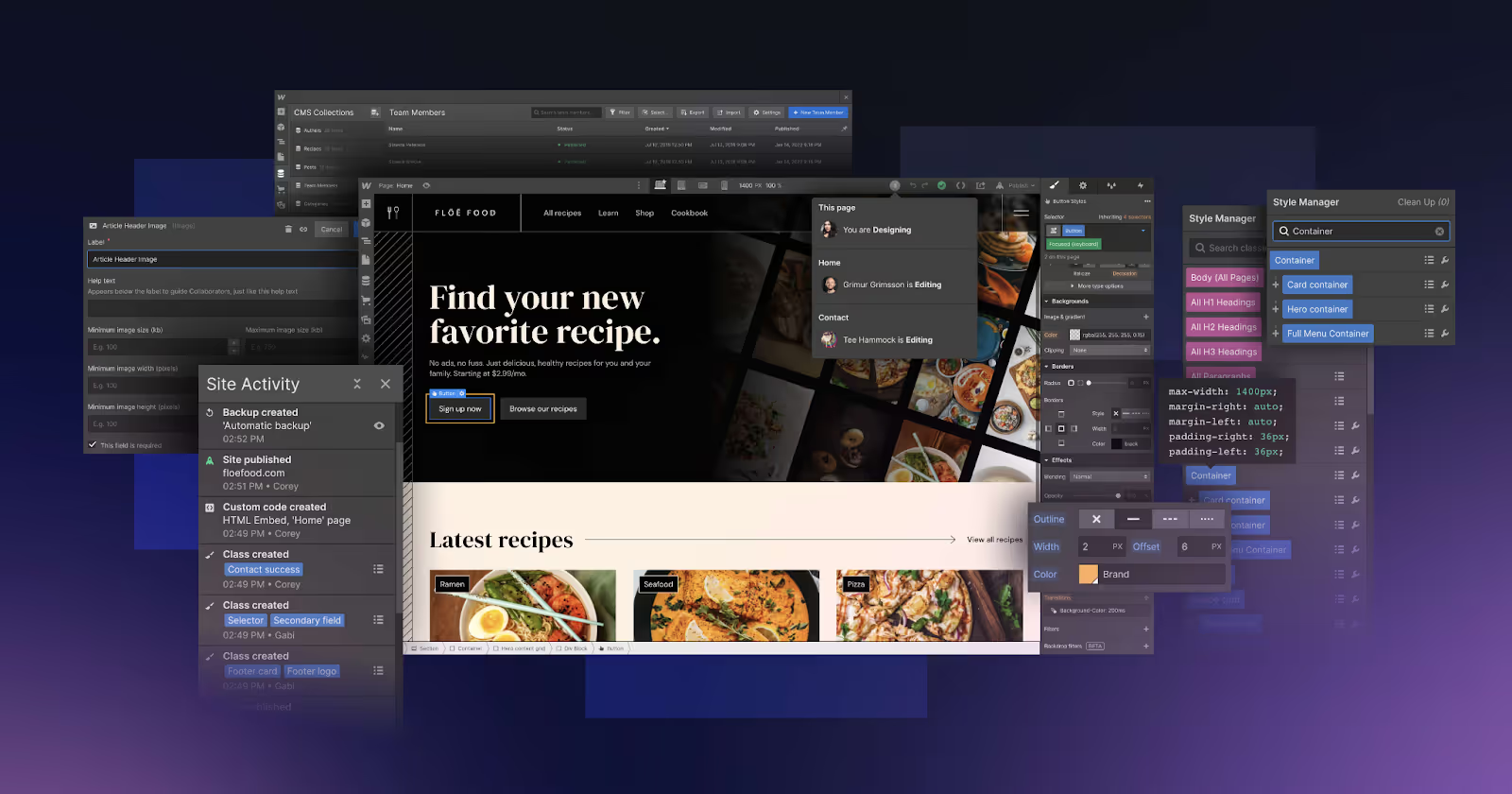
Pros:
- Easy for beginners to use, yet powerful enough for professional designers
- Beautiful, UI/UX-standard designs without being restricted by fixed themes
2. Exports clean, developer-friendly HTML/CSS/JS code
Every drag-and-drop action in Webflow corresponds to clean, W3C-compliant HTML/CSS/JS code. You can fully export the source code for standalone use or integration into larger systems. This makes Webflow the ideal bridge between designers and developers.
Benefits:
- Saves time on front-end development
- Reduces reliance on plugins or bloated code, unlike WordPress
3. Powerful, no-code CMS
Webflow integrates a Content Management System (CMS) that allows you to easily create and update blogs, products, projects, or any dynamic content. The best part is that you can build flexible data structures without any backend programming.
Example: An agency can create custom fields for "Projects," "Clients," "Results Achieved," and more, and update them directly within the Webflow CMS.

4. High-speed hosting with built-in SSL security
Webflow provides dedicated hosting services on the Amazon Web Services (AWS) platform and Fastly CDN ensure your website is always fast, stable, and secure.
Key features:
- Integrated automatic SSL
- Automatic backup and restore
- Page load speed optimization based on user location
5. Comprehensive Responsive Design
Every design in Webflow can be adjusted individually for each device type: desktop, tablet, mobile landscape, and mobile portrait. This gives you granular control over how your site appears on any screen without writing a single line of code. This is crucial, as mobile user experience is now a key ranking factor in SEO.
6. Built-in SEO tools
Unlike many platforms that require additional plugins for SEO, Webflow comes with a full suite of built-in tools to optimize your on-page SEO, including:
- Customizable URLs, title tags, and meta descriptions
- Heading tag optimization (H1, H2, etc.)
- Automatic XML sitemap and robots.txt generation
- Easy integration with Google Analytics and Google Search Console
7. Advanced animations and interactions (Web Interactions)
Webflow allows you to create smooth motion effects, scroll animations, hover effects, sticky elements, and more without needing JavaScript. This enhances aesthetics, improves user experience, and keeps visitors engaged on your website for longer.

With such powerful and intuitive features, Webflow is more than just a design tool; it is a comprehensive solution for all modern web design needs. Whether you are a freelancer building a personal portfolio, a small business owner looking for a professional website, or an agency needing high-quality results in a short timeframe, Webflow has you covered.
Disadvantages of designing websites with Webflow
While Webflow is a powerful, modern platform highly regarded in the web design community, like any other tool, it has certain limitations. Understanding these drawbacks will help you make an informed decision when choosing the right website design platform for your needs.
1. Higher costs compared to popular platforms
Webflow does not offer a fully functional free plan for running a professional website. If you want to use the CMS, connect a custom domain, or publish a significant amount of content, you will need to upgrade to a paid plan, which can be more expensive than platforms like WordPress.
For example:
- CMS Plan: from $29/month
- Business Plan: from $49/month
- Hosting and team workspaces also have separate pricing.
This can be a barrier for individuals or small businesses with limited budgets.
2. A relatively steep learning curve for non-professionals
Although Webflow is a no-code platform, that doesn't mean it's easy for everyone to use right away. Because Webflow allows for granular control over layouts, HTML structure, CSS, and more, those without basic web design knowledge may feel overwhelmed at first.
Time investment is required to learn:
- Concepts such as the box model, flexbox, responsive design, and classes & combo classes.
- Getting familiar with the feature-rich Webflow Designer interface.
3. No support for third-party plugins like WordPress
Webflow operates on a "self-contained" model, meaning you cannot easily install thousands of plugins like you can with WordPress to extend functionality. This can be limiting if you want to integrate specialized features such as forums, membership areas, or complex chatbots.
Alternative solutions: Manual integration via embed code or connecting third-party services like Zapier, Memberstack, Outseta, etc.
4. Not suitable for web projects with complex backend logic
Webflow does not support building web applications with heavy backend logic, such as booking systems, highly customized e-commerce platforms, or social networks. In these cases, you should combine Webflow with other backend platforms (headless CMS, Firebase, custom APIs) or switch to a custom-coded solution.
Despite these limitations, Webflow's drawbacks are not major obstacles if you clearly understand your project's needs and use the platform correctly. For those focused on beautiful interface design, rapid development speed, and flexible content management, Webflow remains one of the top choices available today.
Comparing Webflow with popular website design platforms
In the world of modern web design, there are many platforms to choose from: ranging from simple tools like Wix to powerful content management systems like WordPress. However, Webflow is emerging as a smart "hybrid" solution, combining the visual nature of no-code with the flexibility of professional web development. To better understand where Webflow fits in the landscape of web design tools, let's compare it with some other popular platforms.
Webflow vs. WordPress: Creative Freedom vs. Plugin Ecosystem
WordPress has long been the gold standard for web design, thanks to its massive community and extensive plugin ecosystem. However, to achieve a truly custom look, users often have to juggle theme builders, plugins, and even manual coding, which can lead to bloated, difficult-to-maintain websites.

Webflow is different. Your interface is the only thing you need to control directly within the drag-and-drop designer, without relying on themes or plugins. Furthermore, Webflow generates clean, SEO-friendly HTML/CSS code without the need for extra plugins. With Webflow, you have the freedom to design your interface from A to Z while ensuring a lightweight structure and optimal performance.
Research shows that WordPress powers 43% of all websites globally, making it a clear frontrunner for those choosing a web design platform. If you still have questions or aren't quite sure how to design a website using WordPress, you can check out our guide on professional WordPress website design from A to Z by Markdao!
Webflow vs. Wix: Superior Control and Professionalism
Wix is a popular choice for beginners due to its user-friendly interface and simple operations. However, Wix is quite limited when it comes to deep design customization, especially if you want granular control over layouts or responsiveness across different devices.
Webflow excels here by offering powerful customization based on true front-end standards. Whether you are a designer or a developer, Webflow allows you to control every element in detail, create smooth animations, and ensure your interface responds perfectly on any device.
Webflow vs. Shopify: Differences in Purpose and Design Flexibility
Shopify is the top choice for e-commerce, featuring built-in product management and payment systems. However, design on Shopify is often restricted to pre-built templates, and if you want deep customization, you have to dive into Liquid code—which is no easy task for non-experts.

Webflow isn't meant to replace Shopify for large-scale e-commerce, but it is an excellent tool if you need to create stunning sales landing pages, product showcase websites, or integrate simple sales functionality using third-party tools like Foxy or Snipcart. Designing in Webflow offers absolute flexibility, free from the constraints of themes or default structures.
No platform is perfect, as each tool is created to serve a specific group of users and unique purposes. However, if you are looking for a solution that combines creative freedom, a premium user experience, and the ability to build websites without coding, Webflow is a choice worth considering.
Webflow Pricing: Is It Right for You?
One of the most important factors when choosing a web design platform is the operating cost. Webflow offers many benefits in terms of design and user experience, but it also has its own pricing structure, which differs significantly from platforms like WordPress.
Here is an overview of the costs associated with using Webflow:
1. Costs by plan type
Webflow divides its plans into two main categories:
- Site Plans: for individual websites, including hosting, domain, CMS, and more.
- Workspace Plans: for teams (designing and managing multiple websites simultaneously).
Some popular plans you should know:
- Basic Plan ($14/month): Suitable for simple portfolio or informational websites that do not require a CMS. Includes hosting, SSL, and speed optimization.
- CMS Plan ($29/month): Designed for blogs, portfolios, or news sites that need dynamic content management. Includes 2,000 CMS items, 3 editors, and data export.
- Business Plan ($49/month): Ideal for large business websites with high traffic. Includes 10,000 CMS items, faster speeds, and increased resources.
- Enterprise (contact us directly): Customized for large-scale needs: brand websites, systems with multiple administrators, high-level security, and more.
Additionally, if you are a freelancer or an agency working on multiple websites, you may need a Workspace Team or Workspace Freelancer plan to manage and collaborate on projects more effectively.

2. Domain costs and other integrations
Domains are not included in Webflow plans, so you will need to purchase a domain separately (typically $10–$15/year) from a provider like GoDaddy, Namecheap, etc., and then connect it to Webflow.
Furthermore, if you need to integrate third-party services such as payment systems, chatbots, live chat, or advanced forms, you may incur additional fees or need to use tools like Zapier, Memberstack, or Outseta.
Compared to WordPress, which can be operated at a lower cost due to its open-source nature and cheap hosting, Webflow may have a higher starting cost. However, it saves significantly on maintenance, troubleshooting, and long-term development costs. Plus, you won't need to hire a developer to tweak code every time you want to update a layout or create a new landing page.
So, is Webflow expensive?
The answer depends on your needs. If you are looking for a comprehensive, high-speed, SEO-optimized platform that is easy to manage and doesn't require technical dependencies, then Webflow's pricing is reasonable and transparent.
However, if you only need a simple website that isn't updated frequently, or if you have a limited budget, you might consider other options like lightweight WordPress hosting or landing page builders such as Carrd or Dorik.
Who is Webflow for?
Not everyone needs Webflow, but for individuals and organizations looking for a website platform that is both flexible, performance-optimized, and easy to manage, Webflow is a choice worth considering. Here are the groups for whom Webflow is particularly well-suited:
1. UI/UX designers who want full control over the implementation process
For designers, Webflow is the ideal tool to transition from design to a live product without relying on developers. You can create interfaces, test responsivelayouts, add animations, and publish your website directly, all within one visual workspace.
Benefits:
- Save time on handoffs to developers
- Precise control over every design detail
- Present demos to clients directly in a live environment
2. Freelancers who want to build beautiful, fast websites without coding
With Webflow, freelancers can create professional personal portfolios or offer web design services to clients without needing to know how to code. The clean code export and built-in SEO features ensure your work is optimized from design through to operation.
Benefits:
- Increase the value of your personal services
- Create high-quality websites without needing a support team
- Manage multiple projects within a single platform
3. SMEs that need a flexible, easy-to-update website
Webflow is an excellent choice for SMEs that want a beautiful, fast, and user-friendly website. With its integrated CMS, marketing teams can easily update content, post blogs, and change images without needing to go through the IT department.
Benefits:
- Save on costs for hiring web maintenance developers
- Flexibly update marketing content based on campaigns
- SEO-friendly website, optimized for conversions
4. Design agencies looking to shorten project lifecycles
For design firms or digital agencies, Webflow is a solution that accelerates deployment, especially for projects requiring landing pages, MVP products, or client demos. You can build layouts quickly, test them in a live environment, and easily hand them over to clients.
Benefits:
- Increase team productivity
- Easily manage clients via individual workspaces
- Rapid publishing while maintaining high quality
5. Marketers wanting to control content and create effective landing pages
Marketers constantly need to update content, create landing pages for ad campaigns, run A/B tests, or optimize for SEO. Webflow provides a user-friendly content editor, supports responsive design, and integrates tracking tools like Google Analytics and Meta Pixel without requiring technical expertise.
Benefits:
- Create and deploy landing pages in real-time
- Easily update new content and optimize conversion rates
- Reduce reliance on technical teams or outsourcing
Webflow isn't for everyone, but it is the ideal tool for those who want control and creativity.
Markdao provides Webflow website design services
At Markdao, we understand that every business has different needs, goals, and scales, so a "one-size-fits-all" website design solution doesn't work. That is why we offer a variety of website deployment methods, including design using Webflow, WordPress, and Custom Code depending on the complexity of the project.
With Webflow, Markdao helps businesses shorten development time, providing an intuitive, modern website that is easy to manage without technical dependency. It is the ideal choice for projects that prioritize speed, high aesthetics, and SEO optimization from the ground up.
However, in cases requiring complex backend logic, specific functional integrations, or high security standards, the Markdao team is also prepared to deploy websites using custom code or extended WordPress platforms, ensuring the site is not only visually appealing but also sustainable for long-term operation.
We focus not only on interface design but also partner with clients to build user experience (UX), develop SEO-friendly content, and optimize conversion rates so that the website truly becomes a value-generating tool for the business.
Conclusion
By combining visual design, SEO optimization, and no-code publishing, Webflow ushers in a new era for those who want a modern website without heavy reliance on programming.
However, no tool is perfect for every scenario. Choosing between Webflow or other platforms like WordPress or Custom Code depends heavily on your business goals, operational needs, and long-term development vision.
If you are looking for a team that understands both design and technology, with the flexibility to use various platforms to create effective websites, Markdao is your trusted partner. Whether you choose Webflow or any other solution, the most important thing is to build a website that truly makes an impact and drives brand value.


