



Have you ever thought that creating a professional website could be as simple as... building a LEGO set? With WordPress, it’s entirely possible! No coding skills or massive budgets required—with just a few clicks or drag-and-drop actions, you can have a beautiful, SEO-optimized website ready to win over customers. In this article, Markdao will guide you through designing a website with WordPress from A to Z, helping you turn your ideas into reality in the easiest and most effective way!
Understanding WordPress – Why 43% of websites worldwide trust it
Did you know that over 43% of websites globally are built using WordPress? From personal blogs and business websites to major e-commerce sites like TechCrunch, The New York Times, and even NASA’s website, WordPress has proven its power and exceptional flexibility.
So, what makes WordPress the top choice for millions of users?
WordPress – Create a professional website without knowing how to code
In the past, creating a website required complex programming skills, but with WordPress, you can build a professional site with just a few clicks. This platform offers: A diverse library of themes and an easy-to-use drag-and-drop system.
SEO Optimization – Get your website to the top of Google easily
Beyond just helping you create a website, WordPress has a strong advantage in SEO. Statistics show that over 80% of WordPress websites rank higher on Google thanks to: A search engine-friendly structure and powerful SEO plugins like Yoast SEO and Rank Math.
High security, fast speed – Ready for long-term growth
A website needs to be more than just beautiful; it must be secure and run smoothly. WordPress helps you achieve this with: Continuous security updates to protect your site from hackers and speed-optimization plugins like WP Rocket, which help your site load faster and keep customers engaged.
Low cost, high efficiency
Compared to hiring a developer to build a website from scratch, WordPress helps you save up to 70% in costs. You can start with a small budget—needing only a domain and hosting—and then scale your website as needed without incurring excessive expenses.
A massive community – Support is always available
With millions of users and developers worldwide, you will never be "stuck" when you run into an issue. The WordPress community is always ready to help you through forums, support groups, and extensive documentation.
With all these advantages, it’s no surprise that WordPress has become the world’s most popular website design platform. If you want to learn more about how WordPress works, check out the article What is WordPress? for a comprehensive overview before you start designing your own website!
WordPress website hosting
WordPress website hosting is hosting or a server, where all of a website's data, files, and databases are stored so that users can access them online.
Common types of hosting for WordPress include:
Shared Hosting – Shares resources with many other websites; it is affordable but performance may be affected.
VPS Hosting – A virtual private server that is more powerful than Shared Hosting, suitable for websites with moderate traffic.
Cloud Hosting – Hosted across multiple servers, ensuring high uptime and flexible scalability.
Dedicated Server – A private server that is powerful but costly, suitable for large websites.
Managed WordPress Hosting – A service optimized specifically for WordPress, featuring in-depth technical support.

Using SaaS WordPress.com
Using hosting provided by WordPress.com offers significant benefits, especially for those who are not technically inclined or want to launch a website quickly and reliably. When using this service, users do not need to handle complex installations or configurations. The system is pre-optimized for WordPress, ensuring the website runs smoothly with stable speeds and remains secure thanks to automatic updates and built-in standard security layers.
Another major advantage is the professional technical support provided directly by the WordPress team (available for paid plans), which helps users easily resolve issues without needing deep technical expertise. Additionally, the service plans are flexibly priced, ranging from free to premium options suitable for various purposes such as blogging, personal websites, business portfolios, or online stores.
Currently, WordPress.com offers service plans ranging from free to approximately $540/year (equivalent to about 13.5 million VND). Specifically:
The Freeplan: free of charge, suitable for basic needs, but does not support custom domains and displays WordPress advertisements.
The Starter plan (~1.2 million VND/year): suitable for individuals, supports custom domains, and removes advertisements.
The Explorer plan (~2.4 million VND/year): adds more advanced features for content creators.
The Creator plan (~7.5 million VND/year): designed for small businesses, allowing for greater customization and the installation of third-party plugins.
The Entrepreneur plan (~13.5 million VND/year): integrates WooCommerce, supports e-commerce, and includes SEO optimization and high-performance features.

With the flexibility of WordPress, you can easily bring your ideas to life!
Learn more about what SaaS is here.
Using third-party hosting
Using third-party hosting instead of managing your own server offers several key benefits, including:
Cost savings
No need to invest in expensive hardware.
Reduced costs for maintenance, operations, and software updates.
Flexible hosting plans tailored to your needs (shared hosting, VPS, cloud hosting, etc.).
Faster performance and speed
Optimized server infrastructure using SSDs, CDNs, and caching to help your website run faster.
Servers located in multiple regions to optimize access speed based on geographic location.
Enhanced security
Regular security updates, DDoS protection, and integrated firewalls.
Support for free or affordable SSL certificates.
Automatic backups to help restore data when needed.
Technical support
A professional support team to help resolve issues quickly.
No need for in-depth server administration knowledge.
Scalability
Easy to upgrade as your traffic grows.
Cloud hosting services allow for instant resource scalability.
Better SEO optimization
Faster page load times help improve SEO rankings.
Reliable hosting offers high uptime, preventing traffic loss due to downtime.
When should you manage your own server?
When you have a skilled technical team and require deep system customization.
When you need maximum security or are handling sensitive data.
When your website has massive traffic volume (e.g., large e-commerce platforms).
Installing WordPress
WordPress is an open-source platform that offers a wide range of features to meet user needs. A rich collection of free themes and a diverse plugin library help optimize the user experience. Even those without web programming expertise can easily design and build their own website with WordPress.
Initial WordPress setup
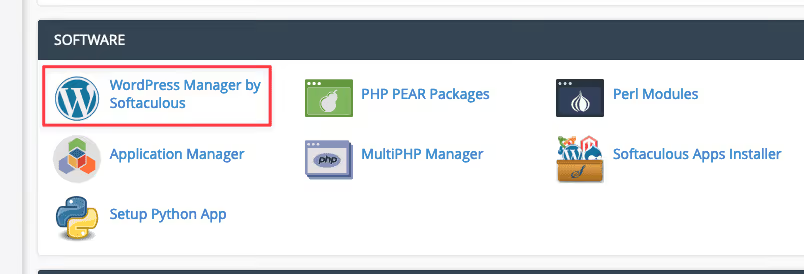
First, log in to cPanel and navigate to the SOFTWARE section and select WordPress Manager by Softaculous
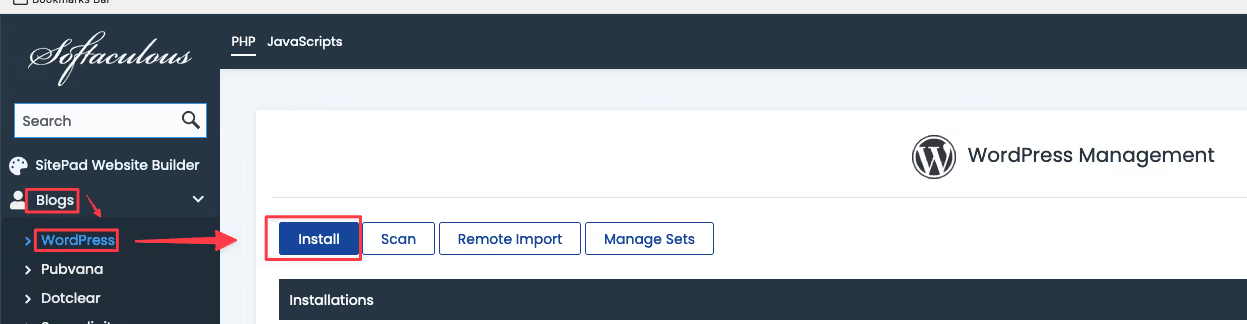
Then select Blogs => WordPress Install to begin the installation
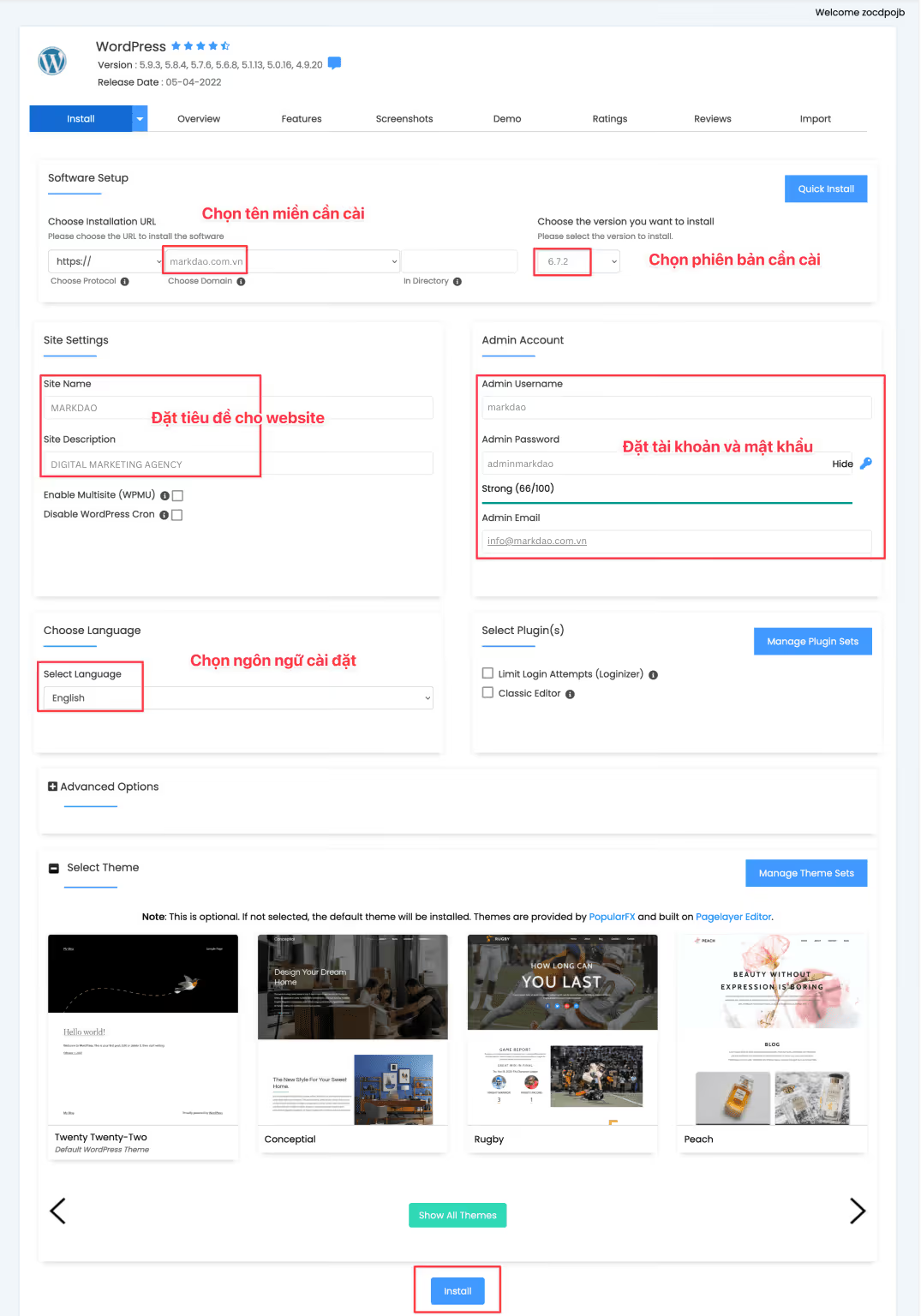
The WordPress installation screen will appear. Enter and select the information as shown in the attached image to configure your settings:
Choose Installation URL: Select the domain name you want to install on
Site Settings: Enter your website name and description
Admin Account: Enter your website administrator username and password
Choose Language: Select the language for your website
Finally, click Install to install WordPress
Installing a WordPress theme
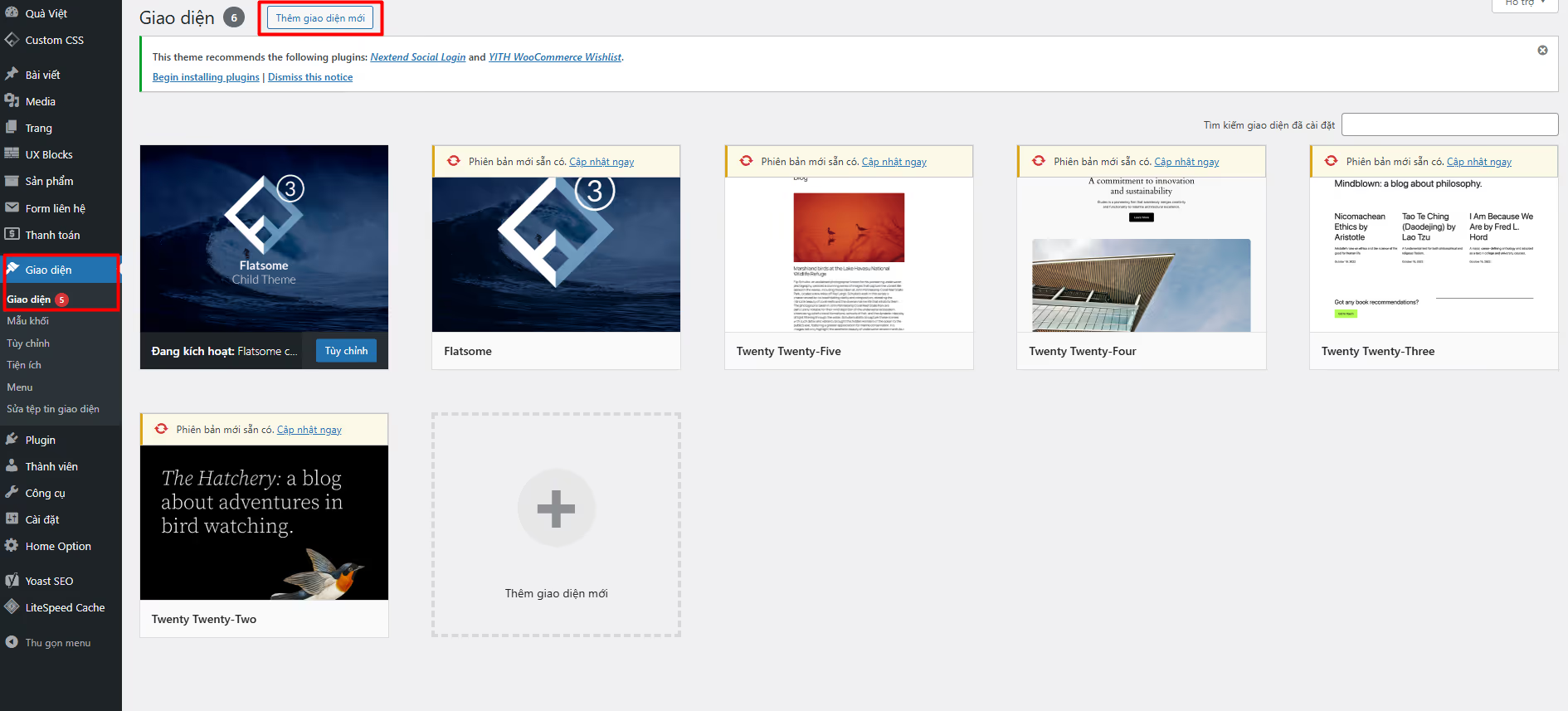
First, to install a theme for WordPress, you need to log in to your admin dashboard, then go to Appearance → Themes . Here, you will see a list of themes already installed on your website. To add a new theme, simply click Add New (Add New).
Installing WordPress plugins
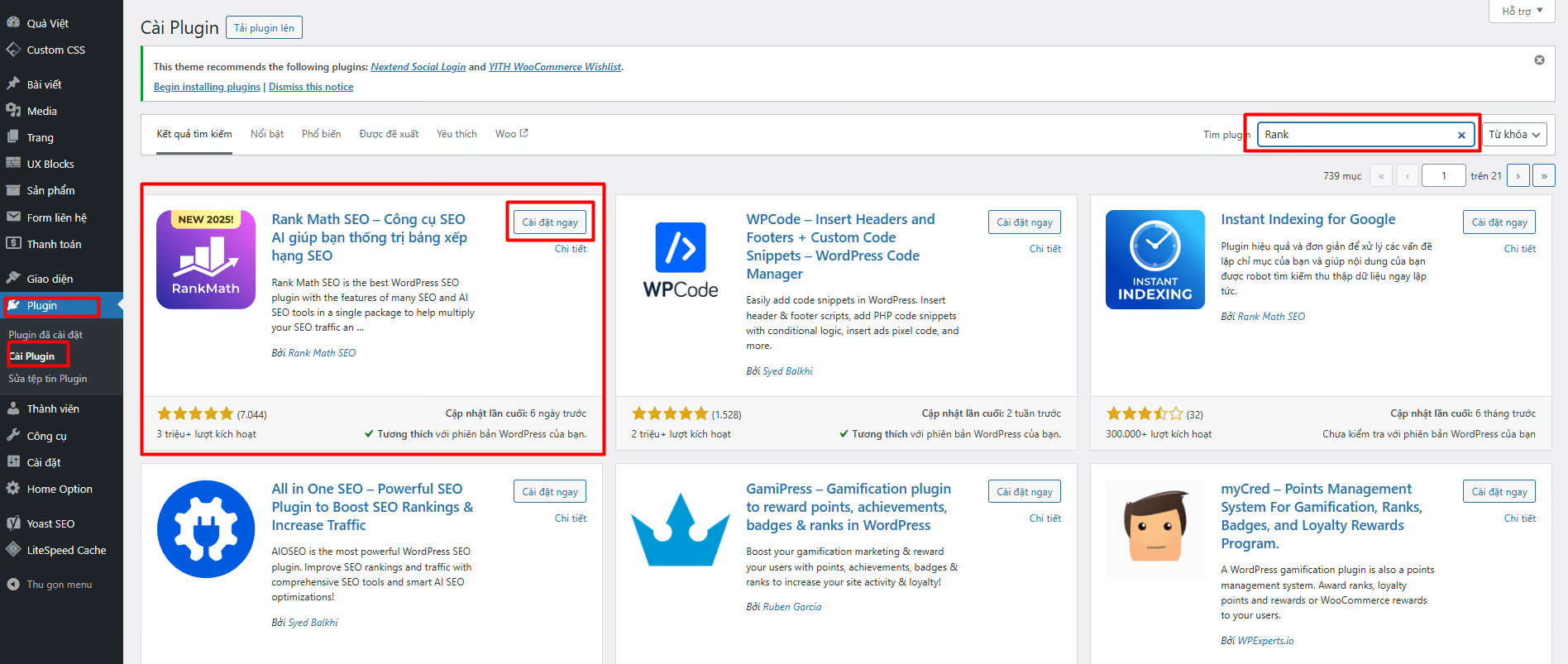
To install a plugin on WordPress, first, log in to your admin dashboard and go to Plugins → Add New (Add New). Here, you can search for your desired plugin by typing its name into the search bar. Once you have found the right plugin, click Install Now (Install Now), then click Activate (Activate) to start using the plugin.
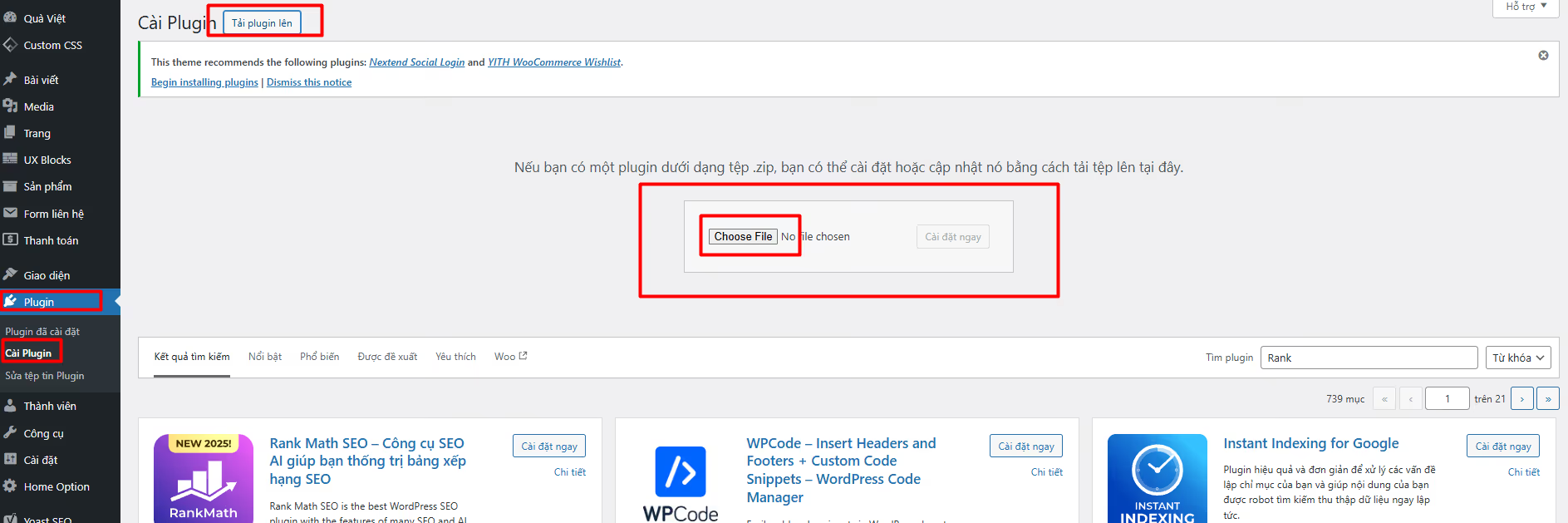
Alternatively, you can upload a plugin as a ZIP file by clicking Upload Plugin (Upload Plugin). Installing plugins helps extend your website's functionality, optimize performance, and meet your needs flexibly.
WordPress website design
When designing a WordPress website, you can choose between custom coding or using a page builder like Elementor. Custom coding allows for deep customization, performance optimization, and the creation of a unique interface tailored to your needs. Meanwhile, Elementor helps you build websites quickly with drag-and-drop functionality, allowing you to create professional sites without needing to know how to code. If you need high flexibility and optimization, custom coding is the ideal choice. If you prioritize speed and ease of use, Elementor is a powerful tool to help you design your WordPress website effectively.
Custom coding a WordPress website
"Custom coding" a WordPress website means you write the code yourself to customize and build the site, rather than using page builders like Elementor, Flatsome, WP Bakery, etc., or pre-made themes. This helps optimize SEO speed and improves website security.

If you want to manually code a WordPress website, you need to understand the core components:
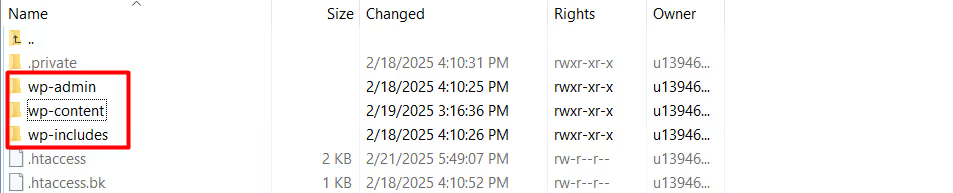
WordPress directory structure
wp-admin/: Contains backend management files.
wp-content/: Contains themes, plugins, and uploads.
wp-includes/: Contains core WordPress files.
In the wp-content/directory, you will work extensively with themes/ to code the interface.
Essential files for theme development
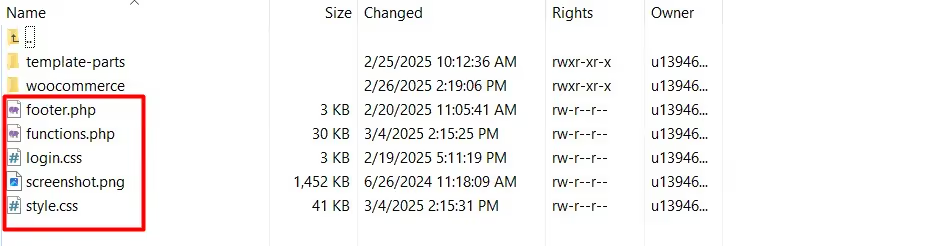
When coding a WordPress theme from scratch, you need at least the following files:
style.css → Contains theme information (required).
index.php → The main file for displaying content.
functions.php → Contains custom functions.
header.php → The header section (menu, logo, meta tags, etc.).
footer.php → The footer section.
single.php → Displays individual posts.
page.php → Displays individual pages.
archive.php → Displays categories, tags, and search results.
How to build a WordPress theme from scratch
Step 1: Create a new theme folder
Create a folder inside wp-content/themes/ (e.g., my-custom-theme/).
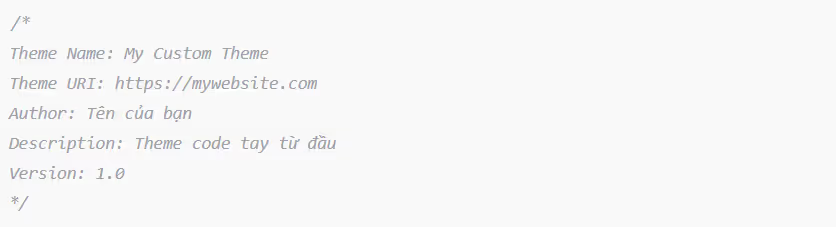
Step 2: Create the style.css file
This file allows WordPress to recognize your theme.
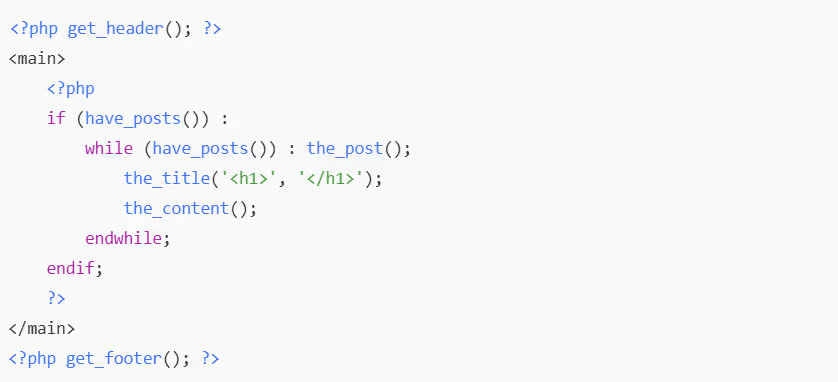
Step 3: Create a basic index.php file
Step 4: Add functions.php to support your theme
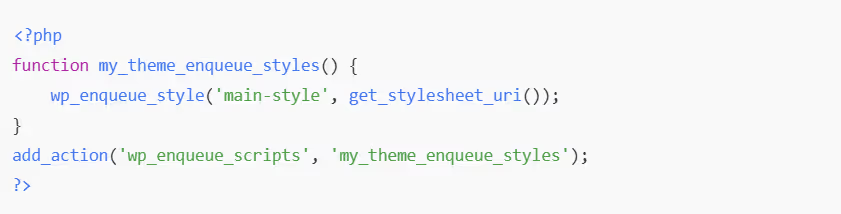
This is where you can add features such as menus, widgets, custom post types…
When to custom code a WordPress website
When you want to create a website with fast loading speeds and SEO optimization.
When you need high customizability and don't want to rely on themes.
When you are a developer looking to build themes for clients.
Building WordPress interfaces with Elementor
Elementor is a powerful drag-and-drop page builder plugin for WordPress that helps you build websites professionally without needing to know how to code. With its intuitive interface, you can design web pages exactly as you want and see changes in real-time. Elementor not only simplifies the design process but also offers maximum flexibility, making it suitable for both beginners and experts. Whether you want to create a landing page, a blog, or a business website, Elementor provides the powerful tools to bring your ideas to life quickly and effectively.
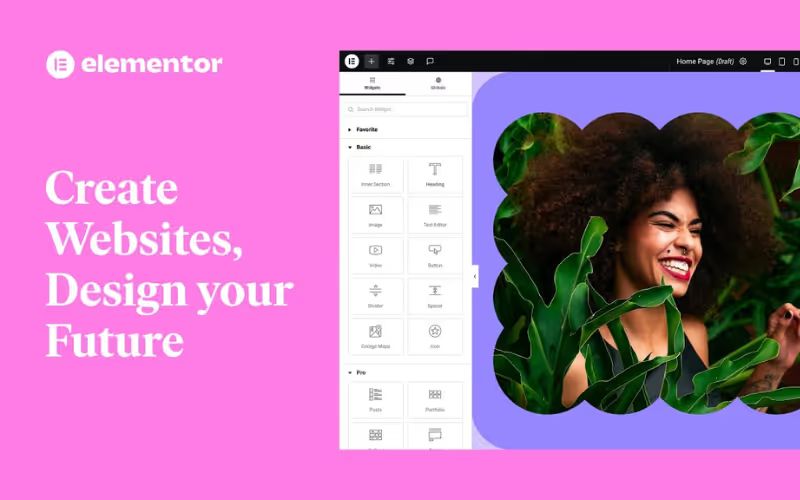
Steps to build a WordPress interface using Elementor
Install and activate Elementor
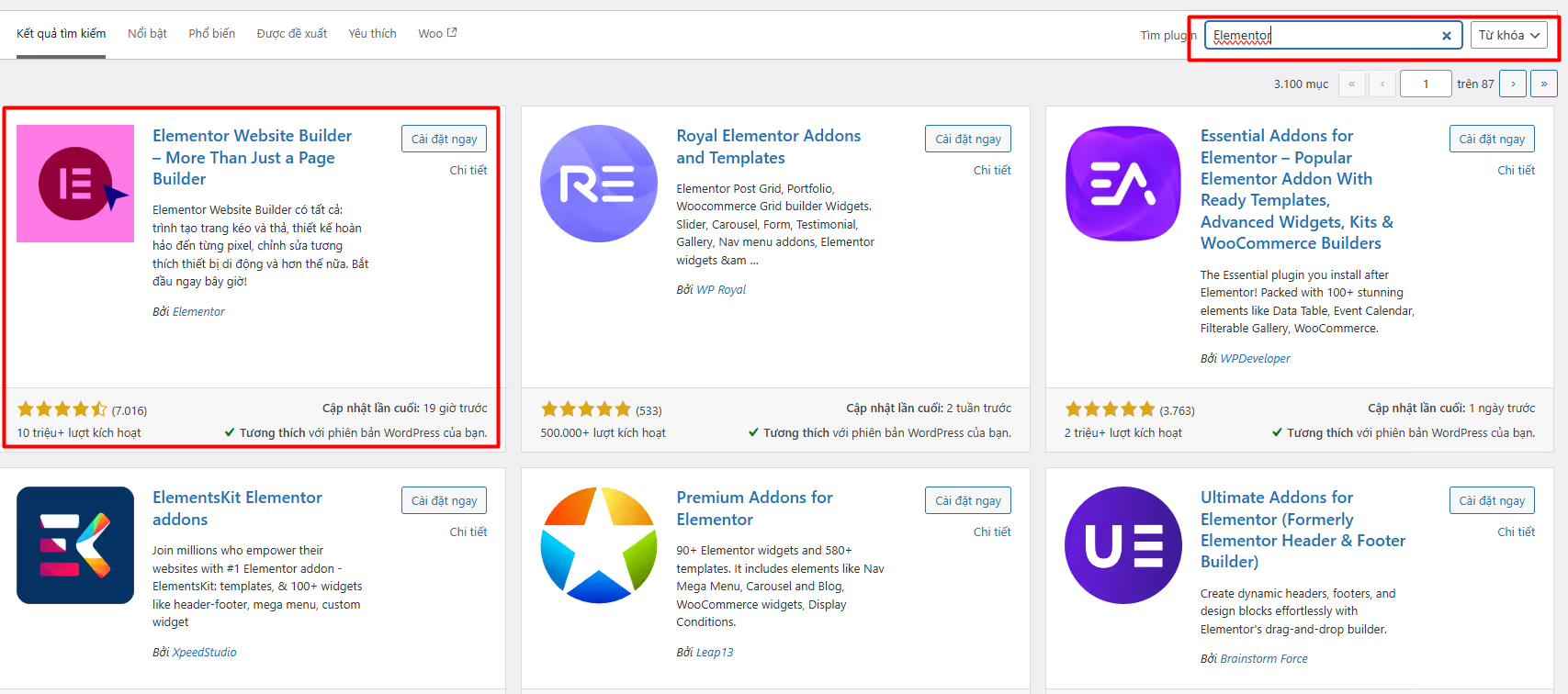
Go to Plugins > Add New in WordPress.
Search for Elementor Page Builder, click Install Now and Activate.
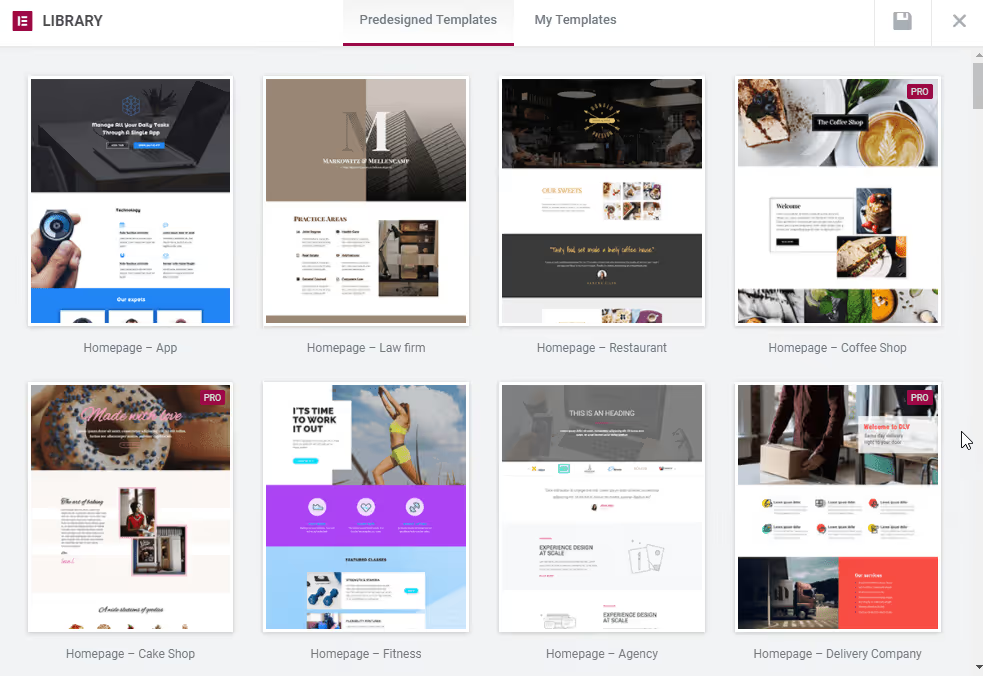
Select or create a layout template
Use Elementor's pre-built template library or design your page from scratch based on your own ideas.
Elementor supports drag-and-drop widgets, making it easy for you to add headings, images, buttons, contact forms, and more.
Customize your website to suit your needs
Customize colors, fonts, and layouts to match your brand style.
Use advanced effects to make your content stand out.
Interface testing and optimization
Ensure your website looks great on all devices.
Check page load speeds and optimize images and caching to improve performance.
Publish your website
Once you have finished editing, click Publish to push your design live to your official website.
Why choose Elementor
Intuitive drag-and-drop interface
Elementor allows you to build websites easily without needing to know how to code. Every change is visible instantly, giving you complete control over your site's appearance.
Diverse template library
The plugin provides hundreds of professional, ready-made templates, helping you save time and create an impressive website in just a few clicks.
Responsive support for all devices
Elementor helps you adjust your layout to fit any device (desktop, tablet, mobile) without manual editing.
Integrates with other plugins
Compatible with many popular plugins like WooCommerce, Yoast SEO, Rank Math, and Contact Form 7, making it easy to extend your website's functionality.
Large support community
With a vast user community and detailed documentation, you can easily find solutions whenever you run into trouble.
Premium Elementor themes
Elementor is a powerful page builder plugin for WordPress that allows users to easily design and customize website layouts without needing any coding knowledge. In addition to the free version, Elementor offers a Pro version with many advanced features.
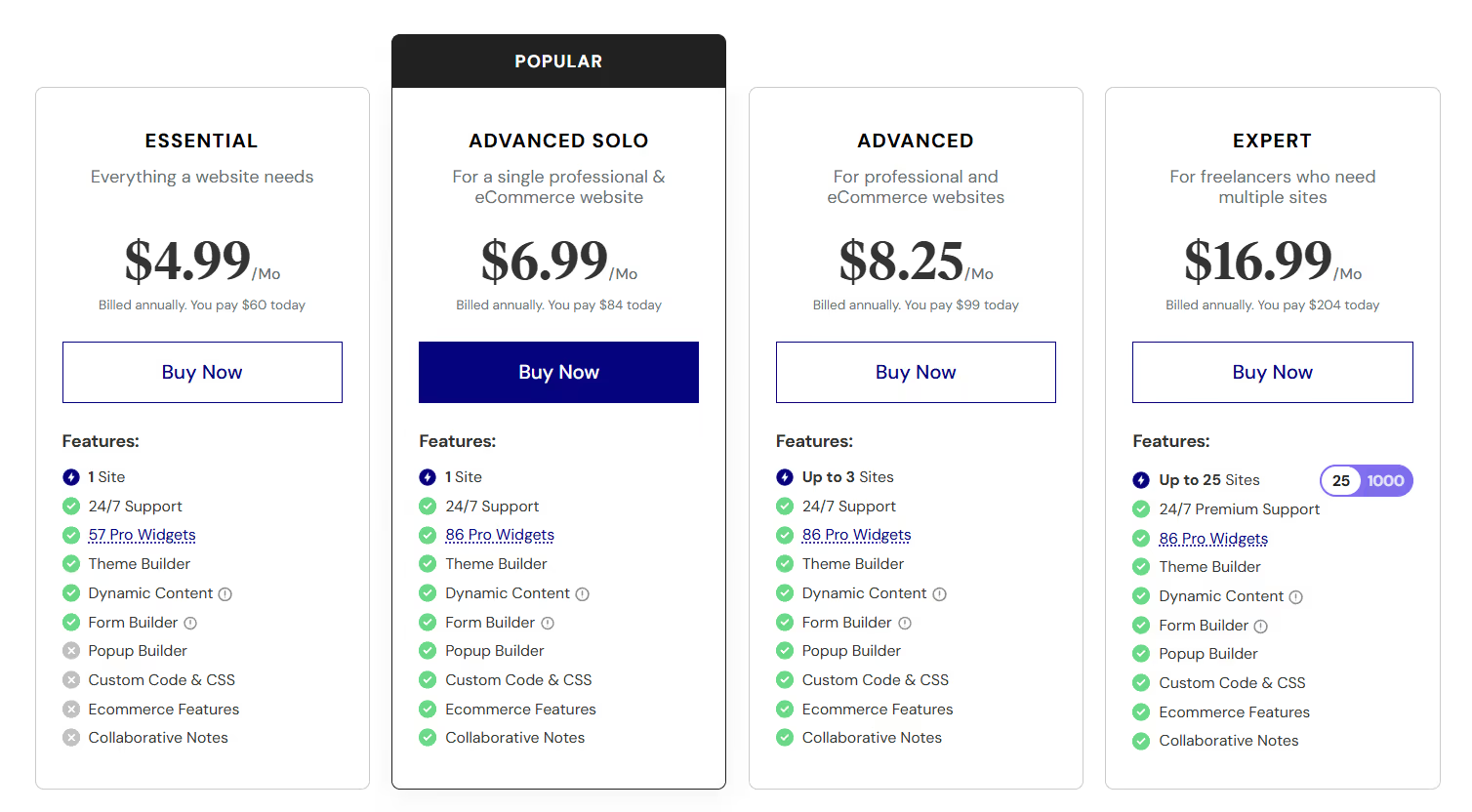
Elementor Pro plans and pricing:
Elementor Pro offers various subscription plans with different price points, depending on the number of websites and included features:
Essential Plan: $4.99/month, for 1 website, includes 57 Pro widgets, 24/7 support, theme builder, dynamic content, and form builder.
Advanced Solo Plan: $6.99/month, for 1 website, includes 86 widgets, theme builder, dynamic content, form builder, popup builder, custom code and CSS, e-commerce features, collaboration notes, and 24/7 support.
Advanced Plan: $8.25/month, for 3 websites, with the same features as the Advanced Solo plan.
Expert Plan: $16.99/month, for 25 websites, includes 86 Pro widgets and all other premium features.
WordPress website management
Managing a WordPress website goes beyond just updating content; it also includes SEO optimization, product management (if using WooCommerce), system maintenance, and ensuring the website remains stable. Below are the key aspects of WordPress website management.
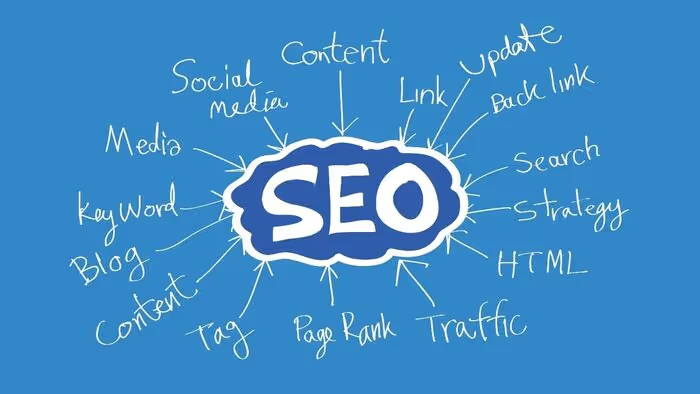
SEO adjustments
SEO is a crucial factor in helping a WordPress website rank highly on search engines. Some key tasks in the SEO optimization process include:
Optimizing titles and meta descriptions for each page.
Improving page load speed to enhance user experience.
Building internal links to improve navigation.
Review and optimize content based on target keywords.
Use SEO plugins like Rank Math or Yoast SEO for easier management.
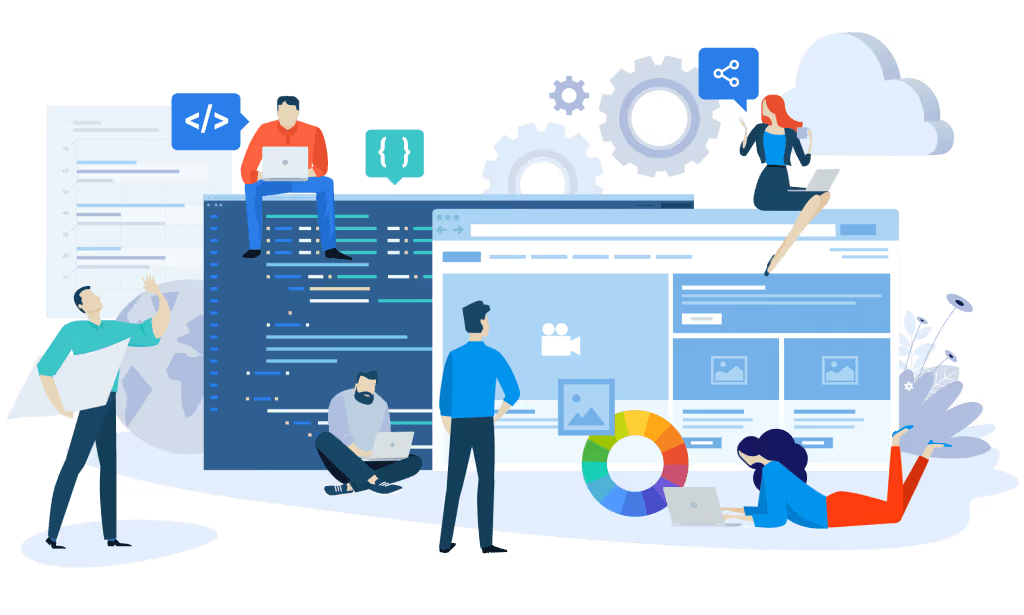
Page-level content management
Content management is more than just posting new articles; it also includes:
Reviewing and updating old content to ensure accuracy.
Optimizing images and videos to reduce file size and improve page load speed.
Formatting content to be readable, clear, and engaging for users.
Managing comments and customer feedback.
WooCommerce product management
For e-commerce websites, WooCommerce is a powerful tool that makes product management easy. Key tasks for managing WooCommerce products include:
Adding, editing, and deleting products as needed.
Updating prices, promotions, and product information.
Managing product categories and tags to optimize display.
Checking orders, processing payments, and handling customer support.
WordPress maintenance and upgrades
To keep your website running smoothly, WordPress maintenance and upgrades are essential. This process includes the following key tasks:
Update PHP
Check your current PHP version and update to the latest release.
Ensure your website is compatible with the new PHP version before updating.
Check for errors after the update to ensure the website is functioning properly.
Update WordPress
Update WordPress to the latest version to improve security and performance.
Check your theme and plugins after the update to avoid compatibility issues.
Update WordPress Plugins
Regularly update plugins to ensure security and add new features.
Check for conflicts between plugins after updating.
Remove unnecessary plugins to reduce system load.
Markdao WordPress Website Design Services
Today, WordPress web design not only helps businesses build a professional image but also optimizes user experience and increases customer reach. Markdao is a professional WordPress website design service provider, helping businesses create modern, SEO-friendly, and user-centric websites.
Why choose Markdao for WordPress website design?
Markdao is more than just a standard web design agency; we are experts in WordPress website optimization services. We provide comprehensive solutions that meet the needs of businesses across various industries, with standout advantages such as:
Tell your brand story through a WordPress website: We focus on conveying your business message and story through website design and content. Interfaces are customized to your brand identity, with no pre-made templates used.
Focus on user needs: We conduct user research and interviews to understand needs and pain points, creating layouts and content that resonate with end users.
Develop brand personality: Incorporate and evolve brand identity elements within website interface design, ensuring consistency and an accurate reflection of the business's identity.
SEO-standard & speed-optimized: Websites are built to SEO standards with fast loading speeds, helping to boost and maintain high rankings on Google.
User & mobile-friendly: Perfectly compatible with all platforms and devices.
Easy to manage & scale: WordPress websites at Markdao are designed with a user-friendly admin interface, making it easy to add content and perform upgrades.

3 WordPress website design packages at Markdao
Well-Inspired Package – Optimized cost, superior quality
For businesses looking for an affordable website without using pre-made templates. Markdao utilizes AI and No-Code technology to reduce costs while ensuring aesthetic appeal and operational efficiency.
Professional Package – Custom WordPress website design
This package is for businesses that want a unique website, not based on existing templates. With custom graphic design and optimized source code, your website will have a distinct identity, helping to make a strong impression on customers.
Bespoke Package – Premium solutions for your brand
If you want an impressive website with various 3D effects and unique animations, the Bespoke package is the perfect choice. Markdao will build a Design System tailored to each brand, ensuring distinctiveness and professionalism.
WordPress Website Optimization Services – Superior Performance Upgrades
In addition to WordPress website design, Markdao provides WordPress optimization services to help businesses improve operational performance:
Page Load Speed Optimization: Reduce load times for a smoother experience. We use image compression technology, code optimization, and caching systems to boost speed. A fast-loading website not only enhances user experience but also reduces bounce rates, helping your site achieve high scores on Google PageSpeed Insights.
On-Page SEO Improvement: Optimize meta tags, headings, images, and content to boost Google rankings. Furthermore, Markdao optimizes content by topic and ensures a logical internal linking structure, making it easier for search engines to crawl and rank your website higher.
Responsive Design: Ensure optimal display on all devices. Markdao uses flexible design techniques to make your website compatible with every screen size, from desktops to mobile phones. Your website interface will maintain its aesthetic appeal and stable functionality across all platforms.
In-depth SEO Support: Markdao’s SEO-standard website design services integrate comprehensive SEO optimization tools, from search-engine-friendly URL structures to technical elements that ensure fast load speeds and effective indexing.
Scalability and Enhanced Security: With the WordPress platform and custom design methods, your website is easily scalable and more secure than using pre-made templates. We minimize attack risks and protect your business data.
Conclusion
WordPress has proven its power and superior flexibility by becoming the world's most popular website design platform. With its ease of use, SEO optimization, strong security, cost-effectiveness, and a vast support community, WordPress is the ideal choice for both individuals and businesses looking to build a professional website without needing coding knowledge.
Whether you want to design a website using page builders like Elementor or custom code for speed and security, WordPress meets every need with its powerful tools. Additionally, choosing the right hosting plays a crucial role in ensuring performance and user experience.
If you are looking for an optimal website design solution, Markdao can help you bring your ideas to life with professionalism and the best strategies. Start your website-building journey today!


