



On-page SEO is the collective term for tasks involved in optimizing on-page content to help readers achieve their goals. Optimizing content for title tags is a crucial task that helps users determine whether an article meets their needs directly from Google's search results page.
In this article, let's join Markdao to learn where the title bar appears, what an SEO title is, and how to optimize them.
What is a title tag?
A Title Tag is an HTML element located in the <Head> section that concisely describes the main content of a webpage. It plays a vital role in encouraging users to click on your article. Each page has only one unique title tag, which typically appears in the code as follows:
<head>
<title> How to write "SEO-friendly titles" updated for 2024 </title>
<meta name="description" content="A Title Tag is an HTML element used to accurately and concisely describe the content of a page." />
</head>
March 2024 Update: Thanks to advancements in AI, Google has rolled out new updates. Currently, the title displayed in search results is determined by Google and no longer strictly follows the HTML <title> declaration. This measure helps prevent websites from manipulating keyword rankings. The title content is now pulled from your page content—it may be a Heading, or Google might automatically select a sentence from the article.
Therefore, avoid writing article titles (especially Heading 1) longer than 60 characters, as this may cut off the content you want to use to entice users to click through to your site. Additionally, your content must align with the titles and Title Tag, otherwise, Google will classify your site as spam content and label it as keyword stuffing.
Where do SEO Titles appear?
The title tag will appear exactly as declared in your browser and on social media. However, in search results, the title may not always match what you have programmed in your HTML code. Typically, the title tag appears in 4 locations:
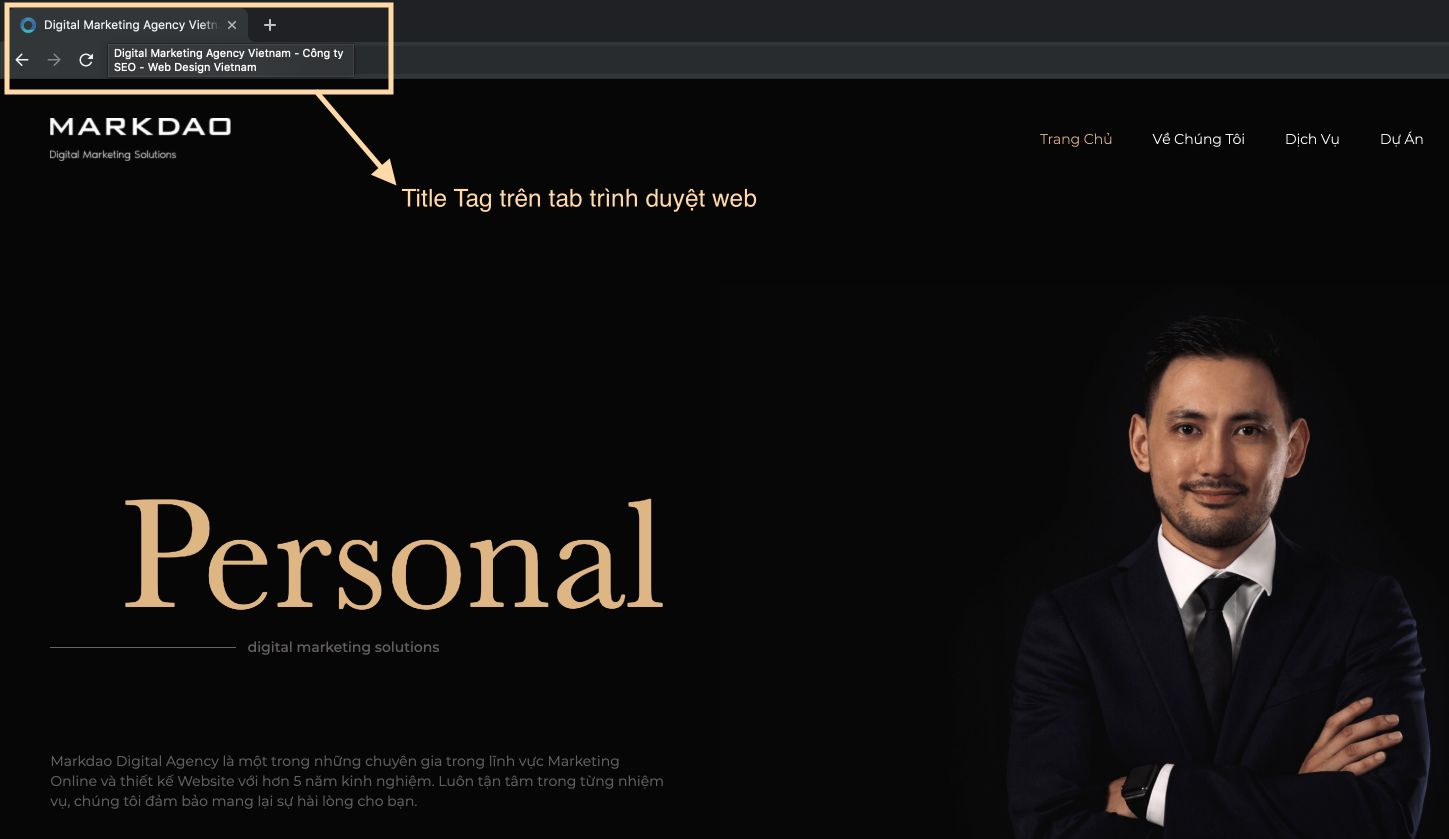
Browser tab names
The title tag is visible in your web browser when you open a page in a new tab. Optimizing SEO title tags is especially helpful when users have multiple tabs open and need to navigate back to a specific page. For this reason, a title tag optimized for on-page SEO must be unique, easily recognizable, and clearly distinct from other pages.
Browser bookmarks
Bookmarks in Chrome default to the page's title unless the user manually changes them. Because space is limited, the full title may not be visible in the bookmarks bar. This is why you should keep your title tags concise, including your primary keyword and content that captures the reader's interest.

Titles in social media shares
You know those little descriptions that appear in Facebook and Twitter posts when someone shares a link? Title tag will also appear in these locations, letting users know what your page is about and what kind of content they can expect to find when they click the link to your site.
Some website builders allow you to customize title tags specifically for how they appear on that page. If you are building your website on WordPress, you can customize your Title Tags using available WordPress SEO plugins such as Yoast or All-in-One SEO Pack.

Title results appearing on search engine results pages (SERPs)
The SERP (Search Engine Results Page) on search engines like Google, Bing, Safari, Yahoo, etc., is the most important display location for any on-page SEO specialist. The title tag appears here as large blue text with a link to the landing page, positioned above the meta description or summary lines.

When someone finds your website by entering a search query with SEO keywords relevant to you, the Title Tag is the first element to make an impression on the user, and if you do it right, you can absolutely convince them to click on your website simply by optimizing your on-page SEO Title Tag.
Why are Title Tags important for SEO?
Although, as mentioned in the March 2024 update, Google may select and cross-reference the Title Tag with the overall content of the article, the Title Tag remains the primary element for browsers to display the page name, helping users identify the brand and know which page they are on.
The best practice is for the Title Tag to match the Heading 1 and include keywords. This is currently the most effective solution for Google to evaluate your website as consistent in terms of content. However, do not sacrifice user-friendliness for the sake of Heading 1 or hide it, as doing so would violate Google's spam policies.
Title Tags help search engines understand content and rank it appropriately
Writing a Title Tag is meant to serve the end user, but even so, it is important to remember that if the page does not reach the top 10 search results, no matter how user-centric it is, your website will not reach anyone. The SEO Title remains the first indicator for Google Bot to determine the main content of your website before it crawls the entire page.
Therefore, when writing an SEO Title, content creators must still keep in mind the importance of using keywords as naturally as possible while creating the most compelling headlines.
Attract users to click on your title (CTR)
If users do not click on your results even when you are in the TOP 10, it is often because your Title Tag lacks appeal. CTR stands for Click-Through Rate, which refers to the percentage of users who click on your title instead of others.
To achieve this, you need to ensure your content is concise, addresses exactly what users need, and you can even use Emojis to stand out. Most importantly, avoid titles that are too long, as they may be truncated in search results.
Guide to setting SEO-friendly Title Tags for Google 2024
- The content within the title tag must contain the primary keyword that the content creator wants to target.
- Avoid keyword stuffing, which makes it difficult for Google to identify the primary keyword and prioritize your article. The primary keyword should be placed at the beginning, and the Title Tag should include your brand name.
- The content must be concise, under 60 characters in length, to ensure it is fully displayed in search results. Use clear grammar and concise phrasing to convey the main message of your website.
- Use emojis to entice users to click on your Title Tag. A higher CTR and more engagement sessions on your landing page are key factors that will boost your website's rankings.
- Use questions to help Google identify your content more easily.
- Include the year so Google can determine how recently the article was updated.
- Continuously update your Title Tags and content.
- Ensure your Title Tag is unique; the more it stands out from competitors while meeting user needs, the higher priority it will receive.
- Use call-to-action words such as: Compare, best, curated list, and many more.
- Researching keywords and competitors before setting your Title Tag helps you accomplish the above tasks quickly and accurately.
Effective on-page SEO means creating Title Tags for users, not for Google.
One of the most common mistakes when creating content for title tags is focusing too much on search engines, while users are the actual primary audience for your website. Therefore, consider how your Title Tag will persuade your users.
Title tags are the bridge that creates the first interaction between website visitors and your brand, so they should accurately convey the content of your page. Continuously monitor competitor updates and user search intent to keep your titles current.


